


* 겪고 있는 문제 상황을 최대한 자세하게 작성해주세요.
* 문제 해결을 위해 어떤 시도를 해보았는지 구체적으로 함께 알려주세요.
이미지에 표시된 부분에서 글 사이에 간격을 주고 싶으면 어디에 어떤 코드를 넣어야 하나요 ?
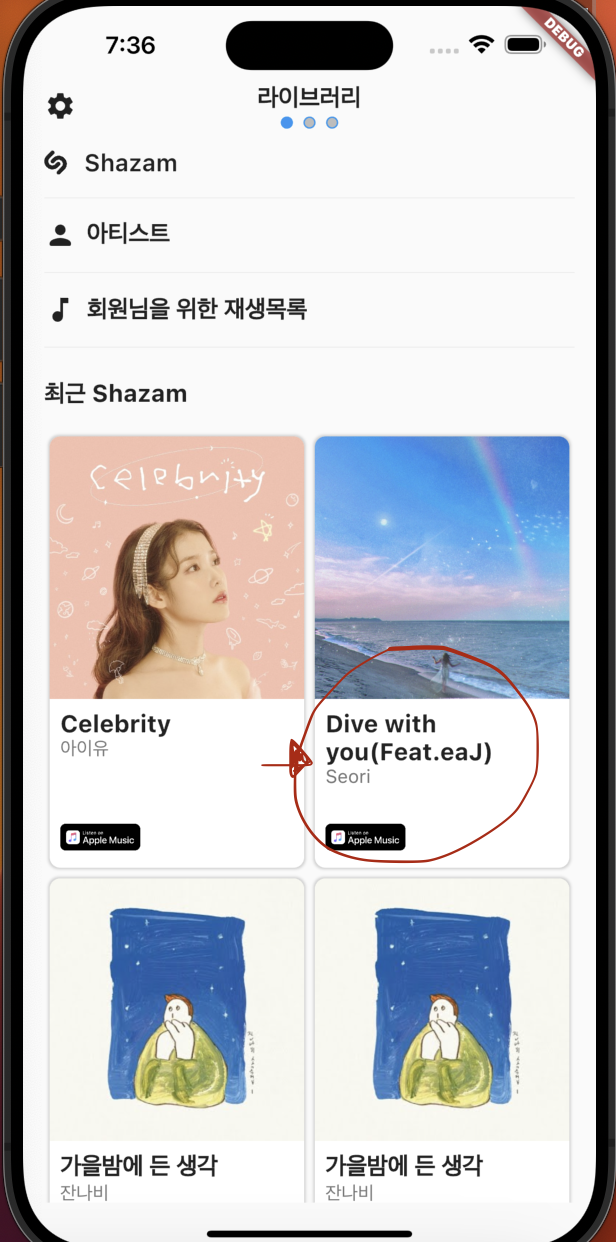
작성한 코드 및 에러 메세지
class FirstTab extends StatelessWidget {
const FirstTab({Key? key}) : super(key: key);
@override
Widget build(BuildContext context) {
const songs = [
{
'imageUrl':
'https://thumb.mt.co.kr/06/2021/02/2021020409438255271_1.jpg/dims/optimize/',
'title': 'Celebrity',
'artist': '아이유',
},
{
'imageUrl':
'https://img.wowtv.co.kr/wowtv_news/dnrs/20210817/2021081716024908494d3244b4fed182172186127.jpg',
'title': 'Dive with you(Feat.eaJ)',
'artist': 'Seori',
},
{
'imageUrl': 'https://i.ibb.co/MRSqtP8/autumnnight.jpg',
'title': '가을밤에 든 생각',
'artist': '잔나비',
},
{
'imageUrl': 'https://i.ibb.co/MRSqtP8/autumnnight.jpg',
'title': '가을밤에 든 생각',
'artist': '잔나비',
},
{
'imageUrl': 'https://i.ibb.co/MRSqtP8/autumnnight.jpg',
'title': '가을밤에 든 생각',
'artist': '잔나비',
},
{
'imageUrl': 'https://i.ibb.co/MRSqtP8/autumnnight.jpg',
'title': '가을밤에 든 생각',
'artist': '잔나비',
},
];
return SafeArea(
child: Padding(
padding: const EdgeInsets.symmetric(horizontal: 16),
child: Column(
crossAxisAlignment: CrossAxisAlignment.start,
children: [
Row(
mainAxisAlignment: MainAxisAlignment.spaceBetween,
crossAxisAlignment: CrossAxisAlignment.start,
children: [
Padding(
padding: const EdgeInsets.symmetric(vertical: 4),
child: Icon(Icons.settings),
),
Text(
"라이브러리",
style: TextStyle(
fontSize: 18,
fontWeight: FontWeight.bold,
),
),
Icon(null),
],
),
SizedBox(height: 8),
Padding(
padding: const EdgeInsets.symmetric(vertical: 8.0),
child: Row(
children: [
ImageIcon(
NetworkImage("https://i.ibb.co/hxNbZ8p/shazam.png"),
size: 18,
),
SizedBox(width: 12),
Text(
"Shazam",
style: TextStyle(
fontSize: 18,
fontWeight: FontWeight.w600,
),
),
],
),
),
Divider(),
Padding(
padding: const EdgeInsets.symmetric(vertical: 8.0),
child: Row(
children: [
Icon(Icons.person_rounded),
SizedBox(width: 8),
Text(
"아티스트",
style: TextStyle(
fontSize: 18,
fontWeight: FontWeight.w600,
),
),
],
),
),
Divider(),
Padding(
padding: const EdgeInsets.symmetric(vertical: 8.0),
child: Row(
children: [
Icon(Icons.music_note),
SizedBox(width: 8),
Text(
"회원님을 위한 재생목록",
style: TextStyle(
fontSize: 18,
fontWeight: FontWeight.w600,
),
),
],
),
),
Divider(),
SizedBox(height: 16),
Text(
"최근 Shazam",
style: TextStyle(
fontSize: 18,
fontWeight: FontWeight.w700,
),
),
SizedBox(height: 16),
Expanded(
child: GridView.builder(
gridDelegate: SliverGridDelegateWithFixedCrossAxisCount(
crossAxisCount: 2,
childAspectRatio: 3 / 5,
),
itemCount: songs.length,
itemBuilder: (context, index) {
var song = songs[index];
String imageUrl = song['imageUrl']!;
String title = song['title']!;
String artist = song['artist']!;
index % 2 == 0; // 왼쪽, 1이면 오른쪽
return Container(
margin: EdgeInsets.only(
left: 4,
right: 4,
top: 4,
bottom: 4,
),
decoration: BoxDecoration(
color: Colors.white,
borderRadius: BorderRadius.all(
Radius.circular(8),
),
boxShadow: [
BoxShadow(
color: Colors.grey.withOpacity(0.5),
blurRadius: 1,
spreadRadius: 1,
),
],
),
child: Column(
children: [
ClipRRect(
borderRadius: BorderRadius.only(
topLeft: Radius.circular(8),
topRight: Radius.circular(8),
),
child: Image.network(
imageUrl,
fit: BoxFit.cover,
height: MediaQuery.of(context).size.width *
0.5 *
5 /
3 *
0.55,
),
),
Expanded(
child: Container(
padding: const EdgeInsets.all(8),
width: double.infinity,
child: Column(
crossAxisAlignment: CrossAxisAlignment.start,
children: [
Text(
title,
style: TextStyle(
fontSize: 18,
fontWeight: FontWeight.bold,
),
),
Text(
artist,
style: TextStyle(
fontSize: 14,
color: Colors.grey[600],
),
),
Spacer(),
Image.network(
"https://i.ibb.co/KG9m5QS/applemusic.png",
width: 60,
),
SizedBox(height: 5),
],
),
),
)
],
),
);
},
),
)
],
),
),
);
}
}


