


* 겪고 있는 문제 상황을 최대한 자세하게 작성해주세요.
* 문제 해결을 위해 어떤 시도를 해보았는지 구체적으로 함께 알려주세요.
1.코딩을 하고 있는데 혹시 너비를 더 넓게 해주는 것도 있을까요?
지금 현재 제가 택스트를 많이 넣어서 이렇게 2줄로 나오는데 이걸 가로길이를 좀더 넓게 해주게끔요!
2. 혹시 마지막내용만 아래쪽이아니라 윗쪽으로 나오게도 할수 있을까요?
지금 class로 묶여있어서 혹시 윗쪽으로 하려면 얘 설정을 이미지4만 id / id로 두개를 잡아서
그 설정된 다른 아이디로 설정하면 될까요?
한번 해봐야겠어요
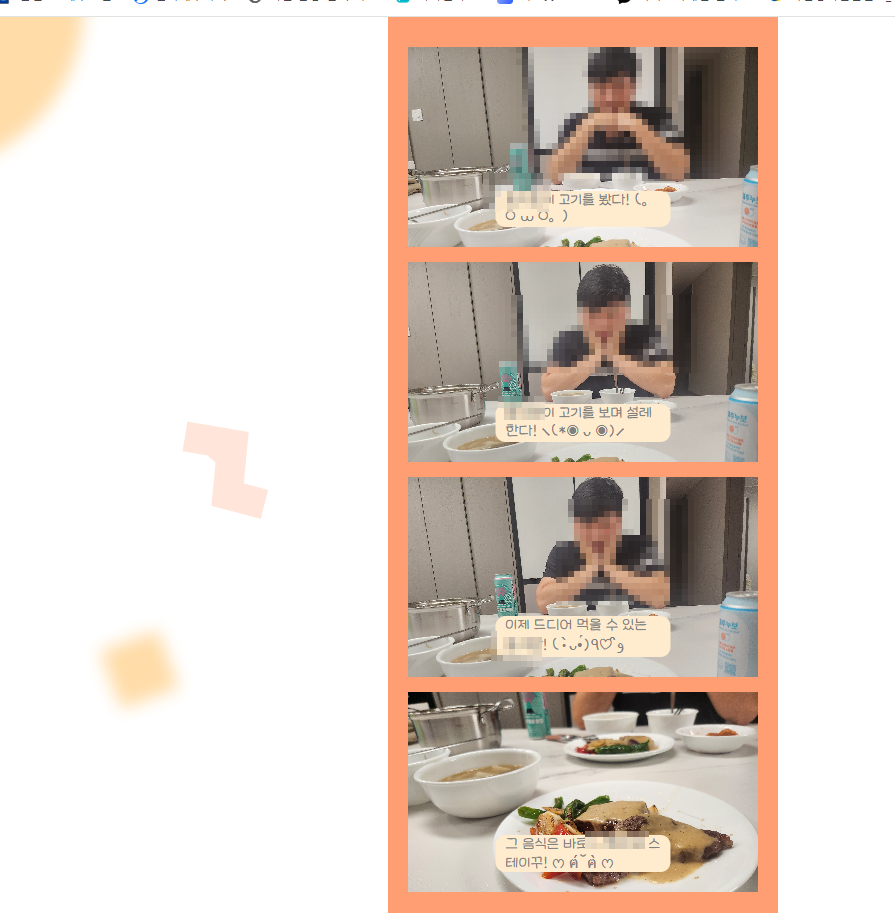
3.코딩내용
<!DOCTYPE html>
<html lang="en">
<head>
<meta charset="UTF-8">
<meta name="viewport" content="width=device-width, initial-scale=1.0">
<title>코딩네컷</title>
<style>
/* 이서윤체 폰트 적용을 위한 코드 */
@font-face {
font-family: "LeeSeoyun";
src: url("https://cdn.jsdelivr.net/gh/projectnoonnu/noonfonts_2202-2@1.0/LeeSeoyun.woff")
format("woff");
font-weight: normal;
font-style: normal;
}
/* body태그 자체에 css 요소 부여 */
body {
font-family: "LeeSeoyun";
margin: 0;
display: flex;
justify-content: center;
background-image: url("./background.png");
}
.container {
width: 390px;
background-color: #ff9d73;
height: 100%;
}
.photos{
margin-top: 30px;
}
.photo-frame {
background-color: white;
margin: 15px 20px;
height:200px;
background-size: cover;
position: relative;
}
.footer {
display: flex;
flex-direction: column;
align-items: center;
}
.f-title {
color: white;
font-size: 25px;
font-weight: 900;
}
.f-date {
color: white;
font-size: 15px;
font-weight: 500;
}
#image1 {
background-image: url(./KakaoTalk_20231215_144232221_02.jpg);
}
#image2 {
background-image: url(./KakaoTalk_20231215_144232221_01.jpg);
} #image3 {
background-image: url(./KakaoTalk_20231215_144232221.jpg);
} #image4 {
background-image: url(./KakaoTalk_20231215_144232221_03.jpg);
}
.photo_description {
color: gray;
background-color: blanchedalmond ;
width: fit-content;
padding: 0 10px;
margin-bottom: 20px;
border-radius: 10px;
position: absolute;
bottom: 0;
transform: translate(-50%);
left: 50%;
}
#hello {
color: gray;
background-color: blanchedalmond ;
width: fit-content;
padding: 0 10px;
margin-bottom: 20px;
border-radius: 10px;
transform: translate(-50%);
left: 50%;
}
</style>
</head>
<body>
<dic class="container">
<div class="photos">
<div id="image1" class="photo-frame">
<span id="desc1" class="photo_description">
홍지환이 고기를 봤다! (。O ⩊ O。)
</span>
</div>
<div id="image2" class="photo-frame">
<span id="desc2" class="photo_description">
홍지환이 고기를 보며 설레한다! ⸜(*◉ ᴗ ◉)⸝
</span>
</div>
<div id="image3" class="photo-frame">
<span id="desc3" class="photo_description">
이제 드디어 먹을 수 있는 홍지환! (•̀ᴗ•́)و ̑̑♡٩
</span>
</div>
<div id="image4" class="photo-frame">
<span id="desc4" id="hello">
그 음식은 바로 나현이의 스테이꾸! ෆ ฅ́˘ฅ̀ ෆ
</span>
</div>
<div class="footer">
<p class="f-title">Happy Lunch Time</p>
<P class="">2023.12.15.</P>
</div>
</div>
</dic>
</body>
</html>


