커뮤니티

포인트
쿠폰
내 강의실
국비 신청 내역
증명서
계정
로그아웃
학습 질문
개발 일지
나의 활동
답변 완료
1-12 완료 후 궁금증
[왕초보] 코딩이 처음이어도 쉽게 배우는 웹개발 A to Z v0
1주차


이*선
댓글
6
・
추천
0
・
조회수
22
조회수
22
답변 완료
* 겪고 있는 문제 상황을 최대한 자세하게 작성해주세요.
* 문제 해결을 위해 어떤 시도를 해보았는지 구체적으로 함께 알려주세요.
Bootstrap에서 가져온 mypostingbox 부분에는 4개의 input 코드가 있는데요.
앨범 이미지, 앨범 제목, 앨범 내용, 앨범 날짜가 이에 해당됩니다.
그런데, 해당 input에 들어가는 글씨를 가운데 정렬하고 싶은데 잘 안되네요.
일단은 제일 위의 앨범 이미지에 해당하는 코드만 수정했는데 잘 안되네요.
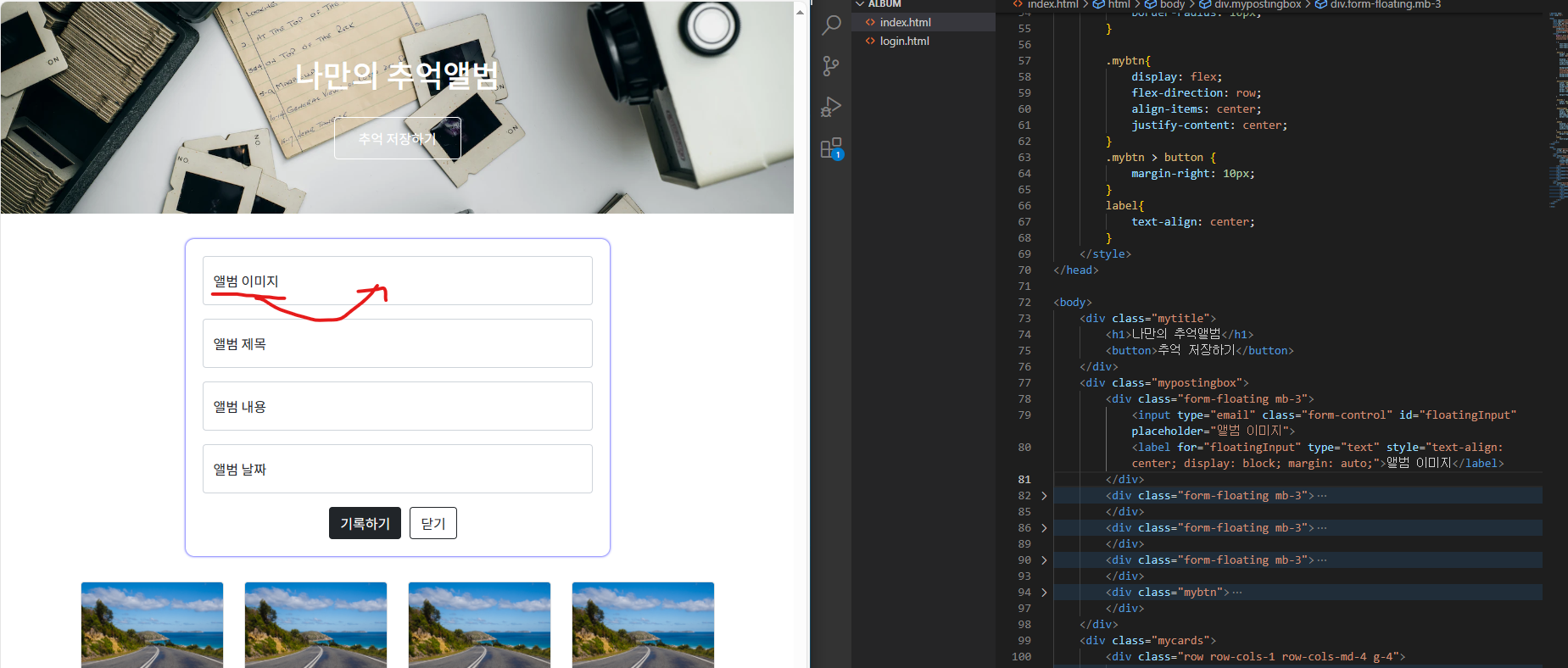
작성한 코드 및 에러 메세지
<!DOCTYPE html>
<html lang="en">


<head>
    <meta charset="UTF-8">
    <meta name="viewport" content="width=device-width, initial-scale=1.0">
    <title>나만의 앨범</title>
    <link href="https://cdn.jsdelivr.net/npm/bootstrap@5.0.2/dist/css/bootstrap.min.css" rel="stylesheet"
        integrity="sha384-EVSTQN3/azprG1Anm3QDgpJLIm9Nao0Yz1ztcQTwFspd3yD65VohhpuuCOmLASjC" crossorigin="anonymous">
    <style>
        @import url('https://fonts.googleapis.com/css2?family=Dongle&family=Gowun+Dodum&family=Noto+Sans+KR:wght@400;500&display=swap');


        * {
            font-family: 'Dongle', sans-serif;
            font-family: 'Gowun Dodum', sans-serif;
            font-family: 'Noto Sans KR', sans-serif;
        }


        .mytitle {
            height: 250px;
            color: white;


            display: flex;
            flex-direction: column;
            align-items: center;
            justify-content: center;


            background-image: url('https://images.unsplash.com/photo-1511992243105-2992b3fd0410?ixlib=rb-4.0.3&ixid=M3wxMjA3fDB8MHxwaG90by1wYWdlfHx8fGVufDB8fHx8fA%3D%3D&auto=format&fit=crop&w=1470&q=80');
            background-position: center;
            background-size: cover;
        }


        .mytitle>button {
            width: 150px;
            height: 50px;
            background-color: transparent;
            color: white;
            border: 1px solid white;
            border-radius: 5px;


            margin-top: 20px;
        }


        .mycards {
            width: 80%;
            margin: 30px auto 0px auto
        }


        .mypostingbox {
            width: 500px;
            margin: 30px auto 0px auto;
            padding: 20px;
            box-shadow: 0px 0px 3px 0px blue;
            border-radius: 10px;
        }


        .mybtn{
            display: flex;
            flex-direction: row;
            align-items: center;
            justify-content: center;
        }
        .mybtn > button {
            margin-right: 10px;
        }
        label{
            text-align: center;
        }
    </style>
</head>


<body>
    <div class="mytitle">
        <h1>나만의 추억앨범</h1>
        <button>추억 저장하기</button>
    </div>
    <div class="mypostingbox">
        <div class="form-floating mb-3">
            <input type="email" class="form-control" id="floatingInput" placeholder="앨범 이미지">
            <label for="floatingInput" type="text" style="text-align: center; display: block; margin: auto;">앨범 이미지</label>
        </div>
        <div class="form-floating mb-3">
            <input type="email" class="form-control" id="floatingInput" placeholder="앨범 제목">
            <label for="floatingInput">앨범 제목</label>
        </div>
        <div class="form-floating mb-3">
            <input type="email" class="form-control" id="floatingInput" placeholder="앨범 내용">
            <label for="floatingInput">앨범 내용</label>
        </div>
        <div class="form-floating mb-3">
            <input type="email" class="form-control" id="floatingInput" placeholder="앨범 날짜">
            <label for="floatingInput">앨범 날짜</label>
        </div>
        <div class="mybtn">
            <button type="button" class="btn btn-dark">기록하기</button>
            <button type="button" class="btn btn-outline-dark">닫기</button>
        </div>
    </div>
    <div class="mycards">
        <div class="row row-cols-1 row-cols-md-4 g-4">
            <div class="col">
                <div class="card h-100">
                    <img src="https://images.unsplash.com/photo-1446768500601-ac47e5ec3719?ixlib=rb-4.0.3&ixid=M3wxMjA3fDB8MHxwaG90by1wYWdlfHx8fGVufDB8fHx8fA%3D%3D&auto=format&fit=crop&w=1446&q=80"
                        class="card-img-top"
                        alt="https://images.unsplash.com/photo-1446768500601-ac47e5ec3719?ixlib=rb-4.0.3&ixid=M3wxMjA3fDB8MHxwaG90by1wYWdlfHx8fGVufDB8fHx8fA%3D%3D&auto=format&fit=crop&w=1446&q=80">
                    <div class="card-body">
                        <h5 class="card-title">앨범 제목</h5>
                        <hr>
                        <p class="card-text">앨범 내용</p>
                    </div>
                    <div class="card-footer">
                        <small class="text-body-secondary">앨범 날짜</small>
                    </div>
                </div>


            </div>
            <div class="col">
                <div class="card h-100">
                    <img src="https://images.unsplash.com/photo-1446768500601-ac47e5ec3719?ixlib=rb-4.0.3&ixid=M3wxMjA3fDB8MHxwaG90by1wYWdlfHx8fGVufDB8fHx8fA%3D%3D&auto=format&fit=crop&w=1446&q=80"
                        class="card-img-top"
                        alt="https://images.unsplash.com/photo-1446768500601-ac47e5ec3719?ixlib=rb-4.0.3&ixid=M3wxMjA3fDB8MHxwaG90by1wYWdlfHx8fGVufDB8fHx8fA%3D%3D&auto=format&fit=crop&w=1446&q=80">
                    <div class="card-body">
                        <h5 class="card-title">앨범 제목</h5>
                        <hr>
                        <p class="card-text">앨범 내용</p>
                    </div>
                    <div class="card-footer">
                        <small class="text-body-secondary">앨범 날짜</small>
                    </div>
                </div>


            </div>
            <div class="col">
                <div class="card h-100">
                    <img src="https://images.unsplash.com/photo-1446768500601-ac47e5ec3719?ixlib=rb-4.0.3&ixid=M3wxMjA3fDB8MHxwaG90by1wYWdlfHx8fGVufDB8fHx8fA%3D%3D&auto=format&fit=crop&w=1446&q=80"
                        class="card-img-top"
                        alt="https://images.unsplash.com/photo-1446768500601-ac47e5ec3719?ixlib=rb-4.0.3&ixid=M3wxMjA3fDB8MHxwaG90by1wYWdlfHx8fGVufDB8fHx8fA%3D%3D&auto=format&fit=crop&w=1446&q=80">
                    <div class="card-body">
                        <h5 class="card-title">앨범 제목</h5>
                        <hr>
                        <p class="card-text">앨범 내용</p>
                    </div>
                    <div class="card-footer">
                        <small class="text-body-secondary">앨범 날짜</small>
                    </div>
                </div>


            </div>
            <div class="col">
                <div class="card h-100">
                    <img src="https://images.unsplash.com/photo-1446768500601-ac47e5ec3719?ixlib=rb-4.0.3&ixid=M3wxMjA3fDB8MHxwaG90by1wYWdlfHx8fGVufDB8fHx8fA%3D%3D&auto=format&fit=crop&w=1446&q=80"
                        class="card-img-top"
                        alt="https://images.unsplash.com/photo-1446768500601-ac47e5ec3719?ixlib=rb-4.0.3&ixid=M3wxMjA3fDB8MHxwaG90by1wYWdlfHx8fGVufDB8fHx8fA%3D%3D&auto=format&fit=crop&w=1446&q=80">
                    <div class="card-body">
                        <h5 class="card-title">앨범 제목</h5>
                        <hr>
                        <p class="card-text">앨범 내용</p>
                    </div>
                    <div class="card-footer">
                        <small class="text-body-secondary">앨범 날짜</small>
                    </div>
                </div>


            </div>
        </div>
    </div>
</body>


</html>
Tip 1) </> 아이콘을 눌러 코드박스를 만들어 보세요.
Tip 2) Ctrl+A(맥의 경우 Command+A) 단축키로 코드를 한 번에 선택할 수 있어요!


댓글 알림
