


* 겪고 있는 문제 상황을 최대한 자세하게 작성해주세요.
* 문제 해결을 위해 어떤 시도를 해보았는지 구체적으로 함께 알려주세요.
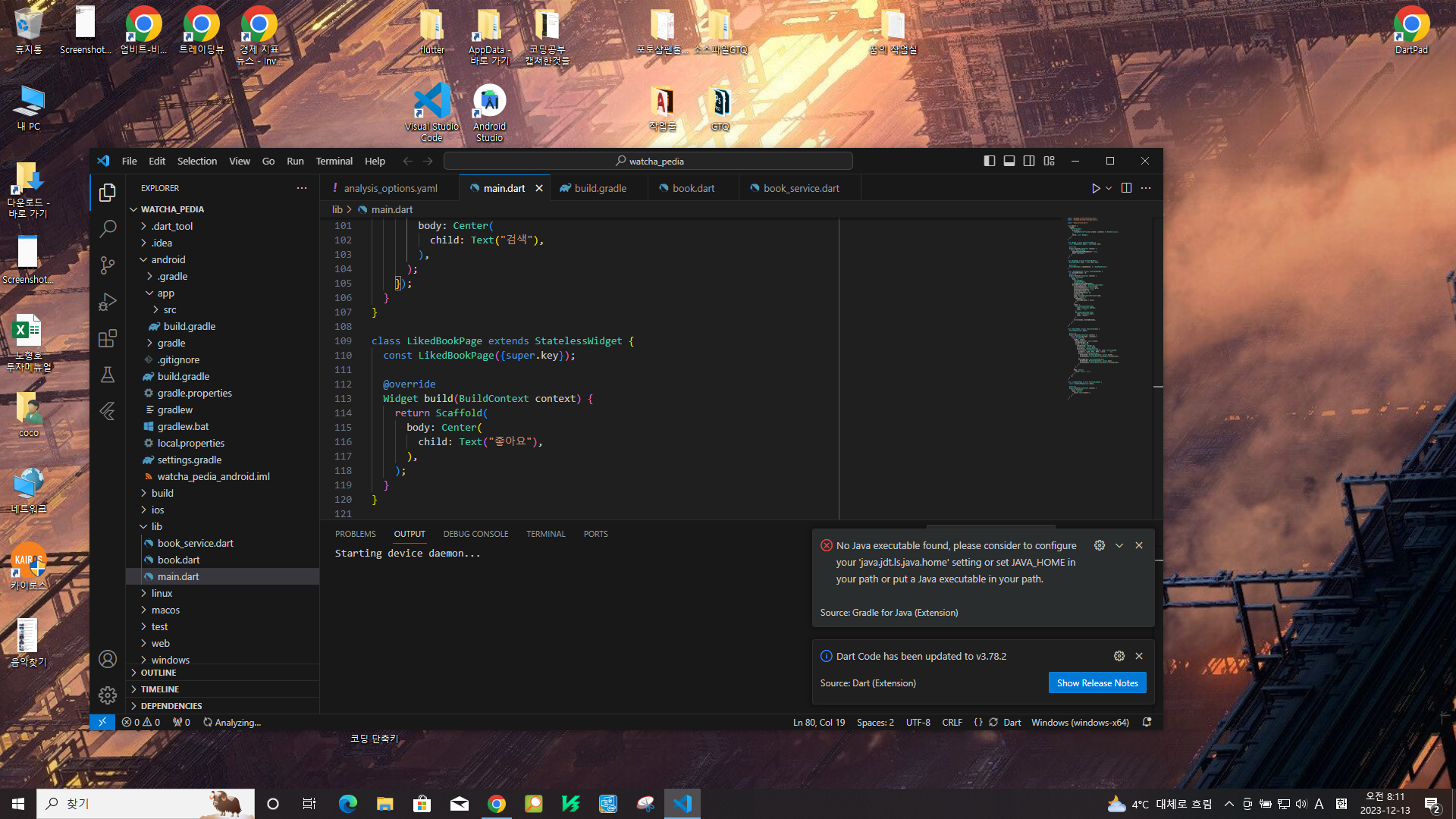
JAVA 뭐라고 나오면서 오류가 떠서 진행이 안됩니다. 도와주세요 ㅠ
analysis.option.yami
# This file configures the analyzer, which statically analyzes Dart code to
# check for errors, warnings, and lints.
#
# The issues identified by the analyzer are surfaced in the UI of Dart-enabled
# IDEs (https://dart.dev/tools#ides-and-editors). The analyzer can also be
# invoked from the command line by running `flutter analyze`.
# The following line activates a set of recommended lints for Flutter apps,
# packages, and plugins designed to encourage good coding practices.
include: package:flutter_lints/flutter.yaml
linter:
# The lint rules applied to this project can be customized in the
# section below to disable rules from the `package:flutter_lints/flutter.yaml`
# included above or to enable additional rules. A list of all available lints
# and their documentation is published at
# https://dart-lang.github.io/linter/lints/index.html.
#
# Instead of disabling a lint rule for the entire project in the
# section below, it can also be suppressed for a single line of code
# or a specific dart file by using the `// ignore: name_of_lint` and
# `// ignore_for_file: name_of_lint` syntax on the line or in the file
# producing the lint.
rules:
prefer_const_constructors: false
prefer_const_literals_to_create_immutables: false
# avoid_print: false # Uncomment to disable the `avoid_print` rule
# prefer_single_quotes: true # Uncomment to enable the `prefer_single_quotes` rule
# Additional information about this file can be found at
# https://dart.dev/guides/language/analysis-options
........................
main.dart
import 'package:flutter/material.dart';
import 'package:provider/provider.dart';
import 'book_service.dart';
void main() {
runApp(
MultiProvider(
providers: [
ChangeNotifierProvider(create: (context) => BookService()),
],
child: const MyApp(),
),
);
}
class MyApp extends StatelessWidget {
const MyApp({Key? key}) : super(key: key);
@override
Widget build(BuildContext context) {
return MaterialApp(
debugShowCheckedModeBanner: false,
home: HomePage(),
);
}
}
class HomePage extends StatefulWidget {
HomePage({Key? key}) : super(key: key);
@override
State<HomePage> createState() => _HomePageState();
}
class _HomePageState extends State<HomePage> {
var bottomNavIndex = 0;
@override
Widget build(BuildContext context) {
return Scaffold(
body: [
SearchPage(),
LikedBookPage(),
].elementAt(bottomNavIndex),
bottomNavigationBar: BottomNavigationBar(
selectedItemColor: Colors.black,
unselectedItemColor: Colors.grey,
showUnselectedLabels: true,
selectedFontSize: 12,
unselectedFontSize: 12,
iconSize: 28,
type: BottomNavigationBarType.fixed,
onTap: (value) {
setState(() {
bottomNavIndex = value;
});
},
items: [
BottomNavigationBarItem(
icon: Icon(Icons.search),
label: '검색',
),
BottomNavigationBarItem(
icon: Icon(Icons.star),
label: '좋아요',
),
],
currentIndex: bottomNavIndex,
),
);
}
}
class SearchPage extends StatelessWidget {
SearchPage({super.key});
@override
Widget build(BuildContext context) {
return Builder(builder: (context) {
return Scaffold(
appBar: AppBar(
backgroundColor: Colors.white,
toolbarHeight: 80,
title: TextField(
onSubmitted: (value) {},
cursorColor: Colors.grey,
decoration: InputDecoration(
prefixIcon: Icon(Icons.search, color: Colors.grey),
hintText: "작품, 감독, 배우, 컬렉션, 유저 등",
border: OutlineInputBorder(
borderSide: BorderSide(color: Colors.white),
borderRadius: BorderRadius.all(Radius.circular(10)),
),
focusedBorder: OutlineInputBorder(
borderSide: BorderSide(color: Colors.grey),
borderRadius: BorderRadius.all(Radius.circular(10)),
),
),
),
),
body: Center(
child: Text("검색"),
),
);
});
}
}
class LikedBookPage extends StatelessWidget {
const LikedBookPage({super.key});
@override
Widget build(BuildContext context) {
return Scaffold(
body: Center(
child: Text("좋아요"),
),
);
}
}
---------------------------
build.gradle
def localProperties = new Properties()
def localPropertiesFile = rootProject.file('local.properties')
if (localPropertiesFile.exists()) {
localPropertiesFile.withReader('UTF-8') { reader ->
localProperties.load(reader)
}
}
def flutterRoot = localProperties.getProperty('flutter.sdk')
if (flutterRoot == null) {
throw new GradleException("Flutter SDK not found. Define location with flutter.sdk in the local.properties file.")
}
def flutterVersionCode = localProperties.getProperty('flutter.versionCode')
if (flutterVersionCode == null) {
flutterVersionCode = '1'
}
def flutterVersionName = localProperties.getProperty('flutter.versionName')
if (flutterVersionName == null) {
flutterVersionName = '1.0'
}
apply plugin: 'com.android.application'
apply plugin: 'kotlin-android'
apply from: "$flutterRoot/packages/flutter_tools/gradle/flutter.gradle"
android {
compileSdkVersion flutter.compileSdkVersion
ndkVersion flutter.ndkVersion
compileOptions {
sourceCompatibility JavaVersion.VERSION_1_8
targetCompatibility JavaVersion.VERSION_1_8
}
kotlinOptions {
jvmTarget = '1.8'
}
sourceSets {
main.java.srcDirs += 'src/main/kotlin'
}
defaultConfig {
// TODO: Specify your own unique Application ID (https://developer.android.com/studio/build/application-id.html).
applicationId "com.example.watcha_pedia"
// You can update the following values to match your application needs.
// For more information, see: https://docs.flutter.dev/deployment/android#reviewing-the-build-configuration.
minSdkVersion 19
targetSdkVersion flutter.targetSdkVersion
versionCode flutterVersionCode.toInteger()
versionName flutterVersionName
}
buildTypes {
release {
// TODO: Add your own signing config for the release build.
// Signing with the debug keys for now, so `flutter run --release` works.
signingConfig signingConfigs.debug
}
}
}
flutter {
source '../..'
}
dependencies {
implementation "org.jetbrains.kotlin:kotlin-stdlib-jdk7:$kotlin_version"
}
------------------
book.dart
class Book {}
--------------------------
book_service.dart
import 'package:dio/dio.dart';
import 'package:flutter/material.dart';
import 'book.dart';
class BookService extends ChangeNotifier {
List<Book> bookList = []; // 책 목록
void search(String q) async {
if (q.isNotEmpty) {
Response res = await Dio().get(
"https://www.googleapis.com/books/v1/volumes?q=$q&startIndex=0&maxResults=40",
);
List items = res.data["items"];
print(items);
}
}
}


