커뮤니티

포인트
쿠폰
내 강의실
국비 신청 내역
증명서
계정
로그아웃
학습 질문
개발 일지
나의 활동
답변 완료
1-6 상호작용 만들기-모달창이 안떠요
1시간만에 크리스마스 디데이 캘린더 만들기 v0
1주차


이*래
댓글
11
・
추천
1
・
조회수
26
조회수
26
답변 완료
* 겪고 있는 문제 상황을 최대한 자세하게 작성해주세요.
* 문제 해결을 위해 어떤 시도를 해보았는지 구체적으로 함께 알려주세요.
1-6 강의에서 2분 29초까지 진도를 맞췄는데, 날짜 별 프레임을 선택했을 때 모달창이 안뜹니다.
노션에서 제공해주신대로 index이름의 html, css, js 내용을 복붙했지만 모달창이 뜨지 않습니다.
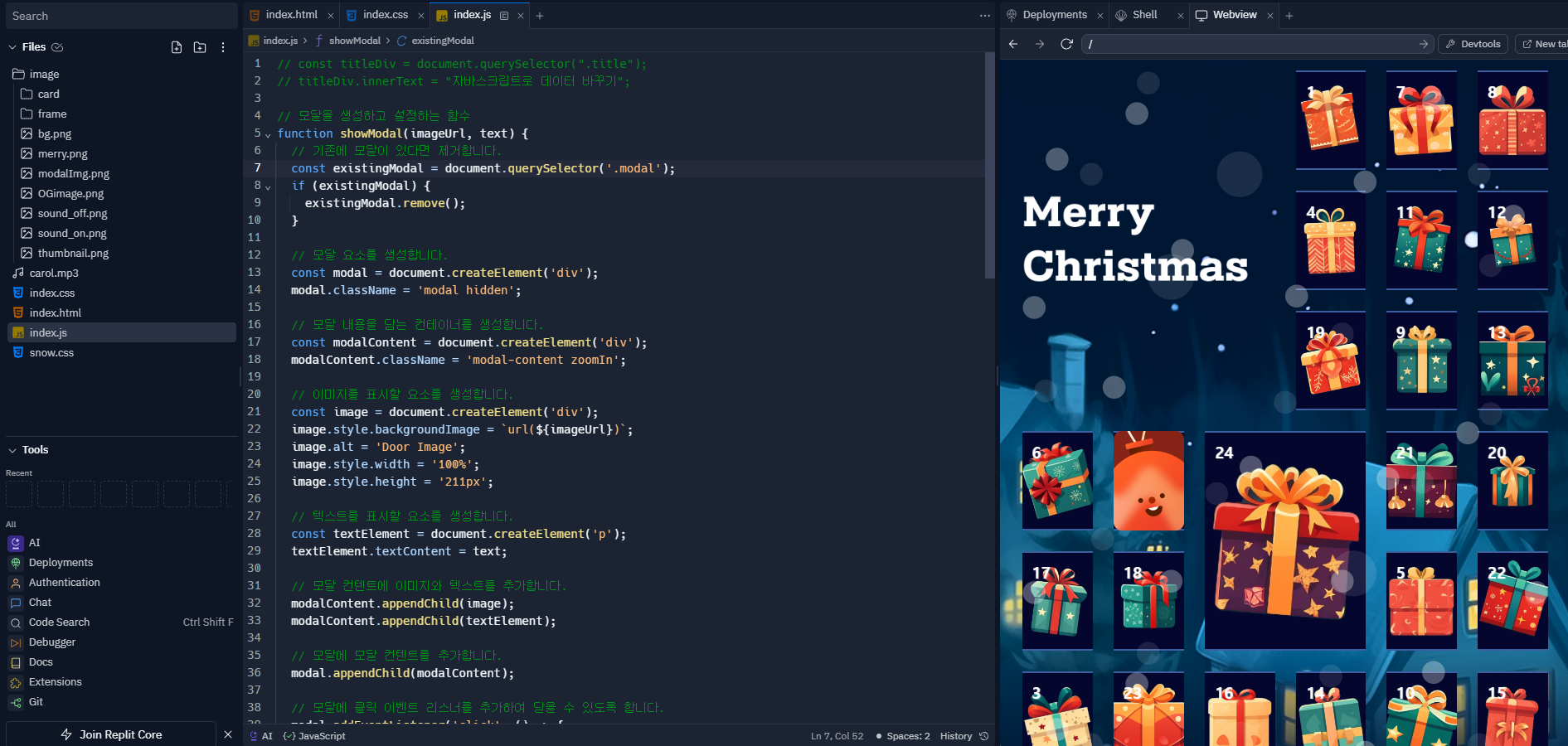
날짜 별 프레임을 클릭하면 모달창이 안뜨고 기존의 카드 회전만 되네요. 어떤게 문제일까요?
작성한 코드 및 에러 메세지
index.html
<html lang="en">

<head>
  <meta charset="UTF-8">
  <meta name="viewport" content="width=device-width, initial-scale=1.0">
  <meta property="og:type" content="website">
  <meta property="og:url" content="https://grayson-choi.github.io/advent_calendar/">
  <meta property="og:title" content="스파르타코딩클럽 크리스마스 디데이 캘린더">
  <meta property="og:image" content="image/OGimage.png">
  <meta property="og:description" content="크리스마스까지 하루가 기다려지는 즐거움, 크리스마스 디데이 캘린더를 함께 만들어봐요!">
  <meta property="og:site_name" content="SCC Advent Calendar">
  <meta property="og:locale" content="en_US">
  <meta property="og:image:width" content="1200">
  <meta property="og:image:height" content="630">


  <title>Sparta Advend Calendar 2023</title>
  <link rel="stylesheet" href="index.css">
  <link rel="stylesheet" href="snow.css">
</head>


<body>
  <!-- 이 곳에 뼈대 코드를 입력! -->
  <!--html뼈대(구조) 웹페이지 제작 코드-->
  <!-- <h1 class="title">안녕 눈사람</h1> -->
  <script src="index.js"></script>
  <div class="snow-wrap">
    <div></div>
  </div>


  <section class="grid-1">
    <div class="title flex-col item-baseline">
      <img src="image/merry.png">
    </div>
    <div class="day-1">
      <label>
        <input type="checkbox">
        <div class="door">
          <div class="front">
            <span class="date-num">1</span>
          </div>
          <div class="back"></div>
        </div>


      </label>
    </div>
    <div class="day-2">
      <label>
        <input type="checkbox">
        <div class="door">
          <div class="front">
            <span class="date-num">2</span>
          </div>
          <div class="back"></div>
        </div>


      </label>
    </div>
    <div class="day-3">
      <label>
        <input type="checkbox">
        <div class="door">
          <div class="front">
            <span class="date-num">3</span>
          </div>
          <div class="back"></div>
        </div>


      </label>
    </div>
    <div class="day-4">
      <label>
        <input type="checkbox">
        <div class="door">
          <div class="front">
            <span class="date-num">4</span>
          </div>
          <div class="back"></div>
        </div>


      </label>
    </div>
    <div class="day-5">
      <label>
        <input type="checkbox">
        <div class="door">
          <div class="front">
            <span class="date-num">5</span>
          </div>
          <div class="back"></div>
        </div>


      </label>
    </div>
    <div class="day-6">
      <label>
        <input type="checkbox">
        <div class="door">
          <div class="front">
            <span class="date-num">6</span>
          </div>
          <div class="back"></div>
        </div>


      </label>
    </div>
    <div class="day-7">
      <label>
        <input type="checkbox">
        <div class="door">
          <div class="front">
            <span class="date-num">7</span>
          </div>
          <div class="back"></div>
        </div>


      </label>
    </div>
    <div class="day-8">
      <label>
        <input type="checkbox">
        <div class="door">
          <div class="front">
            <span class="date-num">8</span>
          </div>
          <div class="back"></div>
        </div>


      </label>
    </div>
    <div class="day-9">
      <label>
        <input type="checkbox">
        <div class="door">
          <div class="front">
            <span class="date-num">9</span>
          </div>
          <div class="back"></div>
        </div>


      </label>
    </div>
    <div class="day-10">
      <label>
        <input type="checkbox">
        <div class="door">
          <div class="front">
            <span class="date-num">10</span>
          </div>
          <div class="back"></div>
        </div>


      </label>
    </div>
    <div class="day-11">
      <label>
        <input type="checkbox">
        <div class="door">
          <div class="front">
            <span class="date-num">11</span>
          </div>
          <div class="back"></div>
        </div>


      </label>
    </div>
    <div class="day-12">
      <label>
        <input type="checkbox">
        <div class="door">
          <div class="front">
            <span class="date-num">12</span>
          </div>
          <div class="back"></div>
        </div>


      </label>
    </div>
    <div class="day-13">
      <label>
        <input type="checkbox">
        <div class="door">
          <div class="front">
            <span class="date-num">13</span>
          </div>
          <div class="back"></div>
        </div>


      </label>
    </div>
    <div class="day-14">
      <label>
        <input type="checkbox">
        <div class="door">
          <div class="front">
            <span class="date-num">14</span>
          </div>
          <div class="back"></div>
        </div>


      </label>
    </div>
    <div class="day-15">
      <label>
        <input type="checkbox">
        <div class="door">
          <div class="front">
            <span class="date-num">15</span>
          </div>
          <div class="back"></div>
        </div>


      </label>
    </div>
    <div class="day-16">
      <label>
        <input type="checkbox">
        <div class="door">
          <div class="front">
            <span class="date-num">16</span>
          </div>
          <div class="back"></div>
        </div>


      </label>
    </div>
    <div class="day-17">
      <label>
        <input type="checkbox">
        <div class="door">
          <div class="front">
            <span class="date-num">17</span>
          </div>
          <div class="back"></div>
        </div>


      </label>
    </div>
    <div class="day-18">
      <label>
        <input type="checkbox">
        <div class="door">
          <div class="front">
            <span class="date-num">18</span>
          </div>
          <div class="back"></div>
        </div>


      </label>
    </div>
    <div class="day-19">
      <label>
        <input type="checkbox">
        <div class="door">
          <div class="front">
            <span class="date-num">19</span>
          </div>
          <div class="back"></div>
        </div>


      </label>
    </div>
    <div class="day-20">
      <label>
        <input type="checkbox">
        <div class="door">
          <div class="front">
            <span class="date-num">20</span>
          </div>
          <div class="back"></div>
        </div>


      </label>
    </div>
    <div class="day-21">
      <label>
        <input type="checkbox">
        <div class="door">
          <div class="front">
            <span class="date-num">21</span>
          </div>
          <div class="back"></div>
        </div>


      </label>
    </div>
    <div class="day-22">
      <label>
        <input type="checkbox">
        <div class="door">
          <div class="front">
            <span class="date-num">22</span>
          </div>
          <div class="back"></div>
        </div>


      </label>
    </div>
    <div class="day-23">
      <label>
        <input type="checkbox">
        <div class="door">
          <div class="front">
            <span class="date-num">23</span>
          </div>
          <div class="back"></div>
        </div>


      </label>
    </div>
    <div class="day-24">
      <label>
        <input type="checkbox">
        <div class="door">
          <div class="front">
            <span class="date-num">24</span>
          </div>
          <div class="back"></div>
        </div>


      </label>
    </div>
  </section>
</body>


</html>
index.css
/* .title {
  color: red;
} */


/*  body: 선택자 */


body {
  background-image: url("image/bg.png");
  background-position: center;
  background-size: cover;
}


body {
  background-color: black;
  color: white;
  font-weight: bold;
}


/* 그리드 설계 */
.grid-1 {
  display: grid;
  width: 90vw;
  max-width: 900px;
  margin: 2% auto;
  z-index: 1;


  grid-template-columns: repeat(3, 1fr);
  grid-template-rows: auto;
  grid-gap: 25px;


  grid-template-areas:
    "t        t       t"
    "d23      d20     d12"
    "d2       d14     d4"
    "d5       d22     d16"
    "d1       d7      d9"
    "d10      d11     d18"
    "d13      d3      d15"
    "d6       d17     d8"
    "d19      d24     d21";
}


@media only screen and (min-width: 500px) {


  .grid-1 {
    /* 너비를 기준으로 높이를 계산 */
    grid-template-columns: repeat(6, 1fr);
    grid-template-areas:
      "t     t     t     d1      d7      d8"
      "t     t     t     d4      d11     d12"
      "t     t     t     d19     d9      d13"
      "d6    d2    d24   d24     d21     d20"
      "d17   d18   d24   d24     d5      d22"
      "d3    d23   d16   d14     d10     d15";
  }


}


/* flex 속성 */
.flex-row {
  display: flex;
}


.flex-col {
  display: flex;
  flex-direction: column;
}


.item-baseline {
  align-items: baseline;
}


.title {
  display: flex;
  align-items: baseline;
  justify-content: center;


  grid-area: t;
}


.title img {
  width: 90%;
  height: auto;
}


/* 그리드 별 배경 이미지 */
.day-1 {
  grid-area: d1;
  background: url("image/frame/frame1.png");
  background-position: center;
  background-size: cover;


}


.day-1 .back {
  background-image: url("image/card/card-1.png");
  background-position: center;
  background-size: cover;
  border-radius: 10px;
}


.day-2 {
  grid-area: d2;
  background: url("image/frame/frame2.png");
  background-position: center;
  background-size: cover;


}


.day-2 .back {
  background-image: url("image/card/card-2.png");
  background-position: center;
  background-size: cover;
  border-radius: 10px;
}


.day-3 {
  grid-area: d3;
  background: url("image/frame/frame3.png");
  background-position: center;
  background-size: cover;


}


.day-3 .back {
  background-image: url("image/card/card-3.png");
  background-position: center;
  background-size: cover;
  border-radius: 10px;
}


.day-4 {
  grid-area: d4;
  background: url("image/frame/frame4.png");
  background-position: center;
  background-size: cover;


}


.day-4 .back {
  background-image: url("image/card/card-4.png");
  background-position: center;
  background-size: cover;
  border-radius: 10px;
}


.day-5 {
  grid-area: d5;
  background: url("image/frame/frame5.png");
  background-position: center;
  background-size: cover;


}


.day-5 .back {
  background-image: url("image/card/card-5.png");
  background-position: center;
  background-size: cover;
  border-radius: 10px;
}


.day-6 {
  grid-area: d6;
  background: url("image/frame/frame6.png");
  background-position: center;
  background-size: cover;


}


.day-6 .back {
  background-image: url("image/card/card-6.png");
  background-position: center;
  background-size: cover;
  border-radius: 10px;
}


.day-7 {
  grid-area: d7;
  background: url("image/frame/frame7.png");
  background-position: center;
  background-size: cover;


}


.day-7 .back {
  background-image: url("image/card/card-7.png");
  background-position: center;
  background-size: cover;
  border-radius: 10px;
}


.day-8 {
  grid-area: d8;
  background: url("image/frame/frame8.png");
  background-position: center;
  background-size: cover;


}


.day-8 .back {
  background-image: url("image/card/card-8.png");
  background-position: center;
  background-size: cover;
  border-radius: 10px;
}


.day-9 {
  grid-area: d9;
  background: url("image/frame/frame9.png");
  background-position: center;
  background-size: cover;


}


.day-9 .back {
  background-image: url("image/card/card-9.png");
  background-position: center;
  background-size: cover;
  border-radius: 10px;
}


.day-10 {
  grid-area: d10;
  background: url("image/frame/frame10.png");
  background-position: center;
  background-size: cover;


}


.day-10 .back {
  background-image: url("image/card/card-10.png");
  background-position: center;
  background-size: cover;
  border-radius: 10px;
}


.day-11 {
  grid-area: d11;
  background: url("image/frame/frame11.png");
  background-position: center;
  background-size: cover;


}


.day-11 .back {
  background-image: url("image/card/card-11.png");
  background-position: center;
  background-size: cover;
  border-radius: 10px;
}


.day-12 {
  grid-area: d12;
  background: url("image/frame/frame12.png");
  background-position: center;
  background-size: cover;


}


.day-12 .back {
  background-image: url("image/card/card-12.png");
  background-position: center;
  background-size: cover;
  border-radius: 10px;
}


.day-13 {
  grid-area: d13;
  background: url("image/frame/frame13.png");
  background-position: center;
  background-size: cover;


}


.day-13 .back {
  background-image: url("image/card/card-13.png");
  background-position: center;
  background-size: cover;
  border-radius: 10px;
}


.day-14 {
  grid-area: d14;
  background: url("image/frame/frame14.png");
  background-position: center;
  background-size: cover;


}


.day-14 .back {
  background-image: url("image/card/card-14.png");
  background-position: center;
  background-size: cover;
  border-radius: 10px;
}


.day-15 {
  grid-area: d15;
  background: url("image/frame/frame15.png");
  background-position: center;
  background-size: cover;


}


.day-15 .back {
  background-image: url("image/card/card-15.png");
  background-position: center;
  background-size: cover;
  border-radius: 10px;
}


.day-16 {
  grid-area: d16;
  background: url("image/frame/frame16.png");
  background-position: center;
  background-size: cover;


}


.day-16 .back {
  background-image: url("image/card/card-16.png");
  background-position: center;
  background-size: cover;
  border-radius: 10px;
}


.day-17 {
  grid-area: d17;
  background: url("image/frame/frame17.png");
  background-position: center;
  background-size: cover;


}


.day-17 .back {
  background-image: url("image/card/card-17.png");
  background-position: center;
  background-size: cover;
  border-radius: 10px;
}


.day-18 {
  grid-area: d18;
  background: url("image/frame/frame18.png");
  background-position: center;
  background-size: cover;


}


.day-18 .back {
  background-image: url("image/card/card-18.png");
  background-position: center;
  background-size: cover;
  border-radius: 10px;
}


.day-19 {
  grid-area: d19;
  background: url("image/frame/frame19.png");
  background-position: center;
  background-size: cover;


}


.day-19 .back {
  background-image: url("image/card/card-19.png");
  background-position: center;
  background-size: cover;
  border-radius: 10px;
}


.day-20 {
  grid-area: d20;
  background: url("image/frame/frame20.png");
  background-position: center;
  background-size: cover;


}


.day-20 .back {
  background-image: url("image/card/card-20.png");
  background-position: center;
  background-size: cover;
  border-radius: 10px;
}


.day-21 {
  grid-area: d21;
  background: url("image/frame/frame21.png");
  background-position: center;
  background-size: cover;


}


.day-21 .back {
  background-image: url("image/card/card-21.png");
  background-position: center;
  background-size: cover;
  border-radius: 10px;
}


.day-22 {
  grid-area: d22;
  background: url("image/frame/frame22.png");
  background-position: center;
  background-size: cover;


}


.day-22 .back {
  background-image: url("image/card/card-22.png");
  background-position: center;
  background-size: cover;
  border-radius: 10px;
}


.day-23 {
  grid-area: d23;
  background: url("image/frame/frame23.png");
  background-position: center;
  background-size: cover;


}


.day-23 .back {
  background-image: url("image/card/card-23.png");
  background-position: center;
  background-size: cover;
  border-radius: 10px;
}


.day-24 {
  grid-area: d24;
  background: url("image/frame/frame24.png");
  background-position: center;
  background-size: cover;


}


.day-24 .back {
  background-image: url("image/card/card-24.png");
  background-position: center;
  background-size: cover;
  border-radius: 10px;
}


/* door styles */
.grid-1 input {
  display: none;
}


label {
  perspective: 1000px;
  transform-style: preserve-3d;
  cursor: pointer;


  display: flex;
  min-height: 100%;
  width: 100%;
  height: 120px;
}


/* 카드 앞면 */
.door {
  width: 100%;
  transform-style: preserve-3d;
  transition: all 300ms;
  border-radius: 10px;
}


.date-num {
  position: absolute;
  top: 12px;
  left: 12px;
  color: white;
}


/* 카드 뒷면 */
.door div {
  position: absolute;
  height: 100%;
  width: 100%;
  backface-visibility: hidden;


  border-radius: 6px;
  font-size: 1.2em;
  font-weight: bold;
  text-shadow: 1px 1px 0 rgba(255, 255, 255, 0.2);
}


/* 카드 뒤집기 애니메이션 */
.door .back {
  background-size: cover;
  background-position: center center;
  background-repeat: no-repeat;
  transform: rotateY(180deg);
}


:checked+.door {
  transform: rotateY(180deg);
  /* 회전 각도 수가 높을 수록 정해진 시간 내 회전속도가 빨라짐 */
  /* transform: rotateY(1540deg); */
}


/* 확대 및 회전 애니메이션 */
@keyframes zoomAndRotate {
  from {
    transform: scale(0) rotateY(0deg);
  }


  to {
    transform: scale(1) rotateY(360deg);
  }
}


/* 애니메이션 적용 */
.zoomIn {
  animation: zoomAndRotate 0.5s ease forwards;
}


.hidden {
  visibility: hidden;
}


.modal {
  display: flex;
  justify-content: center;
  align-items: center;
  position: fixed;
  flex-direction: column;
  top: 0;
  left: 0;
  width: 100%;
  height: 100%;
  z-index: 1000;
}


.modal-content {
  width: 340px;
  height: 347px;
  padding: 20px;
  background-color: white;
  border-radius: 8px;
  text-align: center;
  overflow: hidden;
  box-sizing: border-box;


  display: flex;
  flex-direction: column;
  align-items: center;
  justify-content: center;
}


/* 이미지와 텍스트가 있는 카드를 위한 스타일 */
.modal-content div {
  background-size: cover;
  background-position: center;
  border-radius: 12px;
}


.modal-content p {
  width: 300px;
  color: black;
  margin-top: 30px;
  margin-bottom: 0;
  border-bottom-left-radius: 4px;
  border-bottom-right-radius: 4px;
  font-weight: bold;
  font-size: 17px;
  word-break: keep-all;
}
index.js
// const titleDiv = document.querySelector(".title");
// titleDiv.innerText = "자바스크립트로 데이터 바꾸기";


// 모달을 생성하고 설정하는 함수
function showModal(imageUrl, text) {
  // 기존에 모달이 있다면 제거합니다.
  const existingModal = document.querySelector('.modal');
  if (existingModal) {
    existingModal.remove();
  }


  // 모달 요소를 생성합니다.
  const modal = document.createElement('div');
  modal.className = 'modal hidden';


  // 모달 내용을 담는 컨테이너를 생성합니다.
  const modalContent = document.createElement('div');
  modalContent.className = 'modal-content zoomIn';


  // 이미지를 표시할 요소를 생성합니다.
  const image = document.createElement('div');
  image.style.backgroundImage = `url(${imageUrl})`;
  image.alt = 'Door Image';
  image.style.width = '100%';
  image.style.height = '211px';


  // 텍스트를 표시할 요소를 생성합니다.
  const textElement = document.createElement('p');
  textElement.textContent = text;


  // 모달 컨텐트에 이미지와 텍스트를 추가합니다.
  modalContent.appendChild(image);
  modalContent.appendChild(textElement);


  // 모달에 모달 컨텐트를 추가합니다.
  modal.appendChild(modalContent);


  // 모달에 클릭 이벤트 리스너를 추가하여 닫을 수 있도록 합니다.
  modal.addEventListener('click', () => {
    modal.remove(); // 모달을 문서에서 제거합니다.
  });


  // 문서에 모달을 추가합니다.
  document.body.appendChild(modal);
  // 모달을 표시합니다.
  setTimeout(() => modal.classList.remove('hidden'), 0);
}


const modalMessageList = [
  { "number": 1, "message": "행복의 계절, 모두가 함께하는 24일!" },
  { "number": 2, "message": "이 12월, 행복한 순간이 우리를 감싸네요." },
  { "number": 3, "message": "다 같이 즐겁게 보내는 24일, 행복이 가득합니다!" },
  { "number": 4, "message": "12월의 특별함을 모두와 함께 나누어요." },
  { "number": 5, "message": "각자의 작은 행복이 모여 만드는 특별한 24일!" },
  { "number": 6, "message": "행복이라는 이름의 캘린더, 모두에게 열려 있어요." },
  { "number": 7, "message": "함께 하는 즐거움, 24일 동안 계속되길 바랍니다." },
  { "number": 8, "message": "12월은 행복한 순간들이 가득한 달이에요." },
  { "number": 9, "message": "우리 모두에게 찾아온 특별한 행복의 계절!" },
  { "number": 10, "message": "매일 매일이 행복으로 가득찬 24일이 되길." },
  { "number": 11, "message": "12월, 행복이 가득한 당신과 나누는 소중한 시간." },
  { "number": 12, "message": "다 함께하는 24일, 행복이 여러 가지 모습으로 찾아올 거예요." },
  { "number": 13, "message": "행복의 파도가 모두에게 찾아오는 특별한 24일!" },
  { "number": 14, "message": "12월, 각자의 작은 행복이 모여 큰 기쁨이 되길." },
  { "number": 15, "message": "모두에게 행복이 넘치는 24일을 기대해봐요." },
  { "number": 16, "message": "12월의 특별한 순간, 행복이 퍼져나가길." },
  { "number": 17, "message": "모두에게 행복한 24일이 될 것을 기대합니다!" },
  { "number": 18, "message": "12월, 행복이 가득찬 마음으로 채워져 있는 시간." },
  { "number": 19, "message": "다양한 행복이 모여 하나로 뭉쳐지는 24일!" },
  { "number": 20, "message": "12월, 당신과 나누는 특별한 행복의 순간들." },
  { "number": 21, "message": "모두에게 다가오는 24일, 행복이 함께하기를!" },
  { "number": 22, "message": "12월의 행복한 기운이 모두를 감싸네요." },
  { "number": 23, "message": "다 함께하는 24일, 행복한 느낌이 가득할 거예요." },
  { "number": 24, "message": "12월, 모두에게 기쁨과 행복이 넘치는 달이에요." }
];


// 전역에서 한 번만 실행되도록 클릭 이벤트 리스너를 등록
const doors = document.querySelectorAll('.door');
doors.forEach((door, index) => {
  door.addEventListener('click', () => {
    // 상위 div의 class 번호를 찾아서 image url에 사용합니다
    const imageUrl = `image/card/card-${index + 1}.png`;


    // 'back' 클래스를 가진 요소를 찾아 스타일을 가져옵니다.
    const doorDiv = document.querySelector(`.day-${index + 1}`)
    const backDiv = doorDiv.querySelector(`.back`);


    const style = window.getComputedStyle(backDiv);
    const pTag = backDiv.querySelector('p')
    const text = modalMessageList[index]['message']


    // showModal 함수를 호출하여 모달을 표시합니다.
    showModal(imageUrl, text);
    // alert('이벤트 캘린더를 엽니다.');
  });
});


댓글 알림
