


* 겪고 있는 문제 상황을 최대한 자세하게 작성해주세요.
* 문제 해결을 위해 어떤 시도를 해보았는지 구체적으로 함께 알려주세요.
영상강의 내용처럼 입력하고 돌렸더니 저런 문구가 나옵니다.
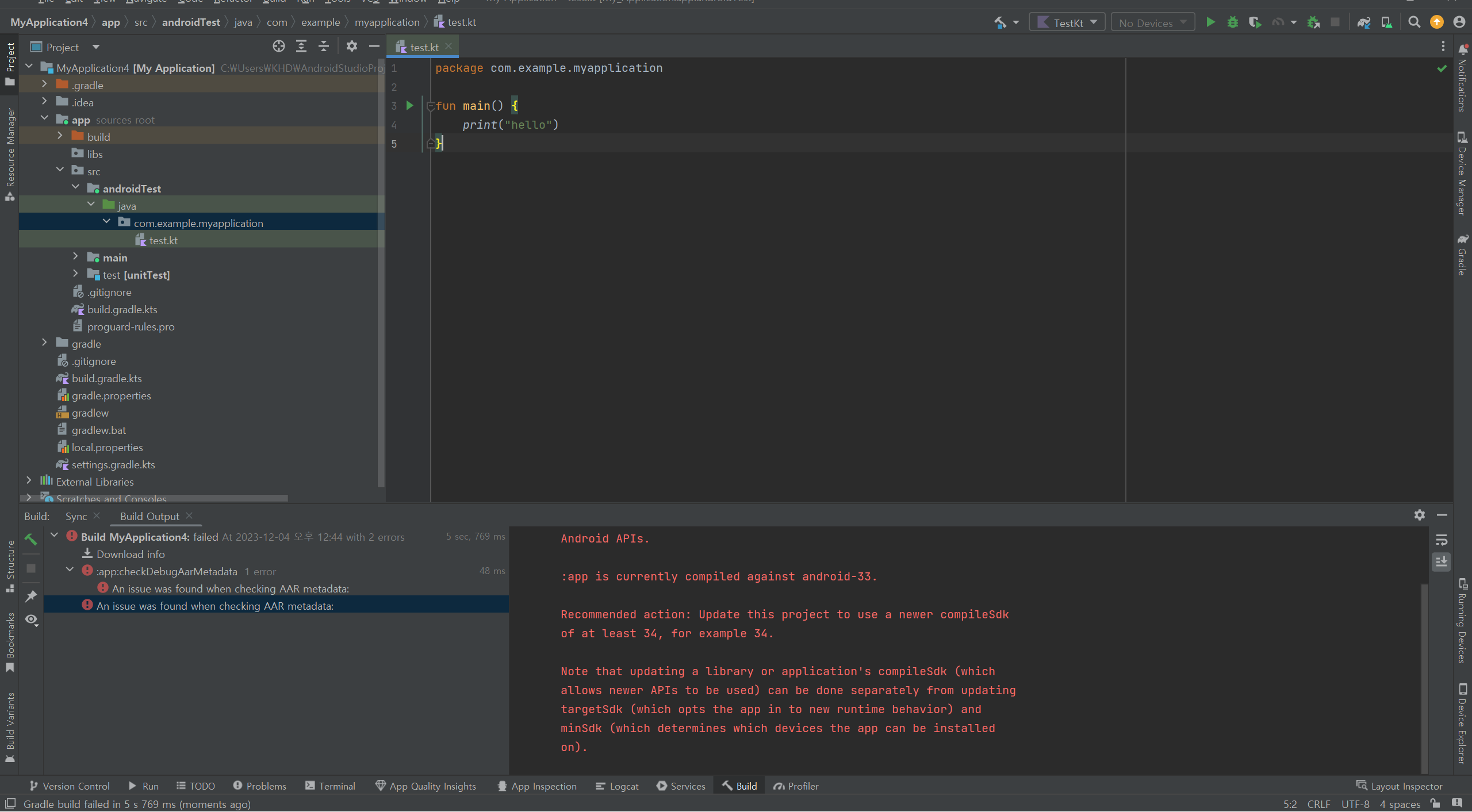
작성한 코드 및 에러 메세지
오류 발생 시, 작성한 코드 전체와 에러 메시지를 첨부해 주세요.
Tip 1) </> 아이콘을 눌러 코드박스를 만들어 보세요.
Tip 2) Ctrl+A(맥의 경우 Command+A) 단An issue was found when checking AAR metadata:
1. Dependency 'androidx.activity:activity:1.8.0' requires libraries and applications that
depend on it to compile against version 34 or later of the
Android APIs.
:app is currently compiled against android-33.
Recommended action: Update this project to use a newer compileSdk
of at least 34, for example 34.
Note that updating a library or application's compileSdk (which
allows newer APIs to be used) can be done separately from updating
targetSdk (which opts the app in to new runtime behavior) and
minSdk (which determines which devices the app can be installed
on).
축키로 코드를 한 번에 선택할 수 있어요!


