


* 겪고 있는 문제 상황을 최대한 자세하게 작성해주세요.
* 문제 해결을 위해 어떤 시도를 해보았는지 구체적으로 함께 알려주세요.
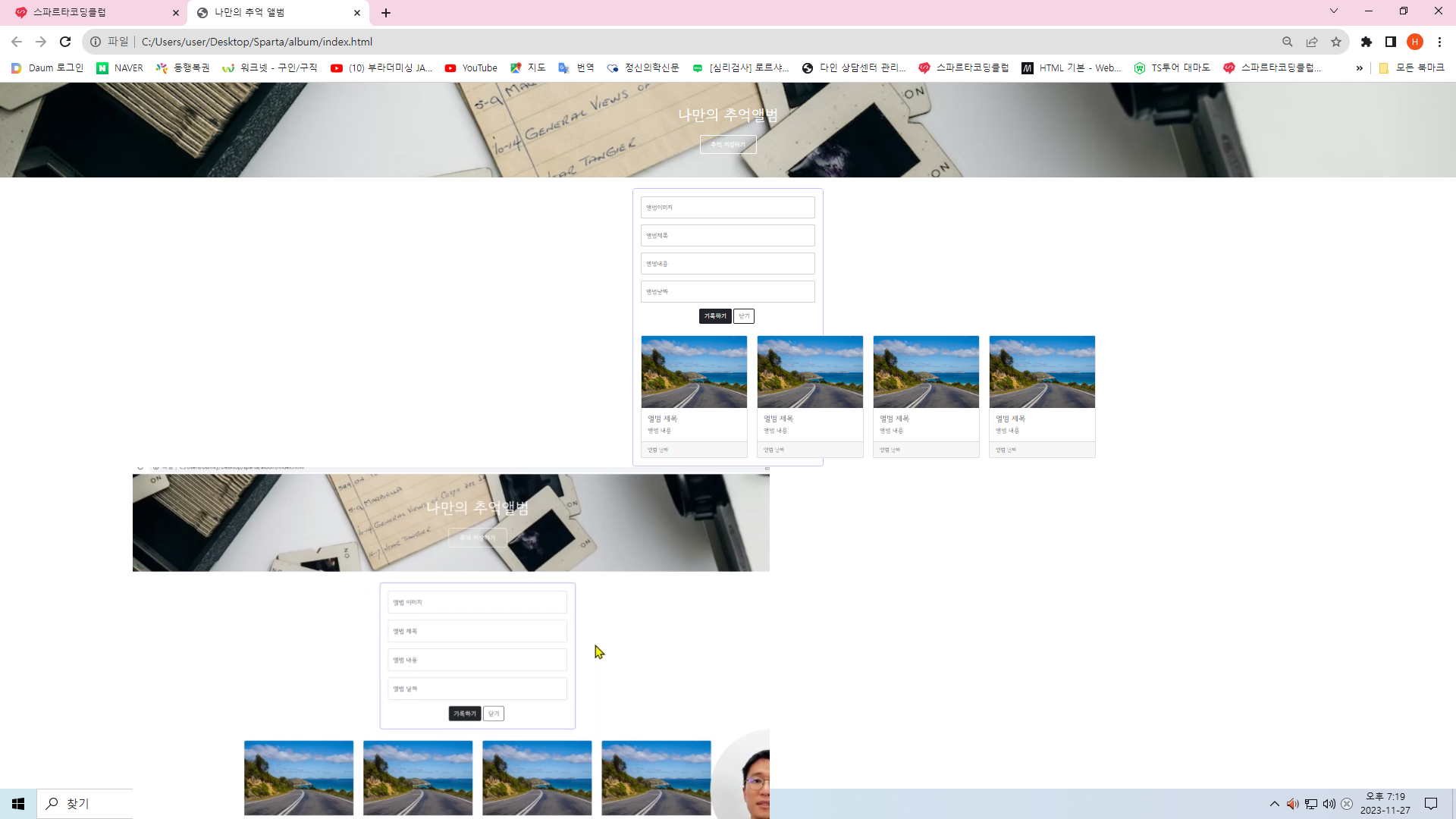
첨부 사진 아래처럼 나와야 하는데 카드 그림 네개가 중앙으로 오지 않고 오른 쪽으로 밀리고
포스팅 박스는 길게 카드 첫번째 까지 걸쳐 있습니다. 어디가 잘못되었을까요?
작성한 코드 및 에러 메세지
오류<!DOCTYPE html>
<html lang="en">
<head>
<meta charset="UTF-8">
<meta name="viewport" content="width=device-width, initial-scale=1.0">
<title> 나만의 추억 앨범 </title>
<link href="https://cdn.jsdelivr.net/npm/bootstrap@5.0.2/dist/css/bootstrap.min.css" rel="stylesheet"
integrity="sha384-EVSTQN3/azprG1Anm3QDgpJLIm9Nao0Yz1ztcQTwFspd3yD65VohhpuuCOmLASjC" crossorigin="anonymous">
<style>
@import url('http://fonts.googleapis.com/css?family=Gowun+Dodum&display=swap');
* {
font-family: 'Gowun Dodum', sans-serif;
}
.mytitle {
height: 250px;
color: white;
display: flex;
flex-direction: column;
align-items: center;
justify-content: center;
background-image: url('https://images.unsplash.com/photo-1511992243105-2992b3fd0410?ixlib=rb-4.0.3&ixid=M3wxMjA3fDB8MHxwaG90by1wYWdlfHx8fGVufDB8fHx8fA%3D%3D&auto=format&fit=crop&w=1470&q=80');
background-position: center;
background-size: cover;
}
.mytitle>button {
width: 150px;
height: 50px;
background-color: transparent;
color: white;
border: 1px solid white;
border-radius: 5px;
margin-top: 20px;
}
.mycards {
width: 1200px;
margin: 30px auto 0px auto;
}
.mypostingbox {
width: 500px;
margin: 30px auto 0px auto;
padding: 20px;
box-shadow: 0px 0px 3px 0px blue;
border-radius: 5px;
}
.mybtn {
display: flex;
flex-direction: row;
align-items: center;
justify-content: center;
}
.mybtn>button {
margin-right: 5px;
}
</style>
</head>
<body>
<div class="mytitle">
<h1> 나만의 추억앨범</h1>
<button>추억 저장하기</button>
</div>
<div class="mypostingbox">
<div class="form-floating mb-3">
<input type="email" class="form-control" id="floatingInput" placeholder="앨범 이미지">
<label for="floatingInput">앨범이미지</label>
</div>
<div class="form-floating mb-3">
<input type="email" class="form-control" id="floatingInput" placeholder="앨범 제목">
<label for="floatingInput">앨범제목</label>
</div>
<div class="form-floating mb-3">
<input type="email" class="form-control" id="floatingInput" placeholder="앨범 내용">
<label for="floatingInput">앨범내용</label>
</div>
<div class="form-floating mb-3">
<input type="email" class="form-control" id="floatingInput" placeholder="앨범 날짜">
<label for="floatingInput">앨범날짜</label>
</div>
<div class="mybtn">
<button type="button" class="btn btn-dark">기록하기</button>
<button type="button" class="btn btn-outline-dark">닫기</button>
</div>
<div class="mycards">
<div class="row row-cols-1 row-cols-md-4 g-4">
<div class="col">
<div class="card h-100">
class="card-img-top" alt="...">
<div class="card-body">
<h5 class="card-title">앨범 제목</h5>
<p class="card-text"> 앨범 내용</p>
</div>
<div class="card-footer">
<small class="text-body-secondary">앨범 날짜</small>
</div>
</div>
</div>
<div class="col">
<div class="card h-100">
class="card-img-top" alt="...">
<div class="card-body">
<h5 class="card-title">앨범 제목</h5>
<p class="card-text"> 앨범 내용</p>
</div>
<div class="card-footer">
<small class="text-body-secondary">앨범 날짜</small>
</div>
</div>
</div>
<div class="col">
<div class="card h-100">
class="card-img-top" alt="...">
<div class="card-body">
<h5 class="card-title">앨범 제목</h5>
<p class="card-text"> 앨범 내용</p>
</div>
<div class="card-footer">
<small class="text-body-secondary">앨범 날짜</small>
</div>
</div>
</div>
<div class="col">
<div class="card h-100">
class="card-img-top" alt="...">
<div class="card-body">
<h5 class="card-title">앨범 제목</h5>
<p class="card-text"> 앨범 내용</p>
</div>
<div class="card-footer">
<small class="text-body-secondary">앨범 날짜</small>
</div>
</div>
</div>
</div>
</div>
</div>
</body>
</html>
발생 시, 작성한 코드 전체와 에러 메시지를 첨부해 주세요.
Tip 1) </> 아이콘을 눌러 코드박스를 만들어 보세요.
Tip 2) Ctrl+A(맥의 경우 Command+A) 단축키로 코드를 한 번에 선택할 수 있어요!


