커뮤니티

포인트
쿠폰
내 강의실
국비 신청 내역
증명서
계정
로그아웃
학습 질문
개발 일지
나의 활동
답변 완료
modal의 margin관련 질문 드립니다
[왕초보] 웹개발 종합반 v0
3주차


방*희
댓글
1
・
추천
0
・
조회수
10
조회수
10
답변 완료
* 겪고 있는 문제 상황을 최대한 자세하게 작성해주세요.
* 문제 해결을 위해 어떤 시도를 해보았는지 구체적으로 함께 알려주세요.
3주차 추억앨범에 제이쿼리를 적용해보는 강의를 듣고 카드를 클릭하면 사진이 크게 팝업되는 기능도 한번 구현해보고자 했습니다. 찾아보니까 창을 팝업시키려면 modal을 사용한다고 하더라구요. 그래서 코드를 찾아서 구현해 봤습니다.
modal div를 width와 height를 설정해서 margin 으로 중앙에 오게 하고 싶었습니다.
하지만 modal창이 중앙에 오지 않았습니다. 찾아보니까 position 속성이 지정되지 않은 경우에는 기본적으로 static으로 적용되며, 이는 margin 속성이 동작하지 않게 된다고 하는데, 중앙에 오게 하려면 position:fixed; 같이 사용해야 한다고 하더라구요.
그런데 이전의 다른 div를 스타일링 할 때에는 width와 height를 설정해서 margin을 사용해도 원하는 위치에 출력이 됐었습니다.
그리고 modal의 내부 div인 modal-content에서는 margin을 사용해도 작동이 잘 되더라구요.
이 두 경우의 차이는 뭔가요?
어떤 경우에는 margin을 사용하고 어떤 경우에는 position을 사용하는지에 대해 차이점이 궁금합니다.
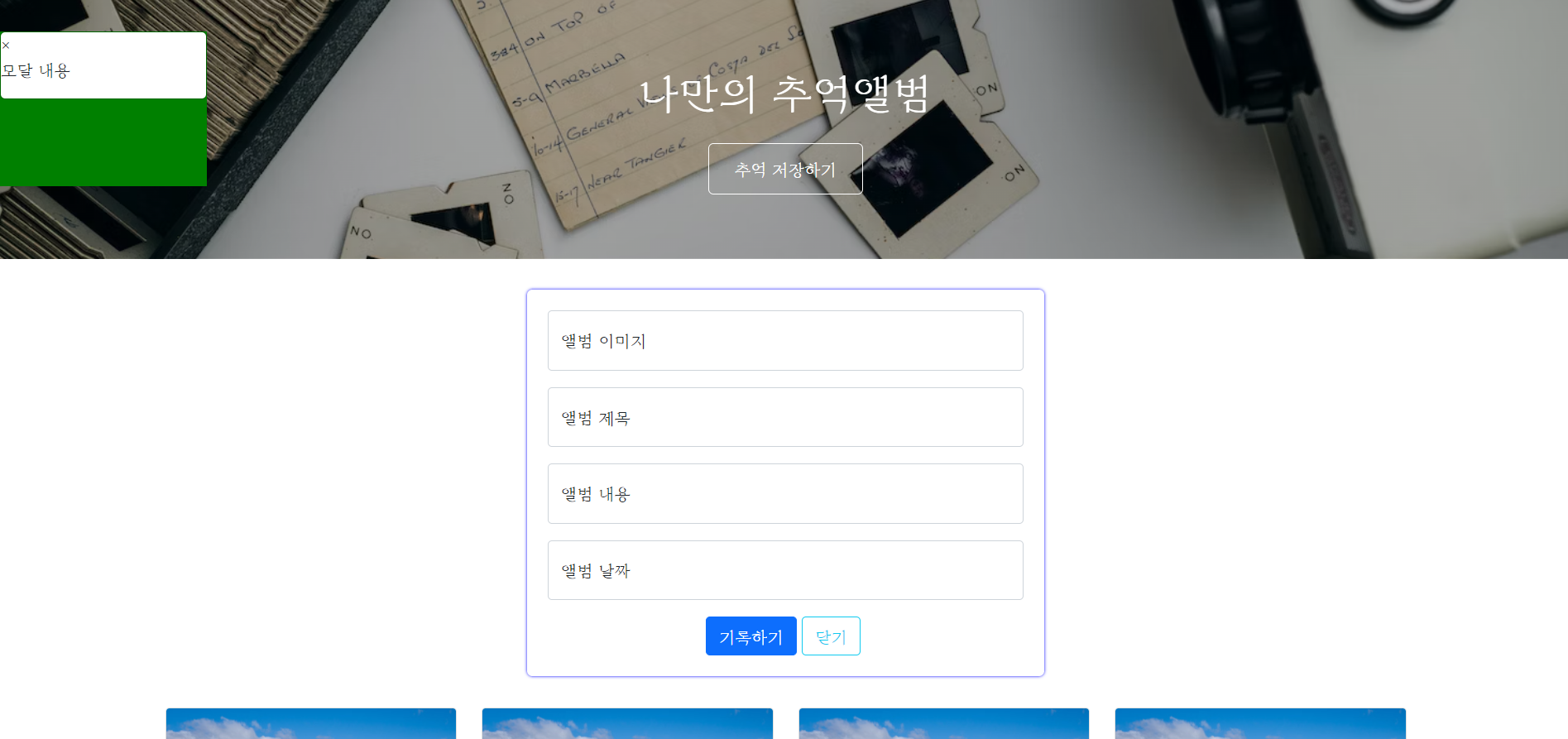
사진은 modal에 margin을 사용했을 때 결과이고 아래는 코드입니다.
작성한 코드 및 에러 메세지
<!DOCTYPE html>
<html lang="en">
<head>
<meta charset="UTF-8">
<meta name="viewport" content="width=device-width, initial-scale=1.0">
<title>나만의 추억엘범</title>
<script src="https://ajax.googleapis.com/ajax/libs/jquery/3.5.1/jquery.min.js"></script>
<link href="https://cdn.jsdelivr.net/npm/bootstrap@5.0.2/dist/css/bootstrap.min.css" rel="stylesheet"
integrity="sha384-EVSTQN3/azprG1Anm3QDgpJLIm9Nao0Yz1ztcQTwFspd3yD65VohhpuuCOmLASjC" crossorigin="anonymous">
<style>
@import url('https://fonts.googleapis.com/css2?family=Diphylleia&display=swap');
* {
font-family: 'Diphylleia', serif;
}
.mytitle {
height: 250px;
color: white;
/* 박스 내부 컨텐츠 정렬 */
display: flex;
flex-direction: column;
align-items: center;
justify-content: center;
background-image: linear-gradient(rgba(0, 0, 0, 0.3), rgba(0, 0, 0, 0.3)), url('https://images.unsplash.com/photo-1511992243105-2992b3fd0410?ixlib=rb-4.0.3&ixid=M3wxMjA3fDB8MHxwaG90by1wYWdlfHx8fGVufDB8fHx8fA%3D%3D&auto=format&fit=crop&w=1470&q=80');
background-position: center;
background-size: cover;
}
.mytitle>button {
width: 150px;
height: 50px;
background-color: transparent;
color: white;
border: 1px solid white;
border-radius: 5px;
margin-top: 20px;
}
.mycards {
width: 1200px;
margin: 30px auto 0px auto;
}
.mypostingbox {
width: 500px;
margin: 30px auto 0px auto;
padding: 20px;
box-shadow: 0px 0px 3px 0px blue;
border-radius: 5px;
}
.modal{
background-color: green;
width: 200px;
height: 150px;
margin: 30px auto 0px auto;
}
.mybtn {
display: flex;
flex-direction: row;
align-items: center;
justify-content: center;
}
.mybtn>button {
margin-right: 5px;
}
.col{
cursor: pointer;
}
</style>
<script>
function openclose() {
$('#postingbox').toggle();
}
function makingcards() {
let image = $('#image').val();
let title = $('#title').val();
let content = $('#content').val();
let date = $('#date').val();
let temp_html = `
<div class="col">
<div class="card h-100">
<img src=${image}
<div class="card-body">
<h5 class="card-title">${title}</h5>
<p class="card-text">${content}</p>
</div>
<div class="card-footer">
<small class="text-body-secondary">${date}</small>
</div>
</div>
</div>`;
$('#card').append(temp_html)
alert('기록되었습니다.');
}
function show_modal(){
$('#myModal').show();
}
</script>
</head>
<body>
<div class="mytitle">
<h1>나만의 추억앨범</h1>
<button onclick="openclose()">추억 저장하기</button>
</div>
<div class="mypostingbox" id="postingbox">
<div class="form-floating mb-3">
<input type="email" class="form-control" id="image" placeholder="앨범 이미지">
<label for="floatingInput">앨범 이미지</label>
</div>
<div class="form-floating mb-3">
<input type="email" class="form-control" id="title" placeholder="앨범 제목">
<label for="floatingInput">앨범 제목</label>
</div>
<div class="form-floating mb-3">
<input type="email" class="form-control" id="content" placeholder="앨범 내용">
<label for="floatingInput">앨범 내용</label>
</div>
<div class="form-floating mb-3">
<input type="email" class="form-control" id="date" placeholder="앨범 날짜">
<label for="floatingInput">앨범 날짜</label>
</div>
<div class="mybtn">
<button onclick="makingcards()" type="button" class="btn btn-primary">기록하기</button>
<button onclick="openclose()" type="button" class="btn btn-outline-info">닫기</button>
</div>
</div>
<div class="mycards">
<div id="card" class="row row-cols-1 row-cols-md-4 g-4">
<div onclick="show_modal()" class="col">
<div class="card h-100">
<img src="https://images.unsplash.com/photo-1446768500601-ac47e5ec3719?ixlib=rb-4.0.3&ixid=M3wxMjA3fDB8MHxwaG90by1wYWdlfHx8fGVufDB8fHx8fA%3D%3D&auto=format&fit=crop&w=1446&q=80"
class="card-img-top" alt="...">
<div class="card-body">
<h5 class="card-title">앨범 제목</h5>
<p class="card-text">앨범 내용</p>
</div>
<div class="card-footer">
<small class="text-body-secondary">앨범 날짜</small>
</div>
</div>
</div>
<div class="col">
<div class="card h-100">
<img src="https://images.unsplash.com/photo-1446768500601-ac47e5ec3719?ixlib=rb-4.0.3&ixid=M3wxMjA3fDB8MHxwaG90by1wYWdlfHx8fGVufDB8fHx8fA%3D%3D&auto=format&fit=crop&w=1446&q=80"
class="card-img-top" alt="...">
<div class="card-body">
<h5 class="card-title">앨범 제목</h5>
<p class="card-text">앨범 내용</p>
</div>
<div class="card-footer">
<small class="text-body-secondary">앨범 날짜</small>
</div>
</div>
</div>
<div class="col">
<div class="card h-100">
<img src="https://images.unsplash.com/photo-1446768500601-ac47e5ec3719?ixlib=rb-4.0.3&ixid=M3wxMjA3fDB8MHxwaG90by1wYWdlfHx8fGVufDB8fHx8fA%3D%3D&auto=format&fit=crop&w=1446&q=80"
class="card-img-top" alt="...">
<div class="card-body">
<h5 class="card-title">앨범 제목</h5>
<p class="card-text">앨범 내용</p>
</div>
<div class="card-footer">
<small class="text-body-secondary">앨범 날짜</small>
</div>
</div>
</div>
<div class="col">
<div class="card h-100">
<img src="https://images.unsplash.com/photo-1446768500601-ac47e5ec3719?ixlib=rb-4.0.3&ixid=M3wxMjA3fDB8MHxwaG90by1wYWdlfHx8fGVufDB8fHx8fA%3D%3D&auto=format&fit=crop&w=1446&q=80"
class="card-img-top" alt="...">
<div class="card-body">
<h5 class="card-title">앨범 제목</h5>
<p class="card-text">앨범 내용</p>
</div>
<div class="card-footer">
<small class="text-body-secondary">앨범 날짜</small>
</div>
</div>
</div>
</div>
</div>
<div id="myModal" class="modal">
<div class="modal-content">
<span class="close" onclick="closeModal()">×</span>
<p>모달 내용</p>
</div>
</div>
</body>
</html>


댓글 알림
