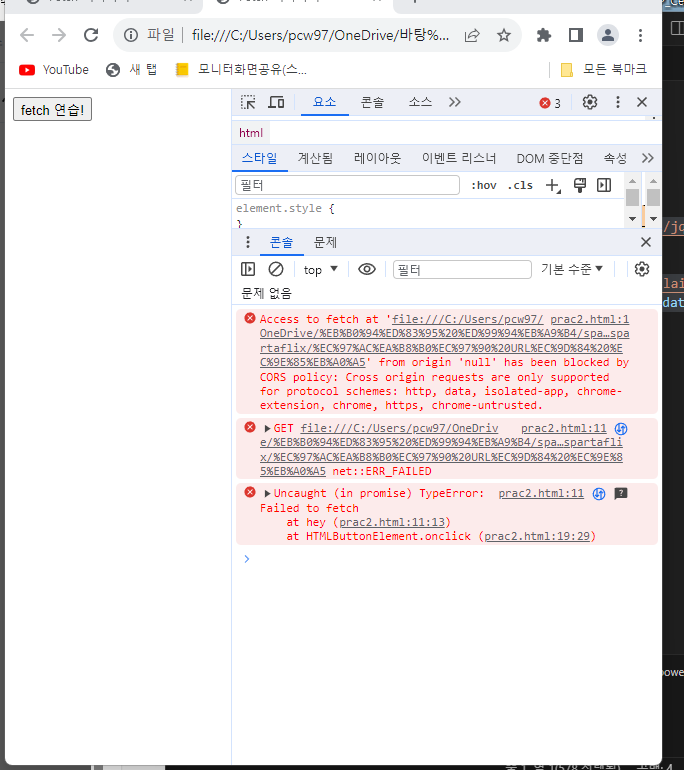
* 겪고 있는 문제 상황을 최대한 자세하게 작성해주세요.
* 문제 해결을 위해 어떤 시도를 해보았는지 구체적으로 함께 알려주세요.
해당 방식으로 진행이 안됩니다.
ㅇ
작성한 코드 및 에러 메세지
오류 발생 시, 작성한 코드 전체와 에러 메시지를 첨부해 주세요.
Tip 1) </> 아이콘을 눌러 코드박스를 만들어 보세요.
<!doctype html>
<html lang="ko">
<head>
<meta charset="UTF-8">
<title>Fetch 시작하기</title>
<script src="https://ajax.googleapis.com/ajax/libs/jquery/3.5.1/jquery.min.js"></script>
<script>
function hey() {
let url = 'http://spartacodingclub.shop/sparta_api/seoulair';
fetch("여기에 URL을 입력").then(res => res.json()).then(data => {
console.log(data['RealtimeCityAir']['row'][0])
})
}
</script>
</head>
<body>
<button onclick="hey()" >fetch 연습!</button>
</body>
</html>
Tip 2) Ctrl+A(맥의 경우 Command+A) 단축키로 코드를 한 번에 선택할 수 있어요!