


* 겪고 있는 문제 상황을 최대한 자세하게 작성해주세요.
* 문제 해결을 위해 어떤 시도를 해보았는지 구체적으로 함께 알려주세요.
영상 몇번을 돌려봐도 코드 작성 부분에서 잘못한게 없는 것 같은데 명언이 자동으로 변경이 안됩니다.
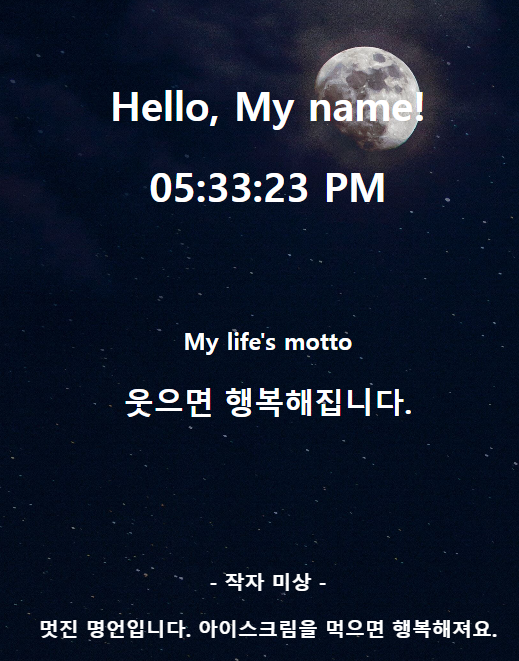
작성한 코드 및 에러 메세지
<!DOCTYPE html>
<html lang="en">
<head>
<meta charset="UTF-8" />
<meta http-equiv="X-UA-Compatible" content="IE=edge" />
<meta name="viewport" content="width=device-width, initial-scale=1.0" />
<title>Document</title>
<style>
body {
background-image: url("https://s3.ap-northeast-2.amazonaws.com/materials.spartacodingclub.kr/webjong/images/background.jpg");
background-position: center;
background-size: cover;
color: white;
}
.navbar {
display: flex;
justify-content: space-between;
align-items: center;
}
.weather {
display: flex;
align-items: center;
margin-right: 30px;
}
.container {
display: flex;
flex-direction: column;
/* Flex 안의 아이템들을 세로 방향으로 배치합니다. */
justify-content: center;
/* 주축 방향으로 가운데 정렬합니다. */
align-items: center;
/* 교차축 방향으로 가운데 정렬합니다. */
height: 100vh;
text-align: center;
}
.footer {
position: fixed;
left: 0;
bottom: 0;
width: 100%;
text-align: center;
font-weight: bold;
padding: 20px 0;
}
.greeting {
margin-bottom: 50px;
}
.motto {
margin-bottom: 100px;
}
.logo {
height: 32px;
margin-left: 30px;
}
</style>
<script src="https://ajax.googleapis.com/ajax/libs/jquery/3.7.1/jquery.min.js"></script>
</head>
<body>
<nav class="navbar">
<img
class="logo"
src="https://s3.ap-northeast-2.amazonaws.com/materials.spartacodingclub.kr/webjong/images/sparta-logo.svg"
alt=""
/>
<div class="weather">
<img
src="https://ssl.gstatic.com/onebox/weather/64/partly_cloudy.png"
/>
<p>날씨 맑음, 20ºC</p>
</div>
</nav>
<div class="container">
<div class="greeting">
<h1>Hello, My name!</h1>
<h1 id="시간표시">12:30</h1>
</div>
<div class="motto">
<h3>My life's motto</h3>
<h2>웃으면 행복해집니다.</h2>
</div>
</div>
<div class="footer">
<p id="quoteAuthor">- 작자 미상 -</p>
<p id="quoteContent">멋진 명언입니다. 아이스크림을 먹으면 행복해져요.</p>
</div>
<script>
function 현재시간표시() {
// 현재 시간을 가져옵니다.
var 현재시각 = new Date();
// 시, 분, 초를 추출합니다.
var 시 = 현재시각.getHours();
var 분 = 현재시각.getMinutes();
var 초 = 현재시각.getSeconds();
// AM 또는 PM을 결정합니다.
var AM_PM = 시 >= 12 ? "PM" : "AM";
// 시간이 12시간 형식으로 표시되도록 조정합니다.
if (시 > 12) {
시 -= 12;
}
// 시, 분, 초를 2자리 숫자로 표시합니다.
시 = 시 < 10 ? "0" + 시 : 시;
분 = 분 < 10 ? "0" + 분 : 분;
초 = 초 < 10 ? "0" + 초 : 초;
// 현재 시간 문자열을 만듭니다.
var 현재시간문자열 = 시 + ":" + 분 + ":" + 초 + " " + AM_PM;
// HTML 요소에 현재 시간을 표시합니다.
document.getElementById("시간표시").innerHTML = 현재시간문자열;
}
// 1초마다 현재 시간을 업데이트합니다.
setInterval(현재시간표시, 1000);
let url = "https://api.quotable.io/random";
fetch(url)
.then((res) => res.json())
.then((data) => {
console.log(data);
let author = data["author"];
let content = data["content"];
let authorMsg = `- ${author} -`;
let contentMsg = `" ${content} "`;
$("quoteAuthor").text(authorMsg);
$("quoteContent").text(contentMsg);
});
</script>
</body>
</html>


