커뮤니티

포인트
쿠폰
내 강의실
국비 신청 내역
증명서
계정
로그아웃
학습 질문
개발 일지
나의 활동
답변 완료
1-11 / 1-12 문의 드립니다.
코딩이 처음이어도 쉽게 배우는 웹개발 A to Z v0
1주차


김*웅
댓글
9
・
추천
0
・
조회수
29
조회수
29
답변 완료
* 겪고 있는 문제 상황을 최대한 자세하게 작성해주세요.
* 문제 해결을 위해 어떤 시도를 해보았는지 구체적으로 함께 알려주세요.
- 나의 앨범 만들기에서 앨범제목,앨범내용,앨범날짜 4개 박스 만드는 부분에서 좌우 대칭 맞게 하는 코드를 똑같이 따라했는데 적용이 안됩니다!
- 나만의 앨범 만들기에서 앨범 이미지,앨범 제목,앨범 내용,앨범 날짜 직접 입력하는 가운데 창안에 기록하기 및 닫기가 가운데로 이동하지 않습니다!
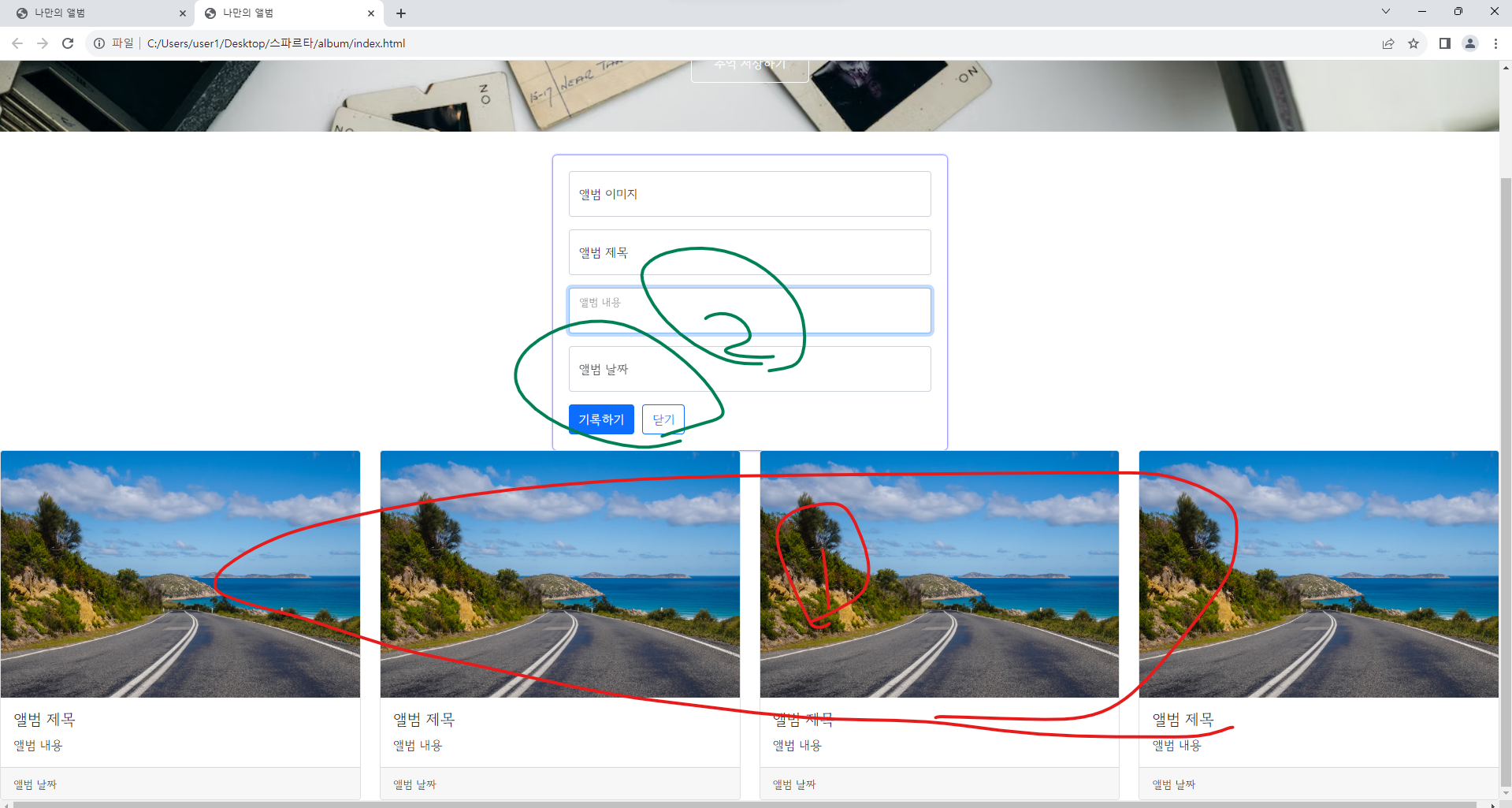
작성한 코드 및 에러 메세지
<!DOCTYPE html>
<html lang="en">


<head>
    <meta charset="UTF-8">
    <meta name="viewport" content="width=device-width, initial-scale=1.0">
    <title>나만의 앨범</title>
    <link href="https://cdn.jsdelivr.net/npm/bootstrap@5.0.2/dist/css/bootstrap.min.css" rel="stylesheet"
        integrity="sha384-EVSTQN3/azprG1Anm3QDgpJLIm9Nao0Yz1ztcQTwFspd3yD65VohhpuuCOmLASjC" crossorigin="anonymous">


    <style>
        @import url('https://fonts.googleapis.com/css2?family=Gowun+Dodum&display=swap');


        * {
            font-family: 'Gowun Dodum', sans-serif;


        }


        .mytitle {
            height: 250px;
            color: white;


            display: flex;
            flex-direction: column;
            align-items: center;
            justify-content: center;


            background-image: url('https://images.unsplash.com/photo-1511992243105-2992b3fd0410?ixlib=rb-4.0.3&ixid=M3wxMjA3fDB8MHxwaG90by1wYWdlfHx8fGVufDB8fHx8fA%3D%3D&auto=format&fit=crop&w=1470&q=80');
            background-position: center;
            background-size: cover;
        }


        .mytitle>button {
            width: 150px;
            height: 50px;
            background-color: transparent;
            color: white;
            border: 1px solid white;
            border-radius: 5px;


            margin-top: 20px;
        }


        .mycards {
            width: 1200px;


            margin: 30px auto 0px auto;
        }


        .mypostingbox {
            width: 500px;
            margin: 30px auto 0px auto;
            padding: 20px;
            box-shadow: 0px 0px 3px 0px blue;
            border-radius: 5px;
        }


        .mybytn {
            display: flex;
            flex-direction: row;
            align-items: center;
            justify-content: center;
        }


        .mybtn > button {
            margin-right: 5px;
        }
    </style>


</head>


<body>
    <div class="mytitle">
        <h1>나만의 추억앨범</h1>
        <button>추억 저장하기</button>
    </div>
    <div class="mypostingbox">
        <div class="form-floating mb-3">
            <input type="email" class="form-control" id="floatingInput" placeholder="앨범 이미지">
            <label for="floatingInput">앨범 이미지</label>
        </div>
        <div class="form-floating mb-3">
            <input type="email" class="form-control" id="floatingInput" placeholder="앨범 제목">
            <label for="floatingInput">앨범 제목</label>
        </div>
         <div class="form-floating mb-3">
            <input type="email" class="form-control" id="floatingInput" placeholder="앨범 내용">
            <label for="floatingInput">앨범 내용</label>
        </div>
        <div class="form-floating mb-3">
            <input type="email" class="form-control" id="floatingInput" placeholder="앨범 날짜">
            <label for="floatingInput">앨범 날짜</label>
        </div>
        <div class="mybtn">
            <button type="button" class="btn btn-primary">기록하기</button>
            <button type="button" class="btn btn-outline-primary">닫기</button>

        </div>
    </div>
    <dic class="mycards">
        <div class="row row-cols-1 row-cols-md-4 g-4">
            <div class="col">
                <div class="card h-100">
                    <img src="https://images.unsplash.com/photo-1446768500601-ac47e5ec3719?ixlib=rb-4.0.3&ixid=M3wxMjA3fDB8MHxwaG90by1wYWdlfHx8fGVufDB8fHx8fA%3D%3D&auto=format&fit=crop&w=1446&q=80"
                        class="card-img-top" alt="...">
                    <div class="card-body">
                        <h5 class="card-title">앨범 제목</h5>
                        <p class="card-text">앨범 내용</p>
                    </div>
                    <div class="card-footer">
                        <small class="text-body-secondary">앨범 날짜</small>
                    </div>
                </div>
            </div>
            <div class="col">
                <div class="card h-100">
                    <img src="https://images.unsplash.com/photo-1446768500601-ac47e5ec3719?ixlib=rb-4.0.3&ixid=M3wxMjA3fDB8MHxwaG90by1wYWdlfHx8fGVufDB8fHx8fA%3D%3D&auto=format&fit=crop&w=1446&q=80"
                        class="card-img-top" alt="...">
                    <div class="card-body">
                        <h5 class="card-title">앨범 제목</h5>
                        <p class="card-text">앨범 내용</p>
                    </div>
                    <div class="card-footer">
                        <small class="text-body-secondary">앨범 날짜</small>
                    </div>
                </div>
            </div>
            <div class="col">
                <div class="card h-100">
                    <img src="https://images.unsplash.com/photo-1446768500601-ac47e5ec3719?ixlib=rb-4.0.3&ixid=M3wxMjA3fDB8MHxwaG90by1wYWdlfHx8fGVufDB8fHx8fA%3D%3D&auto=format&fit=crop&w=1446&q=80"
                        class="card-img-top" alt="...">
                    <div class="card-body">
                        <h5 class="card-title">앨범 제목</h5>
                        <p class="card-text">앨범 내용</p>
                    </div>
                    <div class="card-footer">
                        <small class="text-body-secondary">앨범 날짜</small>
                    </div>
                </div>
            </div>
            <div class="col">
                <div class="card h-100">
                    <img src="https://images.unsplash.com/photo-1446768500601-ac47e5ec3719?ixlib=rb-4.0.3&ixid=M3wxMjA3fDB8MHxwaG90by1wYWdlfHx8fGVufDB8fHx8fA%3D%3D&auto=format&fit=crop&w=1446&q=80"
                        class="card-img-top" alt="...">
                    <div class="card-body">
                        <h5 class="card-title">앨범 제목</h5>
                        <p class="card-text">앨범 내용</p>
                    </div>
                    <div class="card-footer">
                        <small class="text-body-secondary">앨범 날짜</small>
                    </div>
                </div>
            </div>
        </div>
    </dic>
</body>


</html>


댓글 알림
