


* 겪고 있는 문제 상황을 최대한 자세하게 작성해주세요.
* 문제 해결을 위해 어떤 시도를 해보았는지 구체적으로 함께 알려주세요.
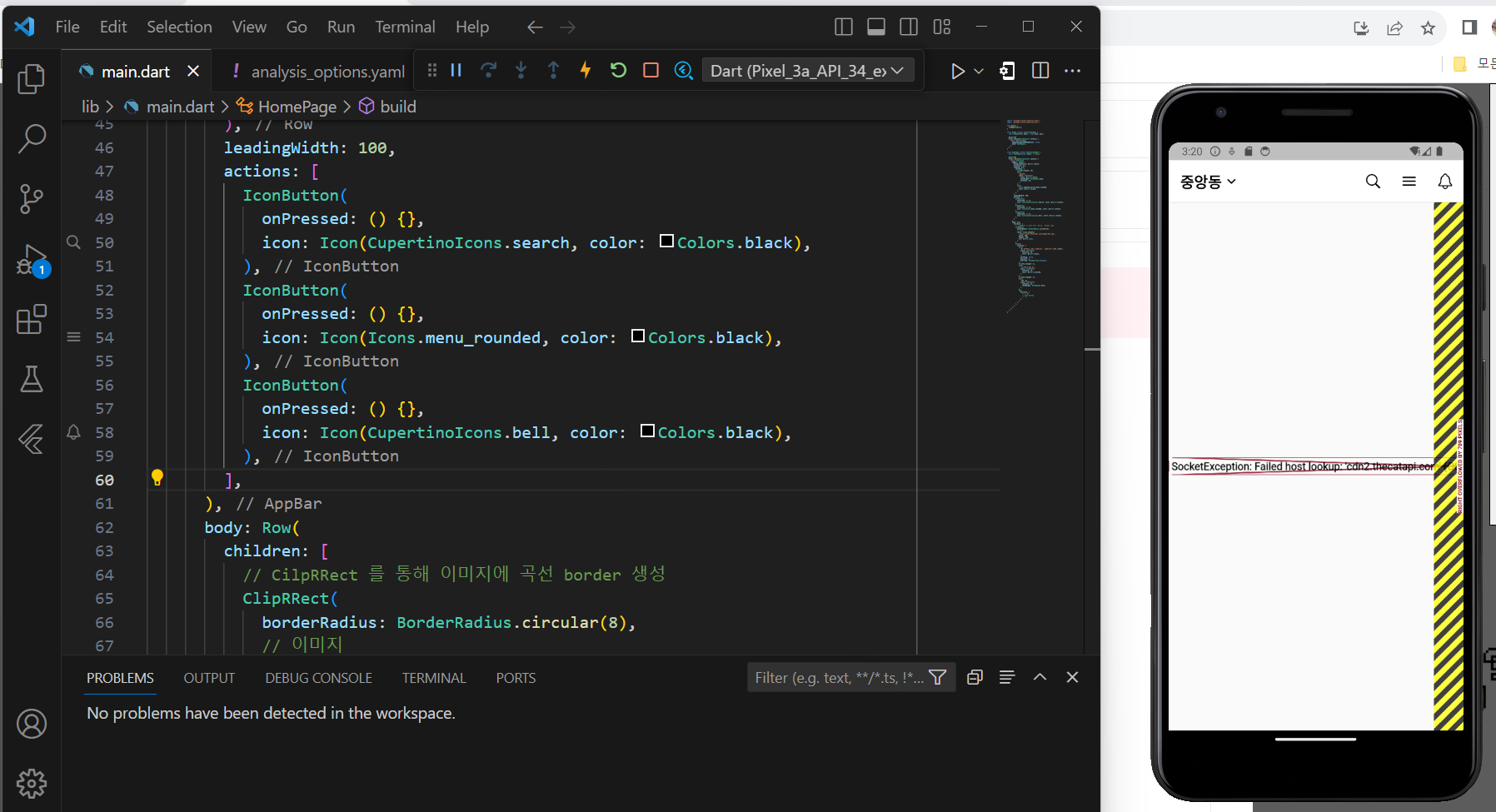
당근마켓화면 만들기에서 레이아웃까지는 잘되었는데,
body이미지 복붙 후 에 사진이 안뜨고 텍스트세로 배치이후 캡처화면처럼 되네요.
디버크콘솔에는 이렇게 나오구요.
The edge of the RenderFlex that is overflowing has been marked in the rendering with a yellow and black striped pattern. This is usually caused by the contents being too big for the RenderFlex.
Consider applying a flex factor (e.g. using an Expanded widget) to force the children of the RenderFlex to fit within the available space instead of being sized to their natural size.
This is considered an error condition because it indicates that there is content that cannot be seen. If the content is legitimately bigger than the available space, consider clipping it with a ClipRect widget before putting it in the flex, or using a scrollable container rather than a Flex, like a ListView.
The specific RenderFlex in question is: RenderFlex#944ac relayoutBoundary=up1 OVERFLOWING
════════════════════════════════════════════════════════════════════════════════
════════ Exception caught by image resource service ════════════════════════════
Failed host lookup: 'cdn2.thecatapi.com' (OS Error: No address associated with hostname, errno = 7)
════════════════════════════════════════════════════════════════════════════════
D/EGL_emulation(23834): app_time_stats: avg=10104.47ms min=7.71ms max=20201.24ms count=2
코드입니다.
import 'package:flutter/cupertino.dart';
import 'package:flutter/material.dart';
void main() {
runApp(MyApp());
}
class MyApp extends StatelessWidget {
const MyApp({Key? key}) : super(key: key);
@override
Widget build(BuildContext context) {
return MaterialApp(
debugShowCheckedModeBanner: false,
home: HomePage(),
);
}
}
class HomePage extends StatelessWidget {
const HomePage({super.key}); //생성자
@override
Widget build(BuildContext context) {
return Scaffold(
appBar: AppBar(
backgroundColor: Colors.white,
elevation: 0.5,
leading: Row(
children: [
SizedBox(width: 16),
Text(
'중앙동',
style: TextStyle(
color: Colors.black,
fontWeight: FontWeight.bold,
fontSize: 20,
),
),
Icon(
Icons.keyboard_arrow_down_rounded,
color: Colors.black,
),
],
),
leadingWidth: 100,
actions: [
IconButton(
onPressed: () {},
icon: Icon(CupertinoIcons.search, color: Colors.black),
),
IconButton(
onPressed: () {},
icon: Icon(Icons.menu_rounded, color: Colors.black),
),
IconButton(
onPressed: () {},
icon: Icon(CupertinoIcons.bell, color: Colors.black),
),
],
),
body: Row(
children: [
// CilpRRect 를 통해 이미지에 곡선 border 생성
ClipRRect(
borderRadius: BorderRadius.circular(8),
// 이미지
child: Image.network(
'https://cdn2.thecatapi.com/images/6bt.jpg',
width: 100,
height: 100,
fit: BoxFit.cover,
),
),
Column(
children: [
Text(
'M1 아이패드 프로 11형(3세대) 와이파이 128G 팝니다.',
style: TextStyle(
fontSize: 16,
color: Colors.black,
),
softWrap: false,
maxLines: 2,
overflow: TextOverflow.ellipsis,
),
SizedBox(height: 2),
Text(
'봉천동 · 6분 전',
style: TextStyle(
fontSize: 12,
color: Colors.black45,
),
),
SizedBox(height: 4),
Text(
'100만원',
style: TextStyle(
fontSize: 14,
fontWeight: FontWeight.bold,
),
),
Row(
children: [
// 빈 칸
// 하트 아이콘
// '1'
],
),
],
),
],
),
);
}
}
고 계신 화면 전체를 캡처해 주시면, 튜터님들이 빠르게 상황을 이해할 수 있어요.


