커뮤니티

포인트
쿠폰
내 강의실
국비 신청 내역
증명서
계정
로그아웃
학습 질문
개발 일지
나의 활동
답변 완료
webview import 오류 해결하다가 어플 에뮬레이터 실행에 오류가 있는건지 코드에 오류가 있는건지 에뮬레이터가 정상 작동하지 않아요 :(
[왕초보] 플러터(Flutter)로 시작하는 앱개발 종합반 v0
4주차


조*승
댓글
8
・
추천
0
・
조회수
29
조회수
29
답변 완료
* 겪고 있는 문제 상황을 최대한 자세하게 작성해주세요.
* 문제 해결을 위해 어떤 시도를 해보았는지 구체적으로 함께 알려주세요.
안녕하세요 담당자님 !
4주차 강의 들으면서 webview import 에 문제가 발생해서 구글링도하고 FAQ 도 찾아보면서 webview 의 import 문제는 해결했는데
제가 잘못 수정을 한건지 import 문제 해결 이후로 어플 에뮬레이터 실행에 있어 오류가 발생하는 것 같아요.
도움 요청을 드립니다 !_!
main.dart
pubspec.yaml
\android\app\build.gradle
위 3가지 파일의 코드를 참고용으로 복붙해놓겠습니다 !
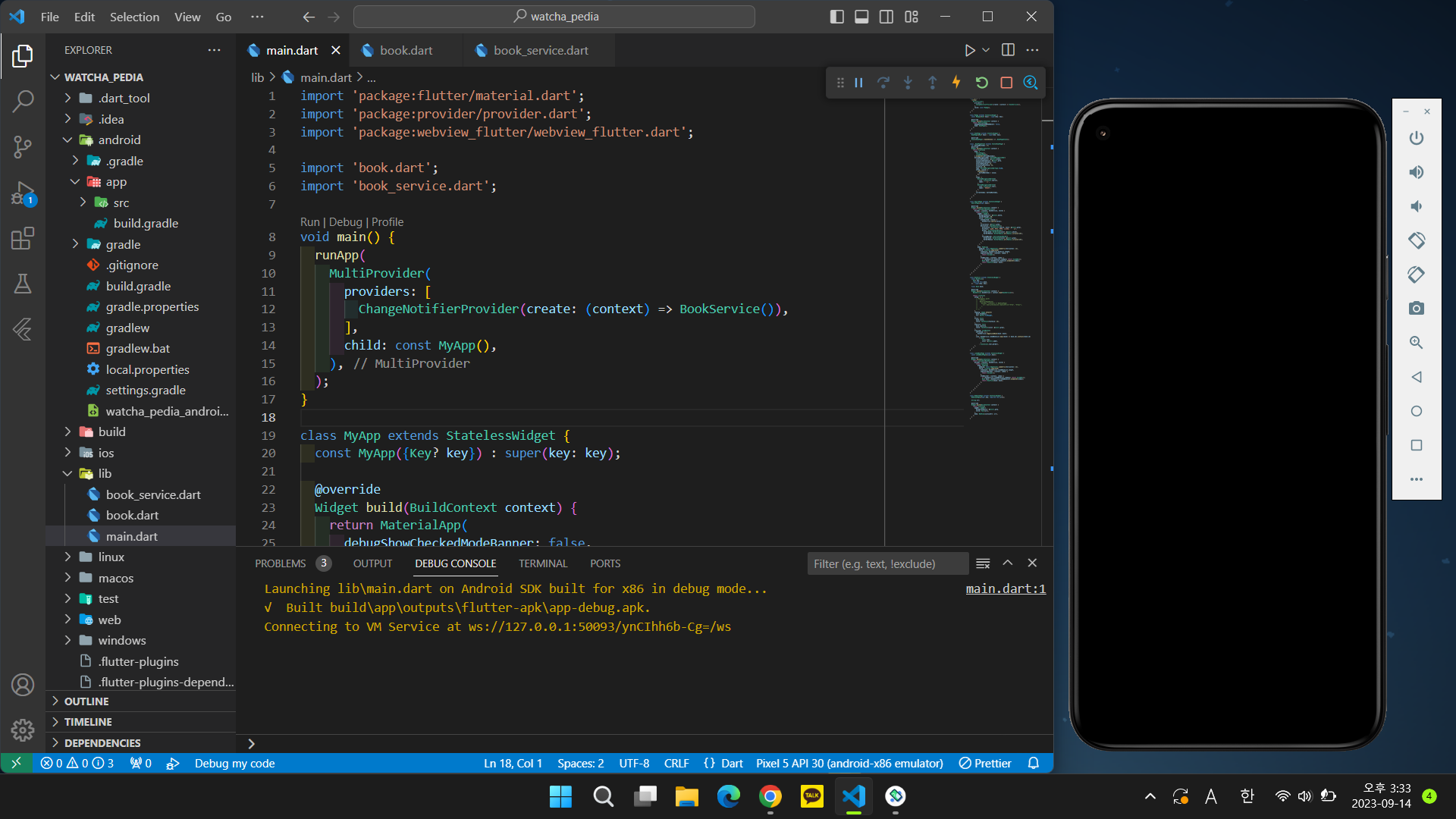
main.dart
import 'package:flutter/material.dart';
import 'package:provider/provider.dart';
import 'package:webview_flutter/webview_flutter.dart';


import 'book.dart';
import 'book_service.dart';


void main() {
  runApp(
    MultiProvider(
      providers: [
        ChangeNotifierProvider(create: (context) => BookService()),
      ],
      child: const MyApp(),
    ),
  );
}


class MyApp extends StatelessWidget {
  const MyApp({Key? key}) : super(key: key);


  @override
  Widget build(BuildContext context) {
    return MaterialApp(
      debugShowCheckedModeBanner: false,
      home: HomePage(),
    );
  }
}


class HomePage extends StatefulWidget {
  HomePage({Key? key}) : super(key: key);


  @override
  State<HomePage> createState() => _HomePageState();
}


class _HomePageState extends State<HomePage> {
  var bottomNavIndex = 0;
  @override
  Widget build(BuildContext context) {
    return Scaffold(
      body: [
        SearchPage(),
        LikedBookPage(),
      ].elementAt(bottomNavIndex),
      bottomNavigationBar: BottomNavigationBar(
        selectedItemColor: Colors.black,
        unselectedItemColor: Colors.grey,
        showUnselectedLabels: true,
        selectedFontSize: 12,
        unselectedFontSize: 12,
        iconSize: 28,
        type: BottomNavigationBarType.fixed,
        onTap: (value) {
          setState(() {
            bottomNavIndex = value;
          });
        },
        items: [
          BottomNavigationBarItem(
            icon: Icon(Icons.search),
            label: '검색',
          ),
          BottomNavigationBarItem(
            icon: Icon(Icons.star),
            label: '좋아요',
          ),
        ],
        currentIndex: bottomNavIndex,
      ),
    );
  }
}


class SearchPage extends StatelessWidget {
  SearchPage({super.key});


  @override
  Widget build(BuildContext context) {
    return Consumer<BookService>(
      builder: (context, bookService, child) {
        return Scaffold(
          appBar: AppBar(
            backgroundColor: Colors.white,
            toolbarHeight: 80,
            title: TextField(
              onSubmitted: (value) {
                bookService.search(value);
              },
              cursorColor: Colors.grey,
              decoration: InputDecoration(
                prefixIcon: Icon(Icons.search, color: Colors.grey),
                hintText: "작품, 감독, 배우, 컬렉션, 유저 등",
                border: OutlineInputBorder(
                  borderSide: BorderSide(color: Colors.white),
                  borderRadius: BorderRadius.all(Radius.circular(10)),
                ),
                focusedBorder: OutlineInputBorder(
                  borderSide: BorderSide(color: Colors.grey),
                  borderRadius: BorderRadius.all(Radius.circular(10)),
                ),
              ),
            ),
          ),
          body: Padding(
            padding: const EdgeInsets.symmetric(horizontal: 12),
            child: ListView.separated(
              itemCount: bookService.bookList.length,
              separatorBuilder: (context, index) {
                return Divider();
              },
              itemBuilder: (context, index) {
                if (bookService.bookList.isEmpty) return SizedBox();
                Book book = bookService.bookList.elementAt(index);
                return BookTile(book: book);
              },
            ),
          ),
        );
      },
    );
  }
}


class BookTile extends StatelessWidget {
  const BookTile({
    Key? key,
    required this.book,
  }) : super(key: key);


  final Book book;


  @override
  Widget build(BuildContext context) {
    BookService bookService = context.read<BookService>();


    return ListTile(
      onTap: () {
        // Navigator.push(
        //   context,
        //   MaterialPageRoute(
        //     builder: (context) => WebViewPage(
        //       url: book.previewLink.replaceFirst("http", "https"),
        //     ),
        //   ),
        // );
      },
      leading: Image.network(
        book.thumbnail,
        fit: BoxFit.fitHeight,
      ),
      title: Text(
        book.title,
        style: TextStyle(fontSize: 16),
      ),
      subtitle: Text(
        book.subtitle,
        style: TextStyle(color: Colors.grey),
      ),
      trailing: IconButton(
        onPressed: () {
          bookService.toggleLikeBook(book: book);
        },
        icon: bookService.likedBookList.map((book) => book.id).contains(book.id)
            ? Icon(
                Icons.star,
                color: Colors.amber,
              )
            : Icon(Icons.star_border),
      ),
    );
  }
}


class LikedBookPage extends StatelessWidget {
  const LikedBookPage({super.key});


  @override
  Widget build(BuildContext context) {
    return Consumer<BookService>(
      builder: (context, bookService, child) {
        return Scaffold(
          body: Padding(
            padding: const EdgeInsets.symmetric(horizontal: 12),
            child: ListView.separated(
              itemCount: bookService.likedBookList.length,
              separatorBuilder: (context, index) {
                return Divider();
              },
              itemBuilder: (context, index) {
                if (bookService.likedBookList.isEmpty) return SizedBox();
                Book book = bookService.likedBookList.elementAt(index);
                return BookTile(book: book);
              },
            ),
          ),
        );
      },
    );
  }
}


class WebViewPage extends StatelessWidget {
  WebViewPage({super.key, required this.url});


  String url;


  @override
  Widget build(BuildContext context) {
    return Scaffold(
      appBar: AppBar(
        backgroundColor: Colors.grey,
        title: Text(url),
      ),
      body: WebView(initialUrl: url),
    );
  }
}
pubspec.yaml
name: watcha_pedia
description: A new Flutter project.


# The following line prevents the package from being accidentally published to
# pub.dev using `flutter pub publish`. This is preferred for private packages.
publish_to: "none" # Remove this line if you wish to publish to pub.dev


# The following defines the version and build number for your application.
# A version number is three numbers separated by dots, like 1.2.43
# followed by an optional build number separated by a +.
# Both the version and the builder number may be overridden in flutter
# build by specifying --build-name and --build-number, respectively.
# In Android, build-name is used as versionName while build-number used as versionCode.
# Read more about Android versioning at https://developer.android.com/studio/publish/versioning
# In iOS, build-name is used as CFBundleShortVersionString while build-number is used as CFBundleVersion.
# Read more about iOS versioning at
# https://developer.apple.com/library/archive/documentation/General/Reference/InfoPlistKeyReference/Articles/CoreFoundationKeys.html
# In Windows, build-name is used as the major, minor, and patch parts
# of the product and file versions while build-number is used as the build suffix.
version: 1.0.0+1


environment:
  sdk: ">=2.18.5 <3.0.0"


# Dependencies specify other packages that your package needs in order to work.
# To automatically upgrade your package dependencies to the latest versions
# consider running `flutter pub upgrade --major-versions`. Alternatively,
# dependencies can be manually updated by changing the version numbers below to
# the latest version available on pub.dev. To see which dependencies have newer
# versions available, run `flutter pub outdated`.
dependencies:
  flutter:
    sdk: flutter


  # The following adds the Cupertino Icons font to your application.
  # Use with the CupertinoIcons class for iOS style icons.
  cupertino_icons: ^1.0.2
  provider: ^6.0.5
  dio: ^5.3.2
  webview_flutter: ^3.0.0


dev_dependencies:
  flutter_test:
    sdk: flutter


  # The "flutter_lints" package below contains a set of recommended lints to
  # encourage good coding practices. The lint set provided by the package is
  # activated in the `analysis_options.yaml` file located at the root of your
  # package. See that file for information about deactivating specific lint
  # rules and activating additional ones.
  flutter_lints: ^2.0.0


# For information on the generic Dart part of this file, see the
# following page: https://dart.dev/tools/pub/pubspec


# The following section is specific to Flutter packages.
flutter:
  # The following line ensures that the Material Icons font is
  # included with your application, so that you can use the icons in
  # the material Icons class.
  uses-material-design: true


  # To add assets to your application, add an assets section, like this:
  # assets:
  #   - images/a_dot_burr.jpeg
  #   - images/a_dot_ham.jpeg


  # An image asset can refer to one or more resolution-specific "variants", see
  # https://flutter.dev/assets-and-images/#resolution-aware


  # For details regarding adding assets from package dependencies, see
  # https://flutter.dev/assets-and-images/#from-packages


  # To add custom fonts to your application, add a fonts section here,
  # in this "flutter" section. Each entry in this list should have a
  # "family" key with the font family name, and a "fonts" key with a
  # list giving the asset and other descriptors for the font. For
  # example:
  # fonts:
  #   - family: Schyler
  #     fonts:
  #       - asset: fonts/Schyler-Regular.ttf
  #       - asset: fonts/Schyler-Italic.ttf
  #         style: italic
  #   - family: Trajan Pro
  #     fonts:
  #       - asset: fonts/TrajanPro.ttf
  #       - asset: fonts/TrajanPro_Bold.ttf
  #         weight: 700
  #
  # For details regarding fonts from package dependencies,
  # see https://flutter.dev/custom-fonts/#from-packages
\android\app\build.gradle
def localProperties = new Properties()
def localPropertiesFile = rootProject.file('local.properties')
if (localPropertiesFile.exists()) {
    localPropertiesFile.withReader('UTF-8') { reader ->
        localProperties.load(reader)
    }
}


def flutterRoot = localProperties.getProperty('flutter.sdk')
if (flutterRoot == null) {
    throw new GradleException("Flutter SDK not found. Define location with flutter.sdk in the local.properties file.")
}


def flutterVersionCode = localProperties.getProperty('flutter.versionCode')
if (flutterVersionCode == null) {
    flutterVersionCode = '1'
}


def flutterVersionName = localProperties.getProperty('flutter.versionName')
if (flutterVersionName == null) {
    flutterVersionName = '1.0'
}


apply plugin: 'com.android.application'
apply plugin: 'kotlin-android'
apply from: "$flutterRoot/packages/flutter_tools/gradle/flutter.gradle"


android {
    compileSdkVersion 32
    ndkVersion flutter.ndkVersion


    compileOptions {
        sourceCompatibility JavaVersion.VERSION_1_8
        targetCompatibility JavaVersion.VERSION_1_8
    }


    kotlinOptions {
        jvmTarget = '1.8'
    }


    sourceSets {
        main.java.srcDirs += 'src/main/kotlin'
    }


    defaultConfig {
        // TODO: Specify your own unique Application ID (https://developer.android.com/studio/build/application-id.html).
        applicationId "com.example.watcha_pedia"
        // You can update the following values to match your application needs.
        // For more information, see: https://docs.flutter.dev/deployment/android#reviewing-the-build-configuration.
        minSdkVersion 19
        targetSdkVersion flutter.targetSdkVersion
        versionCode flutterVersionCode.toInteger()
        versionName flutterVersionName
    }


    buildTypes {
        release {
            // TODO: Add your own signing config for the release build.
            // Signing with the debug keys for now, so `flutter run --release` works.
            signingConfig signingConfigs.debug
        }
    }
}


flutter {
    source '../..'
}


dependencies {
    implementation "org.jetbrains.kotlin:kotlin-stdlib-jdk7:$kotlin_version"
}


댓글 알림
