


* 겪고 있는 문제 상황을 최대한 자세하게 작성해주세요.
* 문제 해결을 위해 어떤 시도를 해보았는지 구체적으로 함께 알려주세요.
아래처럼 코드를 짰는데 페이지 넘기면 TapPageSelector의 color가 grey가 되지 않습니다. 왜 안되는지 모르겠습니다.
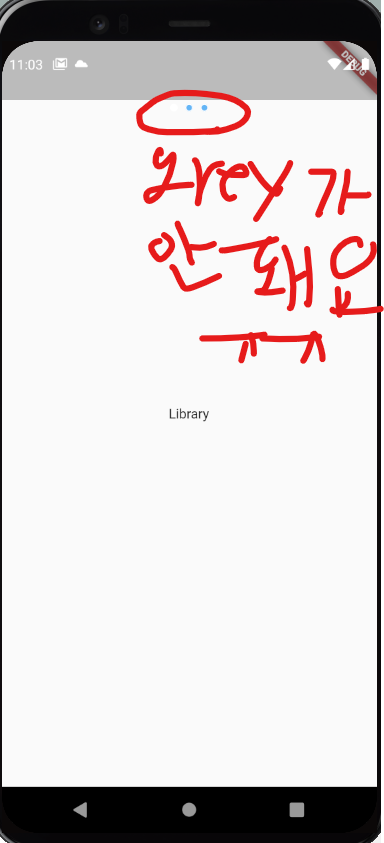
작성한 코드 및 에러 메세지
import 'package:flutter/material.dart';
class HomePage extends StatefulWidget {
const HomePage({super.key});
@override
State<HomePage> createState() => _HomePageState();
}
class _HomePageState extends State<HomePage> {
@override
Widget build(BuildContext context) {
return DefaultTabController(
initialIndex: 1,
length: 3,
child: Scaffold(
body: Stack(
children: [
TabBarView(
children: <Widget>[
Library(),
MainPage(),
Chart(),
],
),
SafeArea(
child: Column(
children: [
Container(
alignment: Alignment.topCenter,
child: TabPage(),
),
],
),
),
],
),
),
);
}
}
class TabPage extends StatefulWidget {
const TabPage({super.key});
@override
State<TabPage> createState() => _TabPageState();
}
class _TabPageState extends State<TabPage> {
@override
Widget build(BuildContext context) {
return TabPageSelector(
color: DefaultTabController.of(context).index == 1
? Colors.blue[300]
: Colors.grey[600],
selectedColor: DefaultTabController.of(context).index == 1
? Colors.white
: Colors.blue,
);
}
}
class MainPage extends StatelessWidget {
const MainPage({super.key});
@override
Widget build(BuildContext context) {
return Scaffold(
backgroundColor: Colors.blue,
body: SafeArea(
child: Container(
decoration: BoxDecoration(
gradient: LinearGradient(
begin: Alignment.topCenter,
end: Alignment.bottomCenter,
colors: [Colors.blue[300]!, Colors.blue[900]!])),
// 전체 Column
child: Column(
children: [
// 라이브러리, 차트
Padding(
padding: EdgeInsets.all(12.0),
child: Row(
children: [
GestureDetector(
onTap: () {
// 누르면 0번 페이지로 가기
DefaultTabController.of(context).animateTo(0);
},
child: Column(
children: [
Icon(
Icons.person,
color: Colors.white,
),
Text(
'라이브러리',
style: TextStyle(
color: Colors.white,
),
)
],
),
),
Spacer(),
GestureDetector(
onDoubleTap: () {
// 더블탭 하면 2번 페이지로 가기
DefaultTabController.of(context).animateTo(2);
},
child: Column(
children: [
Icon(
Icons.show_chart,
color: Colors.white,
),
Text(
'차트',
style: TextStyle(
color: Colors.white,
),
)
],
),
)
],
),
),
// 현재 화면의 높이값 * 0.1 만큼의 sizedBox
// MediaQuery - 디바이스의 크기, 화면 방향, 화면 해상도 및 기타 디바이스 관련 정보를 제공하는 Flutter의 일부
SizedBox(height: MediaQuery.of(context).size.height * 0.1),
// 텍스트
Text(
'Shazam하려면 탭하세요',
style: TextStyle(
fontSize: 20,
fontWeight: FontWeight.bold,
color: Colors.white,
),
),
// 현재 화면의 높이값 * 0.06 만큼의 sizedBox
SizedBox(height: MediaQuery.of(context).size.height * 0.06),
// 이미지
Container(
alignment: Alignment.center,
height: 200,
width: 200,
decoration: BoxDecoration(
shape: BoxShape.circle,
color: Colors.blue[300],
),
child: Image.network(
'https://i.ibb.co/hxNbZ8p/shazam.png',
color: Colors.white,
height: 130,
width: 130,
),
),
SizedBox(height: MediaQuery.of(context).size.height * 0.12),
// 돋보기 이미지
Container(
alignment: Alignment.center,
height: 50,
width: 50,
decoration: BoxDecoration(
shape: BoxShape.circle,
color: Colors.blue[300],
),
child: Icon(
Icons.search,
color: Colors.white,
size: 30,
),
),
],
),
),
),
);
}
}
class Library extends StatelessWidget {
const Library({super.key});
@override
Widget build(BuildContext context) {
return Scaffold(
body: Center(
child: Text('Library'),
),
);
}
}
class Chart extends StatelessWidget {
const Chart({super.key});
@override
Widget build(BuildContext context) {
return Scaffold(
body: Center(
child: Text('Chart'),
),
);
}
}


