


* 겪고 있는 문제 상황을 최대한 자세하게 작성해주세요.
* 문제 해결을 위해 어떤 시도를 해aws보았는지 구체적으로 함께 알려주세요.
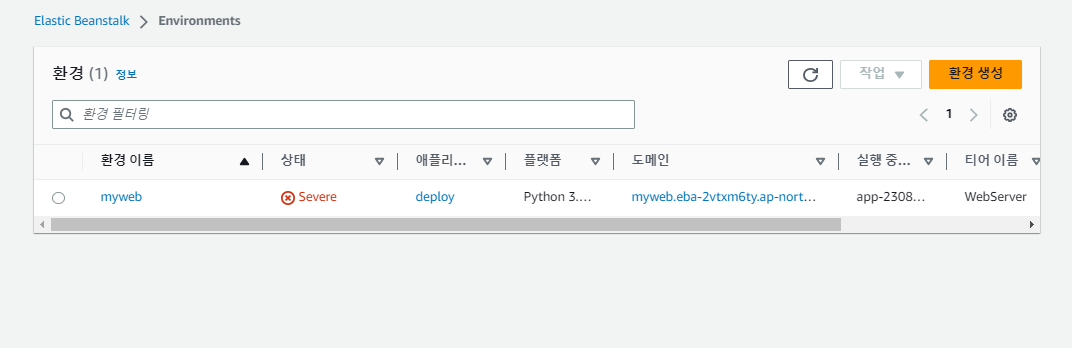
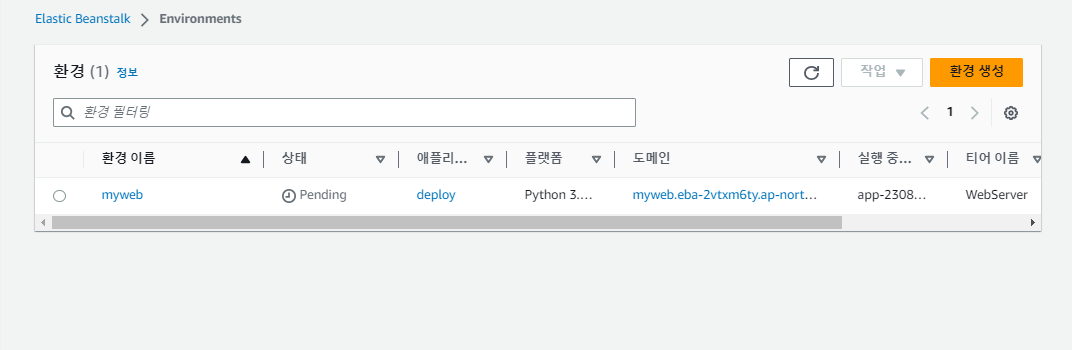
aws 들어가서 애플리케이션 생성하는데 꽤 오랜시간 동안 팬딩이라고 되어 있네요.
선생님 수업처럼 배포 명령어 순서대로 vs코드에서 실행을 밑에와 같이 다했고 안되서 다시 삭제하고 처음부터 같이 수업 진도 따라가고 있는데 여전히 되지 않더니 Severe 라고 합니다 ....왜 실행이 안될까요
보고 계신 화면 전
체를 캡처해 주시면, 튜터님들이 빠르게 상황을 이해할 수 있어요.
작성한 코드 및 에러 메세지
오류 발생 시, 작성한 코드 전체와 에러 메시지를 첨부해 주세요.
Tip 1) </> 아이콘을 눌러 코드박스를 (venv)
user@DESKTOP-5HB88M1 MINGW64 ~/Desktop/sparta/projects/05.fan/deploy
$ eb init
Select a default region
1) us-east-1 : US East (N. Virginia)
2) us-west-1 : US West (N. California)
3) us-west-2 : US West (Oregon)
4) eu-west-1 : EU (Ireland)
5) eu-central-1 : EU (Frankfurt)
6) ap-south-1 : Asia Pacific (Mumbai)
7) ap-southeast-1 : Asia Pacific (Singapore)
8) ap-southeast-2 : Asia Pacific (Sydney)
9) ap-northeast-1 : Asia Pacific (Tokyo)
10) ap-northeast-2 : Asia Pacific (Seoul)
11) sa-east-1 : South America (Sao Paulo)
12) cn-north-1 : China (Beijing)
13) cn-northwest-1 : China (Ningxia)
14) us-east-2 : US East (Ohio)
15) ca-central-1 : Canada (Central)
16) eu-west-2 : EU (London)
17) eu-west-3 : EU (Paris)
18) eu-north-1 : EU (Stockholm)
19) eu-south-1 : EU (Milano)
20) ap-east-1 : Asia Pacific (Hong Kong)
21) me-south-1 : Middle East (Bahrain)
22) af-south-1 : Africa (Cape Town)
23) ap-southeast-3 : Asia Pacific (Jakarta)
24) ap-northeast-3 : Asia Pacific (Osaka)
(default is 3): 10
ERROR: The current user does not have the correct permissions. Reason: Operation Denied. The security token included in the request is invalid.
ERROR: The current user does not have the correct permissions. Reason: Operation Denied. The security token included in the request is invalid.
You have not yet set up your credentials or your credentials are incorrect
You must provide your credentials.
(aws-access-id): AKIAZGXWQCXPOFFFJCYR
(aws-secret-key): vnWzM8LIqx7OuUPVza6PEOFEWgYLSBpQomesV3+1
Enter Application Name
(default is "deploy"):
Application deploy has been created.
It appears you are using Python. Is this correct?
(Y/n): y
Select a platform branch.
1) Python 3.11 running on 64bit Amazon Linux 2023
2) Python 3.9 running on 64bit Amazon Linux 2023
3) Python 3.8 running on 64bit Amazon Linux 2
4) Python 3.7 running on 64bit Amazon Linux 2
(default is 1):
Cannot setup CodeCommit because there is no Source Control setup, continuing with initialization
Do you want to set up SSH for your instances?
(Y/n): y
Select a keypair.
1) aws-eb2
2) aws-eb
3) aws-eb3
4) aws-eb4
5) [ Create new KeyPair ]
(default is 4): 5
Type a keypair name.
(Default is aws-eb5):
Generating public/private rsa key pair.
Enter passphrase (empty for no passphrase):
Enter same passphrase again:
Your identification has been saved in C:\Users\user\.ssh\aws-eb5
Your public key has been saved in C:\Users\user\.ssh\aws-eb5.pub
The key fingerprint is:
SHA256:MBFPwjWyNtIIO69VTppfF9kgSHIIKXtwft1q1LSlXDA aws-eb5
The key's randomart image is:
+---[RSA 3072]----+
| oo.+B+E.. |
|o oo.=oB.+o+ |
| *o o.X=.=o . |
|. oo.Oo+* . |
| . .=...S . |
| o .o. . |
| . .. |
| |
| |
+----[SHA256]-----+
WARNING: Uploaded SSH public key for "aws-eb5" into EC2 for region ap-northeast-2.
(venv)
user@DESKTOP-5HB88M1 MINGW64 ~/Desktop/sparta/projects/05.fan/deploy
$ eb create myweb
Creating application version archive "app-230808_122755772523".
Uploading deploy/app-230808_122755772523.zip to S3. This may take a while.
Upload Complete.
Environment details for: myweb
Application name: deploy
Region: ap-northeast-2
Deployed Version: app-230808_122755772523
Environment ID: e-i2ym75bjh4
Platform: arn:aws:elasticbeanstalk:ap-northeast-2::platform/Python 3.11 running on 64bit Amazon Linux 2023/4.0.3
Tier: WebServer-Standard-1.0
CNAME: UNKNOWN
Updated: 2023-08-08 03:27:57.815000+00:00
Printing Status:
2023-08-08 03:27:56 INFO createEnvironment is starting.
2023-08-08 03:27:58 INFO Using elasticbeanstalk-ap-northeast-2-632950887902 as Amazon S3 storage bucket for environment data.
2023-08-08 03:28:19 INFO Created security group named: sg-0520767f5a4e384c1
2023-08-08 03:28:34 INFO Created security group named: awseb-e-i2ym75bjh4-stack-AWSEBSecurityGroup-T24TSPEO7LCO
2023-08-08 03:28:34 INFO Created target group named: arn:aws:elasticloadbalancing:ap-northeast-2:632950887902:targetgroup/awseb-AWSEB-TWHL4UITX4JM/d284a3ef4aa23f4e
2023-08-08 03:28:34 INFO Created Auto Scaling launch configuration named: awseb-e-i2ym75bjh4-stack-AWSEBAutoScalingLaunchConfiguration-VqDu8ciWFfVu
2023-08-08 03:29:05 INFO Created Auto Scaling group named: awseb-e-i2ym75bjh4-stack-AWSEBAutoScalingGroup-OOJVSDQV967Z
2023-08-08 03:29:05 INFO Waiting for EC2 instances to launch. This may take a few minutes.
2023-08-08 03:29:05 INFO Created Auto Scaling group policy named: arn:aws:autoscaling:ap-northeast-2:632950887902:scalingPolicy:76e6541d-d872-4fdd-b4d4-0c40a19ac1b8:autoScalingGroupName/awseb-e-i2ym75bjh4-stack-AWSEBAutoScalingGroup-OOJVSDQV967Z:policyName/awseb-e-i2ym75bjh4-stack-AWSEBAutoScalingScaleUpPolicy-fkc2009WMoyf
2023-08-08 03:29:05 INFO Created Auto Scaling group policy named: arn:aws:autoscaling:ap-northeast-2:632950887902:scalingPolicy:214a1a76-a1a0-477f-a17a-ba3fa8b3e7a2:autoScalingGroupName/awseb-e-i2ym75bjh4-stack-AWSEBAutoScalingGroup-OOJVSDQV967Z:policyName/awseb-e-i2ym75bjh4-stack-AWSEBAutoScalingScaleDownPolicy-aSq3y75TRlRi
2023-08-08 03:29:05 INFO Created CloudWatch alarm named: awseb-e-i2ym75bjh4-stack-AWSEBCloudwatchAlarmHigh-TGMCVP08K088
2023-08-08 03:29:05 INFO Created CloudWatch alarm named: awseb-e-i2ym75bjh4-stack-AWSEBCloudwatchAlarmLow-P3NOOSAIK4ZP
2023-08-08 03:30:26 INFO Created load balancer named: arn:aws:elasticloadbalancing:ap-northeast-2:632950887902:loadbalancer/app/awseb-AWSEB-1B2CQ2VAEKEOR/996b5ddfaff4a8e9
2023-08-08 03:30:26 INFO Created Load Balancer listener named: arn:aws:elasticloadbalancing:ap-northeast-2:632950887902:listener/app/awseb-AWSEB-1B2CQ2VAEKEOR/996b5ddfaff4a8e9/325f5eacdc2e8a38
2023-08-08 03:30:51 ERROR Instance deployment failed to install application dependencies. The deployment failed.
2023-08-08 03:30:51 ERROR Instance deployment failed. For details, see 'eb-engine.log'.
2023-08-08 03:30:52 ERROR [Instance: i-03838012b6b16f2cc] Command failed on instance. Return code: 1 Output: Engine execution has encountered an error..
2023-08-08 03:30:52 INFO Command execution completed on all instances. Summary: [Successful: 0, Failed: 1].
2023-08-08 03:31:55 ERROR Create environment operation is complete, but with errors. For more information, see troubleshooting documentation.
ERROR: ServiceError - Create environment operation is complete, but with errors. For more information, see troubleshooting documentation.
(venv)
user@DESKTOP-5HB88M1 MINGW64 ~/Desktop/sparta/projects/05.fan/deploy
$만들어 보세요.
Tip 2) Ctrl+A(맥의 경우 Command+A) 단축키로 코드를 한 번에 선택할 수 있어요!


