


* 겪고 있는 문제 상황을 최대한 자세하게 작성해주세요.
* 문제 해결을 위해 어떤 시도를 해보았는지 구체적으로 함께 알려주세요.
해설영상을 보고 화살표 방향에 나온것처럼 아래로 갈수록 어둡게 하려고 했는데 코드를 똑같이 써도 색이 안 바뀌어요... 어떻게 하나요?
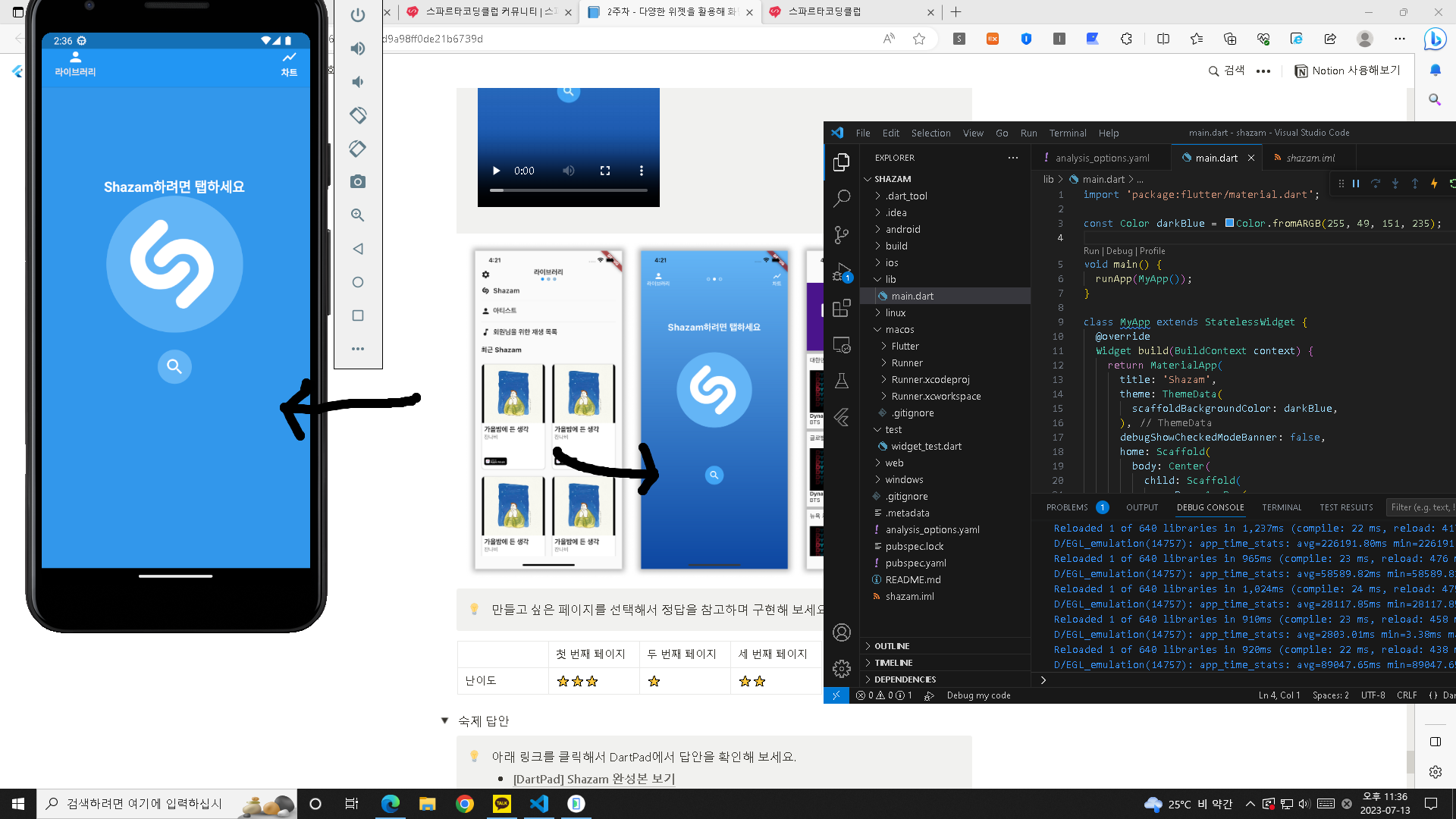
작성한 코드 및 에러 메세지
import 'package:flutter/material.dart';
const Color darkBlue = Color.fromARGB(255, 49, 151, 235);
void main() {
runApp(MyApp());
}
class MyApp extends StatelessWidget {
@override
Widget build(BuildContext context) {
return MaterialApp(
title: 'Shazam',
theme: ThemeData(
scaffoldBackgroundColor: darkBlue,
),
debugShowCheckedModeBanner: false,
home: Scaffold(
body: Center(
child: Scaffold(
appBar: AppBar(
elevation: 0.5,
leading: Column(
children: [
SizedBox(
width: 16,
),
Icon(
Icons.person,
color: Colors.white,
),
Text(
'라이브러리',
style: TextStyle(
color: Color.fromARGB(255, 238, 231, 231),
fontWeight: FontWeight.bold,
fontSize: 13),
)
],
),
actions: [
Column(
children: const [
Icon(
Icons.show_chart,
color: Colors.white,
),
SizedBox(
width: 60,
height: 0.5,
),
Text(
'차트',
style: TextStyle(
color: Colors.white,
fontWeight: FontWeight.bold,
fontSize: 13),
)
],
),
],
leadingWidth: 100,
),
body: Row(
children: [
Column(
children: [
SizedBox(
width: 390,
height: 130,
),
Text(
'Shazam하려면 탭하세요',
style: TextStyle(
color: Colors.white,
fontSize: 20,
fontWeight: FontWeight.bold),
),
Container(
alignment: Alignment.center,
width: 200,
height: 200,
decoration: BoxDecoration(
color: Colors.blue[300],
shape: BoxShape.circle,
),
child: Image.network(
"https://i.ibb.co/hxNbZ8p/shazam.png",
color: Colors.white,
width: 130,
height: 130,
),
),
Container(
alignment: Alignment.center,
width: 50,
height: 100,
decoration: BoxDecoration(
color: Colors.blue[300],
shape: BoxShape.circle,
),
child: Icon(
Icons.search,
color: Colors.white,
size: 30,
),
),
Container(
decoration: BoxDecoration(
gradient: LinearGradient(
begin: Alignment.topCenter,
end: Alignment.bottomCenter,
colors: [Colors.blue[300]!, Colors.blue[900]!],
),
),
),
],
),
],
),
),
),
),
);
}
}


