


* 겪고 있는 문제 상황을 최대한 자세하게 작성해주세요.
* 문제 해결을 위해 어떤 시도를 해보았는지 구체적으로 함께 알려주세요.
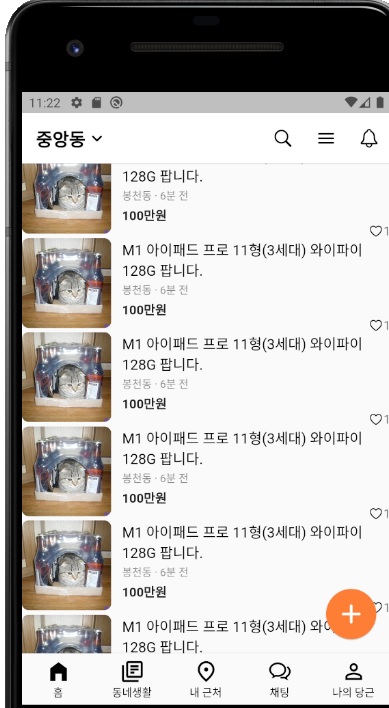
작성한 코드 잘 따라한것 같은데 에뮬레이터상 나타나지 않네요~
itemCount: 10, -10개의피드
separatorBuilder: (context, index) { return Divider(); }, -구분선 추가
padding: const EdgeInsets.symmetric(horizontal: 16),-패딩 추가
하였는데 적용되지가 않아요
최종코드와 비교해도 틀린부분이 없는것같아 질문 드립니다....!
--------------------------------------------------------
import 'package:flutter/cupertino.dart';
import 'package:flutter/material.dart';
import 'feed.dart';
class HomePage extends StatelessWidget {
const HomePage({super.key});
@override
Widget build(BuildContext context) {
return Scaffold(
appBar: AppBar(
backgroundColor: Colors.white,
elevation: 0.5,
leading: Row(
children: [
SizedBox(width: 16),
Text(
'중앙동',
style: TextStyle(
color: Colors.black,
fontWeight: FontWeight.bold,
fontSize: 20,
),
),
Icon(
Icons.keyboard_arrow_down_rounded,
color: Colors.black,
),
],
),
leadingWidth: 100,
actions: [
IconButton(
onPressed: () {},
icon: Icon(CupertinoIcons.search, color: Colors.black),
),
IconButton(
onPressed: () {},
icon: Icon(Icons.menu_rounded, color: Colors.black),
),
IconButton(
onPressed: () {},
icon: Icon(CupertinoIcons.bell, color: Colors.black),
),
],
),
body: Padding(
padding: const EdgeInsets.symmetric(horizontal: 16),
child: ListView.separated(
itemCount: 10,
itemBuilder: (context, index) {
return Padding(
padding: const EdgeInsets.symmetric(vertical: 12),
child: feed(),
);
},
separatorBuilder: (context, index) {
return Divider();
},
),
),
floatingActionButton: FloatingActionButton(
onPressed: () {},
backgroundColor: Color(0xFFFF7E36),
elevation: 1,
child: Icon(
Icons.add_rounded,
size: 36,
),
),
bottomNavigationBar: BottomNavigationBar(
fixedColor: Colors.black,
unselectedItemColor: Colors.black,
showUnselectedLabels: true,
selectedFontSize: 12,
unselectedFontSize: 12,
iconSize: 28,
type: BottomNavigationBarType.fixed,
items: [
BottomNavigationBarItem(
icon: Icon(Icons.home_filled),
label: '홈',
backgroundColor: Colors.white,
),
BottomNavigationBarItem(
icon: Icon(Icons.my_library_books_outlined),
label: '동네생활',
),
BottomNavigationBarItem(
icon: Icon(Icons.fmd_good_outlined),
label: '내 근처',
),
BottomNavigationBarItem(
icon: Icon(CupertinoIcons.chat_bubble_2),
label: '채팅',
),
BottomNavigationBarItem(
icon: Icon(
Icons.person_outline,
),
label: '나의 당근',
),
],
currentIndex: 0,
),
);
}
}


