커뮤니티

포인트
쿠폰
내 강의실
국비 신청 내역
증명서
계정
로그아웃
학습 질문
개발 일지
나의 활동
답변 완료
5-5 앱배포시 빌드할때 에러발생
[왕초보] 플러터(Flutter)로 시작하는 앱개발 종합반 v0
0주차


황*성
댓글
3
・
추천
0
・
조회수
23
조회수
23
답변 완료
* 겪고 있는 문제 상황을 최대한 자세하게 작성해주세요.
* 문제 해결을 위해 어떤 시도를 해보았는지 구체적으로 함께 알려주세요.
vscode 창 terminal창에서 flutter build appbundle 명령어를 치면 에러가 발생합니다
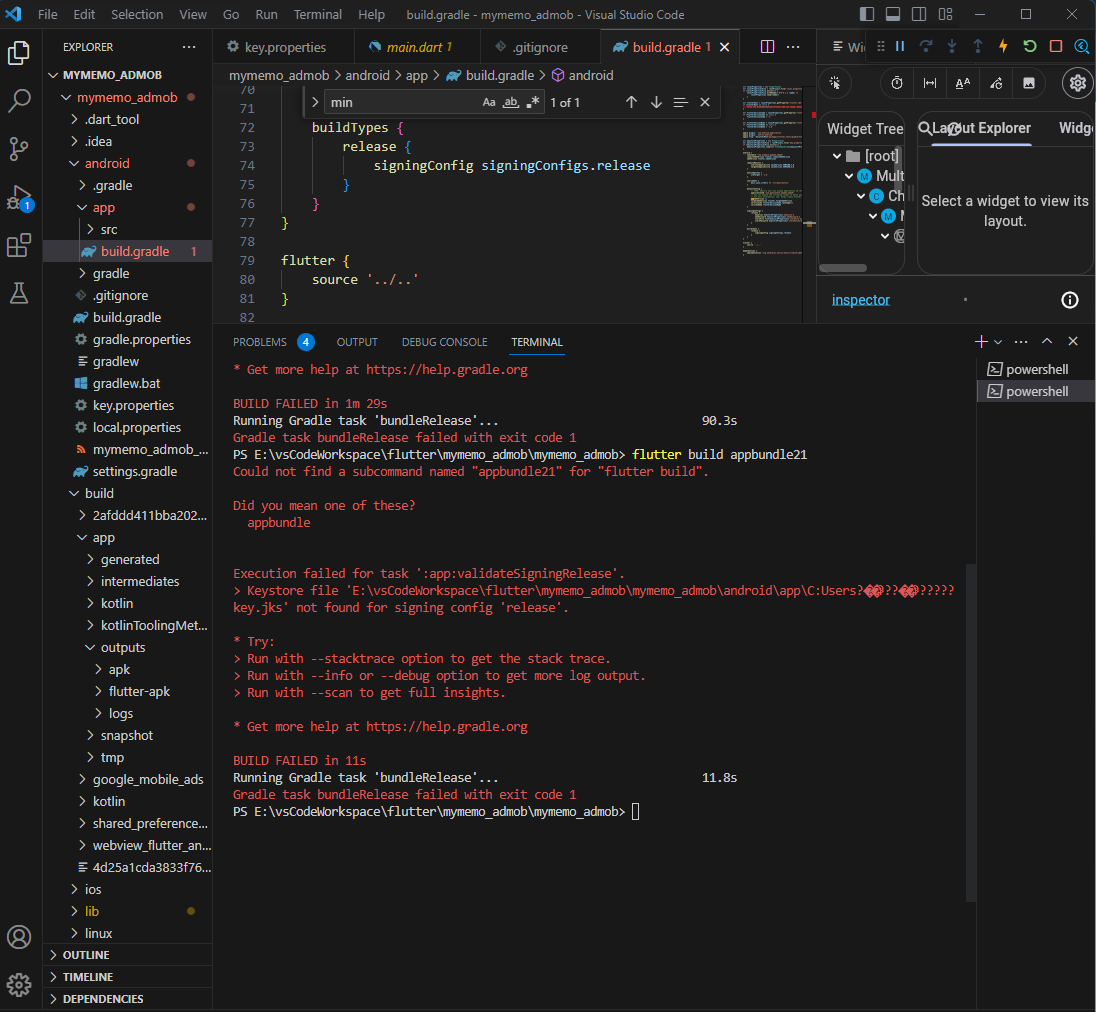
ㅡ먀
main.dart
def localProperties = new Properties()
def localPropertiesFile = rootProject.file('local.properties')
if (localPropertiesFile.exists()) {
    localPropertiesFile.withReader('UTF-8') { reader ->
        localProperties.load(reader)
    }
}


def flutterRoot = localProperties.getProperty('flutter.sdk')
if (flutterRoot == null) {
    throw new GradleException("Flutter SDK not found. Define location with flutter.sdk in the local.properties file.")
}


def flutterVersionCode = localProperties.getProperty('flutter.versionCode')
if (flutterVersionCode == null) {
    flutterVersionCode = '1'
}


def flutterVersionName = localProperties.getProperty('flutter.versionName')
if (flutterVersionName == null) {
    flutterVersionName = '1.0'
}


apply plugin: 'com.android.application'
apply plugin: 'kotlin-android'
apply from: "$flutterRoot/packages/flutter_tools/gradle/flutter.gradle"


def keystoreProperties = new Properties()
def keystorePropertiesFile = rootProject.file('key.properties')
if (keystorePropertiesFile.exists()) {
    keystoreProperties.load(new FileInputStream(keystorePropertiesFile))
}


android {
    namespace "com.example.mymemo_admob"
    compileSdkVersion flutter.compileSdkVersion
    ndkVersion flutter.ndkVersion


    compileOptions {
        sourceCompatibility JavaVersion.VERSION_1_8
        targetCompatibility JavaVersion.VERSION_1_8
    }


    kotlinOptions {
        jvmTarget = '1.8'
    }


    sourceSets {
        main.java.srcDirs += 'src/main/kotlin'
    }


    defaultConfig {
        // TODO: Specify your own unique Application ID (https://developer.android.com/studio/build/application-id.html).
        applicationId "com.gentle1412.mymemo_admob"
        // You can update the following values to match your application needs.
        // For more information, see: https://docs.flutter.dev/deployment/android#reviewing-the-gradle-build-configuration.
        minSdkVersion 21
        targetSdkVersion flutter.targetSdkVersion
        versionCode flutterVersionCode.toInteger()
        versionName flutterVersionName
    }


    signingConfigs {
        release {
            keyAlias keystoreProperties['keyAlias']
            keyPassword keystoreProperties['keyPassword']
            storeFile file(keystoreProperties['storeFile'])
            storePassword keystoreProperties['storePassword']
        }
    }


    buildTypes {
        release {
            signingConfig signingConfigs.release
        }
    }
}


flutter {
    source '../..'
}


dependencies {
    implementation "org.jetbrains.kotlin:kotlin-stdlib-jdk7:$kotlin_version"
}
build.gradle
def localProperties = new Properties()
def localPropertiesFile = rootProject.file('local.properties')
if (localPropertiesFile.exists()) {
    localPropertiesFile.withReader('UTF-8') { reader ->
        localProperties.load(reader)
    }
}


def flutterRoot = localProperties.getProperty('flutter.sdk')
if (flutterRoot == null) {
    throw new GradleException("Flutter SDK not found. Define location with flutter.sdk in the local.properties file.")
}


def flutterVersionCode = localProperties.getProperty('flutter.versionCode')
if (flutterVersionCode == null) {
    flutterVersionCode = '1'
}


def flutterVersionName = localProperties.getProperty('flutter.versionName')
if (flutterVersionName == null) {
    flutterVersionName = '1.0'
}


apply plugin: 'com.android.application'
apply plugin: 'kotlin-android'
apply from: "$flutterRoot/packages/flutter_tools/gradle/flutter.gradle"


def keystoreProperties = new Properties()
def keystorePropertiesFile = rootProject.file('key.properties')
if (keystorePropertiesFile.exists()) {
    keystoreProperties.load(new FileInputStream(keystorePropertiesFile))
}


android {
    namespace "com.example.mymemo_admob"
    compileSdkVersion flutter.compileSdkVersion
    ndkVersion flutter.ndkVersion


    compileOptions {
        sourceCompatibility JavaVersion.VERSION_1_8
        targetCompatibility JavaVersion.VERSION_1_8
    }


    kotlinOptions {
        jvmTarget = '1.8'
    }


    sourceSets {
        main.java.srcDirs += 'src/main/kotlin'
    }


    defaultConfig {
        // TODO: Specify your own unique Application ID (https://developer.android.com/studio/build/application-id.html).
        applicationId "com.gentle1412.mymemo_admob"
        // You can update the following values to match your application needs.
        // For more information, see: https://docs.flutter.dev/deployment/android#reviewing-the-gradle-build-configuration.
        minSdkVersion 21
        targetSdkVersion flutter.targetSdkVersion
        versionCode flutterVersionCode.toInteger()
        versionName flutterVersionName
    }


    signingConfigs {
        release {
            keyAlias keystoreProperties['keyAlias']
            keyPassword keystoreProperties['keyPassword']
            storeFile file(keystoreProperties['storeFile'])
            storePassword keystoreProperties['storePassword']
        }
    }


    buildTypes {
        release {
            signingConfig signingConfigs.release
        }
    }
}


flutter {
    source '../..'
}


dependencies {
    implementation "org.jetbrains.kotlin:kotlin-stdlib-jdk7:$kotlin_version"
}
에러메세지
PS E:\vsCodeWorkspace\flutter\mymemo_admob\mymemo_admob> flutter build appbundle

Picked up JAVA_TOOL_OPTIONS: -Djava.net.preferIPv4Stack=true
Font asset "CupertinoIcons.ttf" was tree-shaken, reducing it from 283452 to 1056 bytes (99.6% reduction). Tree-shaking can be disabled by providing the --no-tree-shake-icons flag when building your app.
Font asset "MaterialIcons-Regular.otf" was tree-shaken, reducing it from 1645184 to 1512 bytes (99.9% reduction). Tree-shaking can be disabled by providing the --no-tree-shake-icons flag when building your app.
Note: Some input files use or override a deprecated API.
Note: Recompile with -Xlint:deprecation for details.


FAILURE: Build failed with an exception.


* What went wrong:
Execution failed for task ':app:validateSigningRelease'.
> Keystore file 'E:\vsCodeWorkspace\flutter\mymemo_admob\mymemo_admob\android\app\C:Users?��???��??????key.jks' not found for signing config 'release'.


* Try:
> Run with --stacktrace option to get the stack trace.
> Run with --info or --debug option to get more log output.
> Run with --scan to get full insights.


* Get more help at https://help.gradle.org


BUILD FAILED in 1m 29s
Running Gradle task 'bundleRelease'...                             90.3s
Gradle task bundleRelease failed with exit code 1
PS E:\vsCodeWorkspace\flutter\mymemo_admob\mymemo_admob> flutter build appbundle21
Could not find a subcommand named "appbundle21" for "flutter build".


Did you mean one of these?
  appbundle


Execution failed for task ':app:validateSigningRelease'.
> Keystore file 'E:\vsCodeWorkspace\flutter\mymemo_admob\mymemo_admob\android\app\C:Users?��???��??????key.jks' not found for signing config 'release'.


* Try:
> Run with --stacktrace option to get the stack trace.
> Run with --info or --debug option to get more log output.
> Run with --scan to get full insights.


* Get more help at https://help.gradle.org


BUILD FAILED in 11s
Running Gradle task 'bundleRelease'...                             11.8s
Gradle task bundleRelease failed with exit code 1
PS E:\vsCodeWorkspace\flutter\mymemo_admob\mymemo_admob>


댓글 알림
