


* 겪고 있는 문제 상황을 최대한 자세하게 작성해주세요.
* 문제 해결을 위해 어떤 시도를 해보았는지 구체적으로 함께 알려주세요.
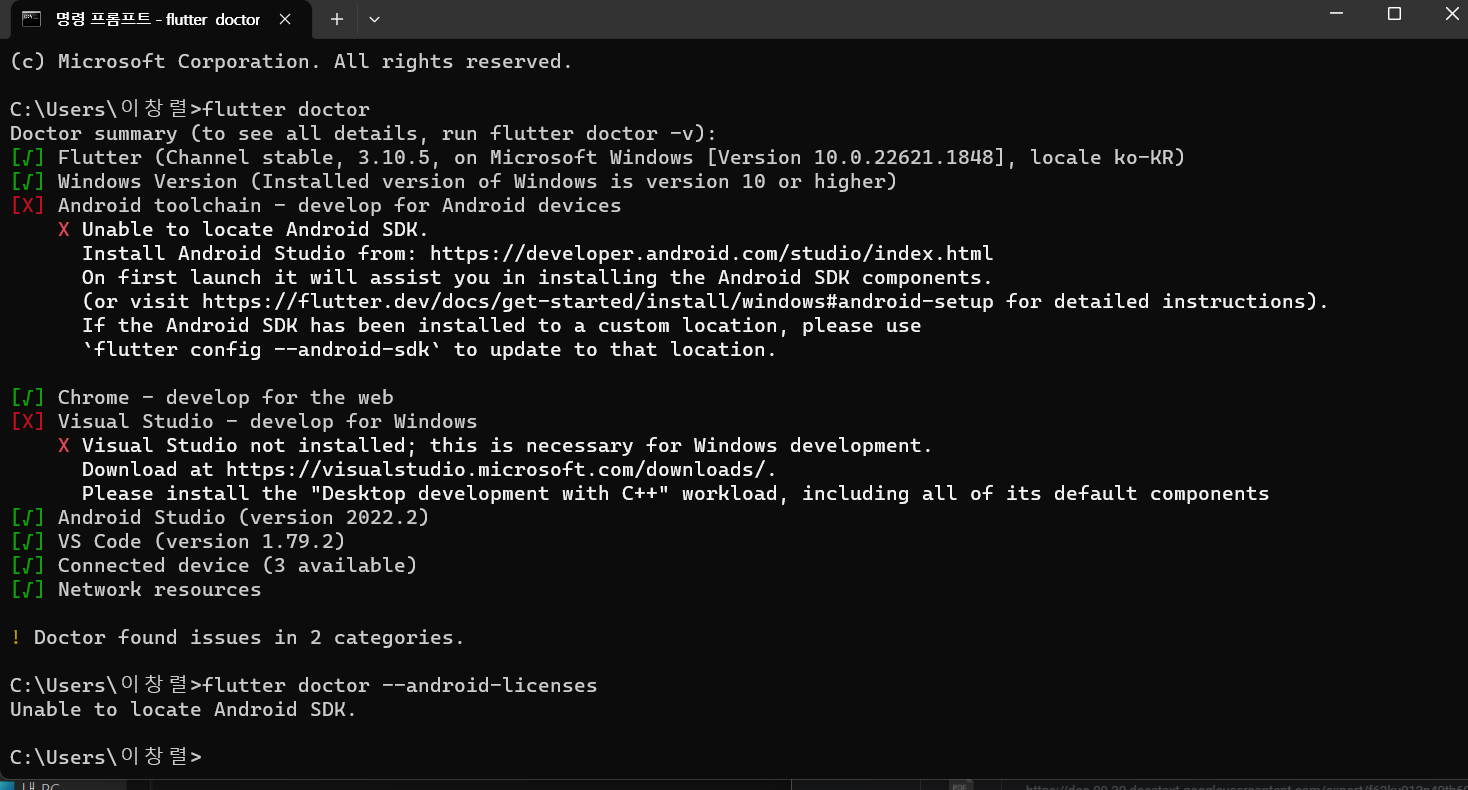
명령프롬프트에서 flutter doctor를 입력후 설명해주신 오류와 다른 오류가 떠서 해결방법 문의드립니다.
3변째 항목에서
[X] Android toolchain - develop for Android devices
X Unable to locate Android SDK.
Install Android Studio from: https://developer.android.com/studio/index.html
On first launch it will assist you in installing the Android SDK components.
(or visit https://flutter.dev/docs/get-started/install/windows#android-setup for detailed instructions).
If the Android SDK has been installed to a custom location, please use
`flutter config --android-sdk` to update to that location.
라는 오류와
5번째 항목에
[X] Visual Studio - develop for Windows
X Visual Studio not installed; this is necessary for Windows development.
Download at https://visualstudio.microsoft.com/downloads/.
Please install the "Desktop development with C++" workload, including all of its default components
와 같은 오류가 떠요.
5번항목은 상관없다 하셨고 3번항목은 설명의 내용과 달라 문의드립니다~
추가로 혹시 테블릿에선 수업이 불가한건가요??


