


* 겪고 있는 문제 상황을 최대한 자세하게 작성해주세요.
* 문제 해결을 위해 어떤 시도를 해보았는지 구체적으로 함께 알려주세요.
구글애드몹 적용시키는 강의도중 에러가 발생합니다
DebugConsole창에난 에러
┌─ Flutter Fix ─────────────────────────────────────────────────────────────────────────────────┐
│ The plugin google_mobile_ads requires a higher Android SDK version. │
│ Fix this issue by adding the following to the file │
│ E:\vsCodeWorkspace\flutter\mymemo_admob\mymemo_admob\android\app\build.gradle: │
│ android { │
│ defaultConfig { │
│ minSdkVersion 19 │
│ } │
│ } │
│ │
│ Following this change, your app will not be available to users running Android SDKs below 19. │
│ Consider searching for a version of this plugin that supports these lower versions of the │
│ Android SDK instead. │
│ For more information, see: │
│ https://docs.flutter.dev/deployment/android#reviewing-the-gradle-build-configuration │
└───────────────────────────────────────────────────────────────────────────────────────────────┘
Exception: Gradle task assembleDebug failed with exit code 1
Exited (sigterm)
main.dart
import 'dart:io';


import 'package:flutter/cupertino.dart';
import 'package:flutter/material.dart';
import 'package:google_mobile_ads/google_mobile_ads.dart';
import 'package:provider/provider.dart';
import 'package:shared_preferences/shared_preferences.dart';


import 'memo_service.dart';


late SharedPreferences prefs;


void main() async {
  WidgetsFlutterBinding.ensureInitialized();
  prefs = await SharedPreferences.getInstance();
  MobileAds.instance.initialize();


  runApp(
    MultiProvider(
      providers: [
        ChangeNotifierProvider(create: (context) => MemoService()),
      ],
      child: const MyApp(),
    ),
  );
}


class MyApp extends StatelessWidget {
  const MyApp({super.key});


  @override
  Widget build(BuildContext context) {
    return MaterialApp(
      debugShowCheckedModeBanner: false,
      home: HomePage(),
    );
  }
}


// 홈 페이지
class HomePage extends StatefulWidget {
  const HomePage({super.key});


  @override
  State<HomePage> createState() => _HomePageState();
}


class _HomePageState extends State<HomePage> {
  final BannerAd myBanner = BannerAd(
    // Test 광고 ID, 광고 승인받은 후 생성한 광고 unit ID 로 바꾸기
    adUnitId: Platform.isAndroid
        ? 'ca-app-pub-3940256099942544/6300978111' // Android ad unit ID
        : 'ca-app-pub-3940256099942544/2934735716', // iOS ad unit ID
    size: AdSize.fullBanner,
    request: AdRequest(),
    listener: BannerAdListener(
      onAdFailedToLoad: (ad, error) {
        ad.dispose();
      },
    ),
  );


  @override
  void initState() {
    // TODO: implement initState
    super.initState();


    myBanner.load();
  }


  @override
  Widget build(BuildContext context) {
    return Consumer<MemoService>(
      builder: (context, memoService, child) {
        // memoService로 부터 memoList 가져오기
        List<Memo> memoList = memoService.memoList;


        return Scaffold(
          appBar: AppBar(
            title: Text("mymemo"),
          ),
          body: memoList.isEmpty
              ? Center(child: Text("메모를 작성해 주세요"))
              : ListView.builder(
                  itemCount: memoList.length, // memoList 개수 만큼 보여주기
                  itemBuilder: (context, index) {
                    Memo memo = memoList[index]; // index에 해당하는 memo 가져오기
                    return ListTile(
                      // 메모 고정 아이콘
                      leading: IconButton(
                        icon: Icon(CupertinoIcons.pin),
                        onPressed: () {
                          print('$memo : pin 클릭 됨');
                        },
                      ),
                      // 메모 내용 (최대 3줄까지만 보여주도록)
                      title: Text(
                        memo.content,
                        maxLines: 3,
                        overflow: TextOverflow.ellipsis,
                      ),
                      onTap: () {
                        // 아이템 클릭시
                        Navigator.push(
                          context,
                          MaterialPageRoute(
                            builder: (_) => DetailPage(
                              index: index,
                            ),
                          ),
                        );
                      },
                    );
                  },
                ),
          floatingActionButton: FloatingActionButton(
            child: Icon(Icons.add),
            onPressed: () {
              // + 버튼 클릭시 메모 생성 및 수정 페이지로 이동
              memoService.createMemo(content: '');
              Navigator.push(
                context,
                MaterialPageRoute(
                  builder: (_) => DetailPage(
                    index: memoService.memoList.length - 1,
                  ),
                ),
              );
            },
          ),
          bottomNavigationBar: Container(
            alignment: Alignment.center,
            width: myBanner.size.width.toDouble(),
            height: myBanner.size.height.toDouble(),
            child: AdWidget(ad: myBanner),
          ),
        );
      },
    );
  }
}


// 메모 생성 및 수정 페이지
class DetailPage extends StatelessWidget {
  DetailPage({super.key, required this.index});


  final int index;


  TextEditingController contentController = TextEditingController();


  @override
  Widget build(BuildContext context) {
    MemoService memoService = context.read<MemoService>();
    Memo memo = memoService.memoList[index];


    contentController.text = memo.content;


    return Scaffold(
      appBar: AppBar(
        actions: [
          IconButton(
            onPressed: () {
              // 삭제 버튼 클릭시
              showDeleteDialog(context, memoService);
            },
            icon: Icon(Icons.delete),
          )
        ],
      ),
      body: Padding(
        padding: const EdgeInsets.all(16),
        child: TextField(
          controller: contentController,
          decoration: InputDecoration(
            hintText: "메모를 입력하세요",
            border: InputBorder.none,
          ),
          autofocus: true,
          maxLines: null,
          expands: true,
          keyboardType: TextInputType.multiline,
          onChanged: (value) {
            // 텍스트필드 안의 값이 변할 때
            memoService.updateMemo(index: index, content: value);
          },
        ),
      ),
    );
  }


  void showDeleteDialog(BuildContext context, MemoService memoService) {
    showDialog(
      context: context,
      builder: (context) {
        return AlertDialog(
          title: Text("정말로 삭제하시겠습니까?"),
          actions: [
            // 취소 버튼
            TextButton(
              onPressed: () {
                Navigator.pop(context);
              },
              child: Text("취소"),
            ),
            // 확인 버튼
            TextButton(
              onPressed: () {
                memoService.deleteMemo(index: index);
                Navigator.pop(context); // 팝업 닫기
                Navigator.pop(context); // HomePage 로 가기
              },
              child: Text(
                "확인",
                style: TextStyle(color: Colors.pink),
              ),
            ),
          ],
        );
      },
    );
  }
}
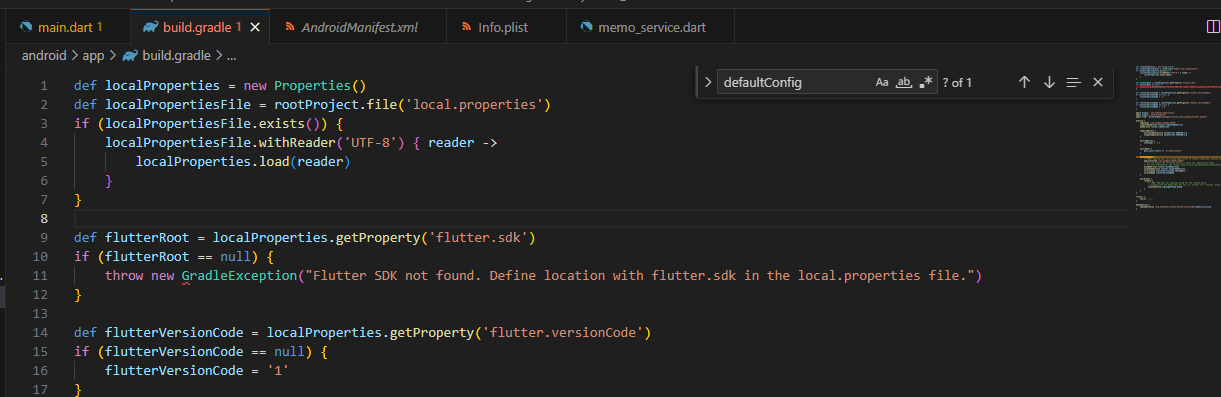
build.gradle
def localProperties = new Properties()
def localPropertiesFile = rootProject.file('local.properties')
if (localPropertiesFile.exists()) {
    localPropertiesFile.withReader('UTF-8') { reader ->
        localProperties.load(reader)
    }
}


def flutterRoot = localProperties.getProperty('flutter.sdk')
if (flutterRoot == null) {
    throw new GradleException("Flutter SDK not found. Define location with flutter.sdk in the local.properties file.")
}


def flutterVersionCode = localProperties.getProperty('flutter.versionCode')
if (flutterVersionCode == null) {
    flutterVersionCode = '1'
}


def flutterVersionName = localProperties.getProperty('flutter.versionName')
if (flutterVersionName == null) {
    flutterVersionName = '1.0'
}


apply plugin: 'com.android.application'
apply plugin: 'kotlin-android'
apply from: "$flutterRoot/packages/flutter_tools/gradle/flutter.gradle"


android {
    namespace "com.example.mymemo_admob"
    compileSdkVersion flutter.compileSdkVersion
    ndkVersion flutter.ndkVersion


    compileOptions {
        sourceCompatibility JavaVersion.VERSION_1_8
        targetCompatibility JavaVersion.VERSION_1_8
    }


    kotlinOptions {
        jvmTarget = '1.8'
    }


    sourceSets {
        main.java.srcDirs += 'src/main/kotlin'
    }


    defaultConfig {
        // TODO: Specify your own unique Application ID (https://developer.android.com/studio/build/application-id.html).
        applicationId "com.example.mymemo_admob"
        // You can update the following values to match your application needs.
        // For more information, see: https://docs.flutter.dev/deployment/android#reviewing-the-gradle-build-configuration.
        minSdkVersion flutter.minSdkVersion
        targetSdkVersion flutter.targetSdkVersion
        versionCode flutterVersionCode.toInteger()
        versionName flutterVersionName
    }


    buildTypes {
        release {
            // TODO: Add your own signing config for the release build.
            // Signing with the debug keys for now, so `flutter run --release` works.
            signingConfig signingConfigs.debug
        }
    }
}


flutter {
    source '../..'
}


dependencies {
    implementation "org.jetbrains.kotlin:kotlin-stdlib-jdk7:$kotlin_version"
}


