커뮤니티

포인트
쿠폰
내 강의실
국비 신청 내역
증명서
계정
로그아웃
학습 질문
개발 일지
나의 활동
답변 완료
GPT에 "뻐대잡기" 버튼 명령
ChatGPT로 10분만에 웹사이트 만들기 v0
0주차


b****m
댓글
1
・
추천
0
・
조회수
20
조회수
20
답변 완료
* 겪고 있는 문제 상황을 최대한 자세하게 작성해주세요.
* 문제 해결을 위해 어떤 시도를 해보았는지 구체적으로 함께 알려주세요.
강의 내용 그대로 GPT에 명령했는데,
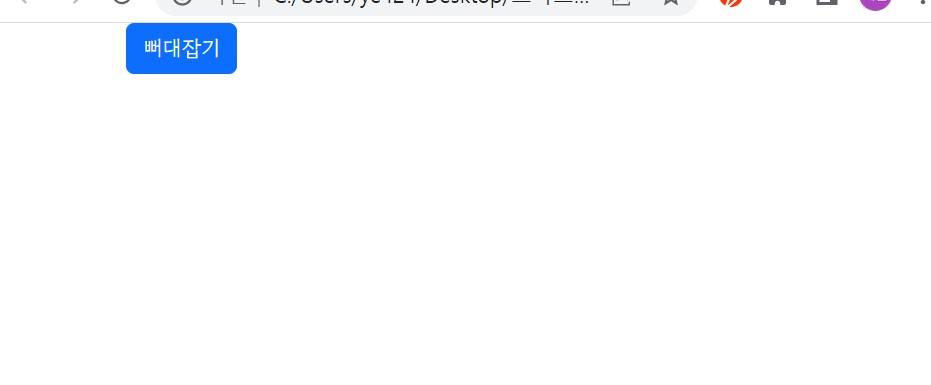
강의와 동일한 버튼이 생성되지 않고 "뻐대잡기" 버튼이 생성됩니다.
강의와 동일한 버튼을 생성하려면 어디에서 수정을 해야할까요.
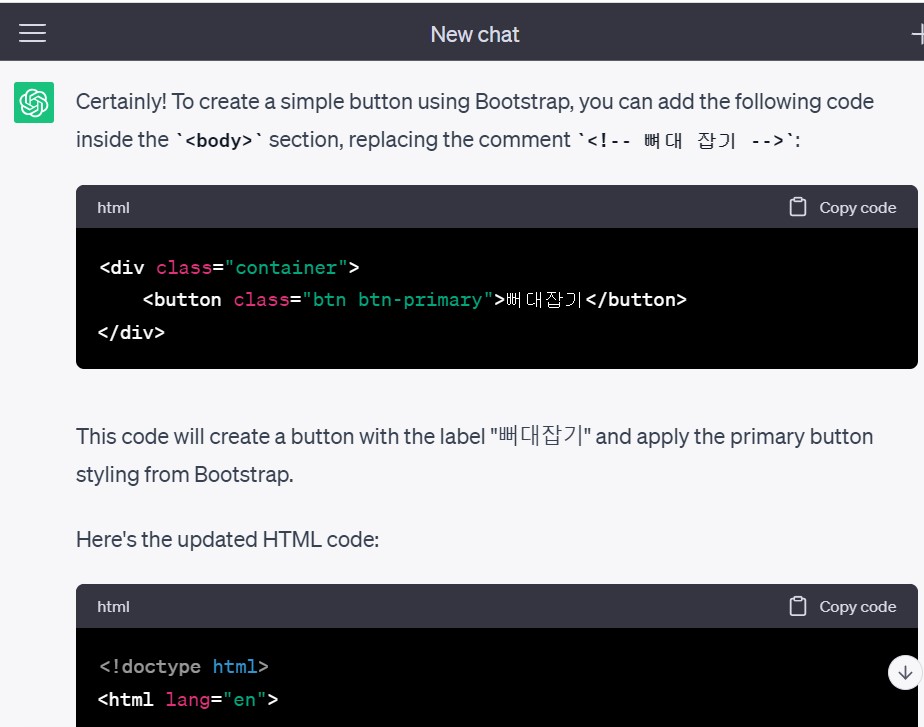
다음은 전문입니다.
---------------
본인 : 부트스트랩을 이용해서 간단한 버튼을 하나 만들어줘. 뻐대잡기 라고 써있는 부분에 넣을거야.
ChatGPT
Certainly! To create a simple button using Bootstrap, you can add the following code inside the <body> section, replacing the comment <!-- 뼈대 잡기 -->:
html

Copy code
<div class="container"> <button class="btn btn-primary">뻐대잡기</button> </div>
This code will create a button with the label "뻐대잡기" and apply the primary button styling from Bootstrap.
Here's the updated HTML code:
html

Copy code
<!doctype html> <html lang="en"> <head> <meta charset="utf-8"> <meta name="viewport" content="width=device-width, initial-scale=1"> <title>나만의 중고마켓</title> <link rel="stylesheet" href="https://s3.ap-northeast-2.amazonaws.com/materials.spartacodingclub.kr/easygpt/default.css"> <link href="https://cdn.jsdelivr.net/npm/bootstrap@5.2.3/dist/css/bootstrap.min.css" rel="stylesheet" integrity="sha384-rbsA2VBKQhggwzxH7pPCaAqO46MgnOM80zW1RWuH61DGLwZJEdK2Kadq2F9CUG65" crossorigin="anonymous"> <script src="https://cdn.jsdelivr.net/npm/bootstrap@5.2.3/dist/js/bootstrap.bundle.min.js" integrity="sha384-kenU1KFdBIe4zVF0s0G1M5b4hcpxyD9F7jL+jjXkk+Q2h455rYXK/7HAuoJl+0I4" crossorigin="anonymous"></script> <style> /* 꾸미기 */ </style> </head> <body> <div class="container"> <button class="btn btn-primary">뻐대잡기</button> </div> </body> </html>
Save the HTML file and open it in a web browser to see the button.


댓글 알림
