커뮤니티

포인트
쿠폰
내 강의실
국비 신청 내역
증명서
계정
로그아웃
학습 질문
개발 일지
나의 활동
답변 완료
샤잠과제 - 이미지 크기가 줄어들지 않아요.. ㅠㅠ
[왕초보] 플러터(Flutter)로 시작하는 앱개발 종합반 v0
2주차


이*준
댓글
10
・
추천
0
・
조회수
10
조회수
10
답변 완료
샤잠 로고 이미지가 줄어들지 않아요. 왜 그런지 모르겠네요 허허허..
FIrist 페이지 body 부분에 Image.network 부분입니다.
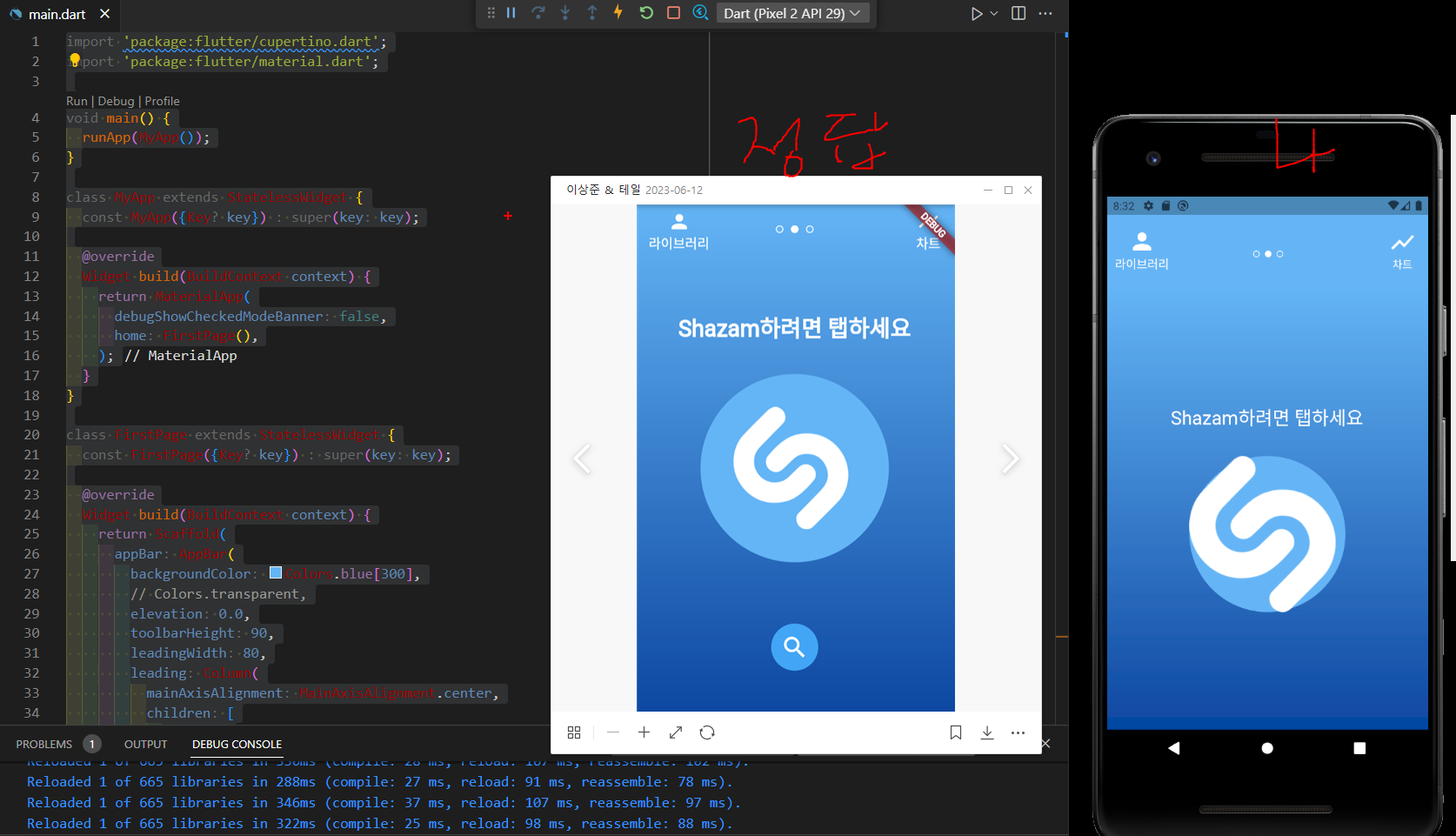
작성한 코드 및 에러 메세지
import 'package:flutter/cupertino.dart';
import 'package:flutter/material.dart';


void main() {
  runApp(MyApp());
}


class MyApp extends StatelessWidget {
  const MyApp({Key? key}) : super(key: key);


  @override
  Widget build(BuildContext context) {
    return MaterialApp(
      debugShowCheckedModeBanner: false,
      home: FirstPage(),
    );
  }
}


class FirstPage extends StatelessWidget {
  const FirstPage({Key? key}) : super(key: key);


  @override
  Widget build(BuildContext context) {
    return Scaffold(
      appBar: AppBar(
        backgroundColor: Colors.blue[300],
        // Colors.transparent,
        elevation: 0.0,
        toolbarHeight: 90,
        leadingWidth: 80,
        leading: Column(
          mainAxisAlignment: MainAxisAlignment.center,
          children: [
            Padding(
              padding: const EdgeInsets.only(left: 10),
              child: GestureDetector(
                onTap: () {
                  Navigator.push(
                    context,
                    MaterialPageRoute(builder: (context) => LibraryPage()),
                  );
                },
                child: Column(
                  children: [
                    Icon(
                      Icons.person,
                      size: 35,
                    ),
                    Text(
                      "라이브러리",
                      style: TextStyle(fontSize: 15),
                      textAlign: TextAlign.center,
                    ),
                  ],
                ),
              ),
            ),
          ],
        ),
        title: Padding(
          padding: const EdgeInsets.only(top: 10),
          child: Row(
            mainAxisAlignment: MainAxisAlignment.center,
            children: [
              Icon(
                Icons.circle_outlined,
                size: 10,
              ),
              Padding(
                padding: const EdgeInsets.all(5.0),
                child: Icon(
                  Icons.circle,
                  size: 10,
                ),
              ),
              Padding(
                padding: const EdgeInsets.only(right: 28),
                child: Icon(
                  Icons.circle_outlined,
                  size: 10,
                ),
              ),
            ],
          ),
        ),
        actions: [
          Column(
            mainAxisAlignment: MainAxisAlignment.center,
            children: [
              Padding(
                padding: const EdgeInsets.only(right: 15),
                child: GestureDetector(
                  onTap: () {
                    Navigator.push(
                      context,
                      MaterialPageRoute(builder: (context) => ThirdPage()),
                    );
                  },
                  child: Column(
                    children: [
                      Icon(
                        Icons.show_chart,
                        size: 35,
                      ),
                      Text("차트")
                    ],
                  ),
                ),
              ),
            ],
          )
        ],
      ),
      body: Container(
        decoration: BoxDecoration(
            gradient: LinearGradient(
          begin: Alignment.topCenter,
          end: Alignment.bottomCenter,
          colors: [Colors.blue[300]!, Colors.blue[900]!],
        )),
        child: Row(
          mainAxisAlignment: MainAxisAlignment.center,
          children: [
            Column(
              mainAxisAlignment: MainAxisAlignment.center,
              children: [
                SizedBox(
                  height: MediaQuery.of(context).size.height * 0.1,
                  child: Text(
                    "Shazam하려면 탭하세요",
                    style: TextStyle(
                      fontSize: 24,
                      color: Colors.white,
                    ),
                  ),
                ),
                SizedBox(
                  // height: MediaQuery.of(context).size.height * 0.06,
                  child: Container(
                    width: 200,
                    height: 200,
                    decoration: BoxDecoration(
                      color: Colors.blue[300],
                      shape: BoxShape.circle,
                      // border: Border.all(
                      //   color: Colors.blue,
                      // ),
                      // borderRadius: BorderRadius.circular(100),
                    ),
                    child: Image.network(
                      'https://i.ibb.co/hxNbZ8p/shazam.png',
                      // fit: BoxFit.contain,
                      color: Colors.white,
                      width: 30,
                      height: 30,
                    ),
                  ),
                )
              ],
            ),
          ],
        ),
      ),
    );
  }
}


// ElevatedButton(
//           child: Text("다음 페이지로 이동"),
//           onPressed: () {
//             // 페이지 이동
//             Navigator.push(
//               context,
//               MaterialPageRoute(builder: (context) => LibraryPage()),
//             );
//           },
//         ),


class LibraryPage extends StatelessWidget {
  const LibraryPage({Key? key}) : super(key: key);


  @override
  Widget build(BuildContext context) {
    return Scaffold(
      appBar: AppBar(
        title: Text("라이브러리 페이지 입니다!"),
      ),
      backgroundColor: Colors.amber,
      body: Center(
        child: Column(
          mainAxisAlignment: MainAxisAlignment.center,
          children: [
            ElevatedButton(
              child: Text("홈페이지로 되돌아가기"),
              onPressed: () {
                // 뒤로가기
                Navigator.pop(context);
              },
            ),
            SizedBox(height: 16), // 버튼 위에 간격 추가
            ElevatedButton(
              child: Text("세 번째 페이지로 이동"),
              onPressed: () {
                // 세 번째 페이지로 이동
                Navigator.push(
                  context,
                  MaterialPageRoute(builder: (context) => ThirdPage()),
                );
              },
            ),
          ],
        ),
      ),
    );
  }
}


class ThirdPage extends StatelessWidget {
  const ThirdPage({Key? key}) : super(key: key);


  @override
  Widget build(BuildContext context) {
    return Scaffold(
      appBar: AppBar(
        title: Text("세 번째 페이지 입니다!"),
      ),
      backgroundColor: Colors.green,
      body: Center(
        child: ElevatedButton(
          child: Text("뒤로가기"),
          onPressed: () {
            // 뒤로가기
            Navigator.pop(context);
          },
        ),
      ),
    );
  }
}


댓글 알림
