커뮤니티

포인트
쿠폰
내 강의실
국비 신청 내역
증명서
계정
로그아웃
학습 질문
개발 일지
나의 활동
답변 완료
3-7강 질문입니다.
undefined주차


박*혁
댓글
3
・
추천
0
・
조회수
20
조회수
20
답변 완료
질문 1
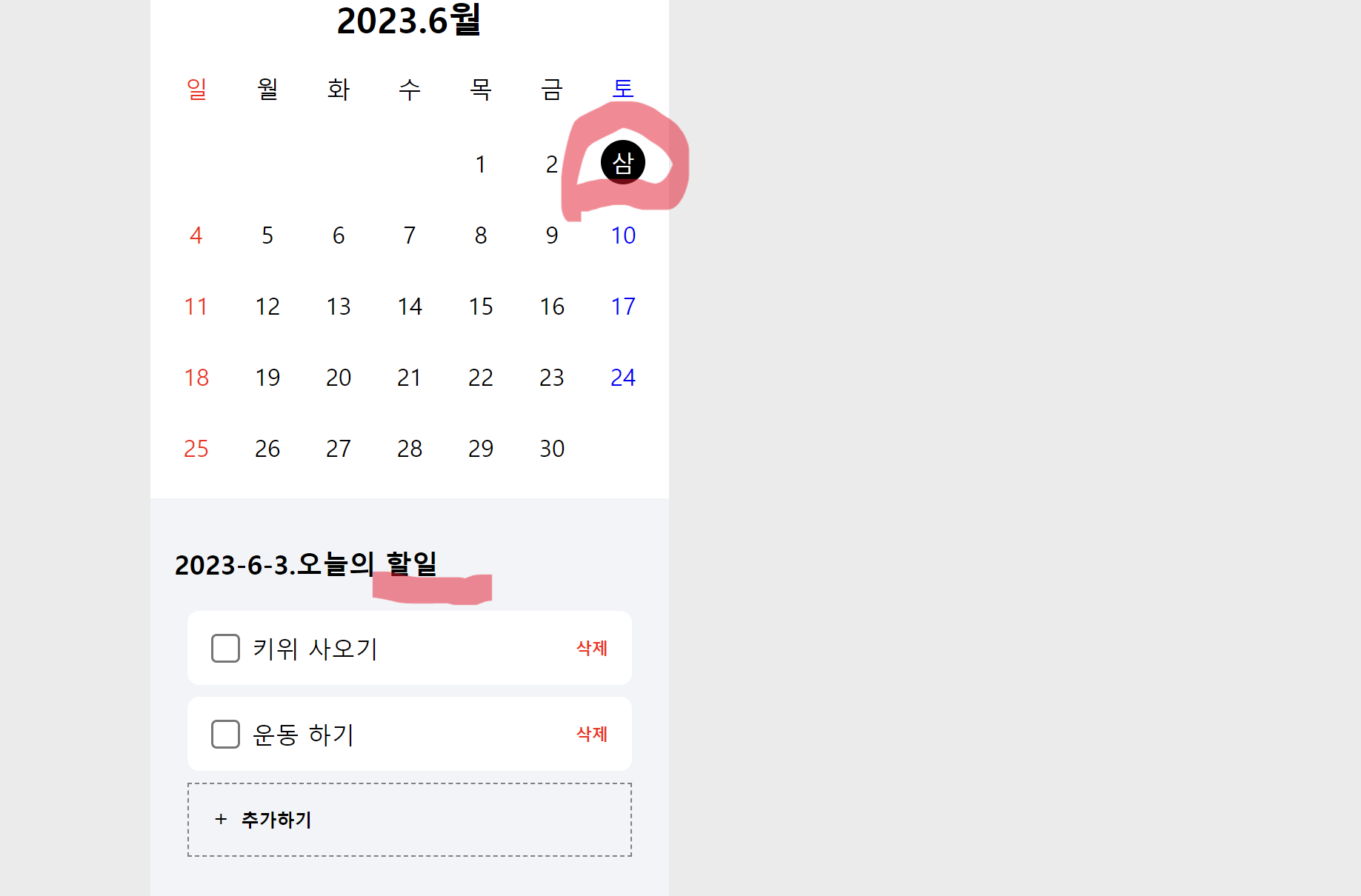
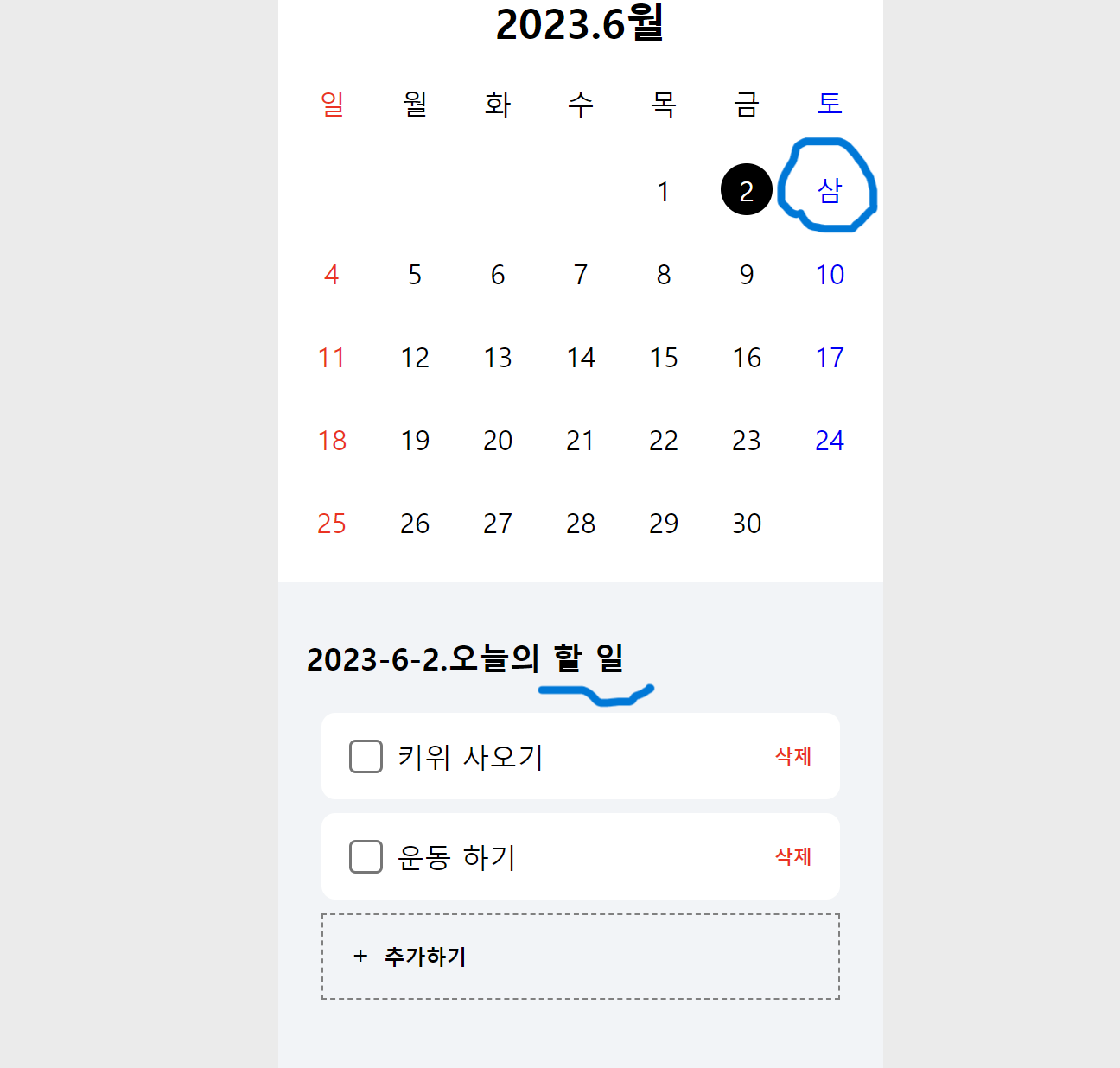
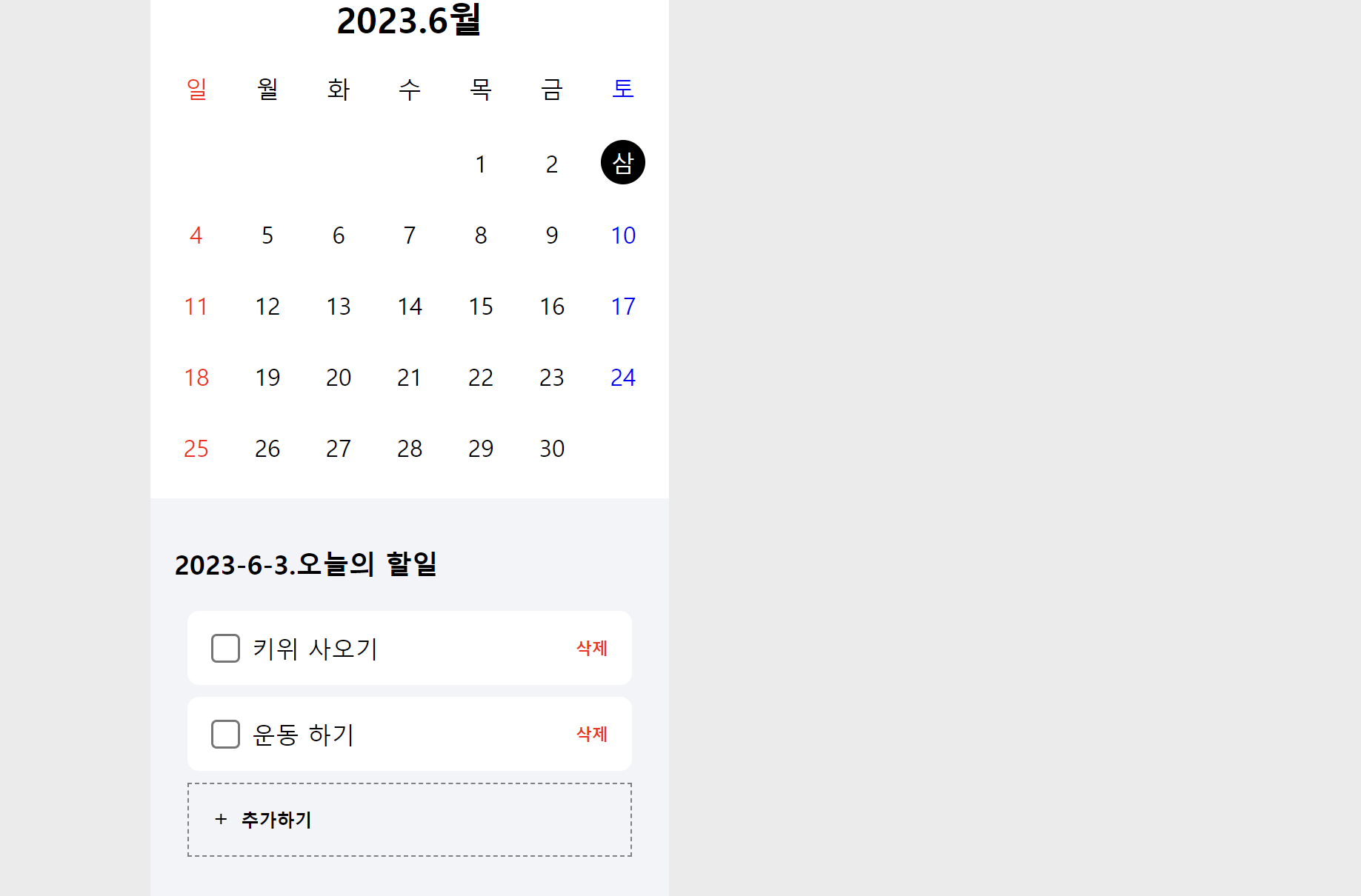
캘린더 3 숫자 (삼으로 표시되는 오류? )
이 부분은 한글 번역 키면 발생하는 것 같음
질문 내용 -> 코드상 문제가 있어서 이런 건지 궁금해서 질문
질문 2
오늘의 할 일 -> 오늘의 할일 으로 붙어 나오는 경우
3일/ 9일 /17일 누르면 이런 문제 발생 ( 3가지 경우만 발생)
질문 내용 -> 오류인가요 이 부분은? 수정해야 하면 어떻게 수정해야 하는지 궁금합니다.
보고 계신 화면 전체를 캡처해 주시면, 튜터님들이 빠르게 상황을 이해할 수 있어요.
작성한 코드 및 에러 메세지
오류 발생 시, 작성한 코드 전체와 에러 메시지를 첨부해 주세요.
Tip 1) </> 아이콘을 눌러 코드박스를 만들어 보세요.
Tip 2) Ctrl+A(맥의 경우 Command+A) 단축키로 코드를 한 번에 선택할 수 있어요!
<!DOCTYPE html>

<html lang="en">


<head>

    <meta charset="UTF-8">

    <meta http-equiv="X-UA-Compatible" content="IE=edge">

    <meta name="viewport" content="width=device-width, initial-scale=1.0">

    <title>Document</title>

    <script src="http://ajax.aspnetcdn.com/ajax/jQuery/jquery-1.12.4.min.js"></script>

    <style>

        html,

        body,

        h1,

        h2,

        h3,

        div,

        span,

        a,

        button,

        input {

            margin: 0;

            padding: 0;

            box-sizing: border-box;

        }


        body {

            background-color: rgb(235, 235, 235);

        }


        .wrap {

            background-color: #f2f4f8;

            width: 350px;

            height: 700px;

            margin: auto;

        }


        .flex-row {

            display: flex;

            flex-direction: row;

            align-items: center;

            justify-content: center;


        }


        .flex-col {

            display: flex;

            flex-direction: column;

            align-items: center;

            justify-content: center;


        }


        .wrap-todo {

            padding: 16px;


        }


        h1 {

            font-size: 18px;

            margin: 16px auto 20px 0px;

        }


        .todo {

            padding: 16px;

            background-color: white;

            border-radius: 8px;

            width: 300px;

            height: 50px;


            margin-bottom: 8px;

        }


        .todo-content {

            margin-left: 8px;

            margin-right: auto;


        }


        .todo>input {

            zoom: 1.5;


            background-color: transparent;

        }


        .add-form {

            padding: 16px;

            background-color: #fff6f8;

            border: 1px solid red;

            border-radius: 8px;

            width: 300px;

            height: 50px;

            display: none;

        }


        .add-form-btns {

            margin-left: auto;

        }


        .add-form-btns>button {

            margin: 0px 4px;

            background-color: transparent;

            border: none;

            cursor: pointer;

            font-size: 12px;

            font-weight: 600;


        }


        .add-form>input {

            background-color: transparent;

            border: none;

            font-size: 16px;

            width: 200px;

        }


        .add-form>input:focus-visible {

            outline: none;

        }


        .add-btn {

            padding: 16px;

            background-color: transparent;

            border: 1px dashed gray;

            width: 300px;

            height: 50px;

            cursor: pointer;

        }


        .add-btn>span {

            margin-bottom: 5px;

        }


        .add-btn>button {

            margin-left: 8px;

            margin-right: auto;

            background-color: transparent;

            border: none;

            font-size: 12px;

            font-weight: 600;

            cursor: pointer;

        }

        .todo > button  {

            color: red;

            background-color: transparent;

            border: none;

            cursor: pointer;

            font-weight: 600;

            font-size: 11px;

        }

        .todo-content-modify > input {

            border:none;

            margin-left: 8px;

            margin-right: auto;

            font-size: 16px;

            color:red;

            width: 160px;


        }

        .todo-content-modify > input:focus-visible {

            outline: none;

        }

        .todo-content-modify > button {

            margin: 0px 8px;

            font-weight: 600;

            cursor: pointer;

            background-color: transparent;

            border: none;

            font-size: 11px;


        }

        .calendar {

            background-color: white;

        }

        .calendar > h2 {

            margin: 16px 0px;

            cursor: pointer;

        }

        .days {

            display: grid;

            grid-template-columns: repeat(7,1fr);

            grid-gap: 18px;

            margin-bottom: 20px;

        }

        .days > div {

            width: 30px;

            height: 30px;

            display:flex;

            flex-direction: row;

            align-items: center;

            justify-content: center;

        }

        .red {

            color: red;

        }

        .blue {

            color: blue;

        }

        .dates {

            display: grid;

            grid-template-columns: repeat(7,1fr);

            grid-gap: 18px;

            margin-bottom: 20px;

        }

        .dates > div {

            width: 30px;

            height: 30px;

            display:flex;

            flex-direction: row;

            align-items: center;

            justify-content: center;


            cursor: pointer;

        }

        .dates > div.clicked {

            background-color: black;

            border-radius: 50%;

            color: white;

        }

    </style>

    <script>

        $(document).ready(() => {

            listContent();

            loadCalendar();

            todayClicked();


        })

        function loadCalendar() {

            let today = new Date();

            let year = today.getFullYear();

            let month = today.getMonth()+1;

            $('#this-month').text(`${year}.${month}월`);


            let first_day = (new Date(year,month-1,1)).getDay()//1

            let last_day = (new Date(year,month,0)).getDate()//31


            for(let i = 0; i < first_day; i++) {

                let temp_html = `<div></div>`

                $('#dates').append(temp_html )

            }

            for(let i = 0; i < last_day; i++) {

                let id = `${year}-${month}-${i+1}`


                let target_day = (new Date(year,month-1,i+1)).getDay()

                let color = ''

                if(target_day == 0) {

                    color= 'red'

                }

                else if (target_day == 6) {

                    color = 'blue'

                }


                let temp_html = `<div class = "${color}" onclick="addClicked('${id}')"  id="${id}">${i+1}</div>`

                $('#dates').append(temp_html)

            }


        }

        function addClicked(id) {

            $('#dates > div').removeClass('clicked')

            $(`#${id}`).addClass('clicked')


            $('#today-todo').text(`${id}.오늘의 할 일`)

        }

        function todayClicked() {

            let today = new Date()

            let year = today.getFullYear();

            let month = today.getMonth()+1;

            let date = today.getDate();


            let id = `${year}-${month}-${date}`

            $(`#${id}`).trigger('click');

        }

        function showAddfform() {

            $('#add-form').css('display', 'flex');

            $('#add-btn').hide()

        }

        function hideAddForm() {

            if (confirm("정말 취소할까요?")) {

                $('#add-form').hide()

                $('#add-btn').css('display', 'flex');

            }


        }

        function addContent() {

            let content = $('#content').val()


            let formData = new FormData()

            formData.append("content_give", content)


            fetch('/post', { method: "POST", body: formData }).then(res => res.json()).then(data => {

                alert(data["msg"])

                window.location.reload()

            })


        }

        function listContent() {

            fetch("/list").then(res => res.json()).then(data => {

                let rows = data['result'];

                rows.forEach((row) => {

                    let content = row['content']

                    let _id = row['_id']

                    let check = row['check']


                    let txt_checked = ''

                    let txt_style = ''

                    if(check == 'true') {

                        txt_checked = 'checked'

                        txt_style = 'style="text-decoration:line-through"'

                    }


                    let temp_html = `<div id="${_id}" class="todo flex-row">

                                        <input ${txt_checked } type="checkbox" onchange="checkContent('${_id}')">

                                        <span ${txt_style } onclick="showUpdateForm('${_id}')" class="todo-content">${content}</span>

                                        <button onclick="deleteContent('${_id}')">삭제</button>

                                        <div style="display: none;" class="todo-content-modify flex-row">

                                            <input value="${content}" type="text">

                                            <button onclick="modifyContent('${_id}')">수정</button>

                                            <button onclick="hideUpdateForm('${_id}')">취소</button>

                                        </div>

            </div>`

                    $('#todos').append(temp_html);

                })

            })

        }

        function showUpdateForm(_id) {

            $(`#${_id} > span`).hide();

            $(`#${_id} > button`).hide();

            $(`#${_id} > input`).hide();

            $(`#${_id} > div`).css('display','flex');


        }

        function hideUpdateForm(_id) {

            $(`#${_id} > span`).show();

            $(`#${_id} > button`).show();

            $(`#${_id} > input`).show();

            $(`#${_id} > div`).css('display','none');


        }

        function modifyContent(_id) {

            let new_content = $(`#${_id} > div > input`).val()

            let formData = new FormData()

            formData.append("id_give", _id)

            formData.append("content_give", new_content)


            fetch('/modify', { method: "POST", body: formData }).then(res => res.json()).then(data => {

                alert(data["msg"])

                window.location.reload()

            })

        }

        function deleteContent(_id) {

            let formData = new FormData()

            formData.append("id_give", _id)


            fetch('/delete', { method: "POST", body: formData }).then(res => res.json()).then(data => {

                alert(data["msg"])

                window.location.reload()

            })

        }

        function checkContent(_id) {

            let is_checked = $(`#${_id} > input`).is(':checked');

            let formData = new FormData()

            formData.append("id_give", _id)

            formData.append("check_give", is_checked)


            fetch('/check', { method: "POST", body: formData }).then(res => res.json()).then(data => {

                alert(data["msg"])

                window.location.reload()

            })

        }

    </script>

</head>


<body>

    <div class="wrap">

        <div class="calendar flex-col">

            <h2 onclick="todayClicked()" id="this-month">2023.2월</h2>

            <div class="days">

                <div class="red">일</div>

                <div>월</div>

                <div>화</div>

                <div>수</div>

                <div>목</div>

                <div>금</div>

                <div class="blue">토</div>

            </div>

            <div id="dates" class="dates">

            </div>

        </div>


        <div class="wrap-todo flex-col">

            <h1 id="today-todo">오늘의 할 일</h1>

            <div id="todos" class="todos flex-col">


            </div>

            <div id="add-form" class="add-form flex-row">

                <input id="content" type="text">

                <div class="add-form-btns flex-row">

                    <button onclick="addContent()">추가</button>

                    <button onclick="hideAddForm()">취소</button>

                </div>

            </div>

            <div id="add-btn" onclick="showAddfform()" class="add-btn flex-row">

                <span>+</span>

                <button>추가하기</button>

            </div>

        </div>

</div>

</body>


</html>


댓글 알림
