


* 겪고 있는 문제 상황을 최대한 자세하게 작성해주세요.
* 문제 해결을 위해 어떤 시도를 해보았는지 구체적으로 함께 알려주세요.
practice.html 코드 안에 <link rel="stylesheet" type="text/css" href="main/main.css"> 를 넣었고 저 css 파일은 main 폴더 안에 있습니다.
그래서 Open with Live Server 로 보면 너무 잘 불러와지는데, app.py 를 실행시켜 서버를 연다음 크롬에서 local host:5000 로 들어가보면 main.css 가 적용이 안되어있습니다.
예상으로는 그럼 서버를 열 때 저 파일들 까지 불러오는 방법이 있는건지, 아니면 제가 못 생각한 문제가 있는 건지 여쭤보고 싶습니다.
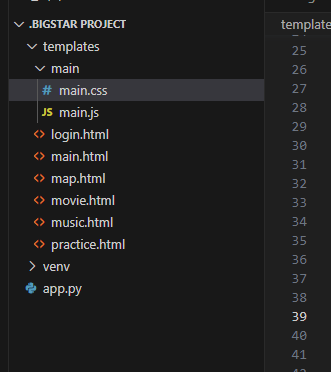
작성한 코드 및 에러 메세지
<!doctype html>
<html lang="en">
<head>
<script src="https://ajax.googleapis.com/ajax/libs/jquery/3.4.1/jquery.min.js"></script>
<meta charset="utf-8">
<meta name="viewport" content="width=device-width, initial-scale=1, shrink-to-fit=no">
<link href="https://cdn.jsdelivr.net/npm/bootstrap@5.0.2/dist/css/bootstrap.min.css" rel="stylesheet"
integrity="sha384-EVSTQN3/azprG1Anm3QDgpJLIm9Nao0Yz1ztcQTwFspd3yD65VohhpuuCOmLASjC" crossorigin="anonymous">
<script src="https://ajax.googleapis.com/ajax/libs/jquery/3.5.1/jquery.min.js"></script>
<script src="https://cdn.jsdelivr.net/npm/bootstrap@5.0.2/dist/js/bootstrap.bundle.min.js"
integrity="sha384-MrcW6ZMFYlzcLA8Nl+NtUVF0sA7MsXsP1UyJoMp4YLEuNSfAP+JcXn/tWtIaxVXM"
crossorigin="anonymous"></script>
<title>Bigstarhan</title>
<link rel="stylesheet" type="text/css" href="main/main.css">
<script>
</script>
</head>
<body>
<div class="wrap">
<h1 class="subtitle">BIGSTAR</h1>
</div>
<header>
<nav>
<ul>
<li><a href="/main">홈</a></li>
<li><a href="#">날씨</a></li>
<li><a href="/map">지도</a></li>
<li><a href="/movie">영화</a></li>
<li><a href="#">축구</a></li>
<li><a href="#">일정</a></li>
<li><a href="/music">노래</a></li>
<li><a href="/practice">실험</a></li>
<hr>
</ul>
</nav>
</header>
</body>
</html>
----------------------------------------------------------------------------------------------------------------------------
@import url('https://fonts.googleapis.com/css2?family=Hi+Melody&display=swap');
.subtitle {
background-color: transparent;
width: 200px;
height: 70px;
border-radius: 10px;
color: gray;
text-align: center;
padding-top: 15px;
background-image: linear-gradient(0deg, rgba(252, 247, 0, 0.2), rgba(0, 0, 0, 0.1)), url('https://search.pstatic.net/common/?src=http%3A%2F%2Fshop1.phinf.naver.net%2F20220513_203%2F16524334823727k4QJ_JPEG%2F53569315865477562_57904410.jpg&type=a340');
background-position: center;
background-size: cover;
font-family: 'Hi Melody', cursive;
}
.wrap {
width: 200px;
margin: 10px auto 0px auto;
border: 0px solid gray;
}
header {
width: 500px;
height: 5px;
background-color: #ffcc00;
color: black;
margin:0px auto 0px auto;
}
nav ul {
list-style-type: none;
margin: 0;
padding: 10px;
text-align: center;
}
nav li {
display: inline;
margin-right: 20px;
}
nav li a {
color: black;
text-decoration: none;
position: relative;
transition: all 0.3s ease;
}
nav li a:hover {
color: #ffcc00;
}
nav li a:before {
content: "";
position: absolute;
width: 100%;
height: 3px;
bottom: -5px;
left: 0;
background-color: #ffcc00;
visibility: hidden;
transform: scaleX(0);
transition: all 0.3s ease;
}
nav li a:hover:before {
visibility: visible;
transform: scaleX(1);
}


