커뮤니티

포인트
쿠폰
내 강의실
국비 신청 내역
증명서
계정
로그아웃
학습 질문
개발 일지
나의 활동
답변 완료
2주차 과제를 해결하면서 발생한 문제점에 대해 문의 드립니다.
undefined주차


강*진
댓글
1
・
추천
0
・
조회수
6
조회수
6
답변 완료
* 겪고 있는 문제 상황을 최대한 자세하게 작성해주세요.
* 문제 해결을 위해 어떤 시도를 해보았는지 구체적으로 함께 알려주세요.
튜터님! 명강의로 수업을 아주 재미있게 진행하고 있습니다. 2주차 과제를 해결하면서 main-right class 배열이 가로가 아닌 세로로 나열됩니다. 뭐가 잘못 됐을까요? ChatGPT에게 질문을 해서 조치해도 똑같은 결과만 나옵니다.
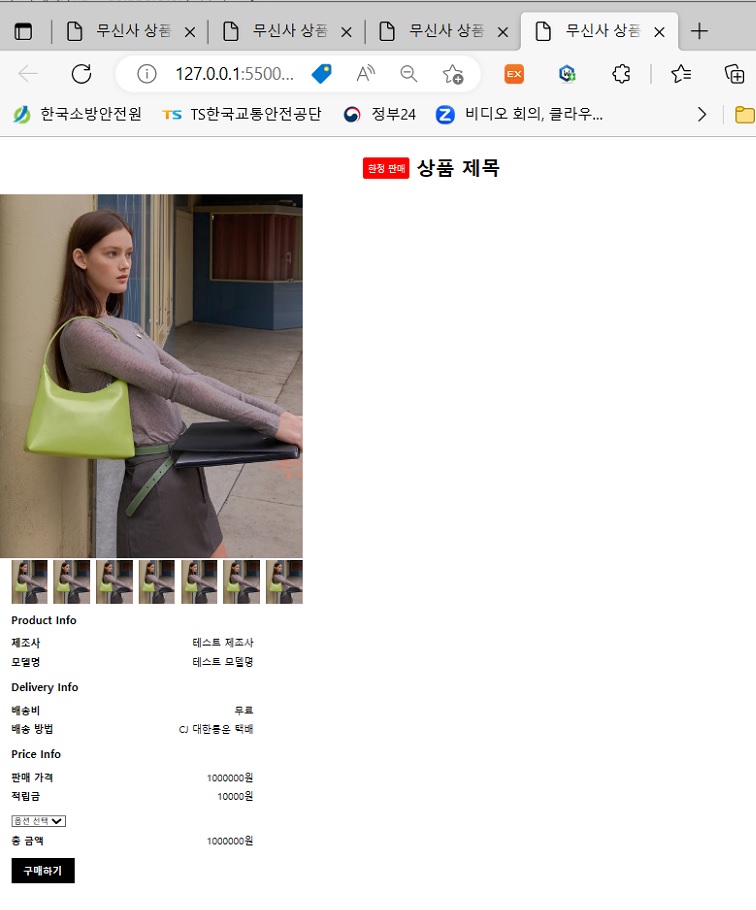
작성한 코드 및 에러 메세지
[HTML 코드]
<!DOCTYPE html>
<html>


<head>
    <title>무신사 상품 상세 페이지</title>
    <link rel="stylesheet" href="hw2_style.css">
    <script src="https://kit.fontawesome.com/your-font-awesome-kit.js" crossorigin="anonymous"></script>
</head>


<body>
    <header>
        <div class="badge">
            <span class="badge-label">한정 판매</span>
        </div>
        <h1 class="product-title">상품 제목</h1>
    </header>


    <main>
        <div class="main-left">
            <img src="https://image.msscdn.net/images/goods_img/20230206/3061872/3061872_16782434339513_500.jpg"
                alt="상품 이미지" width="500" height="600">
        </div>
        <div class="main-right">
            <div class="thumbnail-container">
                <img src="https://image.msscdn.net/images/goods_img/20230206/3061872/3061872_16782434339513_500.jpg"
                    alt="썸네일 이미지1" width="60" height="72">
                <img src="https://image.msscdn.net/images/goods_img/20230206/3061872/3061872_16782434339513_500.jpg"
                    alt="썸네일 이미지2" width="60" height="72">
                <img src="https://image.msscdn.net/images/goods_img/20230206/3061872/3061872_16782434339513_500.jpg"
                    alt="썸네일 이미지3" width="60" height="72">
                <img src="https://image.msscdn.net/images/goods_img/20230206/3061872/3061872_16782434339513_500.jpg"
                    alt="썸네일 이미지4" width="60" height="72">
                <img src="https://image.msscdn.net/images/goods_img/20230206/3061872/3061872_16782434339513_500.jpg"
                    alt="썸네일 이미지5" width="60" height="72">
                <img src="https://image.msscdn.net/images/goods_img/20230206/3061872/3061872_16782434339513_500.jpg"
                    alt="썸네일 이미지6" width="60" height="72">
                <img src="https://image.msscdn.net/images/goods_img/20230206/3061872/3061872_16782434339513_500.jpg"
                    alt="썸네일 이미지7" width="60" height="72">
            </div>
        </div>
        <div class="main-right">
            <div class="product-info">
                <h2 class="info-title">Product Info</h2>
                <div class="info-item">
                    <span class="info-label">제조사</span>
                    <span class="info-text">테스트 제조사</span>
                </div>
                <div class="info-item">
                    <span class="info-label">모델명</span>
                    <span class="info-text">테스트 모델명</span>
                </div>
            </div>
            <div class="delivery-info">
                <h2 class="info-title">Delivery Info</h2>
                <div class="info-item">
                    <span class="info-label">배송비</span>
                    <span class="info-text">무료</span>
                </div>
                <div class="info-item">
                    <span class="info-label">배송 방법</span>
                    <span class="info-text">CJ 대한통운 택배</span>
                </div>
            </div>
            <div class="price-info">
                <h2 class="info-title">Price Info</h2>
                <div class="info-item">
                    <span class="info-label">판매 가격</span>
                    <span class="info-text">1000000원</span>
                </div>
                <div class="info-item">
                    <span class="info-label">적립금</span>
                    <span class="info-text">10000원</span>
                </div>
            </div>
            <div class="purchase">
                <select name="options" id="options">
                    <option value="">옵션 선택</option>
                    <option value="1">옵션 1</option>
                    <option value="2">옵션 2</option>
                    <option value="3">옵션 3</option>
                </select>
                <div class="total-price">
                    <span class="total-label">총 금액</span>
                    <span class="total-text">1000000원</span>
                </div>
                <button class="purchase-button">구매하기</button>
            </div>
        </div>


    </main>


</body>


</html>
[CSS 코드]
header {
    display: flex;
    align-items: center;
    justify-content: center;
    /* 요소들을 수평 가운데로 정렬합니다 */
}


.badge {
    height: 26px;
    background-color: #ff0000;
    padding: 4px 8px;
    border-radius: 4px;
    display: flex;
    align-items: center;
    /* 내부 요소들을 수직 가운데로 정렬합니다 */
}


.badge-label {
    color: #ffffff;
    font-size: 14px;
}


.product-title {
    font-weight: bold;
    margin-left: 10px;
}


.main {
    display: flex;
    justify-content: space-between;
    align-items: flex-start;
}


.main-left img {
    width: 500px;
    height: 600px;
}


.thumbnail-container {
    display: flex;
}


.thumbnail-container img {
    width: 60px;
    height: 72px;
    margin-right: 10px;
}


.thumbnail-container img:last-child {
    margin-right: 0;
}


.main-right {
    width: 400px;
    margin-left: 20px;
    margin-right: 20px;
}


.product-info,
.delivery-info,
.price-info,
.purchase {
    margin-bottom: 20px;
}


.info-title {
    font-size: 18px;
    font-weight: bold;
}


.info-item {
    display: flex;
    justify-content: space-between;
    margin-top: 10px;
}


.info-label {
    font-weight: bold;
}


.total-price {
    display: flex;
    justify-content: space-between;
    margin-top: 10px;
}


.total-label {
    font-weight: bold;
}


.purchase-button {
    background-color: #000;
    color: #fff;
    font-size: 16px;
    font-weight: bold;
    border: none;
    padding: 10px 20px;
    margin-top: 20px;
    cursor: pointer;
}


댓글 알림
