


* 겪고 있는 문제 상황을 최대한 자세하게 작성해주세요.
* 문제 해결을 위해 어떤 시도를 해보았는지 구체적으로 함께 알려주세요.
이번에는 sdk 버전이 어쩌구 하는데
build gradle 메시지 보고 30 33 이렇게 수정했는데도 안되네요
보고 계신 화면 전체를 캡처해
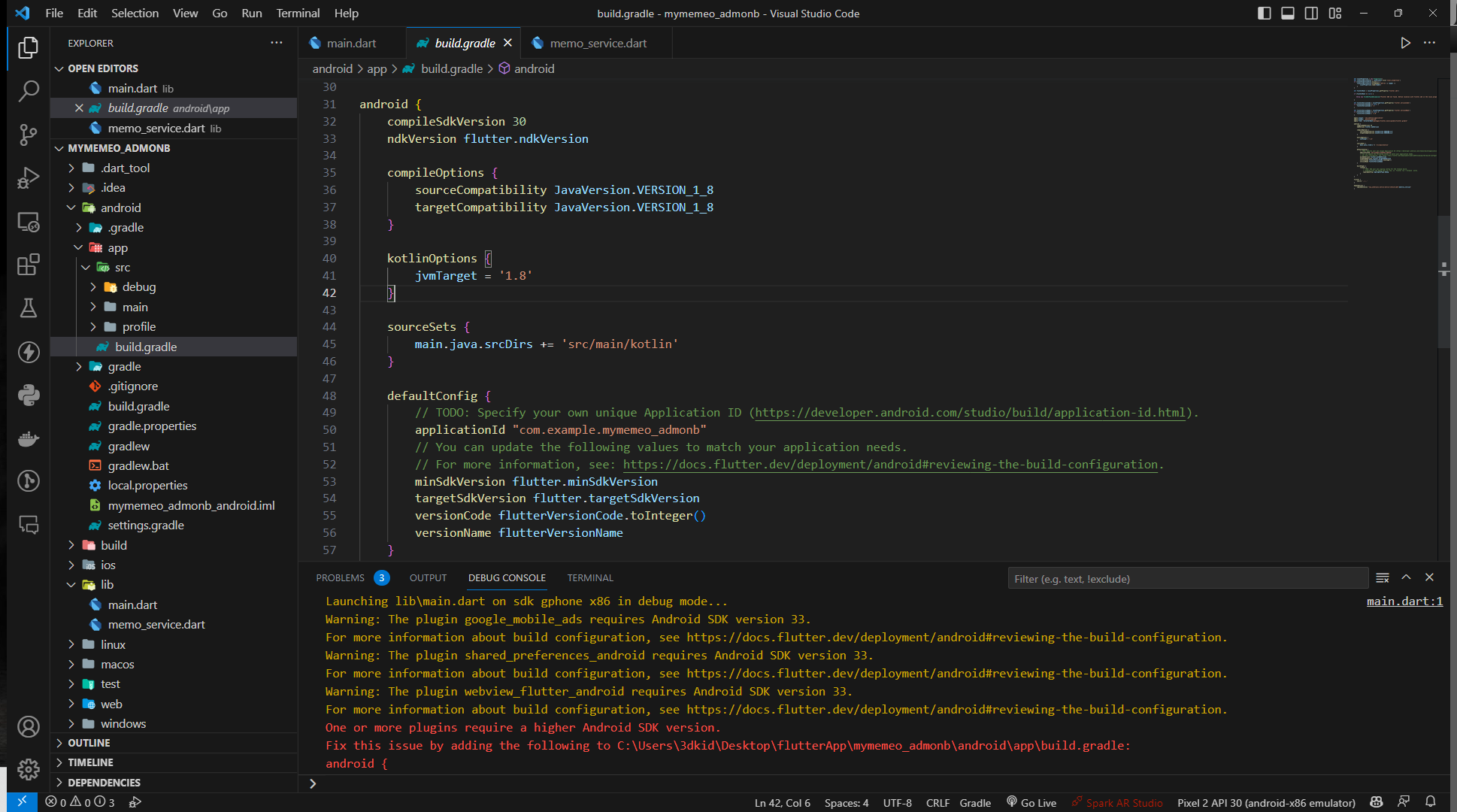
주시면, 튜터님들이 빠르게 상황을 이해할 수 있어요.
작성한 코드 및 에러 메세지
에러 메시지
Launching lib\main.dart on sdk gphone x86 in debug mode...
main.dart:1
Warning: The plugin google_mobile_ads requires Android SDK version 33.
For more information about build configuration, see https://docs.flutter.dev/deployment/android#reviewing-the-build-configuration.
Warning: The plugin shared_preferences_android requires Android SDK version 33.
For more information about build configuration, see https://docs.flutter.dev/deployment/android#reviewing-the-build-configuration.
Warning: The plugin webview_flutter_android requires Android SDK version 33.
For more information about build configuration, see https://docs.flutter.dev/deployment/android#reviewing-the-build-configuration.
One or more plugins require a higher Android SDK version.
Fix this issue by adding the following to C:\Users\3dkid\Desktop\flutterApp\mymemeo_admonb\android\app\build.gradle:
android {
compileSdkVersion 33
...
}
2
FAILURE: Build failed with an exception.
* What went wrong:
----------------------------------------------
build gradle 메시지 보고 30 33 이렇게 수정했는데도 안되네요
def localProperties = new Properties()
def localPropertiesFile = rootProject.file('local.properties')
if (localPropertiesFile.exists()) {
localPropertiesFile.withReader('UTF-8') { reader ->
localProperties.load(reader)
}
}
def flutterRoot = localProperties.getProperty('flutter.sdk')
if (flutterRoot == null) {
throw new FileNotFoundException("Flutter SDK not found. Define location with flutter.sdk in the local.properties file.")
}
def flutterVersionCode = localProperties.getProperty('flutter.versionCode')
if (flutterVersionCode == null) {
flutterVersionCode = '1'
}
def flutterVersionName = localProperties.getProperty('flutter.versionName')
if (flutterVersionName == null) {
flutterVersionName = '1.0'
}
apply plugin: 'com.android.application'
apply plugin: 'kotlin-android'
apply from: "$flutterRoot/packages/flutter_tools/gradle/flutter.gradle"
android {
compileSdkVersion 30
ndkVersion flutter.ndkVersion
compileOptions {
sourceCompatibility JavaVersion.VERSION_1_8
targetCompatibility JavaVersion.VERSION_1_8
}
kotlinOptions {
jvmTarget = '1.8'
}
sourceSets {
main.java.srcDirs += 'src/main/kotlin'
}
defaultConfig {
// TODO: Specify your own unique Application ID (https://developer.android.com/studio/build/application-id.html).
applicationId "com.example.mymemeo_admonb"
// You can update the following values to match your application needs.
// For more information, see: https://docs.flutter.dev/deployment/android#reviewing-the-build-configuration.
minSdkVersion flutter.minSdkVersion
targetSdkVersion flutter.targetSdkVersion
versionCode flutterVersionCode.toInteger()
versionName flutterVersionName
}
buildTypes {
release {
// TODO: Add your own signing config for the release build.
// Signing with the debug keys for now, so `flutter run --release` works.
signingConfig signingConfigs.debug
}
}
}
flutter {
source '../..'
}
dependencies {
implementation "org.jetbrains.kotlin:kotlin-stdlib-jdk7:$kotlin_version"
}


