


* 겪고 있는 문제 상황을 최대한 자세하게 작성해주세요.
* 문제 해결을 위해 어떤 시도를 해보았는지 구체적으로 함께 알려주세요.
안녕하세요! 1주차 숙제를 하다가 몇 가지 의문점이 있어 질문을 드립니다. 미리 도움 주심에 감사드립니다!
- import와 라이브러리는 항상 맨 앞에 써야되나요? 숙제의 답안을 보면 import openpyxl과 import urllib.request가 맨 위에 차례대로 써있는데, 각 라이브러리에 관련된 코드 앞이 아니라 항상 맨 위에 라이브러리는 몰아써야 하는 것인지 궁금합니다.
- new_rows = list(sheet.rows)[1:]의 경우, new_rows가 아니라 rows로 코드를 써서 그 이후에 for row in rows: 로 써도 제대로 연산이 될 수 있나요? new_rows라는 기능이 별도로 있는 것인지, 임의로 정의한 것인지 설명해주시면 감사드리겠습니다.
- 강의자료에 나오는 코드스니펫은 아래와 같은데, 정답에는 왜 f가 추가된 것일까요...? 어떤 이유로 005930과 samsung.jpg 글자를 대체하는 것만으로는 오류가 나는지 설명해주시면 감사드리겠습니다.
import urllib.request
url = 'https://ssl.pstatic.net/imgfinance/chart/item/area/year3/005930.png'
urllib.request.urlretrieve(url, "samsung.jpg")
보고 계신 화면 전체를 캡처해 주시면, 튜터님들이 빠르게
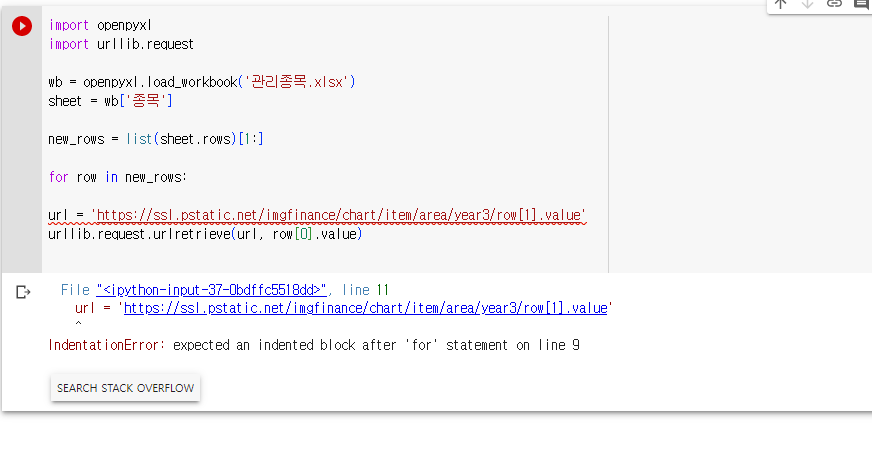
상황을 이해할 수 있어요.
작성한 코드 및 에러 메세지
import openpyxl
import urllib.request
wb = openpyxl.load_workbook('관리종목.xlsx')
sheet = wb['종목']
new_rows = list(sheet.rows)[1:]
for row in new_rows:
url = 'https://ssl.pstatic.net/imgfinance/chart/item/area/year3/row[1].value'
urllib.request.urlretrieve(url, row[0].value)
File "<ipython-input-37-0bdffc5518dd>", line 11
url = 'https://ssl.pstatic.net/imgfinance/chart/item/area/year3/row[1].value'
^
IndentationError: expected an indented block after 'for' statement on line 9


