


* 겪고 있는 문제 상황을 최대한 자세하게 작성해주세요.
* 문제 해결을 위해 어떤 시도를 해보았는지 구체적으로 함께 알려주세요.
웹 배포 이전 app.py와 index.html 코드로는 팬명록 웹 페이지 정상작동했습니다.
AWS Elastic Beanstalk 액세스 키 생성하고, 배포 명령어 따라서 강의 듣다가, pip install awsebcli 했는데 어마어마한 오류 창이 뜨네요..
뭐가 문제 일까요..?
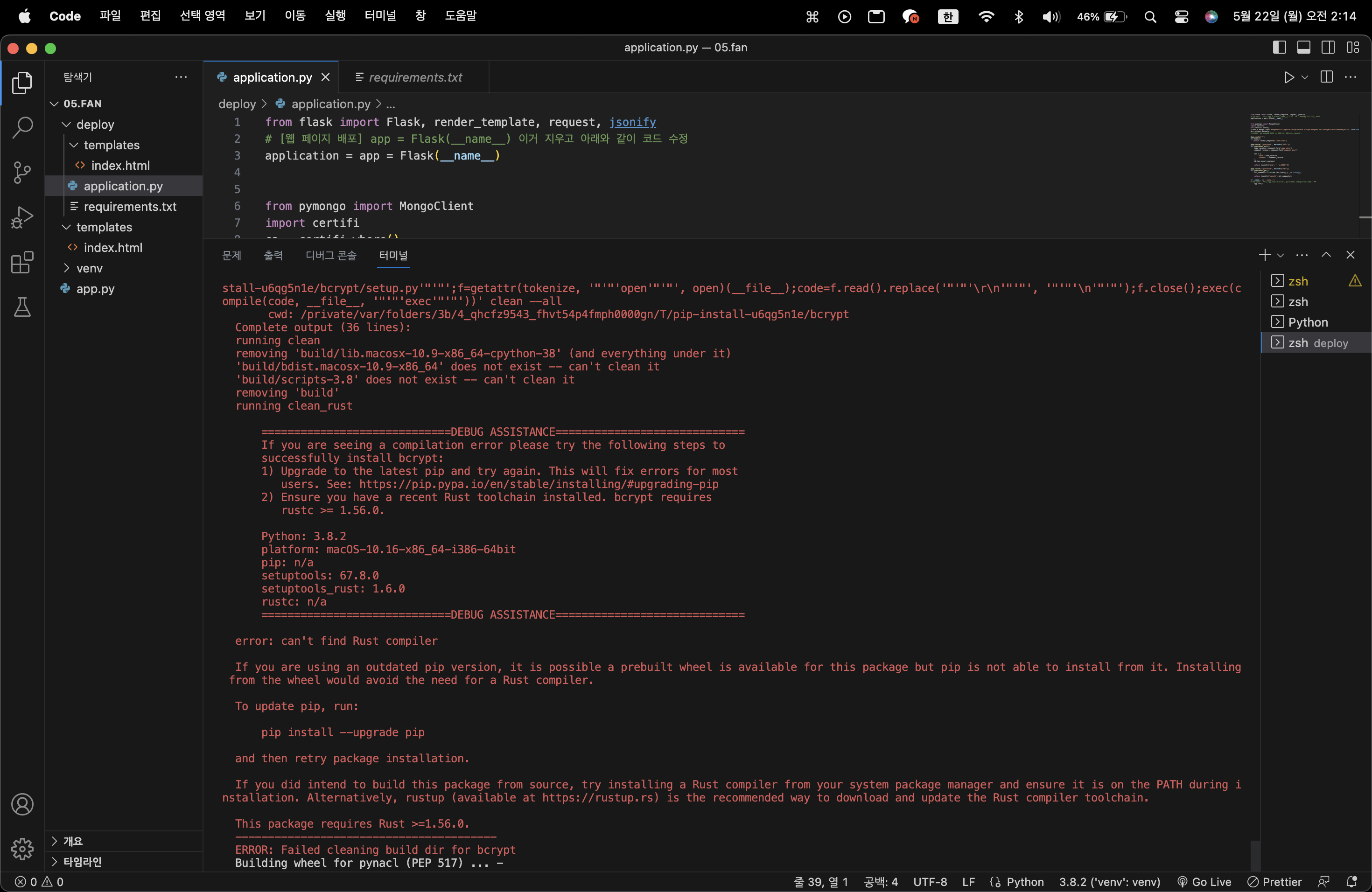
[1. 에러 코드]
ERROR: Command errored out with exit status 1:
command: /Users/heeyeon/Desktop/sparta/projects/05.fan/venv/bin/python3 /Users/heeyeon/Desktop/sparta/projects/05.fan/venv/lib/python3.8/site-packages/pip/_vendor/pep517/_in_process.py build_wheel /var/folders/3b/4_qhcfz9543_fhvt54p4fmph0000gn/T/tmp35804per
cwd: /private/var/folders/3b/4_qhcfz9543_fhvt54p4fmph0000gn/T/pip-install-u6qg5n1e/bcrypt
Complete output (58 lines):
running bdist_wheel
running build
running build_py
creating build
creating build/lib.macosx-10.9-x86_64-cpython-38
creating build/lib.macosx-10.9-x86_64-cpython-38/bcrypt
copying src/bcrypt/__init__.py -> build/lib.macosx-10.9-x86_64-cpython-38/bcrypt
copying src/bcrypt/__about__.py -> build/lib.macosx-10.9-x86_64-cpython-38/bcrypt
running egg_info
writing src/bcrypt.egg-info/PKG-INFO
writing dependency_links to src/bcrypt.egg-info/dependency_links.txt
writing requirements to src/bcrypt.egg-info/requires.txt
writing top-level names to src/bcrypt.egg-info/top_level.txt
reading manifest file 'src/bcrypt.egg-info/SOURCES.txt'
reading manifest template 'MANIFEST.in'
warning: no previously-included files found matching 'requirements.txt'
warning: no previously-included files found matching 'release.py'
warning: no previously-included files found matching 'mypy.ini'
warning: no previously-included files matching '*' found under directory '.github'
warning: no previously-included files matching '*' found under directory '.circleci'
warning: no previously-included files found matching 'src/_bcrypt/target'
warning: no previously-included files matching '*' found under directory 'src/_bcrypt/target'
adding license file 'LICENSE'
writing manifest file 'src/bcrypt.egg-info/SOURCES.txt'
copying src/bcrypt/_bcrypt.pyi -> build/lib.macosx-10.9-x86_64-cpython-38/bcrypt
copying src/bcrypt/py.typed -> build/lib.macosx-10.9-x86_64-cpython-38/bcrypt
running build_ext
running build_rust
=============================DEBUG ASSISTANCE=============================
If you are seeing a compilation error please try the following steps to
successfully install bcrypt:
1) Upgrade to the latest pip and try again. This will fix errors for most
users. See: https://pip.pypa.io/en/stable/installing/#upgrading-pip
2) Ensure you have a recent Rust toolchain installed. bcrypt requires
rustc >= 1.56.0.
Python: 3.8.2
platform: macOS-10.16-x86_64-i386-64bit
pip: n/a
setuptools: 67.8.0
setuptools_rust: 1.6.0
rustc: n/a
=============================DEBUG ASSISTANCE=============================
error: can't find Rust compiler
If you are using an outdated pip version, it is possible a prebuilt wheel is available for this package but pip is not able to install from it. Installing from the wheel would avoid the need for a Rust compiler.
To update pip, run:
pip install --upgrade pip
and then retry package installation.
If you did intend to build this package from source, try installing a Rust compiler from your system package manager and ensure it is on the PATH during installation. Alternatively, rustup (available at https://rustup.rs) is the recommended way to download and update the Rust compiler toolchain.
This package requires Rust >=1.56.0.
----------------------------------------
ERROR: Failed building wheel for bcrypt
Running setup.py clean for bcrypt
ERROR: Command errored out with exit status 1:
command: /Users/heeyeon/Desktop/sparta/projects/05.fan/venv/bin/python3 -u -c 'import sys, setuptools, tokenize; sys.argv[0] = '"'"'/private/var/folders/3b/4_qhcfz9543_fhvt54p4fmph0000gn/T/pip-install-u6qg5n1e/bcrypt/setup.py'"'"'; __file__='"'"'/private/var/folders/3b/4_qhcfz9543_fhvt54p4fmph0000gn/T/pip-install-u6qg5n1e/bcrypt/setup.py'"'"';f=getattr(tokenize, '"'"'open'"'"', open)(__file__);code=f.read().replace('"'"'\r\n'"'"', '"'"'\n'"'"');f.close();exec(compile(code, __file__, '"'"'exec'"'"'))' clean --all
cwd: /private/var/folders/3b/4_qhcfz9543_fhvt54p4fmph0000gn/T/pip-install-u6qg5n1e/bcrypt
Complete output (36 lines):
running clean
removing 'build/lib.macosx-10.9-x86_64-cpython-38' (and everything under it)
'build/bdist.macosx-10.9-x86_64' does not exist -- can't clean it
'build/scripts-3.8' does not exist -- can't clean it
removing 'build'
running clean_rust
=============================DEBUG ASSISTANCE=============================
If you are seeing a compilation error please try the following steps to
successfully install bcrypt:
1) Upgrade to the latest pip and try again. This will fix errors for most
users. See: https://pip.pypa.io/en/stable/installing/#upgrading-pip
2) Ensure you have a recent Rust toolchain installed. bcrypt requires
rustc >= 1.56.0.
Python: 3.8.2
platform: macOS-10.16-x86_64-i386-64bit
pip: n/a
setuptools: 67.8.0
setuptools_rust: 1.6.0
rustc: n/a
=============================DEBUG ASSISTANCE=============================
error: can't find Rust compiler
If you are using an outdated pip version, it is possible a prebuilt wheel is available for this package but pip is not able to install from it. Installing from the wheel would avoid the need for a Rust compiler.
To update pip, run:
pip install --upgrade pip
and then retry package installation.
If you did intend to build this package from source, try installing a Rust compiler from your system package manager and ensure it is on the PATH during installation. Alternatively, rustup (available at https://rustup.rs) is the recommended way to download and update the Rust compiler toolchain.
This package requires Rust >=1.56.0.
----------------------------------------
ERROR: Failed cleaning build dir for bcrypt
Building wheel for pynacl (PEP 517) ... done
Created wheel for pynacl: filename=PyNaCl-1.5.0-cp38-cp38-macosx_10_9_x86_64.whl size=285345 sha256=56dc8b2e308acdab9568b734157982b41cdb0fbf060e3919b5e19c5f7e97f7ce
Stored in directory: /Users/heeyeon/Library/Caches/pip/wheels/2f/01/7f/11d382bf954a093a55ed9581fd66c3b45b98769f292367b4d3
Successfully built pynacl
Failed to build bcrypt
ERROR: Could not build wheels for bcrypt which use PEP 517 and cannot be installed directly
WARNING: You are using pip version 19.2.3, however version 23.1.2 is available.
You should consider upgrading via the 'pip install --upgrade pip' command.
(venv) heeyeon@heeyeon deploy %
[2. application.py 코드]
from flask import Flask, render_template, request, jsonify
# [웹 페이지 배포] app = Flask(__name__) 이거 지우고 아래와 같이 코드 수정
application = app = Flask(__name__)
from pymongo import MongoClient
import certifi
ca = certifi.where()
client = MongoClient('mongodb+srv://sparta:test@cluster0.8ik2q4d.mongodb.net/?retryWrites=true&w=majority', ssl=True,tlsCAFile = ca)
db = client.dbsparta
# 여기까지가 mongoDB 사용 시 기본 툴, 복사해서 쓰세요..
@app.route('/')
def home():
return render_template('index.html')
@app.route("/guestbook", methods=["POST"])
def guestbook_post():
name_receive = request.form['name_give']
comment_receive = request.form['comment_give']
doc = {
'name': name_receive,
'comment' : comment_receive
}
db.fan.insert_one(doc)
return jsonify({'msg': '저장 완료!'})
@app.route("/guestbook", methods=["GET"])
def guestbook_get():
all_comments = list(db.fan.find({},{'_id':False}))
return jsonify({'result': all_comments})
if __name__ == '__main__':
# [웹 페이지 배포] app.run('0.0.0.0', port=5001, debug=True) 얘도 지우고
app.run()
[3. index.html 코드]
<!DOCTYPE html>
<html lang="en">
<head>
<meta charset="UTF-8" />
<meta http-equiv="X-UA-Compatible" content="IE=edge" />
<meta name="viewport" content="width=device-width, initial-scale=1.0" />
<link
href="https://cdn.jsdelivr.net/npm/bootstrap@5.0.2/dist/css/bootstrap.min.css"
rel="stylesheet"
integrity="sha384-EVSTQN3/azprG1Anm3QDgpJLIm9Nao0Yz1ztcQTwFspd3yD65VohhpuuCOmLASjC"
crossorigin="anonymous"
/>
<script src="https://ajax.googleapis.com/ajax/libs/jquery/3.5.1/jquery.min.js"></script>
<script
src="https://cdn.jsdelivr.net/npm/bootstrap@5.0.2/dist/js/bootstrap.bundle.min.js"
integrity="sha384-MrcW6ZMFYlzcLA8Nl+NtUVF0sA7MsXsP1UyJoMp4YLEuNSfAP+JcXn/tWtIaxVXM"
crossorigin="anonymous"
></script>
<title>초미니홈피 - 팬명록</title>
<meta property="og:title" content="HONNE 팬페이지" />
<meta property="og:description" content="아티스트에게 응원을 보내주세요!" />
<meta
property="og:image"
content="https://cdnimg.melon.co.kr/resource/image/cds/musicstory/imgUrl20161202121403.jpg/melon/optimize/90"
/>
<!-- og 태그(meta 태그) 넣기, honne 이미지 주소 복사해서 url 넣음 -->
<link
href="https://fonts.googleapis.com/css2?family=Noto+Serif+KR:wght@200;300;400;500;600;700;900&display=swap"
rel="stylesheet"
/>
<style>
* {
font-family: "Noto Serif KR", serif;
}
.mypic {
width: 100%;
height: 500px;
background-image: linear-gradient(
0deg,
rgba(0, 0, 0, 0.5),
rgba(0, 0, 0, 0.5)
),
url("https://cdnimg.melon.co.kr/resource/image/cds/musicstory/imgUrl20161202121403.jpg/melon/optimize/90");
background-position: center 30%;
background-size: cover;
/* og 태그 image 넣으면서, 여기 background image의 url도 함께 넣어줘야해 */
color: white;
display: flex;
flex-direction: column;
align-items: center;
justify-content: center;
}
.mypost {
width: 95%;
max-width: 500px;
margin: 20px auto 20px auto;
box-shadow: 0px 0px 3px 0px black;
padding: 20px;
}
.mypost > button {
margin-top: 15px;
}
.mycards {
width: 95%;
max-width: 500px;
margin: auto;
}
.mycards > .card {
margin-top: 10px;
margin-bottom: 10px;
}
</style>
<script>
$(document).ready(function () {
set_temp();
show_comment();
});
function set_temp() {
fetch("http://spartacodingclub.shop/sparta_api/weather/seoul")
.then((res) => res.json())
.then((data) => {
let temp = data["temp"];
$("#temp").text(temp);
});
}
function save_comment() {
let name = $("#name").val();
let comment = $("#comment").val();
let formData = new FormData();
formData.append("name_give", name);
formData.append("comment_give", comment);
fetch("/guestbook", { method: "POST", body: formData })
.then((res) => res.json())
.then((data) => {
//console.log(data)
alert(data["msg"]);
window.location.reload();
});
}
function show_comment() {
fetch("/guestbook")
.then((res) => res.json())
.then((data) => {
let rows = data["result"];
$("#comment-list").empty();
rows.forEach((a) => {
let name = a["name"];
let comment = a["comment"];
let temp_html = ` <div class="card">
<div class="card-body">
<blockquote class="blockquote mb-0">
<p>${comment}</p>
<footer class="blockquote-footer">${name}</footer>
</blockquote>
</div>
</div>`;
$("#comment-list").append(temp_html);
});
});
}
</script>
</head>
<body>
<div class="mypic">
<h1>HONNE 팬페이지</h1>
<!-- og 태그 title 입력하면서, 실제 웹 페이지 제목도 바꿔줘야지 -->
<p>현재기온: <span id="temp">36</span>도</p>
</div>
<div class="mypost">
<div class="form-floating mb-3">
<input type="text" class="form-control" id="name" placeholder="url" />
<label for="floatingInput">닉네임</label>
</div>
<div class="form-floating">
<textarea
class="form-control"
placeholder="Leave a comment here"
id="comment"
style="height: 100px"
></textarea>
<label for="floatingTextarea2">응원댓글</label>
</div>
<button onclick="save_comment()" type="button" class="btn btn-dark">
댓글 남기기
</button>
</div>
<div class="mycards" id="comment-list">
<div class="card">
<div class="card-body">
<blockquote class="blockquote mb-0">
<p>새로운 앨범 너무 멋져요!</p>
<footer class="blockquote-footer">호빵맨</footer>
</blockquote>
</div>
</div>
<div class="card">
<div class="card-body">
<blockquote class="blockquote mb-0">
<p>새로운 앨범 너무 멋져요!</p>
<footer class="blockquote-footer">호빵맨</footer>
</blockquote>
</div>
</div>
<div class="card">
<div class="card-body">
<blockquote class="blockquote mb-0">
<p>새로운 앨범 너무 멋져요!</p>
<footer class="blockquote-footer">호빵맨</footer>
</blockquote>
</div>
</div>
</div>
</body>
</html>


