


안녕하세요
코딩은 아무런 문제 없이 잘했으나, 배포할 때 문제가 지속적으로 발생합니다.
일단 터미널에서 eb init을 실행했을 때부터 문제가 발생했습니다. eb init를 쳐도 자꾸 에러가 떴습니다.
갖가지 방법을 실행한 결과 터미널에 pip install --upgrade awscli를 입력하여 AWS CLI 버전을 업그레이드하고 나서야 eb init을 진행할 수 있었습니다.
그런데 더 어려운 문제가 발생했습니다.
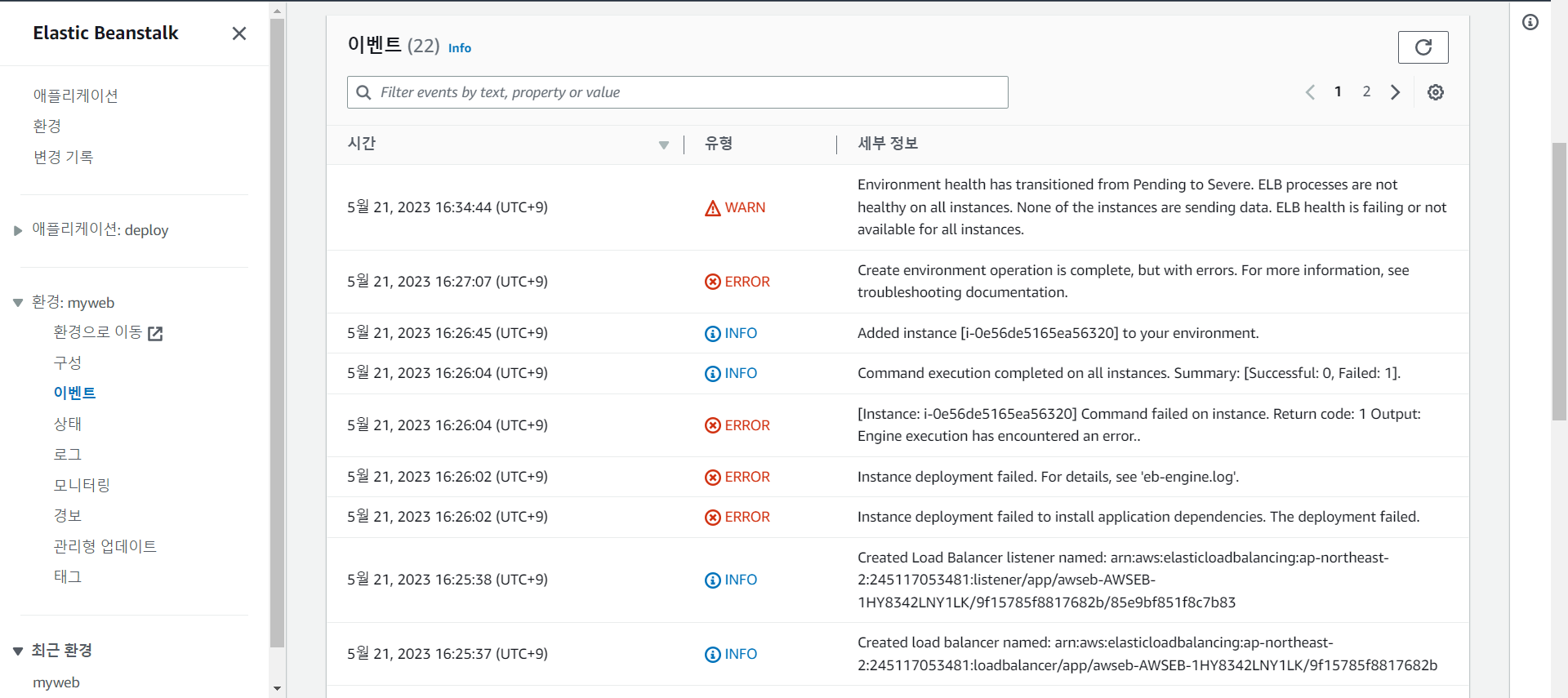
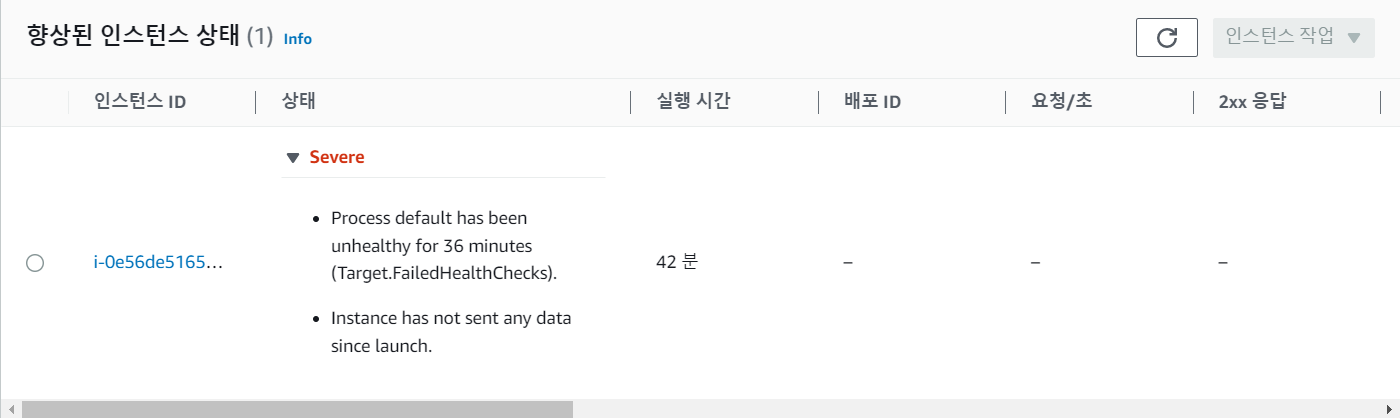
eb init을 실행시키고 AWS에 들어가 제 도메인에 들어갔더니 502 Bad Gateway 가 뜹니다.
그래서 컴퓨터의 문제인가 싶어 다른 컴퓨터로 작업을 해도 동일한 문제가 발생했습니다.
이 문제를 해결하기 위해 갖은 방법을 실행해도 해결되지 않아 질문을 남깁니다.
작성한 코드 및 에러 메세지
user@DESKTOP-8Q7BR4G MINGW64 ~/Desktop/sparta/projects/05.fan.fan v/Scripts/activate
$ source c:/Users/user/Desktop/sparta/projects/05.fan/venv/Scripts/activate .fan
(venv)
user@DESKTOP-8Q7BR4G MINGW64 ~/Desktop/sparta/projects/05.fan
$ ip install flask pymongo dnspython
bash: ip: command not found
(venv)
user@DESKTOP-8Q7BR4G MINGW64 ~/Desktop/sparta/projects/05.fan
$ pip install flask pymongo dnspython
Collecting flask
Using cached Flask-2.3.2-py3-none-any.whl (96 kB)
Collecting pymongo
Using cached pymongo-4.3.3-cp38-cp38-win_amd64.whl (382 kB)
Collecting dnspython
Using cached dnspython-2.3.0-py3-none-any.whl (283 kB)
Collecting blinker>=1.6.2
Using cached blinker-1.6.2-py3-none-any.whl (13 kB)
Collecting Jinja2>=3.1.2
Using cached Jinja2-3.1.2-py3-none-any.whl (133 kB)
Collecting click>=8.1.3
Using cached click-8.1.3-py3-none-any.whl (96 kB)
Collecting importlib-metadata>=3.6.0; python_version < "3.10"
Using cached importlib_metadata-6.6.0-py3-none-any.whl
(22 kB)
Collecting itsdangerous>=2.1.2
Using cached itsdangerous-2.1.2-py3-none-any.whl (15 kB)
Collecting Werkzeug>=2.3.3
Using cached Werkzeug-2.3.4-py3-none-any.whl (242 kB)
Collecting MarkupSafe>=2.0
Using cached MarkupSafe-2.1.2-cp38-cp38-win_amd64.whl (16 kB)
Collecting colorama; platform_system == "Windows"
Using cached colorama-0.4.6-py2.py3-none-any.whl (25 kB)
Collecting zipp>=0.5
Using cached zipp-3.15.0-py3-none-any.whl (6.8 kB)
Installing collected packages: blinker, MarkupSafe, Jinja2, colorama, click, zipp, importlib-metadata, itsdangerous, Werkzeug, flask, dnspython, pymongo
Successfully installed Jinja2-3.1.2 MarkupSafe-2.1.2 Werkzeug-2.3.4 blinker-1.6.2 click-8.1.3 colorama-0.4.6 dnspython-2.3.0 flask-2.3.2 importlib-metadata-6.6.0 itsdangerous-2.1.2 pymongo-4.3.3 zipp-3.15.0
WARNING: You are using pip version 20.2.1; however, version 23.1.2 is available.
You should consider upgrading via the 'c:\users\user\desktop\sparta\projects\05.fan\venv\scripts\python.exe -m pip install --upgrade pip' command.
(venv)
user@DESKTOP-8Q7BR4G MINGW64 ~/Desktop/sparta/projects/05.fan
$ mkdir deploy
(venv)
user@DESKTOP-8Q7BR4G MINGW64 ~/Desktop/sparta/projects/05.fan
$ cp app.py deploy/application.py
(venv)
user@DESKTOP-8Q7BR4G MINGW64 ~/Desktop/sparta/projects/05.fan
$ cp -r templates deploy/templates
(venv)
user@DESKTOP-8Q7BR4G MINGW64 ~/Desktop/sparta/projects/05.fan
$ pip freeze > deploy/requirements.txt
(venv)
user@DESKTOP-8Q7BR4G MINGW64 ~/Desktop/sparta/projects/05.fan
$ cd deploy
(venv)
user@DESKTOP-8Q7BR4G MINGW64 ~/Desktop/sparta/projects/05.fan/deploy
$ pip install awsebcli
Collecting awsebcli
Using cached awsebcli-3.20.6.tar.gz (268 kB)
Collecting botocore<1.29.100,>1.23.41
Using cached botocore-1.29.99-py3-none-any.whl (10.5 MB)
Collecting cement==2.8.2
Using cached cement-2.8.2.tar.gz (165 kB)
Collecting colorama<0.4.4,>=0.2.5
Using cached colorama-0.4.3-py2.py3-none-any.whl (15 kB)
Collecting pathspec==0.10.1
Using cached pathspec-0.10.1-py3-none-any.whl (27 kB)
Collecting python-dateutil<3.0.0,>=2.1
Using cached python_dateutil-2.8.2-py2.py3-none-any.whl (247 kB)
Collecting requests<=2.26,>=2.20.1
Using cached requests-2.26.0-py2.py3-none-any.whl (62 kB)
Requirement already satisfied: setuptools>=20.0 in c:\users\user\desktop\sparta\projects\05.fan\venv\lib\site-packages (from awsebcli) (49.2.1)
Collecting semantic_version==2.8.5
Using cached semantic_version-2.8.5-py2.py3-none-any.whl (15 kB)
Collecting six<1.15.0,>=1.11.0
Using cached six-1.14.0-py2.py3-none-any.whl (10 kB)
Collecting termcolor==1.1.0
Using cached termcolor-1.1.0.tar.gz (3.9 kB)
Collecting wcwidth<0.2.0,>=0.1.7
Using cached wcwidth-0.1.9-py2.py3-none-any.whl (19 kB)Collecting PyYAML<5.5,>=5.3.1
Using cached PyYAML-5.4.1-cp38-cp38-win_amd64.whl (213
kB)
Collecting urllib3>=1.26.5
Using cached urllib3-2.0.2-py3-none-any.whl (123 kB)
Collecting pypiwin32==223
Using cached pypiwin32-223-py3-none-any.whl (1.7 kB)
Collecting jmespath<2.0.0,>=0.7.1
Using cached jmespath-1.0.1-py3-none-any.whl (20 kB)
Collecting certifi>=2017.4.17
Using cached certifi-2023.5.7-py3-none-any.whl (156 kB)Collecting idna<4,>=2.5; python_version >= "3"
Using cached idna-3.4-py3-none-any.whl (61 kB)
Collecting charset-normalizer~=2.0.0; python_version >= "3"
Using cached charset_normalizer-2.0.12-py3-none-any.whl (39 kB)
Collecting pywin32>=223
Using cached pywin32-306-cp38-cp38-win_amd64.whl (9.4 MB)
Using legacy 'setup.py install' for awsebcli, since package 'wheel' is not installed.
Using legacy 'setup.py install' for cement, since package 'wheel' is not installed.
Using legacy 'setup.py install' for termcolor, since package 'wheel' is not installed.
Installing collected packages: jmespath, six, python-dateutil, urllib3, botocore, cement, colorama, pathspec, certifi, idna, charset-normalizer, requests, semantic-version, termcolor, wcwidth, PyYAML, pywin32, pypiwin32, awsebcli
Running setup.py install for cement ... done
Attempting uninstall: colorama
Found existing installation: colorama 0.4.6
Uninstalling colorama-0.4.6:
Successfully uninstalled colorama-0.4.6
Running setup.py install for termcolor ... done
Running setup.py install for awsebcli ... done
ERROR: After October 2020 you may experience errors when
installing or updating packages. This is because pip will change the way that it resolves dependency conflicts.
We recommend you use --use-feature=2020-resolver to test
your packages with the new resolver before it becomes the default.
botocore 1.29.99 requires urllib3<1.27,>=1.25.4, but you'll have urllib3 2.0.2 which is incompatible.
requests 2.26.0 requires urllib3<1.27,>=1.21.1, but you'll have urllib3 2.0.2 which is incompatible.
Successfully installed PyYAML-5.4.1 awsebcli-3.20.6 botocore-1.29.99 cement-2.8.2 certifi-2023.5.7 charset-normalizer-2.0.12 colorama-0.4.3 idna-3.4 jmespath-1.0.1 pathspec-0.10.1 pypiwin32-223 python-dateutil-2.8.2 pywin32-306
requests-2.26.0 semantic-version-2.8.5 six-1.14.0 termcolor-1.1.0 urllib3-2.0.2 wcwidth-0.1.9
WARNING: You are using pip version 20.2.1; however, version 23.1.2 is available.
You should consider upgrading via the 'c:\users\user\desktop\sparta\projects\05.fan\venv\scripts\python.exe -m pip install --upgrade pip' command.
(venv)
user@DESKTOP-8Q7BR4G MINGW64 ~/Desktop/sparta/projects/05.fan/deploy
$ pip install --upgrade awscli
Collecting awscli
Using cached awscli-1.27.137-py3-none-any.whl (4.1 MB)
Collecting docutils<0.17,>=0.10
Using cached docutils-0.16-py2.py3-none-any.whl (548 kB)
Collecting rsa<4.8,>=3.1.2
Using cached rsa-4.7.2-py3-none-any.whl (34 kB)
Collecting s3transfer<0.7.0,>=0.6.0
Using cached s3transfer-0.6.1-py3-none-any.whl (79 kB)
Requirement already satisfied, skipping upgrade: colorama<0.4.5,>=0.2.5 in c:\users\user\desktop\sparta\projects\05.fan\venv\lib\site-packages (from awscli) (0.4.3)
Requirement already satisfied, skipping upgrade: PyYAML<5.5,>=3.10 in c:\users\user\desktop\sparta\projects\05.fan\venv\lib\site-packages (from awscli) (5.4.1)
Collecting botocore==1.29.137
Using cached botocore-1.29.137-py3-none-any.whl (10.8 MB)
Collecting pyasn1>=0.1.3
Using cached pyasn1-0.5.0-py2.py3-none-any.whl (83 kB)
Requirement already satisfied, skipping upgrade: python-dateutil<3.0.0,>=2.1 in c:\users\user\desktop\sparta\projects\05.fan\venv\lib\site-packages (from botocore==1.29.137->awscli) (2.8.2)
Collecting urllib3<1.27,>=1.25.4
Using cached urllib3-1.26.15-py2.py3-none-any.whl (140
kB)
Requirement already satisfied, skipping upgrade: jmespath<2.0.0,>=0.7.1 in c:\users\user\desktop\sparta\projects\05.fan\venv\lib\site-packages (from botocore==1.29.137->awscli) (1.0.1)
Requirement already satisfied, skipping upgrade: six>=1.5 in c:\users\user\desktop\sparta\projects\05.fan\venv\lib\site-packages (from python-dateutil<3.0.0,>=2.1->botocore==1.29.137->awscli) (1.14.0)
Installing collected packages: docutils, pyasn1, rsa, urllib3, botocore, s3transfer, awscli
Attempting uninstall: urllib3
Found existing installation: urllib3 2.0.2
Uninstalling urllib3-2.0.2:
Successfully uninstalled urllib3-2.0.2
Attempting uninstall: botocore
Found existing installation: botocore 1.29.99
Uninstalling botocore-1.29.99:
Successfully uninstalled botocore-1.29.99
ERROR: After October 2020 you may experience errors when
installing or updating packages. This is because pip will change the way that it resolves dependency conflicts.
We recommend you use --use-feature=2020-resolver to test
your packages with the new resolver before it becomes the default.
awsebcli 3.20.6 requires botocore<1.29.100,>1.23.41, but
you'll have botocore 1.29.137 which is incompatible.
Successfully installed awscli-1.27.137 botocore-1.29.137
docutils-0.16 pyasn1-0.5.0 rsa-4.7.2 s3transfer-0.6.1 urllib3-1.26.15
WARNING: You are using pip version 20.2.1; however, version 23.1.2 is available.
You should consider upgrading via the 'c:\users\user\desktop\sparta\projects\05.fan\venv\scripts\python.exe -m pip install --upgrade pip' command.
(venv)
user@DESKTOP-8Q7BR4G MINGW64 ~/Desktop/sparta/projects/05.fan/deploy
$ eb init
Select a default region
1) us-east-1 : US East (N. Virginia)
2) us-west-1 : US West (N. California)
3) us-west-2 : US West (Oregon)
4) eu-west-1 : EU (Ireland)
5) eu-central-1 : EU (Frankfurt)
6) ap-south-1 : Asia Pacific (Mumbai)
7) ap-southeast-1 : Asia Pacific (Singapore)
8) ap-southeast-2 : Asia Pacific (Sydney)
9) ap-northeast-1 : Asia Pacific (Tokyo)
10) ap-northeast-2 : Asia Pacific (Seoul)
11) sa-east-1 : South America (Sao Paulo)
12) cn-north-1 : China (Beijing)
13) cn-northwest-1 : China (Ningxia)
14) us-east-2 : US East (Ohio)
15) ca-central-1 : Canada (Central)
16) eu-west-2 : EU (London)
17) eu-west-3 : EU (Paris)
18) eu-north-1 : EU (Stockholm)
19) eu-south-1 : EU (Milano)
20) ap-east-1 : Asia Pacific (Hong Kong)
21) me-south-1 : Middle East (Bahrain)
22) il-central-1 : Middle East (Israel)
23) af-south-1 : Africa (Cape Town)
24) ap-southeast-3 : Asia Pacific (Jakarta)
25) ap-northeast-3 : Asia Pacific (Osaka)
(default is 3): 10
ERROR: The current user does not have the correct permissions. Reason: Operation Denied. The security token included in the request is invalid.
ERROR: The current user does not have the correct permissions. Reason: Operation Denied. The security token included in the request is invalid.
You have not yet set up your credentials or your credentials are incorrect
You must provide your credentials.
(aws-access-id): AKIA4EZTG2J52BTNOV7D
(aws-secret-key): 3OyM7n9ArySqeumglJv+49ZRXDi+atRzqx8j63z2
Select an application to use
1) deploy2
2) 05.fan
3) deploy
4) [ Create new Application ]
(default is 3):
Cannot setup CodeCommit because there is no Source Control setup, continuing with initialization
(venv)
user@DESKTOP-8Q7BR4G MINGW64 ~/Desktop/sparta/projects/05.fan/deploy
$ eb init --interactive
Select a default region
1) us-east-1 : US East (N. Virginia)
2) us-west-1 : US West (N. California)
3) us-west-2 : US West (Oregon)
4) eu-west-1 : EU (Ireland)
5) eu-central-1 : EU (Frankfurt)
6) ap-south-1 : Asia Pacific (Mumbai)
7) ap-southeast-1 : Asia Pacific (Singapore)
8) ap-southeast-2 : Asia Pacific (Sydney)
9) ap-northeast-1 : Asia Pacific (Tokyo)
10) ap-northeast-2 : Asia Pacific (Seoul)
11) sa-east-1 : South America (Sao Paulo)
12) cn-north-1 : China (Beijing)
13) cn-northwest-1 : China (Ningxia)
14) us-east-2 : US East (Ohio)
15) ca-central-1 : Canada (Central)
16) eu-west-2 : EU (London)
17) eu-west-3 : EU (Paris)
18) eu-north-1 : EU (Stockholm)
19) eu-south-1 : EU (Milano)
20) ap-east-1 : Asia Pacific (Hong Kong)
21) me-south-1 : Middle East (Bahrain)
22) il-central-1 : Middle East (Israel)
23) af-south-1 : Africa (Cape Town)
24) ap-southeast-3 : Asia Pacific (Jakarta)
25) ap-northeast-3 : Asia Pacific (Osaka)
(default is 3): 10
Select an application to use
1) deploy2
2) 05.fan
3) deploy
4) [ Create new Application ]
(default is 3): 4
Enter Application Name
(default is "deploy3"):
Application deploy3 has been created.
It appears you are using Python. Is this correct?
(Y/n): y
Select a platform branch.
1) Python 3.11 running on 64bit Amazon Linux 2023
2) Python 3.9 running on 64bit Amazon Linux 2023
3) Python 3.8 running on 64bit Amazon Linux 2
4) Python 3.7 running on 64bit Amazon Linux 2
(default is 1):
Cannot setup CodeCommit because there is no Source Control setup, continuing with initialization
Do you want to set up SSH for your instances?
(Y/n): y
Select a keypair.
1) aws-eb
2) [ Create new KeyPair ]
(default is 1):
(venv)
user@DESKTOP-8Q7BR4G MINGW64 ~/Desktop/sparta/projects/05.fan/deploy
$ eb create myweb
Creating application version archive "app-230521_155611586835".
Uploading deploy3/app-230521_155611586835.zip to S3. This may take a while.
Upload Complete.
ERROR: InvalidParameterValueError - Environment myweb already exists.
(venv)
user@DESKTOP-8Q7BR4G MINGW64 ~/Desktop/sparta/projects/05.fan/deploy
$ eb create myweb1
Creating application version archive "app-230521_160003424066".
Uploading deploy3/app-230521_160003424066.zip to S3. This may take a while.
Upload Complete.
Environment details for: myweb1
Application name: deploy3
Region: ap-northeast-2
Deployed Version: app-230521_160003424066
Environment ID: e-rqfwqp6hg3
Platform: arn:aws:elasticbeanstalk:ap-northeast-2::platform/Python 3.11 running on 64bit Amazon Linux 2023/4.0.0 Tier: WebServer-Standard-1.0
CNAME: UNKNOWN
Updated: 2023-05-21 07:00:05.944000+00:00
Printing Status:
2023-05-21 07:00:04 INFO createEnvironment is starting.
2023-05-21 07:00:06 INFO Using elasticbeanstalk-ap-northeast-2-834941670011 as Amazon S3 storage bucket for
environment data.
2023-05-21 07:00:26 INFO Created security group named: sg-077fdac4df6732740
2023-05-21 07:00:41 INFO Created security group named: awseb-e-rqfwqp6hg3-stack-AWSEBSecurityGroup-HHKERPECPAF
2023-05-21 07:00:41 INFO Created target group named: arn:aws:elasticloadbalancing:ap-northeast-2:834941670011:targetgroup/awseb-AWSEB-A62BVHV9URLH/237e417760190eae
2023-05-21 07:00:41 INFO Created Auto Scaling launch configuration named: awseb-e-rqfwqp6hg3-stack-AWSEBAutoScalingLaunchConfiguration-20eRjrKGs90g
(venv)
user@DESKTOP-8Q7BR4G MINGW64 ~/Desktop/sparta/projects/05.fan/deploy
$ mkdir deploy
(venv)
user@DESKTOP-8Q7BR4G MINGW64 ~/Desktop/sparta/projects/05.fan/deploy
$ cp app.py deploy/application.py
cp: cannot stat 'app.py': No such file or directory
(venv)
user@DESKTOP-8Q7BR4G MINGW64 ~/Desktop/sparta/projects/05.fan/deploy
$ cp -r templates deploy/templates
(venv)
user@DESKTOP-8Q7BR4G MINGW64 ~/Desktop/sparta/projects/05.fan/deploy
$ pip freeze > deploy/requirements.txt
(venv)
user@DESKTOP-8Q7BR4G MINGW64 ~/Desktop/sparta/projects/05.fan/deploy
$ cd deploy
(venv)
user@DESKTOP-8Q7BR4G MINGW64 ~/Desktop/sparta/projects/05.fan/deploy/deploy
$ pip install awsebcli
Requirement already satisfied: awsebcli in c:\users\user\desktop\sparta\projects\05.fan\venv\lib\site-packages (3.20.6)
Collecting botocore<1.29.100,>1.23.41
Using cached botocore-1.29.99-py3-none-any.whl (10.5 MB)
Requirement already satisfied: cement==2.8.2 in c:\users\user\desktop\sparta\projects\05.fan\venv\lib\site-packages (from awsebcli) (2.8.2)
Requirement already satisfied: colorama<0.4.4,>=0.2.5 in
c:\users\user\desktop\sparta\projects\05.fan\venv\lib\site-packages (from awsebcli) (0.4.3)
Requirement already satisfied: pathspec==0.10.1 in c:\users\user\desktop\sparta\projects\05.fan\venv\lib\site-packages (from awsebcli) (0.10.1)
Requirement already satisfied: python-dateutil<3.0.0,>=2.1 in c:\users\user\desktop\sparta\projects\05.fan\venv\lib\site-packages (from awsebcli) (2.8.2)
Requirement already satisfied: requests<=2.26,>=2.20.1 in c:\users\user\desktop\sparta\projects\05.fan\venv\lib\site-packages (from awsebcli) (2.26.0)
Requirement already satisfied: setuptools>=20.0 in c:\users\user\desktop\sparta\projects\05.fan\venv\lib\site-packages (from awsebcli) (49.2.1)
Requirement already satisfied: semantic_version==2.8.5 in c:\users\user\desktop\sparta\projects\05.fan\venv\lib\site-packages (from awsebcli) (2.8.5)
Requirement already satisfied: six<1.15.0,>=1.11.0 in c:\users\user\desktop\sparta\projects\05.fan\venv\lib\site-packages (from awsebcli) (1.14.0)
Requirement already satisfied: termcolor==1.1.0 in c:\users\user\desktop\sparta\projects\05.fan\venv\lib\site-packages (from awsebcli) (1.1.0)
Requirement already satisfied: wcwidth<0.2.0,>=0.1.7 in c:\users\user\desktop\sparta\projects\05.fan\venv\lib\site-packages (from awsebcli) (0.1.9)
Requirement already satisfied: PyYAML<5.5,>=5.3.1 in c:\users\user\desktop\sparta\projects\05.fan\venv\lib\site-packages (from awsebcli) (5.4.1)
Requirement already satisfied: urllib3>=1.26.5 in c:\users\user\desktop\sparta\projects\05.fan\venv\lib\site-packages (from awsebcli) (1.26.15)
Requirement already satisfied: pypiwin32==223 in c:\users\user\desktop\sparta\projects\05.fan\venv\lib\site-packages (from awsebcli) (223)
Requirement already satisfied: jmespath<2.0.0,>=0.7.1 in
c:\users\user\desktop\sparta\projects\05.fan\venv\lib\site-packages (from botocore<1.29.100,>1.23.41->awsebcli) (1.0.1)
Requirement already satisfied: idna<4,>=2.5; python_version >= "3" in c:\users\user\desktop\sparta\projects\05.fan\venv\lib\site-packages (from requests<=2.26,>=2.20.1->awsebcli) (3.4)
Requirement already satisfied: charset-normalizer~=2.0.0; python_version >= "3" in c:\users\user\desktop\sparta\projects\05.fan\venv\lib\site-packages (from requests<=2.26,>=2.20.1->awsebcli) (2.0.12)
Requirement already satisfied: certifi>=2017.4.17 in c:\users\user\desktop\sparta\projects\05.fan\venv\lib\site-packages (from requests<=2.26,>=2.20.1->awsebcli) (2023.5.7)
Requirement already satisfied: pywin32>=223 in c:\users\user\desktop\sparta\projects\05.fan\venv\lib\site-packages (from pypiwin32==223->awsebcli) (306)
Installing collected packages: botocore
Attempting uninstall: botocore
Found existing installation: botocore 1.29.137
Uninstalling botocore-1.29.137:
Successfully uninstalled botocore-1.29.137
ERROR: After October 2020 you may experience errors when
installing or updating packages. This is because pip will change the way that it resolves dependency conflicts.
We recommend you use --use-feature=2020-resolver to test
your packages with the new resolver before it becomes the default.
awscli 1.27.137 requires botocore==1.29.137, but you'll have botocore 1.29.99 which is incompatible.
Successfully installed botocore-1.29.99
WARNING: You are using pip version 20.2.1; however, version 23.1.2 is available.
You should consider upgrading via the 'c:\users\user\desktop\sparta\projects\05.fan\venv\scripts\python.exe -m pip install --upgrade pip' command.
(venv)
user@DESKTOP-8Q7BR4G MINGW64 ~/Desktop/sparta/projects/05.fan/deploy/deploy
$ pip install --upgrade awscli
Requirement already up-to-date: awscli in c:\users\user\desktop\sparta\projects\05.fan\venv\lib\site-packages (1.27.137)
Requirement already satisfied, skipping upgrade: rsa<4.8,>=3.1.2 in c:\users\user\desktop\sparta\projects\05.fan\venv\lib\site-packages (from awscli) (4.7.2)
Requirement already satisfied, skipping upgrade: colorama<0.4.5,>=0.2.5 in c:\users\user\desktop\sparta\projects\05.fan\venv\lib\site-packages (from awscli) (0.4.3)
Collecting botocore==1.29.137
Using cached botocore-1.29.137-py3-none-any.whl (10.8 MB)
Requirement already satisfied, skipping upgrade: s3transfer<0.7.0,>=0.6.0 in c:\users\user\desktop\sparta\projects\05.fan\venv\lib\site-packages (from awscli) (0.6.1)
Requirement already satisfied, skipping upgrade: docutils<0.17,>=0.10 in c:\users\user\desktop\sparta\projects\05.fan\venv\lib\site-packages (from awscli) (0.16)
Requirement already satisfied, skipping upgrade: PyYAML<5.5,>=3.10 in c:\users\user\desktop\sparta\projects\05.fan\venv\lib\site-packages (from awscli) (5.4.1)
Requirement already satisfied, skipping upgrade: pyasn1>=0.1.3 in c:\users\user\desktop\sparta\projects\05.fan\venv\lib\site-packages (from rsa<4.8,>=3.1.2->awscli) (0.5.0)
Requirement already satisfied, skipping upgrade: python-dateutil<3.0.0,>=2.1 in c:\users\user\desktop\sparta\projects\05.fan\venv\lib\site-packages (from botocore==1.29.137->awscli) (2.8.2)
Requirement already satisfied, skipping upgrade: jmespath<2.0.0,>=0.7.1 in c:\users\user\desktop\sparta\projects\05.fan\venv\lib\site-packages (from botocore==1.29.137->awscli) (1.0.1)
Requirement already satisfied, skipping upgrade: urllib3<1.27,>=1.25.4 in c:\users\user\desktop\sparta\projects\05.fan\venv\lib\site-packages (from botocore==1.29.137->awscli) (1.26.15)
Requirement already satisfied, skipping upgrade: six>=1.5 in c:\users\user\desktop\sparta\projects\05.fan\venv\lib\site-packages (from python-dateutil<3.0.0,>=2.1->botocore==1.29.137->awscli) (1.14.0)
Installing collected packages: botocore
Attempting uninstall: botocore
Found existing installation: botocore 1.29.99
Uninstalling botocore-1.29.99:
Successfully uninstalled botocore-1.29.99
ERROR: After October 2020 you may experience errors when
installing or updating packages. This is because pip will change the way that it resolves dependency conflicts.
We recommend you use --use-feature=2020-resolver to test
your packages with the new resolver before it becomes the default.
awsebcli 3.20.6 requires botocore<1.29.100,>1.23.41, but
you'll have botocore 1.29.137 which is incompatible.
Successfully installed botocore-1.29.137
WARNING: You are using pip version 20.2.1; however, version 23.1.2 is available.
You should consider upgrading via the 'c:\users\user\desktop\sparta\projects\05.fan\venv\scripts\python.exe -m pip install --upgrade pip' command.
(venv)
user@DESKTOP-8Q7BR4G MINGW64 ~/Desktop/sparta/projects/05.fan/deploy/deploy
$ eb init
Select a default region
1) us-east-1 : US East (N. Virginia)
2) us-west-1 : US West (N. California)
3) us-west-2 : US West (Oregon)
4) eu-west-1 : EU (Ireland)
5) eu-central-1 : EU (Frankfurt)
6) ap-south-1 : Asia Pacific (Mumbai)
7) ap-southeast-1 : Asia Pacific (Singapore)
8) ap-southeast-2 : Asia Pacific (Sydney)
9) ap-northeast-1 : Asia Pacific (Tokyo)
10) ap-northeast-2 : Asia Pacific (Seoul)
11) sa-east-1 : South America (Sao Paulo)
12) cn-north-1 : China (Beijing)
13) cn-northwest-1 : China (Ningxia)
14) us-east-2 : US East (Ohio)
15) ca-central-1 : Canada (Central)
16) eu-west-2 : EU (London)
17) eu-west-3 : EU (Paris)
18) eu-north-1 : EU (Stockholm)
19) eu-south-1 : EU (Milano)
20) ap-east-1 : Asia Pacific (Hong Kong)
21) me-south-1 : Middle East (Bahrain)
22) il-central-1 : Middle East (Israel)
23) af-south-1 : Africa (Cape Town)
24) ap-southeast-3 : Asia Pacific (Jakarta)
25) ap-northeast-3 : Asia Pacific (Osaka)
(default is 3): 10
ERROR: The current user does not have the correct permissions. Reason: Operation Denied. The security token included in the request is invalid.
ERROR: The current user does not have the correct permissions. Reason: Operation Denied. The security token included in the request is invalid.
You have not yet set up your credentials or your credentials are incorrect
You must provide your credentials.
(aws-access-id): AKIATSEQ5NIU2XMG43MU
(aws-secret-key): dGKlJhBXvvnhiyUPlvUaGCyRnqsyAoASBqyiwBQz
Enter Application Name
(default is "deploy"):
Application deploy has been created.
It appears you are using Python. Is this correct?
(Y/n): y
Select a platform branch.
1) Python 3.11 running on 64bit Amazon Linux 2023
2) Python 3.9 running on 64bit Amazon Linux 2023
3) Python 3.8 running on 64bit Amazon Linux 2
4) Python 3.7 running on 64bit Amazon Linux 2
(default is 1):
Cannot setup CodeCommit because there is no Source Control setup, continuing with initialization
Do you want to set up SSH for your instances?
(Y/n): y
Type a keypair name.
(Default is aws-eb):
Generating public/private rsa key pair.
C:\Users\user\.ssh\aws-eb already exists.
Overwrite (y/n)? y
Enter passphrase (empty for no passphrase):
Enter same passphrase again:
Your identification has been saved in C:\Users\user\.ssh\aws-eb
Your public key has been saved in C:\Users\user\.ssh\aws-eb.pub
The key fingerprint is:
SHA256:1vXUuDcoqRp7TMT8HBQXWvEpMxnWemQnjcgYwBxy5eQ aws-ebThe key's randomart image is:
+---[RSA 3072]----+
| .o+++=.O+o |
| oo+..B **+|
| o E..=*+o|
| = o.+=o |
| S +o..+..|
| . ..o. ..|
| .o. |
| +o |
| o. |
+----[SHA256]-----+
WARNING: Uploaded SSH public key for "aws-eb" into EC2 for region ap-northeast-2.
(venv)
user@DESKTOP-8Q7BR4G MINGW64 ~/Desktop/sparta/projects/05.fan/deploy/deploy
$
(venv)
user@DESKTOP-8Q7BR4G MINGW64 ~/Desktop/sparta/projects/05.fan/deploy/deploy
$ eb create myweb
Creating application version archive "app-230521_162301913404".
Uploading deploy/app-230521_162301913404.zip to S3. This
may take a while.
Upload Complete.
Environment details for: myweb
Application name: deploy
Region: ap-northeast-2
Deployed Version: app-230521_162301913404
Environment ID: e-mixhkrjnqd
Platform: arn:aws:elasticbeanstalk:ap-northeast-2::platform/Python 3.11 running on 64bit Amazon Linux 2023/4.0.0 Tier: WebServer-Standard-1.0
CNAME: UNKNOWN
Updated: 2023-05-21 07:23:04.831000+00:00
Printing Status:
2023-05-21 07:23:03 INFO createEnvironment is starting.
2023-05-21 07:23:04 INFO Using elasticbeanstalk-ap-northeast-2-245117053481 as Amazon S3 storage bucket for
environment data.
2023-05-21 07:23:31 INFO Created security group named: sg-03a33822d2ea58c6d
2023-05-21 07:23:46 INFO Created security group named: awseb-e-mixhkrjnqd-stack-AWSEBSecurityGroup-4CF6APA6FWY5
2023-05-21 07:23:46 INFO Created target group named: arn:aws:elasticloadbalancing:ap-northeast-2:245117053481:targetgroup/awseb-AWSEB-JPHDLCDNTHZA/06cc6315c7789582
2023-05-21 07:23:46 INFO Created Auto Scaling launch configuration named: awseb-e-mixhkrjnqd-stack-AWSEBAutoScalingLaunchConfiguration-2ULkMJ9poQMK
2023-05-21 07:24:33 INFO Created Auto Scaling group named: awseb-e-mixhkrjnqd-stack-AWSEBAutoScalingGroup-17OSX3X6O65AO
2023-05-21 07:24:33 INFO Waiting for EC2 instances
to launch. This may take a few minutes.
2023-05-21 07:24:48 INFO Created Auto Scaling group policy named: arn:aws:autoscaling:ap-northeast-2:245117053481:scalingPolicy:38bf32a0-c04b-4ba7-a0d9-0b3c569c2e6a:autoScalingGroupName/awseb-e-mixhkrjnqd-stack-AWSEBAutoScalingGroup-17OSX3X6O65AO:policyName/awseb-e-mixhkrjnqd-stack-AWSEBAutoScalingScaleUpPolicy-jLUA8QoCvVH0
2023-05-21 07:24:48 INFO Created Auto Scaling group policy named: arn:aws:autoscaling:ap-northeast-2:245117053481:scalingPolicy:51c3ba27-bc1c-435f-864a-c7f4d5fb2977:autoScalingGroupName/awseb-e-mixhkrjnqd-stack-AWSEBAutoScalingGroup-17OSX3X6O65AO:policyName/awseb-e-mixhkrjnqd-stack-AWSEBAutoScalingScaleDownPolicy-4VVGxvGYntGc
2023-05-21 07:24:49 INFO Created CloudWatch alarm named: awseb-e-mixhkrjnqd-stack-AWSEBCloudwatchAlarmHigh-AIBKIUV0SB69
2023-05-21 07:24:49 INFO Created CloudWatch alarm named: awseb-e-mixhkrjnqd-stack-AWSEBCloudwatchAlarmLow-E9KO7IV0R4L7
2023-05-21 07:25:37 INFO Created load balancer named: arn:aws:elasticloadbalancing:ap-northeast-2:245117053481:loadbalancer/app/awseb-AWSEB-1HY8342LNY1LK/9f15785f8817682b
2023-05-21 07:25:38 INFO Created Load Balancer listener named: arn:aws:elasticloadbalancing:ap-northeast-2:245117053481:listener/app/awseb-AWSEB-1HY8342LNY1LK/9f15785f8817682b/85e9bf851f8c7b83
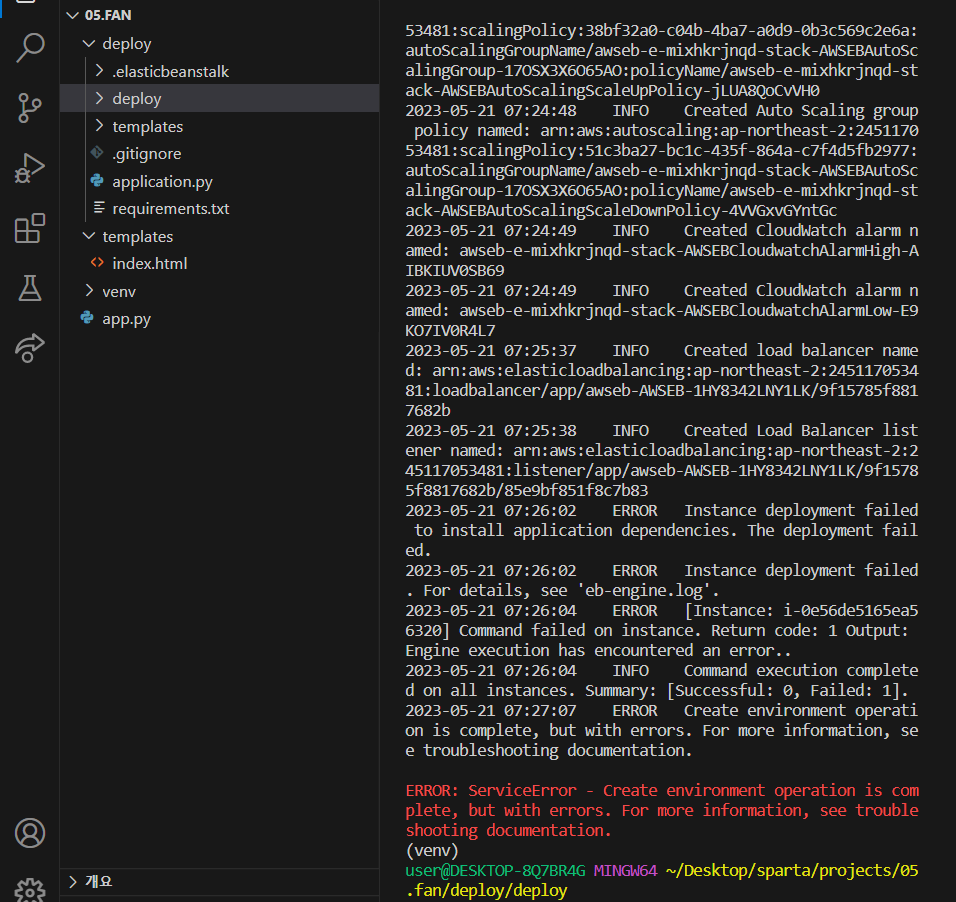
2023-05-21 07:26:02 ERROR Instance deployment failed to install application dependencies. The deployment failed.
2023-05-21 07:26:02 ERROR Instance deployment failed. For details, see 'eb-engine.log'.
2023-05-21 07:26:04 ERROR [Instance: i-0e56de5165ea56320] Command failed on instance. Return code: 1 Output:
Engine execution has encountered an error..
2023-05-21 07:26:04 INFO Command execution completed on all instances. Summary: [Successful: 0, Failed: 1].
2023-05-21 07:27:07 ERROR Create environment operation is complete, but with errors. For more information, see troubleshooting documentation.
ERROR: ServiceError - Create environment operation is complete, but with errors. For more information, see troubleshooting documentation.
(venv)
user@DESKTOP-8Q7BR4G MINGW64 ~/Desktop/sparta/projects/05.fan/deploy/deploy


