


수정을 누르면 팝업이 뜨면서 수정 창으로 이동해 데이터를 전부 받는 거 까지 완료 했는데
그것을 출력하려 temp_html을 작성했는데 확면에 출력이 되질 않습니다..
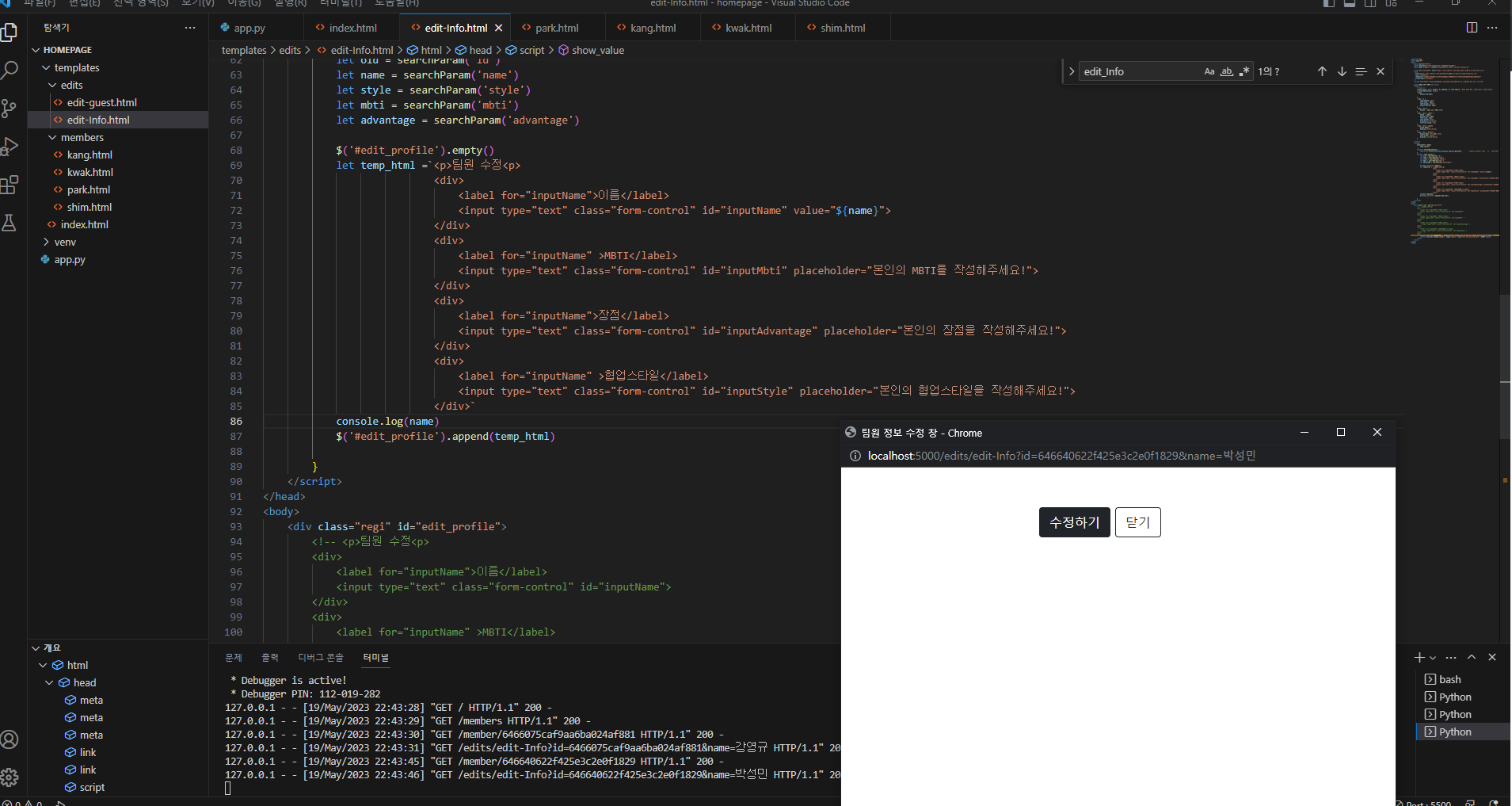
작성한 코드 및 에러 메세지
<!DOCTYPE html>
<html lang="KR">
<head>
<meta charset="UTF-8">
<meta http-equiv="X-UA-Compatible" content="IE=edge">
<meta name="viewport" content="width=device-width, initial-scale=1.0">
<link rel="stylesheet" href="https://cdn.jsdelivr.net/npm/reset-css@5.0.1/reset.min.css">
<link
href="https://cdn.jsdelivr.net/npm/bootstrap@5.0.2/dist/css/bootstrap.min.css"
rel="stylesheet"
integrity="sha384-EVSTQN3/azprG1Anm3QDgpJLIm9Nao0Yz1ztcQTwFspd3yD65VohhpuuCOmLASjC"
crossorigin="anonymous"
/>
<script src="https://ajax.googleapis.com/ajax/libs/jquery/3.5.1/jquery.min.js"></script>
<title>팀원 정보 수정 창</title>
<style>
/* 공통 */
*{list-style: none; margin: 0; padding: 0; font-family: 'Noto Sans KR', sans-serif !important;}
a {text-decoration: none;}
.regi{
margin-top:30px;
}
.regi > p {
font-weight: bold;
font-size : 40px;
text-align: center;
margin-bottom: 30px;
}
.regi > div {
margin : 20px auto 20px auto;
}
.regi > div > label {
width : 150px;
margin-left: 20px;
font-size: 20px;
font-weight: bold;
display:inline-block;
vertical-align: top;
}
.regi > div > input{
width:500px;
display:inline-block;
}
.regi > div > button {
margin:20px auto 20px auto;
text-align: center;
display: inline-block;
}
</style>
<script>
$(document).ready(
show_value()
)
function searchParam(key) {
return new URLSearchParams(location.search).get(key); //getAll사용하는 상황은 같은 id의 값이 여러개 일때 그걸 배열로 반환하기 위해서 사용 한다!
}
function show_value() {
let oid = searchParam('id')
let name = searchParam('name')
let style = searchParam('style')
let mbti = searchParam('mbti')
let advantage = searchParam('advantage')
$('#edit_profile').empty()
let temp_html =`<p>팀원 수정<p>
<div>
<label for="inputName">이름</label>
<input type="text" class="form-control" id="inputName" value="${name}">
</div>
<div>
<label for="inputName" >MBTI</label>
<input type="text" class="form-control" id="inputMbti" placeholder="본인의 MBTI를 작성해주세요!">
</div>
<div>
<label for="inputName">장점</label>
<input type="text" class="form-control" id="inputAdvantage" placeholder="본인의 장점을 작성해주세요!">
</div>
<div>
<label for="inputName" >협업스타일</label>
<input type="text" class="form-control" id="inputStyle" placeholder="본인의 협업스타일을 작성해주세요!">
</div>`
console.log(name)
$('#edit_profile').append(temp_html)
}
</script>
</head>
<body>
<div class="regi" id="edit_profile">
<!-- <p>팀원 수정<p>
<div>
<label for="inputName">이름</label>
<input type="text" class="form-control" id="inputName">
</div>
<div>
<label for="inputName" >MBTI</label>
<input type="text" class="form-control" id="inputMbti" >
</div>
<div>
<label for="inputName">장점</label>
<input type="text" class="form-control" id="inputAdvantage" >
</div>
<div>
<label for="inputName" >협업스타일</label>
<input type="text" class="form-control" id="inputStyle" >
</div> -->
<div>
<button onclick="Edit_Info()" type="button" class="btn btn-dark" style="margin-left: 250px;">수정하기</button>
<button onclick="window.close()" type="submit" class="btn btn-outline-dark" >닫기</button>
</div>
</div>
</body>
</html>


