


* 겪고 있는 문제 상황을 최대한 자세하게 작성해주세요.
* 문제 해결을 위해 어떤 시도를 해보았는지 구체적으로 함께 알려주세요.
5-13강의 eb create myweb 입력 후 오류가 떠서 문의 드립니다.
보고 계신 화면 전체를 캡처해 주시면, 튜터님들이 빠르게 상황을 이해할 수 있어요.
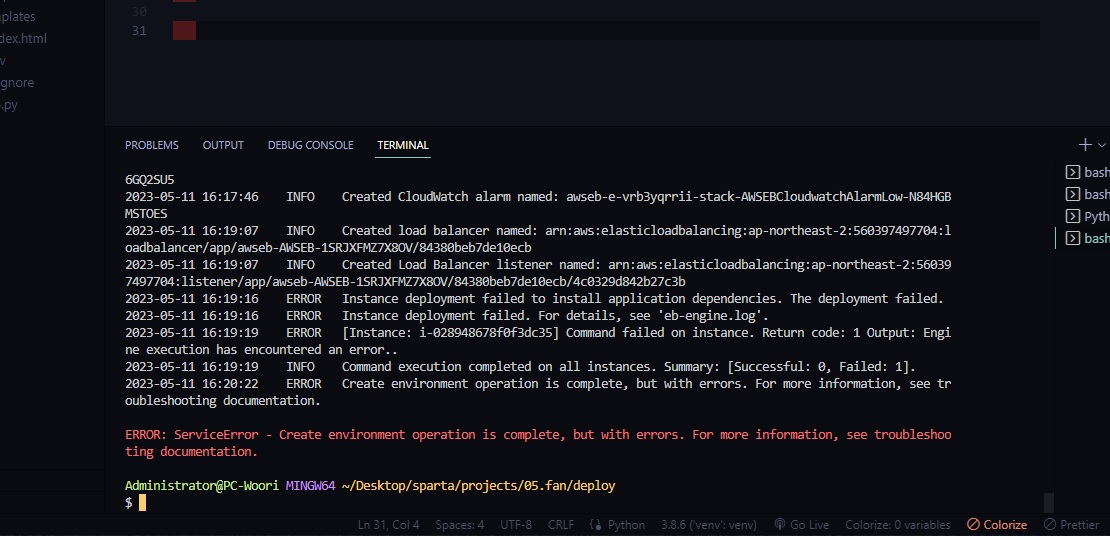
작성한 코드 및 에러 메세지
오류 발생 시, 작성한 코드 전체와 에러 메시지를 첨부해 주세요.
Tip 1) </> 아이콘을 눌러 코드박스를 만들어 보세요.
Tip 2) Ctrl+A(맥의 경우 Command+A) 단축키로 코드를 한 번에 선택할 수 있어요!
Administrator@PC-Woori MINGW64 ~/Desktop/sparta/projects/05.fan
$ cd deploy
Administrator@PC-Woori MINGW64 ~/Desktop/sparta/projects/05.fan/deploy
$ eb init
Select a default region
1) us-east-1 : US East (N. Virginia)
2) us-west-1 : US West (N. California)
3) us-west-2 : US West (Oregon)
4) eu-west-1 : EU (Ireland)
5) eu-central-1 : EU (Frankfurt)
6) ap-south-1 : Asia Pacific (Mumbai)
7) ap-southeast-1 : Asia Pacific (Singapore)
8) ap-southeast-2 : Asia Pacific (Sydney)
9) ap-northeast-1 : Asia Pacific (Tokyo)
10) ap-northeast-2 : Asia Pacific (Seoul)
11) sa-east-1 : South America (Sao Paulo)
12) cn-north-1 : China (Beijing)
13) cn-northwest-1 : China (Ningxia)
14) us-east-2 : US East (Ohio)
15) ca-central-1 : Canada (Central)
16) eu-west-2 : EU (London)
17) eu-west-3 : EU (Paris)
18) eu-north-1 : EU (Stockholm)
19) eu-south-1 : EU (Milano)
20) ap-east-1 : Asia Pacific (Hong Kong)
21) me-south-1 : Middle East (Bahrain)
22) il-central-1 : Middle East (Israel)
23) af-south-1 : Africa (Cape Town)
24) ap-southeast-3 : Asia Pacific (Jakarta)
25) ap-northeast-3 : Asia Pacific (Osaka)
(default is 3): 10
Select an application to use
1) 05.fan
2) [ Create new Application ]
(default is 2):
Enter Application Name
(default is "deploy"):
Application deploy has been created.
It appears you are using Python. Is this correct?
(Y/n): y
Select a platform branch.
1) Python 3.11 running on 64bit Amazon Linux 2023
2) Python 3.9 running on 64bit Amazon Linux 2023
3) Python 3.8 running on 64bit Amazon Linux 2
4) Python 3.7 running on 64bit Amazon Linux 2
(default is 1):
Cannot setup CodeCommit because there is no Source Control setup, continuing with initialization
Do you want to set up SSH for your instances?
(Y/n): y
Select a keypair.
1) aws-eb
2) [ Create new KeyPair ]
(default is 1): 2
Type a keypair name.
(Default is aws-eb2):
Generating public/private rsa key pair.
Enter passphrase (empty for no passphrase):
Enter same passphrase again:
Your identification has been saved in C:\Users\Administrator\.ssh\aws-eb2
Your public key has been saved in C:\Users\Administrator\.ssh\aws-eb2.pub
The key fingerprint is:
SHA256:UZN8y8OC4xt0W2zMdKeKhHmUkpTEw4gfziQVsN+kDBI aws-eb2
The key's randomart image is:
+---[RSA 3072]----+
| E .+oBo+oo |
| .o.+ B.=.o . .|
| . o* .oB O o o |
| . +++*.= @ . |
| +oS= * o |
| o o . |
| o |
| . |
| |
+----[SHA256]-----+
WARNING: Uploaded SSH public key for "aws-eb2" into EC2 for region ap-northeast-2.
Administrator@PC-Woori MINGW64 ~/Desktop/sparta/projects/05.fan/deploy
$ eb create myweb
Creating application version archive "app-230512_011636103177".
Uploading deploy/app-230512_011636103177.zip to S3. This may take a while.
Upload Complete.
Environment details for: myweb
Application name: deploy
Region: ap-northeast-2
Deployed Version: app-230512_011636103177
Environment ID: e-vrb3yqrrii
Platform: arn:aws:elasticbeanstalk:ap-northeast-2::platform/Python 3.11 running on 64bit Amazon Linux 2023/4.0.0
Tier: WebServer-Standard-1.0
CNAME: UNKNOWN
Updated: 2023-05-11 16:16:39.182000+00:00
Printing Status:
2023-05-11 16:16:37 INFO createEnvironment is starting.
2023-05-11 16:16:39 INFO Using elasticbeanstalk-ap-northeast-2-560397497704 as Amazon S3 storage bucket for environment data.
2023-05-11 16:17:00 INFO Created security group named: sg-002926baa65735d8d
2023-05-11 16:17:15 INFO Created security group named: awseb-e-vrb3yqrrii-stack-AWSEBSecurityGroup-14FYMBW0IXI072023-05-11 16:17:15 INFO Created target group named: arn:aws:elasticloadbalancing:ap-northeast-2:560397497704:targetgroup/awseb-AWSEB-BMVYDAYENAOS/fe932dd6d815cfb6
2023-05-11 16:17:15 INFO Created Auto Scaling launch configuration named: awseb-e-vrb3yqrrii-stack-AWSEBAutoScalingLaunchConfiguration-CD3vDQrcX1Or
2023-05-11 16:17:31 INFO Created Auto Scaling group named: awseb-e-vrb3yqrrii-stack-AWSEBAutoScalingGroup-C5HDTVPZRA4B
2023-05-11 16:17:31 INFO Waiting for EC2 instances to launch. This may take a few minutes.
2023-05-11 16:17:46 INFO Created Auto Scaling group policy named: arn:aws:autoscaling:ap-northeast-2:560397497704:scalingPolicy:bec0dd80-39eb-44f2-b75a-ef10cbe93d84:autoScalingGroupName/awseb-e-vrb3yqrrii-stack-AWSEBAutoScalingGroup-C5HDTVPZRA4B:policyName/awseb-e-vrb3yqrrii-stack-AWSEBAutoScalingScaleUpPolicy-BHjlZhWnYw14
2023-05-11 16:17:46 INFO Created Auto Scaling group policy named: arn:aws:autoscaling:ap-northeast-2:560397497704:scalingPolicy:dcb35871-b7a8-431e-bac1-499ddb916c59:autoScalingGroupName/awseb-e-vrb3yqrrii-stack-AWSEBAutoScalingGroup-C5HDTVPZRA4B:policyName/awseb-e-vrb3yqrrii-stack-AWSEBAutoScalingScaleDownPolicy-BndQBDj49wh3
2023-05-11 16:17:46 INFO Created CloudWatch alarm named: awseb-e-vrb3yqrrii-stack-AWSEBCloudwatchAlarmHigh-OGX636GQ2SU5
2023-05-11 16:17:46 INFO Created CloudWatch alarm named: awseb-e-vrb3yqrrii-stack-AWSEBCloudwatchAlarmLow-N84HGBMSTOES
2023-05-11 16:19:07 INFO Created load balancer named: arn:aws:elasticloadbalancing:ap-northeast-2:560397497704:loadbalancer/app/awseb-AWSEB-1SRJXFMZ7X8OV/84380beb7de10ecb
2023-05-11 16:19:07 INFO Created Load Balancer listener named: arn:aws:elasticloadbalancing:ap-northeast-2:560397497704:listener/app/awseb-AWSEB-1SRJXFMZ7X8OV/84380beb7de10ecb/4c0329d842b27c3b
2023-05-11 16:19:16 ERROR Instance deployment failed to install application dependencies. The deployment failed.
2023-05-11 16:19:16 ERROR Instance deployment failed. For details, see 'eb-engine.log'.
2023-05-11 16:19:19 ERROR [Instance: i-028948678f0f3dc35] Command failed on instance. Return code: 1 Output: Engine execution has encountered an error..
2023-05-11 16:19:19 INFO Command execution completed on all instances. Summary: [Successful: 0, Failed: 1].
2023-05-11 16:20:22 ERROR Create environment operation is complete, but with errors. For more information, see troubleshooting documentation.
ERROR: ServiceError - Create environment operation is complete, but with errors. For more information, see troubleshooting documentation.
Administrator@PC-Woori MINGW64 ~/Desktop/sparta/projects/05.fan/deploy
$


