커뮤니티

포인트
쿠폰
내 강의실
국비 신청 내역
증명서
계정
로그아웃
학습 질문
개발 일지
나의 활동
답변 완료
AWS 에서 명령어를 칠때 액세스 키를 잘못 입력하였는데 수정을 어떻게 해야하나요..?
undefined주차


권*원
댓글
22
・
추천
0
・
조회수
22
조회수
22
답변 완료
* 겪고 있는 문제 상황을 최대한 자세하게 작성해주세요.
* 문제 해결을 위해 어떤 시도를 해보았는지 구체적으로 함께 알려주세요.
팬명록을 진행을 하고 AWS에 배포하는일만 남았습니다.. AWS 처음 이용하는것이여서 root 계정의 액세스키를 입력하고 명령어를 입력하였습니다..
- 터미널 준비하기 -
mkdir deploy
cp app.py deploy/application.py
cp -r templates deploy/templates
pip freeze > deploy/requirements.txt
cd deploy
- appication.py 세팅하기 -
application = app = Flask(__name__)
app.run()
- 패키지 설치하기 -
pip install awsebcli
- 보안 자격증명 -
eb init
- 초기 설정 -
eb create myweb
처음 생성하고 할때는 잘 된것 같아서 Elastic Beanstalk 에 확인을 해보니 애플리케이션이 생성이 안되어 있었습니다.
결국엔 혼자 3번 다시 파일을 삭제하고 재생성 하고 하였지만 결국엔 안되서 문의드립니다 바쁠실텐데 구원을 해주시면 감사하겠습니다 :)
보고 계신 화면 전
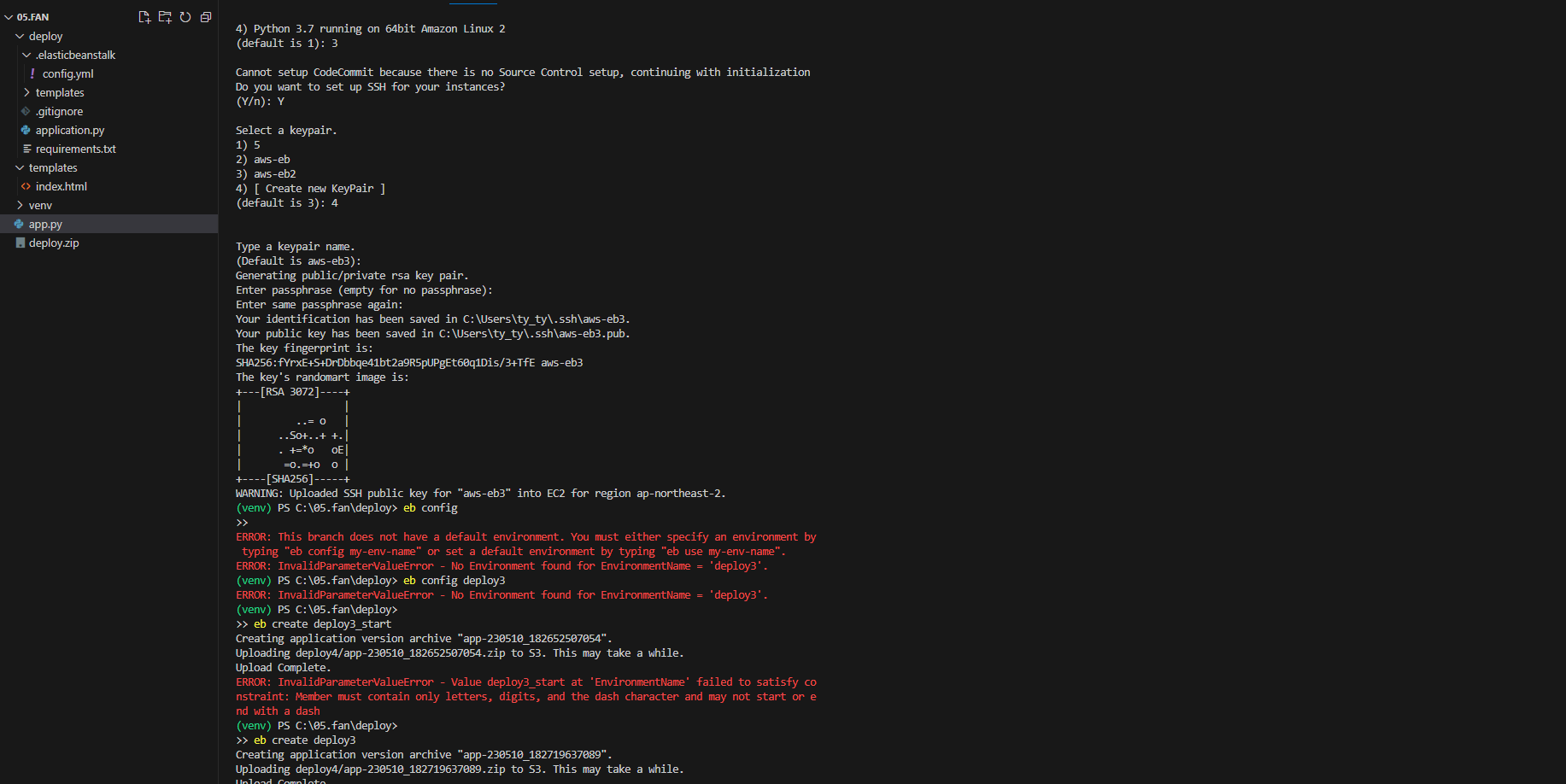
체를 캡처해 주시면, 튜터님들이 빠르게 상황을 이해할 수 있어요.
4) Python 3.7 running on 64bit Amazon Linux 2
(default is 1): 3


Cannot setup CodeCommit because there is no Source Control setup, continuing with initialization
Do you want to set up SSH for your instances?
(Y/n): Y


Select a keypair.
1) 5
2) aws-eb
3) aws-eb2
4) [ Create new KeyPair ]
(default is 3): 4


Type a keypair name.
(Default is aws-eb3):
Generating public/private rsa key pair.
Enter passphrase (empty for no passphrase):
Enter same passphrase again:
Your identification has been saved in C:\Users\ty_ty\.ssh\aws-eb3.
Your public key has been saved in C:\Users\ty_ty\.ssh\aws-eb3.pub.
The key fingerprint is:
SHA256:fYrxE+S+DrDbbqe41bt2a9R5pUPgEt60q1Dis/3+TfE aws-eb3
The key's randomart image is:
+---[RSA 3072]----+
|                 |
|         ..= o   |
|      ..So+..+ +.|
|      . +=*o   oE|
|       =o.=+o  o |
+----[SHA256]-----+
WARNING: Uploaded SSH public key for "aws-eb3" into EC2 for region ap-northeast-2.
(venv) PS C:\05.fan\deploy> eb config
>>
ERROR: This branch does not have a default environment. You must either specify an environment by typing "eb config my-env-name" or set a default environment by typing "eb use my-env-name".
ERROR: InvalidParameterValueError - No Environment found for EnvironmentName = 'deploy3'.
(venv) PS C:\05.fan\deploy> eb config deploy3
ERROR: InvalidParameterValueError - No Environment found for EnvironmentName = 'deploy3'.
(venv) PS C:\05.fan\deploy>
>> eb create deploy3_start
Creating application version archive "app-230510_182652507054".
Uploading deploy4/app-230510_182652507054.zip to S3. This may take a while.
Upload Complete.
ERROR: InvalidParameterValueError - Value deploy3_start at 'EnvironmentName' failed to satisfy constraint: Member must contain only letters, digits, and the dash character and may not start or end with a dash
(venv) PS C:\05.fan\deploy>
>> eb create deploy3
Creating application version archive "app-230510_182719637089".
Uploading deploy4/app-230510_182719637089.zip to S3. This may take a while.
Upload Complete.
Environment details for: deploy3
  Application name: deploy4
  Region: ap-northeast-2
  Deployed Version: app-230510_182719637089
  Environment ID: e-fu9ye3driq
  Platform: arn:aws:elasticbeanstalk:ap-northeast-2::platform/Python 3.8 running on 64bit Amazon Linux 2/3.5.2
  Tier: WebServer-Standard-1.0
  CNAME: UNKNOWN
  Updated: 2023-05-10 09:27:21.001000+00:00
Printing Status:
2023-05-10 09:27:19    INFO    createEnvironment is starting.
2023-05-10 09:27:21    INFO    Using elasticbeanstalk-ap-northeast-2-469481561264 as Amazon S3 storage bucket for environment data.
2023-05-10 09:27:40    INFO    Created security group named: sg-0192f7f8e9dc67fe8
2023-05-10 09:27:56    INFO    Created security group named: awseb-e-fu9ye3driq-stack-AWSEBSecurityGroup-1077WDN124P0S
2023-05-10 09:27:56    INFO    Created target group named: arn:aws:elasticloadbalancing:ap-northeast-2:469481561264:targetgroup/awseb-AWSEB-2VZ1PANNVMNY/676dd834ca8e4c9d
2023-05-10 09:27:56    INFO    Created Auto Scaling launch configuration named: awseb-e-fu9ye3driq-stack-AWSEBAutoScalingLaunchConfiguration-RKoRpaWK8wXP
2023-05-10 09:28:27    INFO    Created Auto Scaling group named: awseb-e-fu9ye3driq-stack-AWSEBAutoScalingGroup-1PDI7B6X3XGZF
2023-05-10 09:28:27    INFO    Waiting for EC2 instances to launch. This may take a few minutes.
2023-05-10 09:28:42    INFO    Created Auto Scaling group policy named: arn:aws:autoscaling:ap-northeast-2:469481561264:scalingPolicy:386ae89e-2145-4229-8faf-19c1d0a2ba08:autoScalingGroupName/awseb-e-fu9ye3driq-stack-AWSEBAut
oScalingGroup-1PDI7B6X3XGZF:policyName/awseb-e-fu9ye3driq-stack-AWSEBAutoScalingScaleDownPolicy-m4PPOR3NIO1B
2023-05-10 09:28:42    INFO    Created Auto Scaling group policy named: arn:aws:autoscaling:ap-northeast-2:469481561264:scalingPolicy:efb88d4d-f6b2-48a8-a702-42a591636e61:autoScalingGroupName/awseb-e-fu9ye3driq-stack-AWSEBAut
oScalingGroup-1PDI7B6X3XGZF:policyName/awseb-e-fu9ye3driq-stack-AWSEBAutoScalingScaleUpPolicy-CJ6a2jMNdVVA
2023-05-10 09:28:42    INFO    Created CloudWatch alarm named: awseb-e-fu9ye3driq-stack-AWSEBCloudwatchAlarmHigh-1PSBJ91VY1S5J
2023-05-10 09:28:42    INFO    Created CloudWatch alarm named: awseb-e-fu9ye3driq-stack-AWSEBCloudwatchAlarmLow-14ZXAT9TWDJEA
2023-05-10 09:29:48    INFO    Created load balancer named: arn:aws:elasticloadbalancing:ap-northeast-2:469481561264:loadbalancer/app/awseb-AWSEB-R4BTNZQKIHFP/9b2156700dbb852c
2023-05-10 09:29:48    INFO    Created Load Balancer listener named: arn:aws:elasticloadbalancing:ap-northeast-2:469481561264:listener/app/awseb-AWSEB-R4BTNZQKIHFP/9b2156700dbb852c/2bc9a5ad0bf4ffee
2023-05-10 09:29:55    ERROR   Instance deployment failed to install application dependencies. The deployment failed.
2023-05-10 09:29:55    ERROR   Instance deployment failed. For details, see 'eb-engine.log'.
2023-05-10 09:29:59    ERROR   [Instance: i-0b8611413932b5727] Command failed on instance. Return code: 1 Output: Engine execution has encountered an error..
2023-05-10 09:29:59    INFO    Command execution completed on all instances. Summary: [Successful: 0, Failed: 1].
2023-05-10 09:31:01    ERROR   Create environment operation is complete, but with errors. For more information, see troubleshooting documentation.


ERROR: ServiceError - Create environment operation is complete, but with errors. For more information, see troubleshooting documentation.
(venv) PS C:\05.fan\deploy>
 *  History restored


(venv) PS C:\05.fan>


댓글 알림
