


*안 겪고 있는 문제 상황을 최대한 자세하게 작성해주세요.
* 문제 해결을 위해 어떤 시도를 해보았는지 구체적으로 함께 알려주세요.
안녕하세요. 네이버영화 서비스가 종료되고 네이버영화검색에 통합되어 주소가 변경되었습니다. 강의 내용을 참고하여 코드를 작성해보았으나 영화별 주소를 가져오는 것은 어떻게 해야 할 지 막힘니다. 3주차 크롤링은 바뀐 네이버영화통합검색을 기준으로 했는데 이번 4주차 나홀로 메모장에서 영화별 주소가져오는 것은 어디서 주소를 가져와야 하나요?
보고
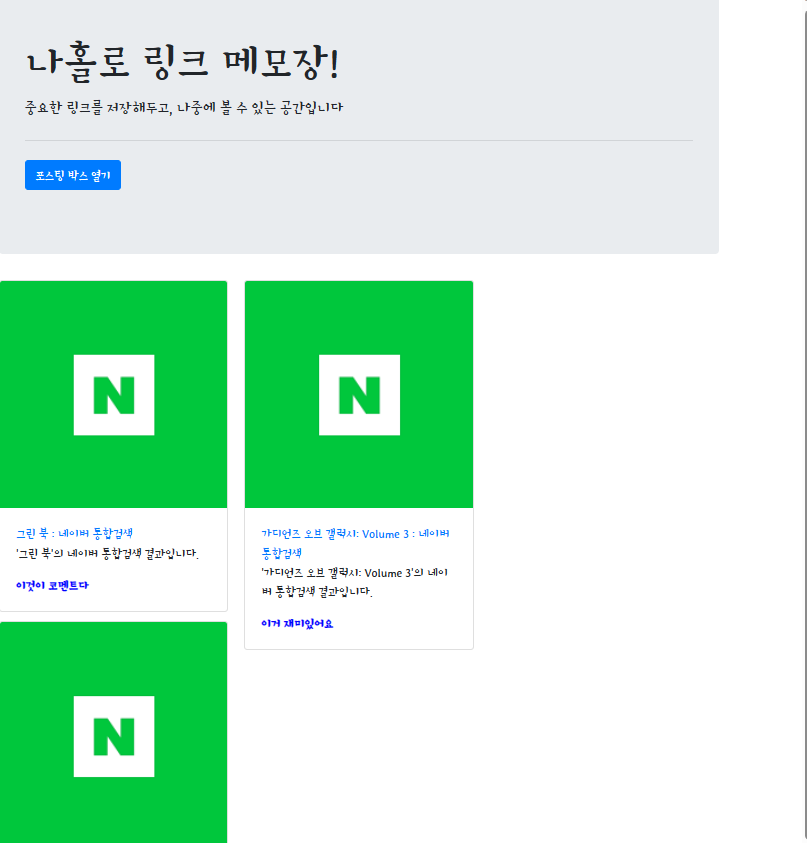
계신 화면 전체를 캡처해 주시면, 튜터님들이 빠르게 상황을 이해할 수 있어요.
작성한 코드 및 에러 메세지
app.py
from flask import Flask, render_template, jsonify, request
app = Flask(__name__)
import requests
from bs4 import BeautifulSoup
from pymongo import MongoClient
client = MongoClient('localhost', 27017)
db = client.dbsparta
## HTML을 주는 부분
@app.route('/')
def home():
return render_template('index.html')
@app.route('/memo', methods=['GET'])
def listing():
articles = list(db.articles.find({}, {'_id': False}))
return jsonify({'all_articles':articles})
## API 역할을 하는 부분
@app.route('/memo', methods=['POST'])
def saving():
url_receive = request.form['url_give']
comment_receive = request.form['comment_give']
headers = {
'User-Agent': 'Mozilla/5.0 (Windows NT 10.0; Win64; x64)AppleWebKit/537.36 (KHTML, like Gecko) Chrome/73.0.3683.86 Safari/537.36'}
data = requests.get(url_receive, headers=headers)
soup = BeautifulSoup(data.text, 'html.parser')
title = soup.select_one('meta[property="og:title"]')['content']
image = soup.select_one('meta[property="og:image"]')['content']
desc = soup.select_one('meta[property="og:description"]')['content']
doc = {
'title':title,
'image':image,
'desc':desc,
'url':url_receive,
'comment':comment_receive
}
db.articles.insert_one(doc)
return jsonify({'msg':'저장이 완료되었습니다!'})
if __name__ == '__main__':
app.run('0.0.0.0',port=5000,debug=True)
=====================================================================
index.html
<!Doctype html>
<html lang="ko">
<head>
<!-- Required meta tags -->
<meta charset="utf-8">
<meta name="viewport" content="width=device-width, initial-scale=1, shrink-to-fit=no">
<!-- Bootstrap CSS -->
<link rel="stylesheet" href="https://maxcdn.bootstrapcdn.com/bootstrap/4.0.0/css/bootstrap.min.css"
integrity="sha384-Gn5384xqQ1aoWXA+058RXPxPg6fy4IWvTNh0E263XmFcJlSAwiGgFAW/dAiS6JXm"
crossorigin="anonymous">
<!-- JS -->
<script src="https://ajax.googleapis.com/ajax/libs/jquery/3.5.1/jquery.min.js"></script>
<script src="https://cdnjs.cloudflare.com/ajax/libs/popper.js/1.12.9/umd/popper.min.js"
integrity="sha384-ApNbgh9B+Y1QKtv3Rn7W3mgPxhU9K/ScQsAP7hUibX39j7fakFPskvXusvfa0b4Q"
crossorigin="anonymous"></script>
<!-- 구글폰트 -->
<link href="https://fonts.googleapis.com/css?family=Stylish&display=swap" rel="stylesheet">
<title>스파르타코딩클럽 | 나홀로 메모장</title>
<!-- style -->
<style type="text/css">
* {
font-family: "Stylish", sans-serif;
}
.wrap {
width: 900px;
margin: auto;
}
.comment {
color: blue;
font-weight: bold;
}
#post-box {
width: 500px;
margin: 20px auto;
padding: 50px;
border: black solid;
border-radius: 5px;
}
</style>
<script>
$(document).ready(function () {
showArticles();
});
function openClose() {
if ($("#post-box").css("display") == "block") {
$("#post-box").hide();
$("#btn-post-box").text("포스팅 박스 열기");
} else {
$("#post-box").show();
$("#btn-post-box").text("포스팅 박스 닫기");
}
}
function postArticle() {
let url = $('#post-url').val()
let comment = $('#post-comment').val()
$.ajax({
type: "POST",
url: "/memo",
data: {url_give:url, comment_give:comment},
success: function (response) { // 성공하면
alert(response["msg"]);
window.location.reload()
}
})
}
function showArticles() {
$.ajax({
type: "GET",
url: "/memo",
data: {},
success: function (response) {
let articles = response['all_articles']
for(let i = 0; i < articles.length; i++){
let title = articles[i]['title']
let image = articles[i]['image']
let url = articles[i]['url']
let desc = articles[i]['desc']
let comment = articles[i]['comment']
let temp_html = ` <div class="card">
<img class="card-img-top"
src="${image}"
alt="Card image cap">
<div class="card-body">
<a target="_blank" href="#" class="card-title">${title}</a>
<p class="card-text">${desc}</p>
<p class="card-text comment">${comment}</p>
</div>
</div>`
$('#cards-box').append(temp_html)
}
}
})
}
</script>
</head>
<body>
<div class="wrap">
<div class="jumbotron">
<h1 class="display-4">나홀로 링크 메모장!</h1>
<p class="lead">중요한 링크를 저장해두고, 나중에 볼 수 있는 공간입니다</p>
<hr class="my-4">
<p class="lead">
<button onclick="openClose()" id="btn-post-box" type="button" class="btn btn-primary">포스팅 박스 열기
</button>
</p>
</div>
<div id="post-box" class="form-post" style="display:none">
<div>
<div class="form-group">
<label for="post-url">아티클 URL</label>
<input id="post-url" class="form-control" placeholder="">
</div>
<div class="form-group">
<label for="post-comment">간단 코멘트</label>
<textarea id="post-comment" class="form-control" rows="2"></textarea>
</div>
<button type="button" class="btn btn-primary" onclick="postArticle()">기사저장</button>
</div>
</div>
<div id="cards-box" class="card-columns">
</div>
</div>
</body>
</html>
오류 발생 시, 작성한 코드 전체와 에러 메시지를 첨부해 주세요.
Tip 1) </> 아이콘을 눌러 코드박스를 만들어 보세요.
Tip 2) Ctrl+A(맥의 경우 Command+A) 단축키로 코드를 한 번에 선택할 수 있어요!


