커뮤니티

포인트
쿠폰
내 강의실
국비 신청 내역
증명서
계정
로그아웃
학습 질문
개발 일지
나의 활동
답변 완료
eb create myweb 에러
undefined주차


E*******)
댓글
6
・
추천
0
・
조회수
27
조회수
27
답변 완료
* 겪고 있는 문제 상황을 최대한 자세하게 작성해주세요.
* 문제 해결을 위해 어떤 시도를 해보았는지 구체적으로 함께 알려주세요.
eb create myweb 실행 시 에러 발생
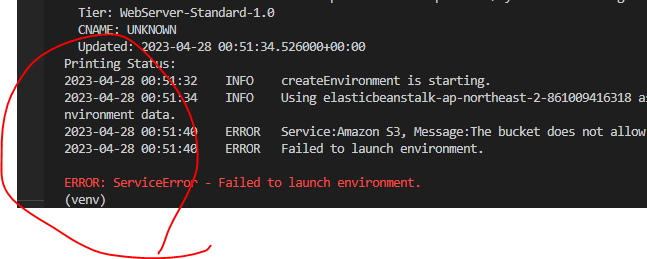
/Desktop/sparta/projects/05.fan/deploy (master)
$ eb init


Select a default region
1) us-east-1 : US East (N. Virginia)
2) us-west-1 : US West (N. California)
3) us-west-2 : US West (Oregon)
4) eu-west-1 : EU (Ireland)
5) eu-central-1 : EU (Frankfurt)
6) ap-south-1 : Asia Pacific (Mumbai)
7) ap-southeast-1 : Asia Pacific (Singapore)
8) ap-southeast-2 : Asia Pacific (Sydney)
9) ap-northeast-1 : Asia Pacific (Tokyo)
10) ap-northeast-2 : Asia Pacific (Seoul)
11) sa-east-1 : South America (Sao Paulo)
12) cn-north-1 : China (Beijing)
13) cn-northwest-1 : China (Ningxia)
14) us-east-2 : US East (Ohio)
15) ca-central-1 : Canada (Central)
16) eu-west-2 : EU (London)
17) eu-west-3 : EU (Paris)
18) eu-north-1 : EU (Stockholm)
19) eu-south-1 : EU (Milano)
20) ap-east-1 : Asia Pacific (Hong Kong)
21) me-south-1 : Middle East (Bahrain)
22) il-central-1 : Middle East (Israel)
23) af-south-1 : Africa (Cape Town)
24) ap-southeast-3 : Asia Pacific (Jakarta)
25) ap-northeast-3 : Asia Pacific (Osaka)
(default is 3): 10


You have not yet set up your credentials or your credentials are incorrect
You must provide your credentials.
(aws-access-id): AKIA4Q6BJCB7DJNZ2UCD
(aws-secret-key): 9ihpkwwgCt9BRUUqZIrwa/YMkhRaCxAhU1b8y3B+


Enter Application Name
(default is "deploy"):
Application deploy has been created.


It appears you are using Python. Is this correct?
(Y/n): Y
Select a platform branch.
1) Python 3.8 running on 64bit Amazon Linux 2
2) Python 3.7 running on 64bit Amazon Linux 2
(default is 1):


Cannot setup CodeCommit because there is no Source Control setup, continuing with initialization
Do you want to set up SSH for your instances?
(Y/n): Y


Type a keypair name.
(Default is aws-eb):
Generating public/private rsa key pair.
Enter passphrase (empty for no passphrase):
Enter same passphrase again:
Your identification has been saved in C:\Users\sktl50455\.ssh\aws-eb
Your public key has been saved in C:\Users\sktl50455\.ssh\aws-eb.pub
The key fingerprint is:
SHA256:KEXLLo0himstOUc7W0C/4T8FeznzmGbl/R4snOiynw8 aws-eb
The key's randomart image is:
+---[RSA 3072]----+
|      .          |
|     o .         |
|  ... +          |
|.....* o         |
|o  o+o+ S .      |
| .+ +oo. * .o o  |
|.= = +  o OE.+ o |
|. + + .. *.oo.. .|
|   .   .+.++..oo |
+----[SHA256]-----+
WARNING: Uploaded SSH public key for "aws-eb" into EC2 for region ap-northeast-2.
(venv)
SKTL50455@P50455-01 MINGW64 ~/Desktop/sparta/projects/05.fan/deploy (master)
$ eb create myweb
Creating application version archive "app-230428_095131690322".
Uploading deploy/app-230428_095131690322.zip to S3. This may take a while.
Upload Complete.
Environment details for: myweb
  Application name: deploy
  Region: ap-northeast-2
  Deployed Version: app-230428_095131690322
  Environment ID: e-zb398bcdtp
  Platform: arn:aws:elasticbeanstalk:ap-northeast-2::platform/Python 3.8 running on 64bit Amazon Linux 2/3.5.1
  Tier: WebServer-Standard-1.0
  CNAME: UNKNOWN
  Updated: 2023-04-28 00:51:34.526000+00:00
Printing Status:
2023-04-28 00:51:32    INFO    createEnvironment is starting.
2023-04-28 00:51:34    INFO    Using elasticbeanstalk-ap-northeast-2-861009416318 as Amazon S3 storage bucket for environment data.
2023-04-28 00:51:40    ERROR   Service:Amazon S3, Message:The bucket does not allow ACLs
2023-04-28 00:51:40    ERROR   Failed to launch environment.


ERROR: ServiceError - Failed to launch environment.


댓글 알림
