


* 겪고 있는 문제 상황을 최대한 자세하게 작성해주세요.
* 문제 해결을 위해 어떤 시도를 해보았는지 구체적으로 함께 알려주세요.
자바 코딩을 복붙해 온 후
onmouseover="showText(1)"
onmouseout="hideText(1)"
onclick="alertText(1)"
이걸 말씀하신 자리에 넣었는데 코딩이 안 된 것 같아요.
글자가 햐안색이고 사진에도 코딩한 글씨가 사진 왼쪽 위에 그대로 뜨네요.
밑에 사진 설명하는 글 안 보이게 하는 것까지 했는데 마우스를 갖다대도 안 보여요.
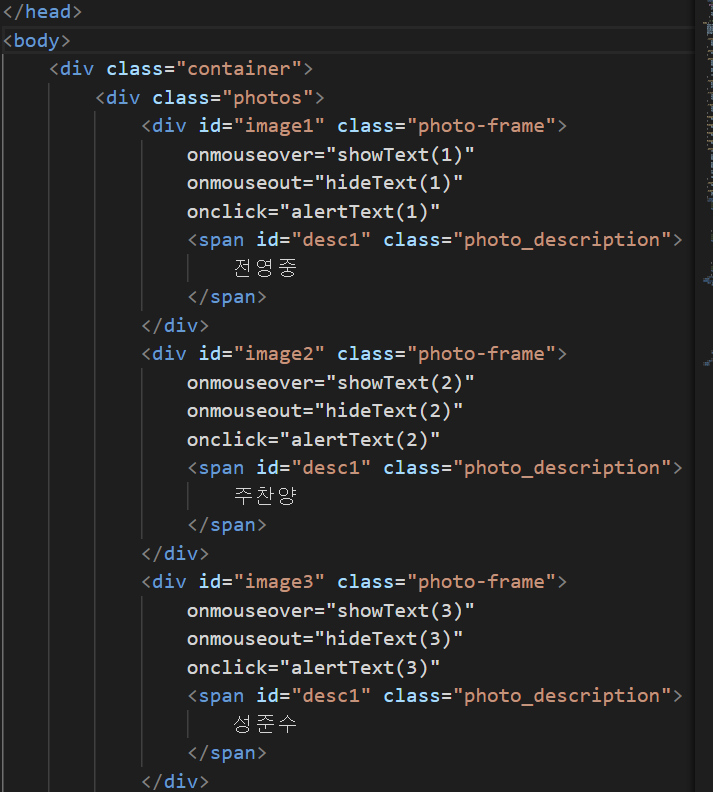
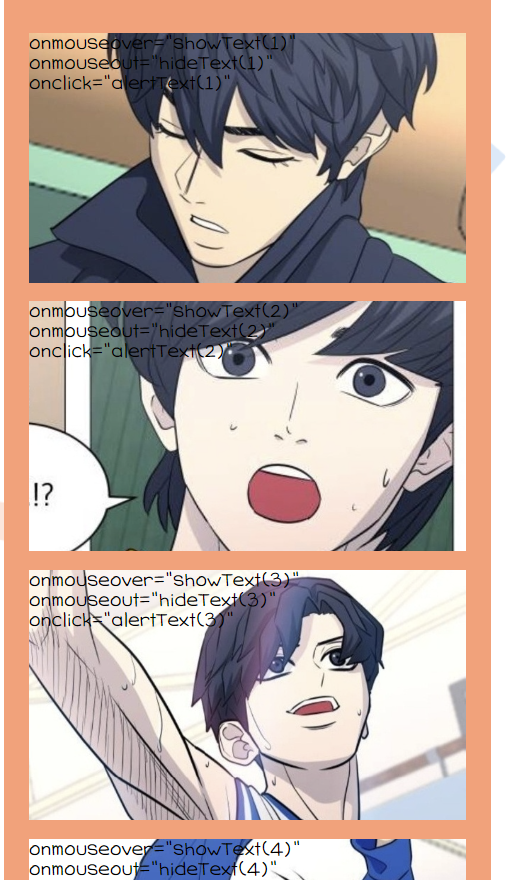
<!DOCTYPE html>
<html lang="en">
<head>
<meta charset="UTF-8">
<meta http-equiv="X-UA-Compatible" content="IE=edge">
<meta name="viewport" content="width=device-width, initial-scale=1.0">
<title>Document</title>
<style>
/* 이서윤체 폰트 적용을 위한 코드 */
@font-face {
font-family: "LeeSeoyun";
src: url("https://cdn.jsdelivr.net/gh/projectnoonnu/noonfonts_2202-2@1.0/LeeSeoyun.woff")
format("woff");
font-weight: normal;
font-style: normal;
}
/* body태그 자체에 css 요소 부여 */
body {
font-family: "LeeSeoyun";
margin: 0;
display: flex;
justify-content: center;
background-image: url("./background.png");
}
.container {
width: 390px;
background-color: #ff9d73;
height: 100%;
}
.photos {
margin-top: 30px;
}
.photo-frame {
background-color: white;
margin: 15px 20px;
height: 200px;
background-size: cover;
position: relative;
cursor: pointer;
}
.footer {
display: flex;
flex-direction: column;
align-items: center;
}
.f-title{
color: white;
font-size: 25px;
font-weight: 900;
}
.f-date {
color: white;
font-size: 15px;
font-weight: 500;
}
#image1 {
background-image: url('./가비지타임/KakaoTalk_20230423_200750465.jpg')
}
#image2 {
background-image: url('./가비지타임/KakaoTalk_20230423_200750465_01.jpg')
}
#image3 {
background-image: url('./가비지타임/KakaoTalk_20230423_200750465_02.jpg')
}
#image4 {
background-image: url('./가비지타임/KakaoTalk_20230423_200750465_03.jpg')
}
.photo_description {
color: black;
width: fit-content;
padding: 0 20px;
margin-bottom: 10px;
border-radius: 10px;
position: absolute;
bottom: 0;
transform: translate(-50%);
left: 50%;
opacity: 0;
}
.showText {
opacity: 0;
}
.hideText {
opacity: 1;
transition: opacity 0.5s linear;
}
</style>
<script>
// 텍스트가 보여지는 기능
// 1. 몇 번째 사진에 마우스가 올라갔는지 확인(if문)
// 2. 해당 사진을 찾아 hideText class를 지워주고, showText는 삽입해줌
function showText(number) {
if (number === 1) {
document.querySelector("#desc1").classList.remove("hideText");
document.querySelector("#desc1").classList.add("showText");
} else if (number === 2) {
document.querySelector("#desc2").classList.remove("hideText");
document.querySelector("#desc2").classList.add("showText");
} else {
document.querySelector("#desc3").classList.remove("hideText");
document.querySelector("#desc3").classList.add("showText");
}
}
// 텍스트가 감춰지는 기능
// 1. 몇 번째 사진에서 마우스가 벗어났는지 확인(if문)
// 2. 해당 사진을 찾아 shotText class를 지워주고, hideText는 삽입해줌
function hideText(number) {
if (number === 1) {
document.querySelector("#desc1").classList.remove("showText");
document.querySelector("#desc1").classList.add("hideText");
} else if (number === 2) {
document.querySelector("#desc2").classList.remove("showText");
document.querySelector("#desc2").classList.add("hideText");
} else {
document.querySelector("#desc3").classList.remove("showText");
document.querySelector("#desc3").classList.add("hideText");
}
}
// 클릭 기능
// 1. 선택된 사진의 숫자를 가진 텍스트를 alert 형태로 출력해줌
function alertText(number) {
alert(`${number}번째 추억이에요! 눌러주셔서 감사합니다 :)`);
}
</script>
</head>
<body>
<div class="container">
<div class="photos">
<div id="image1" class="photo-frame">
onmouseover="showText(1)"
onmouseout="hideText(1)"
onclick="alertText(1)"
<span id="desc1" class="photo_description">
전영중
</span>
</div>
<div id="image2" class="photo-frame">
onmouseover="showText(2)"
onmouseout="hideText(2)"
onclick="alertText(2)"
<span id="desc1" class="photo_description">
주찬양
</span>
</div>
<div id="image3" class="photo-frame">
onmouseover="showText(3)"
onmouseout="hideText(3)"
onclick="alertText(3)"
<span id="desc1" class="photo_description">
성준수
</span>
</div>
<div id="image4" class="photo-frame">
onmouseover="showText(4)"
onmouseout="hideText(4)"
onclick="alertText(4)"
<span id="desc1" class="photo_description">
박병찬
</span>
</div>
</div>
<div class="footer">
<p class="f-title">Gabbage Time</p>
<p class="f-date">2023.04.23</p>
</div>
</div>
</body>
</html>


