커뮤니티

포인트
쿠폰
내 강의실
국비 신청 내역
증명서
계정
로그아웃
학습 질문
개발 일지
나의 활동
답변 완료
2-3 반응웹 강의 중 질문
undefined주차


이*현
댓글
10
・
추천
0
・
조회수
13
조회수
13
답변 완료
* 겪고 있는 문제 상황을 최대한 자세하게 작성해주세요.
* 문제 해결을 위해 어떤 시도를 해보았는지 구체적으로 함께 알려주세요.
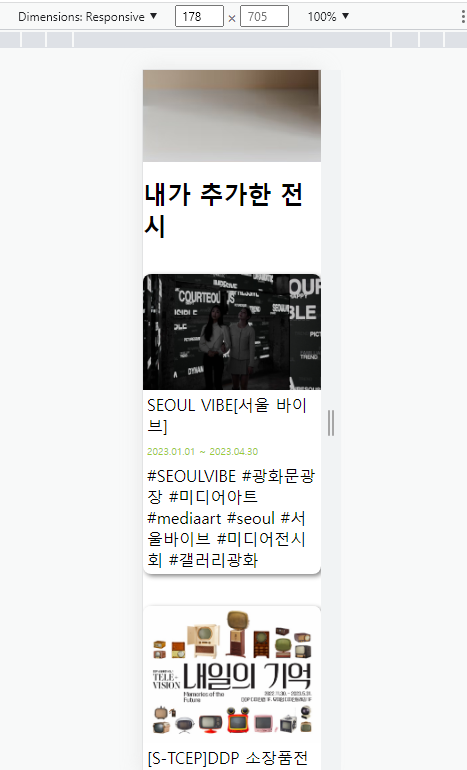
인터넷 창이 작아지면 글씨도 작아지는 작업을 했는데 글씨가 작아지지가 않습니다. 어떻게 해야 할까요?
작성한 코드 및 에러 메세지
<!DOCTYPE html>
<html lang="en">


<head>
    <meta charset="UTF-8">
    <meta http-equiv="X-UA-Compatible" content="IE=edge">
    <meta name="viewport" content="width=device-width, initial-scale=1.0">
    <title>오늘의 전시</title>
    <script src="http://ajax.aspnetcdn.com/ajax/jQuery/jquery-1.12.4.min.js"></script>
    <style>
        html,
        body,
        h1,
        h2,
        h3,
        p,
        a,
        span {
            margin: 0;
            padding: 0;
        }


        .wrap {
            max-width: 1050px;
            width: 100%;
            margin: auto;
        }


        .card {
            width: 320px;
            height: 340px;
            display: flex;
            flex-direction: column;
            align-items: flex-start;
            justify-content: flex-start;
            margin: 16px 8px;
            cursor: pointer;
            border: none;
            border-radius: 8px;
            overflow: hidden;
            box-shadow: 2px 2px 5px 0px gray;
        }


        .card-wrap {
            display: flex;
            flex-direction: row;
            flex-wrap: wrap;
        }


        .card-image {


            background-position: center;
            background-size: cover;


            width: 100%;
            height: 200px;
        }


        .card>span {
            margin: 8px;
        }


        .card-title {
            font-size: 18px;
            font-weight: bold;
        }


        .period {
            color: yellowgreen;
            font-size: 14px;
        }


        .tags {
            color: gray;
            font-size: 14px;
            word-break: keep-all;
        }


        .url-form {
            align-items: center;
            justify-content: space-around;
        }


        .plus-form {
            align-items: center;
            justify-content: center;
            cursor: pointer;
        }


        .bg{
            width: 100%;
            height: 420px;
            background-color: #d7d8da;
            position: relative;


            display: flex;
            flex-direction: row;
            align-items: center;
            justify-content: center;
        }
        .main-image{
            width: 790px;
            height: 420px;
            background-image: url('https://s3.ap-northeast-2.amazonaws.com/materials.spartacodingclub.kr/pirates/web/lv2/header-image.png');
            background-position: center;
            background-size: cover;

        }
        h1 {
            color: white;
            position: absolute;
            top: 50px;
            left: 25%
        }
        h2 {
            margin: 16px 0px;
        }
        .url-input {
            width: 220px;
            height: 40px;
            border-radius: 8px;
            font-size: 16px;
            border: none;
            background-color: #f2f2f2;
            padding: 0px 8px;
        }
        .url-input:focus {
            outline: 1px solid gray;
        }
        button {
            width: 100px;
            height: 30px;
            border-radius: 8px;
            border: 1px solid gray;
            background-color: #f2f2f2;
            font-weight: bold;
        }
        .posting-btn {
            background-color: black;
            color: white;
        }
        @media screen and (max-width: 700px) {
            .card {
                margin: 16px auto;
                width: 300px;
                height: 300px;
            }
            .card>span {
                margin: 4px;
            }
            .card-title, .period, .tags {
                font-size: 12px;
            }
        }
        @media screen and (max-width: 400px) {
            .card {
                margin: 16px auto;
                width: 220px;
                height: 300px;
            }
            .card>span {
                margin: 4px;
            }
            .card-title, .period, .tags {
                font-size: 5px;
            }
        }
    </style>
    <script>
        $(document).ready(() => {
            listing();
            showPlusForm();
            now();
        })
        const showUrlForm = () => {
            $('#url-form').show();
            $('#plus-form').hide();
        }
        const showPlusForm = () => {
            $('#url-form').hide();
            $('#plus-form').show();
        }
        const posting = () => {
            let url = $('#url').val();
            let formData = new FormData()
            formData.append("url_give", url)
            fetch('/exhibit', { method: "POST", body: formData }).then(res => res.json()).then(data => {
                alert(data['msg'])
                window.location.reload();
            })


        }
        const move = (url) => {
            window.open(url, '_blank')
        }
        const listing = () => {
            fetch('/exhibit').then(res => res.json()).then(data => {
                let rows = data['result']
                rows.forEach((row) => {
                    let title = row['title']
                    let period = row['period']
                    let image = row['image']
                    let tags = row['tags']
                    let url = row['url']


                    let temp_html = `<div onclick="move('${url}')" class="card">
                                        <div style="background-image: url('${image}');" class="card-image"></div>
                                        <span class="title">${title}</span>
                                        <span class="period">${period}</span>
                                        <span class="tag">${tags}</span>
                                    </div>`
                    $('#card-wrap').prepend(temp_html)
                })
            })
        }


        const now = () => {
            fetch('/now').then(res => res.json()).then(data => {
                let rows = data['now']
                rows.forEach((row) => {
                    let title = row['title']
                    let period = row['period']
                    let image = row['image']
                    let url = row['url']


                    let temp_html = `<div onclick="move('${url}')" class="card">
                                        <div style="background-image: url('${image}');" class="card-image"></div>
                                        <span class="title">${title}</span>
                                        <span class="period">${period}</span>
                                        <span class="tag"></span>
                                    </div>`
                    $('#card-now').prepend(temp_html)
                })
            })
        }
    </script>
</head>


<body>
    <div class="bg">
        <h1>오늘의<br/>전시</h1>
        <div class="main-image"></div>
    </div>
    <div class="wrap">

        <h2>내가 추가한 전시</h2>
        <div id="card-wrap" class="card-wrap">
            <div id="url-form" class="url-form card">
                <input id="url" class="url-input" type="text">
                <div>
                    <button onclick="showPlusForm()">취소하기</button>
                    <button class="posting-btn" onclick="posting()">등록하기</button>
                </div>
            </div>
            <div id="plus-form" onclick="showUrlForm()" class="plus-form card">
                <span>+</span>
                <span>추가하기</span>
            </div>
        </div>
        <h2>현재 진행중인 전시</h2>
        <div id="card-now" class="card-wrap">


        </div>
    </div>


</body>


</html>


댓글 알림
