


* 겪고 있는 문제 상황을 최대한 자세하게 작성해주세요.
* 문제 해결을 위해 어떤 시도를 해보았는지 구체적으로 함께 알려주세요.
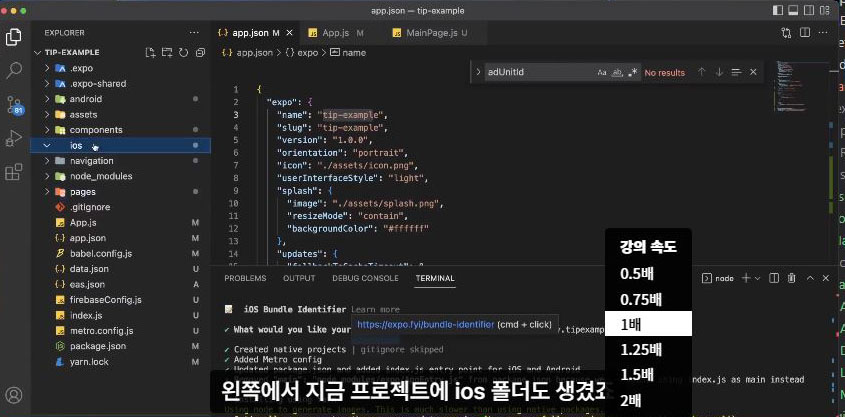
eas prebulild 해보기에서 강사 선생님이 터미널에 이 명령어, npx expo prebuild 코드를 치라고 해서 했는데 제 VC Code기에는 Aadroid와 Iso 폴더가 생성이 안되네요. 왜 에러가 나는 것인지 도움이 필요합니다.
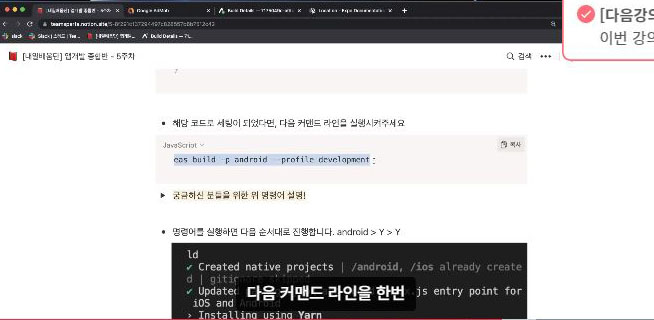
그리고 이 명령어, eas build -p android --profile development 설치도 안되고 에러가 나요.
도움을 요청합니다.
보고 계신
화면 전체를 캡처해 주시면, 튜터님들이 빠르게 상황을 이해할 수 있어요.
작성한 코드 및 에러 메세지
1.에러
C:\Users\user\Desktop\sparta-study\sparta-study>npx expo prebuild
CommandError: Error parsing JSON: {
"expo": {
"name": "sparta-study",
"slug": "sparta-study",
"version": "1.0.0",
"orientation": "portrait",
"icon": "./assets/icon.png",
"userInterfaceStyle": "light",
"splash": {
"image": "./assets/splash.png",
"resizeMode": "contain",
"backgroundColor": "#ffffff"
},
"assetBundlePatterns": [
"**/*"
],
"ios": {
"supportsTablet": true
},
"android": {
"adaptiveIcon": {
"foregroundImage": "./assets/adaptive-icon.png",
"backgroundColor": "#ffffff"
}
},
"web": {
"favicon": "./assets/favicon.png"
},
"plugins": [
[
"expo-build-properties",
{
"ios": {
"useFrameworks": "static"
}
}
]
]
"extra": {
"eas": {
"projectId": "7fd0cfc8-a405-4ce6-aa68-33fc225b2518"
}
}
},
"react-native-google-mobile-ads": {
"android_app_id": "ca-app-pub-1694345730519276~4778766888"
"ios_app_id": "ca-app-pub-1694345730519276~8307233766"
}
}
├─ File: C:\Users\user\Desktop\sparta-study\sparta-study\app.j
└─ Cause: SyntaxError: JSON5: invalid character '\"' at 39:5
37 | ]
| ^
40 | "eas": {
41 | "projectId": "7fd0cfc8-a405-4ce6-aa68-33fc225b2518"
42 | }
2.에러
C:\Users\user\Desktop\sparta-study\sparta-study>eas build -p android --profile development
Error parsing JSON: {
"expo": {
"name": "sparta-study",
"slug": "sparta-study",
"version": "1.0.0",
"orientation": "portrait",
"icon": "./assets/icon.png",
"userInterfaceStyle": "light",
"splash": {
"image": "./assets/splash.png",
"resizeMode": "contain",
"backgroundColor": "#ffffff"
},
"assetBundlePatterns": [
"**/*"
],
"ios": {
"supportsTablet": true
},
"android": {
"adaptiveIcon": {
"foregroundImage": "./assets/adaptive-icon.png",
"backgroundColor": "#ffffff"
}
},
"web": {
"favicon": "./assets/favicon.png"
},
"plugins": [
[
"expo-build-properties",
{
"ios": {
"useFrameworks": "static"
}
}
]
]
"extra": {
"eas": {
"projectId": "7fd0cfc8-a405-4ce6-aa68-33fc225b2518"
}
}
},
"react-native-google-mobile-ads": {
"android_app_id": "ca-app-pub-1694345730519276~4778766888",
"ios_app_id": "ca-app-pub-1694345730519276~8307233766"
}
}
├─ File: C:\Users\user\Desktop\sparta-study\sparta-study\app.json
└─ Cause: SyntaxError: JSON5: invalid character '\"' at 39:5
37 | ]
38 | ]
> 39 | "extra": {
| ^
40 | "eas": {
41 | "projectId": "7fd0cfc8-a405-4ce6-aa68-33fc225b2518"
42 | }
Error: build command failed.
시, 작성한 코드 전체와 에러 메시지를 첨부해 주세요.
Tip 1) </> 아이콘을 눌러 코드박스를 만들어 보세요.
Tip 2) Ctrl+A(맥의 경우 Command+A) 단축키로 코드를 한 번에 선택할 수 있어요!


