


* 겪고 있는 문제 ㅁ상황을 최대한 자세하게 작성해주세요.
* 문제 해결을 위해 어떤 시도를 해보았는지 구체적으로 함께 알려주세요.
웹상에서는 되는거 같은데
db몽고 연결이 안됩니다 ㅠㅠㅠ
리프레쉬해도 이런식으로 데이터가 몽고에 저장이 안됩니다 ㅠㅠ
코드에 문제가 있는걸까요
처음에 몽고에 있던 무비와유저 지워서 전에는 연결이 되었던거 같은데
데이터가 몽고에 저장이 되지 않아요
보고 계신 화면 전체를 캡
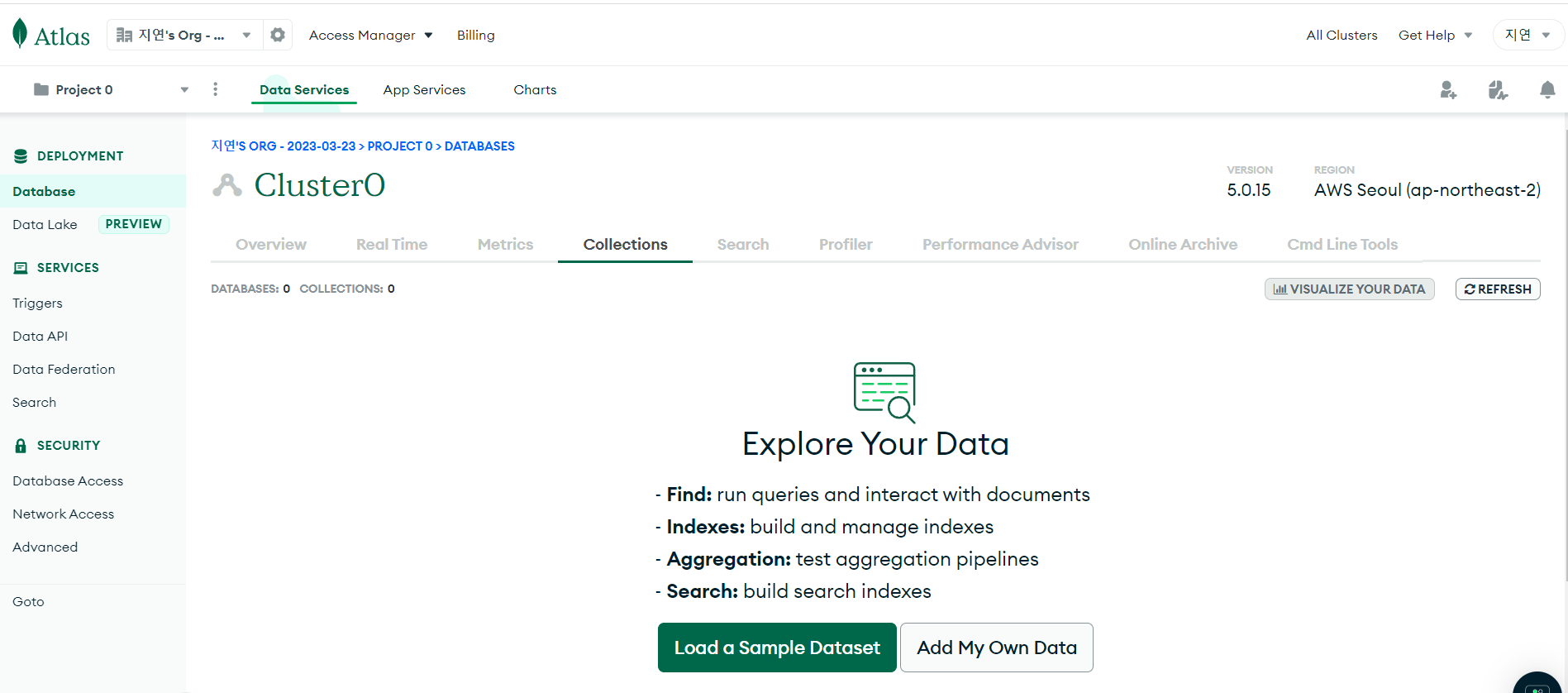
처해 주시면, 튜터님들이 빠르게 상황을 이해할 수 있어요.
작성한 코드 및 에러 메세지
<app.py>
from flask import Flask, render_template, request, jsonify
app = Flask(__name__)
from pymongo import MongoClient
client = MongoClient('mongodb+srv://sparta:test@cluster0.p0bvdr9.mongodb.net/?retryWrites=true&w=majority')
db = client.dbsparta
@app.route('/')
def home():
return render_template('index.html')
@app.route("/mars", methods=["GET"])
def mars_post():
name_receive = request.form['name_give']
address_receive = request.form['address_give']
size_receive = request.form['size_give']
doc = {
'name' : name_receive,
'address' : address_receive,
'size' : size_receive
}
db.mars.insert_one(doc)
return jsonify({'msg':'저장완료!'})
@app.route("/mars", methods=["GET"])
def mars_get():
return jsonify({'msg':'GET 연결 완료!'})
if __name__ == '__main__':
app.run('0.0.0.0', port=5000, debug=True)오류 발생 시, 작성한 코드 전체와 에러 메시지를 첨부해 주세요.
Tip 1) </> 아이콘을 눌러 코드박스를 만들어 보세요.
Tip 2) Ctrl+A(맥의 경우 Command+A) 단축키로 코드를 한 번에 선택할 수 있어요!
<html>
<!DOCTYPE html>
<html lang="en">
<head>
<meta charset="UTF-8" />
<meta http-equiv="X-UA-Compatible" content="IE=edge" />
<meta name="viewport" content="width=device-width, initial-scale=1.0" />
<link href="https://cdn.jsdelivr.net/npm/bootstrap@5.0.2/dist/css/bootstrap.min.css" rel="stylesheet"
integrity="sha384-EVSTQN3/azprG1Anm3QDgpJLIm9Nao0Yz1ztcQTwFspd3yD65VohhpuuCOmLASjC" crossorigin="anonymous" />
<script src="https://ajax.googleapis.com/ajax/libs/jquery/3.5.1/jquery.min.js"></script>
<script src="https://cdn.jsdelivr.net/npm/bootstrap@5.0.2/dist/js/bootstrap.bundle.min.js"
integrity="sha384-MrcW6ZMFYlzcLA8Nl+NtUVF0sA7MsXsP1UyJoMp4YLEuNSfAP+JcXn/tWtIaxVXM"
crossorigin="anonymous"></script>
<link href="https://fonts.googleapis.com/css2?family=Gowun+Batang:wght@400;700&display=swap" rel="stylesheet" />
<title>선착순 공동구매</title>
<style>
* {
font-family: "Gowun Batang", serif;
color: white;
}
body {
background-image: linear-gradient(0deg,
rgba(0, 0, 0, 0.5),
rgba(0, 0, 0, 0.5)),
url("https://cdn.aitimes.com/news/photo/202010/132592_129694_3139.jpg");
background-position: center;
background-size: cover;
}
h1 {
font-weight: bold;
}
.order {
width: 500px;
margin: 60px auto 0px auto;
padding-bottom: 60px;
}
.mybtn {
width: 100%;
}
.order>table {
margin: 40px 0;
font-size: 18px;
}
option {
color: black;
}
</style>
<script>
$(document).ready(function () {
show_order();
});
function show_order() {
fetch('/mars').then((res) => res.json()).then((data) => {
console.log(data)
alert(data['msg'])
})
}
function save_order() {
let name = $('#name').val()
let address = $('#address').val()
let size = $('#size').val()
let formData = new FormData();
formData.append("name_give", name)
formData.append("address_give", address)
formData.append("size", size)
fetch('/mars', { method: "POST", body: formData }).then((res) => res.json()).then((data) => {
alert(data["msg"]);
window.location.reload()
});
}
</script>
</head>
<body>
<div class="mask"></div>
<div class="order">
<h1>화성에 땅 사놓기!</h1>
<h3>가격: 평 당 500원</h3>
<p>
화성에 땅을 사둘 수 있다고?<br />
앞으로 백년 간 오지 않을 기회. 화성에서 즐기는 노후!
</p>
<div class="order-info">
<div class="input-group mb-3">
<span class="input-group-text">이름</span>
<input id="name" type="text" class="form-control" />
</div>
<div class="input-group mb-3">
<span class="input-group-text">주소</span>
<input id="address" type="text" class="form-control" />
</div>
<div class="input-group mb-3">
<label class="input-group-text" for="size">평수</label>
<select class="form-select" id="size">
<option selected>-- 주문 평수 --</option>
<option value="10평">10평</option>
<option value="20평">20평</option>
<option value="30평">30평</option>
<option value="40평">40평</option>
<option value="50평">50평</option>
</select>
</div>
<button onclick="save_order()" type="button" class="btn btn-warning mybtn">
주문하기
</button>
</div>
<table class="table">
<thead>
<tr>
<th scope="col">이름</th>
<th scope="col">주소</th>
<th scope="col">평수</th>
</tr>
</thead>
<tbody id="order-box">
<tr>
<td>홍길동</td>
<td>서울시 용산구</td>
<td>20평</td>
</tr>
<tr>
<td>임꺽정</td>
<td>부산시 동구</td>
<td>10평</td>
</tr>
<tr>
<td>세종대왕</td>
<td>세종시 대왕구</td>
<td>30평</td>
</tr>
</tbody>
</table>
</div>
</body>
</html>


