


* 겪고 있는 문제 상황을 최대한 자세하게 작성해주세요.
* 문제 해결을 위해 어떤 시도를 해보았는지 구체적으로 함께 알려주세요.
App.js JSX 문법 map 함수 코드니스펫 붙여넣기 했더니 해당 오류가 뜹니다. 뭐가 잘못된걸까요??
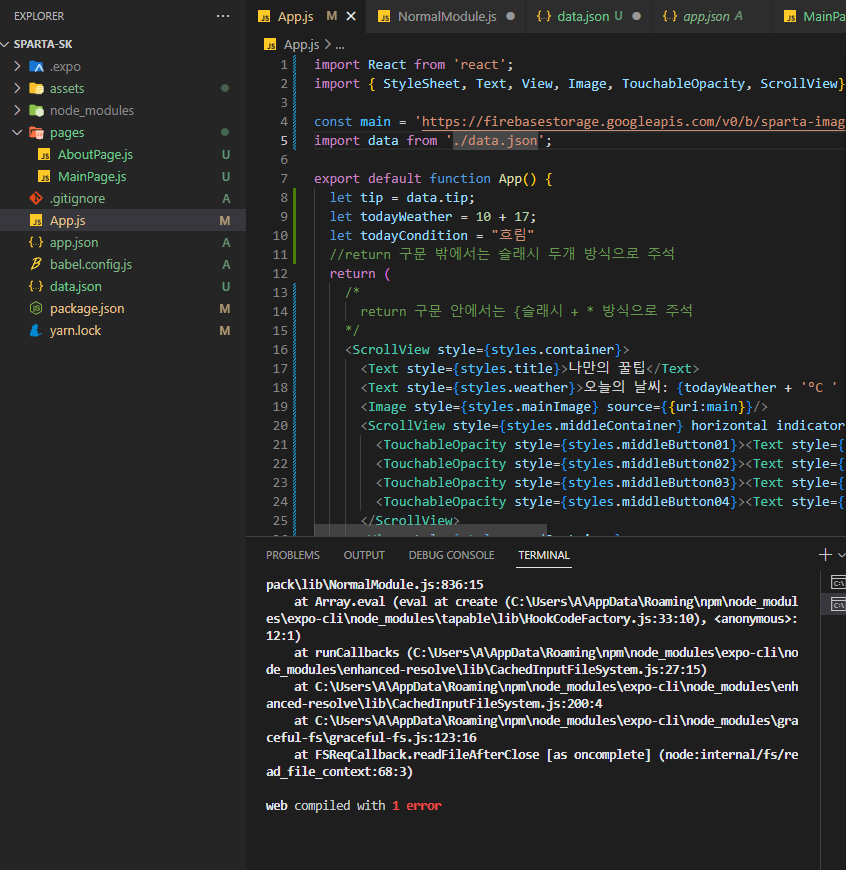
JSONParseError: Unexpected end of JSON input while parsing empty string
at JsonParser.parse (C:\Users\A\AppData\Roaming\npm\node_modules\expo-cli\node_modules\webpack\lib\json\JsonParser.js:43:7)
at C:\Users\A\AppData\Roaming\npm\node_modules\expo-cli\node_modules\webpack\lib\NormalModule.js:1089:26
at processResult (C:\Users\A\AppData\Roaming\npm\node_modules\expo-cli\node_modules\webpack\lib\NormalModule.js:802:11)
at C:\Users\A\AppData\Roaming\npm\node_modules\expo-cli\node_modules\webpack\lib\NormalModule.js:862:5
at C:\Users\A\AppData\Roaming\npm\node_modules\expo-cli\node_modules\loader-runner\lib\LoaderRunner.js:407:3
at iterateNormalLoaders (C:\Users\A\AppData\Roaming\npm\node_modules\expo-cli\node_modules\loader-runner\lib\LoaderRunner.js:233:10)
at C:\Users\A\AppData\Roaming\npm\node_modules\expo-cli\node_modules\loader-runner\lib\LoaderRunner.js:224:4
at C:\Users\A\AppData\Roaming\npm\node_modules\expo-cli\node_modules\webpack\lib\NormalModule.js:836:15
at Array.eval (eval at create (C:\Users\A\AppData\Roaming\npm\node_modules\expo-cli\node_modules\tapable\lib\HookCodeFactory.js:33:10), <anonymous>:12:1)
at runCallbacks (C:\Users\A\AppData\Roaming\npm\node_modules\expo-cli\node_modules\enhanced-resolve\lib\CachedInputFileSystem.js:27:15)
at C:\Users\A\AppData\Roaming\npm\node_modules\expo-cli\node_modules\enhanced-resolve\lib\CachedInputFileSystem.js:200:4
at C:\Users\A\AppData\Roaming\npm\node_modules\expo-cli\node_modules\graceful-fs\graceful-fs.js:123:16
at FSReqCallback.readFileAfterClose [as oncomplete] (node:internal/fs/read_file_context:68:3)
web compiled with 1 error
작성한 코드 및 에러 메세지
import React from 'react';
import { StyleSheet, Text, View, Image, TouchableOpacity, ScrollView} from 'react-native';
import data from './data.json';
export default function App() {
let tip = data.tip;
let todayWeather = 10 + 17;
let todayCondition = "흐림"
//return 구문 밖에서는 슬래시 두개 방식으로 주석
return (
/*
return 구문 안에서는 {슬래시 + * 방식으로 주석
*/
<ScrollView style={styles.container}>
<Text style={styles.title}>나만의 꿀팁</Text>
<Text style={styles.weather}>오늘의 날씨: {todayWeather + '°C ' + todayCondition} </Text>
<Image style={styles.mainImage} source={{uri:main}}/>
<ScrollView style={styles.middleContainer} horizontal indicatorStyle={"white"}>
<TouchableOpacity style={styles.middleButton01}><Text style={styles.middleButtonText}>생활</Text></TouchableOpacity>
<TouchableOpacity style={styles.middleButton02}><Text style={styles.middleButtonText}>재테크</Text></TouchableOpacity>
<TouchableOpacity style={styles.middleButton03}><Text style={styles.middleButtonText}>반려견</Text></TouchableOpacity>
<TouchableOpacity style={styles.middleButton04}><Text style={styles.middleButtonText}>꿀팁 찜</Text></TouchableOpacity>
</ScrollView>
<View style={styles.cardContainer}>
{/* 하나의 카드 영역을 나타내는 View */}
{
tip.map((content,i)=>{
return (<View style={styles.card} key={i}>
<Image style={styles.cardImage} source={{uri:content.image}}/>
<View style={styles.cardText}>
<Text style={styles.cardTitle} numberOfLines={1}>{content.title}</Text>
<Text style={styles.cardDesc} numberOfLines={3}>{content.desc}</Text>
<Text style={styles.cardDate}>{content.date}</Text>
</View>
</View>)
})
}
</View>
</ScrollView>
);
}
const styles = StyleSheet.create({
container: {
//앱의 배경 색
backgroundColor: '#fff',
},
title: {
//폰트 사이즈
fontSize: 20,
//폰트 두께
fontWeight: '700',
//위 공간으로 부터 이격
marginTop:50,
//왼쪽 공간으로 부터 이격
marginLeft:20
},
weather:{
alignSelf:"flex-end",
paddingRight:20
},
mainImage: {
//컨텐츠의 넓이 값
width:'90%',
//컨텐츠의 높이 값
height:200,
//컨텐츠의 모서리 구부리기
borderRadius:10,
marginTop:20,
//컨텐츠 자체가 앱에서 어떤 곳에 위치시킬지 결정(정렬기능)
//각 속성의 값들은 공식문서에 고대로~ 나와 있음
alignSelf:"center"
},
middleContainer:{
marginTop:20,
marginLeft:10,
height:60
},
middleButton01: {
width:100,
height:50,
padding:15,
backgroundColor:"#fdc453",
borderColor:"deeppink",
borderRadius:15,
margin:7
},
middleButton02: {
width:100,
height:50,
padding:15,
backgroundColor:"#fe8d6f",
borderRadius:15,
margin:7
},
middleButton03: {
width:100,
height:50,
padding:15,
backgroundColor:"#9adbc5",
borderRadius:15,
margin:7
},
middleButtonText: {
color:"#fff",
fontWeight:"700",
//텍스트의 현재 위치에서의 정렬
textAlign:"center"
},
middleButton04: {
width:100,
height:50,
padding:15,
backgroundColor:"#f886a8",
borderRadius:15,
margin:7
},
cardContainer: {
marginTop:10,
marginLeft:10
},
card:{
flex:1,
//컨텐츠들을 가로로 나열
//세로로 나열은 column <- 디폴트 값임
flexDirection:"row",
margin:10,
borderBottomWidth:0.5,
borderBottomColor:"#eee",
paddingBottom:10
},
cardImage: {
flex:1,
width:100,
height:100,
borderRadius:10,
},
cardText: {
flex:2,
flexDirection:"column",
marginLeft:10,
},
cardTitle: {
fontSize:20,
fontWeight:"700"
},
cardDesc: {
fontSize:15
},
cardDate: {
fontSize:10,
color:"#A6A6A6",
},
});


