


* 겪고 있는 문제 상황을 최대한 자세하게 작성해주세요.
* 문제 해결을 위해 어떤 시도를 해보았는지 구체적으로 함께 알려주세요.
게임끝날때 판넬 까지는 나오는데 클릭 했을때 에러가 뜨네요
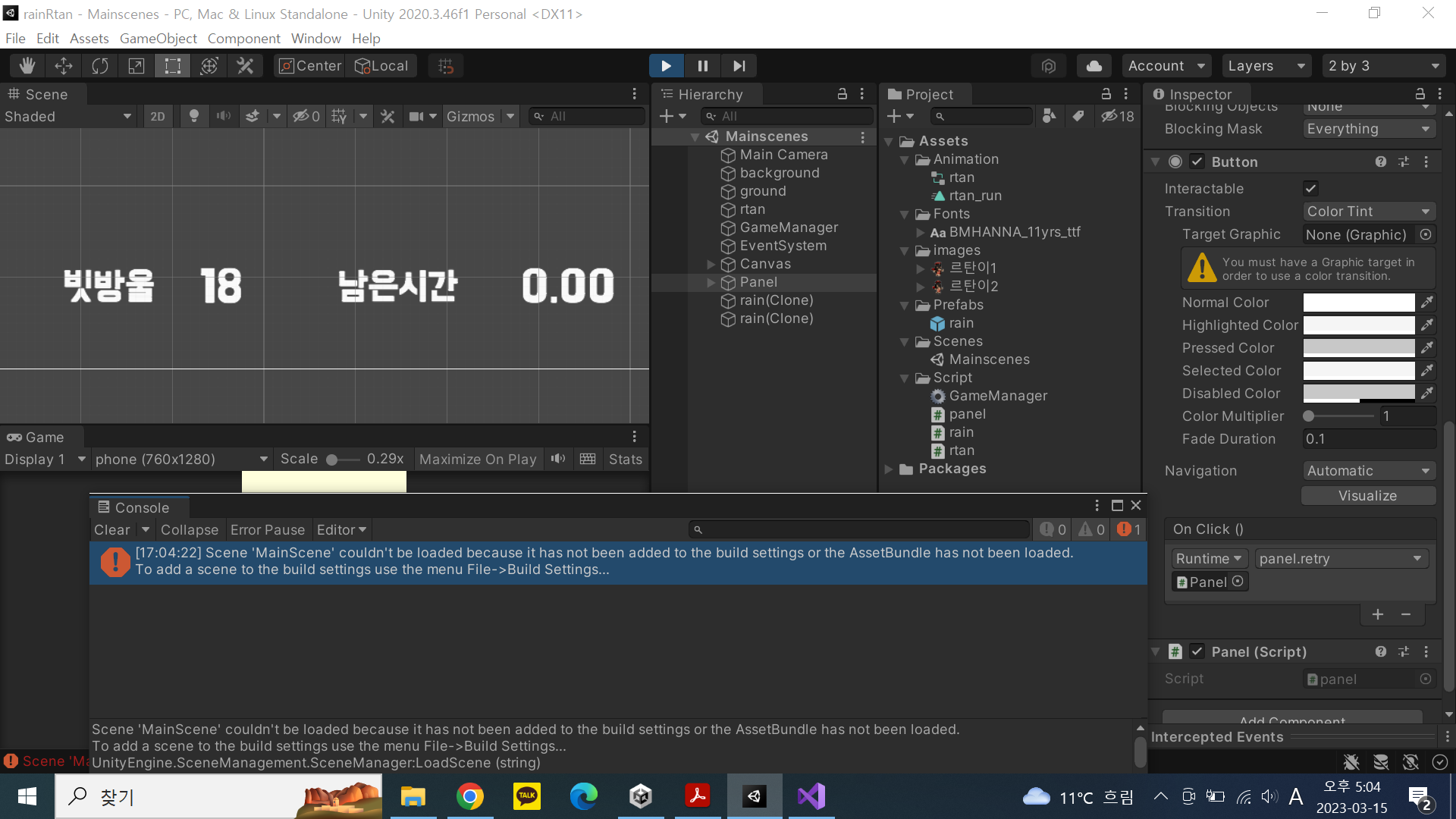
신 화면 전체를 캡처해 주시면, 튜터님들이 빠르게 상황을 이해할 수 있어요.
작성한 코드 및 에러 메세지
게임메니저 스크립트
using System.Collections;
using System.Collections.Generic;
using UnityEngine;
using UnityEngine.UI;
using UnityEngine.SceneManagement;
public class GameManager : MonoBehaviour
{
public GameObject rain;
public GameObject panel;
public static GameManager I;
public Text scoreText;
public Text timeText;
int totalScore;
float limit = 5f;
void Awake()
{
I = this;
}
// Start is called before the first frame update
void Start()
{
InvokeRepeating("makeRain", 0, 0.5f);
}
// Update is called once per frame
void Update()
{
limit -= Time.deltaTime;
if (limit < 0)
{
Time.timeScale = 0.0f;
panel.SetActive(true);
limit = 0.0f;
}
timeText.text = limit.ToString("N2");
}
void makeRain()
{
Instantiate(rain);
}
public void addScore(int score)
{
totalScore += score;
scoreText.text = totalScore.ToString();
}
public void retry()
{
SceneManager.LoadScene("MainScene");
}
}
판넬 스트립트
using System.Collections;
using System.Collections.Generic;
using UnityEngine;
public class panel : MonoBehaviour
{
// Start is called before the first frame update
void Start()
{
}
// Update is called once per frame
void Update()
{
}
public void retry()
{
GameManager.I.retry();
}
}
에러메세지
Scene 'MainScene' couldn't be loaded because it has not been added to the build settings or the AssetBundle has not been loaded.
To add a scene to the build settings use the menu File->Build Settings...
UnityEngine.SceneManagement.SceneManager:LoadScene (string)
GameManager:retry () (at Assets/Script/GameManager.cs:52)
panel:retry () (at Assets/Script/panel.cs:20)
UnityEngine.EventSystems.EventSystem:Update ()
오류 발생 시, 작성한 코드 전체와 에러 메시지를 첨부해 주세요.
Tip 1) </> 아이콘을 눌러 코드박스를 만들어 보세요.
Tip 2) Ctrl+A(맥의 경우 Command+A) 단축키로 코드를 한 번에 선택할 수 있어요!


