커뮤니티

포인트
쿠폰
내 강의실
국비 신청 내역
증명서
계정
로그아웃
학습 질문
개발 일지
나의 활동
답변 완료
2-5 게임 끝내기 강의에서 retry버튼 누른 후
undefined주차


조*근
댓글
7
・
추천
0
・
조회수
25
조회수
25
답변 완료
* 겪고 있는 문제 상황을 최대한 자세하게 작성해주세요.
* 문제 해결을 위해 어떤 시도를 해보았는지 구체적으로 함께 알려주세요.
안녕하세요. 강의 잘 보고 있습니다.
[2-5게임 끝내기]까지 진행 했습니다.
다시하기 버튼을 구현하고 게임이 다시 시작되긴 합니다. 하지만 다시 시작하면 시간이 흐르지 않고, 네모에 풍선이 닿아도 게임이 끝나지 않으며,
NullReferenceException: Object reference not set to an instance of an object
gameManager.Update () (at Assets/Scripts/gameManager.cs:40)
위와 같은 코드가 나옵니다.
무엇이 문제인지 모르겠습니다. 다시하기 버튼을 누르기 전까지는 문제없습니다.
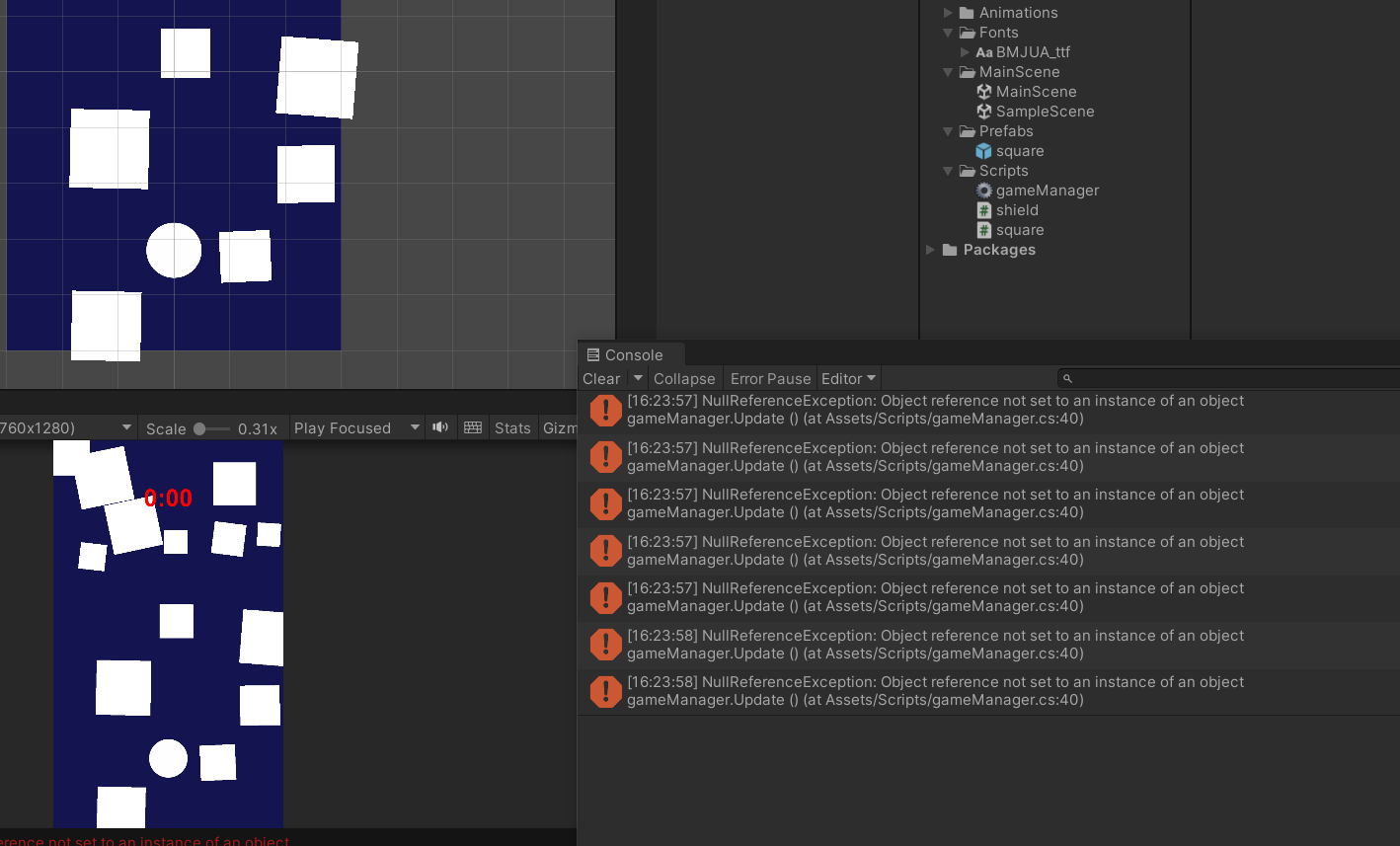
작성한 코드 및 에러 메세지
오류 발생 시, 작성한 코드 전체와 에러 메시지를 첨부해 주세요.
Tip 1) </> 아이콘을 눌러 코드박스를 만들어 보세요.
Tip 2) Ctrl+A(맥의 경우 Command+A) 단축키로 코드를 한 번에 선택할 수 있어요!
using System.Collections;
using System.Collections.Generic;
using UnityEngine;
using UnityEngine.UI;
using UnityEngine.SceneManagement;


public class gameManager : MonoBehaviour
{
    public GameObject square;
    public Text timeTxt;
    float alive=0f;
    public static gameManager I;
    public GameObject endPanel;
    public Text thisScoreTxt;
    bool isRunning = true;


    // Start is called before the first frame update


    void Awake()
    {
    I = this;
    }


    void Start()
    {
        Time.timeScale=1;
        InvokeRepeating("makesquare", 0.0f, 0.1f);
    }


    // Update is called once per frame
    void Update()
    {
        if(isRunning)
        {
        alive+=Time.deltaTime;
        timeTxt.text=alive.ToString("N2");
        }

    }
    void makesquare()
    {
        Instantiate(square);
    }


    public void gameOver()
    {
        isRunning=false;
        Time.timeScale=0f;
        endPanel.SetActive(true);
        thisScoreTxt.text=alive.ToString("N2");
    }


    public void retry()
    {
        SceneManager.LoadScene("MainScene");


    }


}
using System.Collections;
using System.Collections.Generic;
using UnityEngine;


public class square : MonoBehaviour
{
    // Start is called before the first frame update


    void Start()
    {
        float x =Random.Range(-3.0f,3.0f);
        float y =Random.Range(3.0f,5.0f);
        transform.position=new Vector3(x,y,0);


        float size=Random.Range(0.5f,1.5f);
        transform.localScale= new Vector3(size,size,0);
    }


    // Update is called once per frame
    void Update()
    {

    }


    void OnCollisionEnter2D(Collision2D coll)
    {
    if (coll.gameObject.tag == "ballon")
        {
        gameManager.I.gameOver();
        }
    }
}
using System.Collections;
using System.Collections.Generic;
using UnityEngine;


public class shield : MonoBehaviour
{
    // Start is called before the first frame update
    void Start()
    {

    }


    // Update is called once per frame
    void Update()
    {
    Vector3 mousePos = Camera.main.ScreenToWorldPoint(Input.mousePosition);
    transform.position = new Vector3(mousePos.x, mousePos.y, 0);
    }

}


댓글 알림
