커뮤니티

포인트
쿠폰
내 강의실
국비 신청 내역
증명서
계정
로그아웃
학습 질문
개발 일지
나의 활동
답변 완료
Shazam 이미지에 엑박이 뜹니당 ㅠ.ㅠ
앱개발 종합반 - 플러터 v8
2주차


이*란
댓글
6
・
추천
0
・
조회수
16
조회수
16
답변 완료
* 겪고 있는 문제 상황을 최대한 자세하게 작성해주세요.
* 문제 해결을 위해 어떤 시도를 해보았는지 구체적으로 함께 알려주세요.
안녕하세요!
2주차 숙제를 하고 있는데,
Shazam 이미지를 띄우는 데서 벌써 막혀버렸습니당...
빨간 엑스 박스로 뜨는데, 혹시 뭘 고쳐야 할까요?
파일은 총 4개로 분리해서 만들고 있고,
Shazam 들어가는 탭은 tab2.dart에 넣어서 만들고 있습니다!
main.dart
tab1.dart
tab2.dart
tab3.dart
"작성한 코드"에는 tab2.dart를 붙여 두겠습니다.
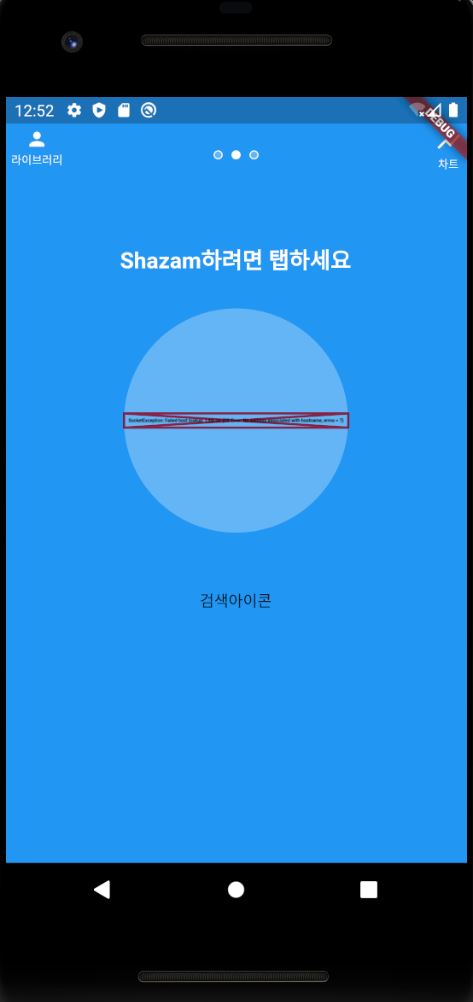
// 두번째 페이지
import 'package:flutter/cupertino.dart';
import 'package:flutter/material.dart';


class SecondTab extends StatelessWidget {
  const SecondTab({Key? key}) : super(key: key);


  @override
  Widget build(BuildContext context) {
    return MaterialApp(
      debugShowCheckedModeBanner: false,
      home: Scaffold(
        backgroundColor: Colors.blue,
        appBar: AppBar(
          // 위에도 간격 좀 띄고 싶은데, 어떡하지? Padding 하면 에러나고.
          leading: Padding(
            padding: const EdgeInsets.all(4.0),
            child: Column(
              children: [
                Icon(
                  Icons.person,
                  size: 20,
                ),
                Text(
                  '라이브러리',
                  style: TextStyle(fontSize: 10),
                ),
              ],
            ),
          ),
          actions: [
            Padding(
              padding: const EdgeInsets.all(4.0),
              child: Column(
                children: [
                  Icon(Icons.show_chart),
                  Text(
                    '차트',
                    style: TextStyle(fontSize: 10),
                  ),
                ],
              ),
            )
          ],
          elevation: 0,
          backgroundColor: Color.fromRGBO(0, 0, 0, 0),
        ),
        body: Center(
          child: Column(
            children: [
              SizedBox(
                height: 50,
              ),
              Text(
                'Shazam하려면 탭하세요',
                style: TextStyle(
                  color: Colors.white,
                  fontSize: 20,
                  fontWeight: FontWeight.bold,
                ),
              ),
              SizedBox(
                height: 30,
              ),
              Container(
                alignment: Alignment.center,
                width: 200,
                height: 200,
                decoration: BoxDecoration(
                  color: Colors.blue[300],
                  shape: BoxShape.circle,
                ),
                child: Image.network(
                  "https://i.ibb.co/hxNbZ8p/shazam.png", // 왜 깨질까?
                  color: Colors.white,
                  width: 130,
                  height: 130,
                ),
              ),
              SizedBox(
                height: 50,
              ),
              Text('검색아이콘'),
            ],
          ),
        ),
      ),
    );
  }
}


댓글 알림
