커뮤니티

포인트
쿠폰
내 강의실
국비 신청 내역
증명서
계정
로그아웃
학습 질문
개발 일지
나의 활동
답변 완료
로컬에서 잘 돌아가는데 서버에 올리니까 안 돌아가요
undefined주차


이*림
댓글
15
・
추천
0
・
조회수
39
조회수
39
답변 완료
* 겪고 있는 문제 상황을 최대한 자세하게 작성해주세요.
* 문제 해결을 위해 어떤 시도를 해보았는지 구체적으로 함께 알려주세요.
이때까지 만든 페이지를 다 서버에 올리고 싶어서
버튼으로 들어갈 수 있게 만들었는데
제 로컬에선 실행이 잘 되는데 서버에 올리니까 안 돌아가요
이유를 모르겠어서 질문드립니다
서버
# 백엔드(서버)
from flask import Flask, render_template, request, jsonify
app = Flask(__name__)


# 크롤링
import requests
from bs4 import BeautifulSoup


# 몽공 DB
from pymongo import MongoClient
client = MongoClient('mongodb+srv://sparta:test@cluster0.mmgalfj.mongodb.net/?retryWrites=true&w=majority')
db = client.dbsparta


# 기본('/') 웹주소 요청
@app.route('/')
def home():
   return render_template('index.html')


# REST API
@app.route('/html/<html_name>')
def html(html_name):
    return render_template(html_name)


# movies.html
# 저장
@app.route("/movie", methods=["POST"])
def movie_post():
    url_receive = request.form['url_give']
    comment_receive = request.form['comment_give']


    headers = {'User-Agent' : 'Mozilla/5.0 (Windows NT 10.0; Win64; x64)AppleWebKit/537.36 (KHTML, like Gecko) Chrome/73.0.3683.86 Safari/537.36'}
    data = requests.get(url_receive, headers=headers)


    soup = BeautifulSoup(data.text, 'html.parser')


    ogtitle = soup.select_one('meta[property="og:title"]')['content']
    ogdesc = soup.select_one('meta[property="og:description"]')['content']
    ogimage = soup.select_one('meta[property="og:image"]')['content']


    doc = {
        'title': ogtitle,
        'desc': ogdesc,
        'image': ogimage,
        'comment': comment_receive
    }
    db.movies.insert_one(doc)


    return jsonify({'msg':'저장 완료!'})


# 조회
@app.route("/movie", methods=["GET"])
def movie_get():
    all_movies = list(db.movies.find({}, {'_id': False}))


    return jsonify({'result':all_movies})


# mars.html
# 저장
@app.route("/mars", methods=["POST"])
def mars_post():
    name_receive = request.form['name_give']
    address_receive = request.form['address_give']
    size_receive = request.form['size_give']


    doc = {
        'name': name_receive,
        'address': address_receive,
        'size': size_receive
    }
    db.mars.insert_one(doc)


    return jsonify({'msg':'저장 완료!'})


# 조회
@app.route("/mars", methods=["GET"])
def mars_get():
    mars_data = list(db.mars.find({}, {'_id': False}))


    return jsonify({'result' : mars_data})


# bucketlist.html
# 저장
@app.route("/bucket", methods=["POST"])
def bucket_post():
    bucket_receive = request.form['bucket_give']


    doc = {
        'bucket': bucket_receive
    }
    db.bucket.insert_one(doc)


    return jsonify({'msg': '저장 완료!'})


# 조회
@app.route("/bucket", methods=["GET"])
def bucket_get():
    all_buckets = list(db.bucket.find({}, {'_id': False}))


    return jsonify({'result': all_buckets})


# movies.html
# 저장
@app.route("/guestbook", methods=["POST"])
def guestbook_post():
    name_receive = request.form['name_give']
    comment_receive = request.form['comment_give']


    doc = {
        'name': name_receive,
        'comment': comment_receive
    }
    db.fan.insert_one(doc)


    return jsonify({'msg': '저장 완료!'})


# 조회
@app.route("/guestbook", methods=["GET"])
def guestbook_get():
    all_comments = list(db.fan.find({}, {'_id': False}))


    return jsonify({'result': all_comments})


if __name__ == '__main__':
   app.run('0.0.0.0', port=5000, debug=True
프런트
<!DOCTYPE html>
<html lang="en">


<head>
    <meta charset="UTF-8">
    <meta http-equiv="X-UA-Compatible" content="IE=edge">
    <meta name="viewport" content="width=device-width, initial-scale=1.0">
    <title>Myweb</title>
    <style>
        @import url('https://fonts.googleapis.com/css?family=Amatic+SC');


        body {
            margin: 0;
            height: 100%;
            background-image: linear-gradient(to top, #d9afd9 0%, #97d9e1 100%);
            background-repeat: no-repeat;
            background-size: cover;
            background-attachment: fixed;
        }


        .button_container {
            position: absolute;
            left: 0;
            right: 0;
            top: 30%;
        }


        .description,
        .link {
            font-family: 'Amatic SC', cursive;
            text-align: center;
        }


        .description {
            font-size: 35px;
        }


        .btn {
            border: none;
            display: block;
            text-align: center;
            cursor: pointer;
            text-transform: uppercase;
            outline: none;
            overflow: hidden;
            position: relative;
            color: #fff;
            font-weight: 700;
            font-size: 15px;
            background-color: #222;
            padding: 17px 60px;
            margin: 0 auto;
            box-shadow: 0 5px 15px rgba(0, 0, 0, 0.20);
        }


        .btn span {
            position: relative;
            z-index: 1;
        }


        .btn:after {
            content: "";
            position: absolute;
            left: 0;
            top: 0;
            height: 490%;
            width: 140%;
            background: #78c7d2;
            -webkit-transition: all .5s ease-in-out;
            transition: all .5s ease-in-out;
            -webkit-transform: translateX(-98%) translateY(-25%) rotate(45deg);
            transform: translateX(-98%) translateY(-25%) rotate(45deg);
        }


        .btn:hover:after {
            -webkit-transform: translateX(-9%) translateY(-25%) rotate(45deg);
            transform: translateX(-9%) translateY(-25%) rotate(45deg);
        }


        .link {
            font-size: 20px;
            margin-top: 30px;
        }


        .link a {
            color: #000;
            font-size: 25px;
        }
    </style>
</head>


<body>
    <div class="button_container">
        <p class="description">Welcomve to Myweb!</p>
        <a href="/html/fanboard.html" target="_blank">
            <button class="btn"><span>Fan Board</span></button>
        </a>
        <br>
        <a href="/html/bucketlist.html" target="_blank">
            <button class="btn"><span>Bucket List</span></button>
        </a>
        <br>
        <a href="/html/mars.html" target="_blank">
            <button class="btn"><span>Mars</span></button>
        </a>
        <br>
        <a href="/html/movies.html" target="_blank">
            <button class="btn"><span>Movies</span></button>
        </a>
        <br>
    </div>
</body>


</html>
aws
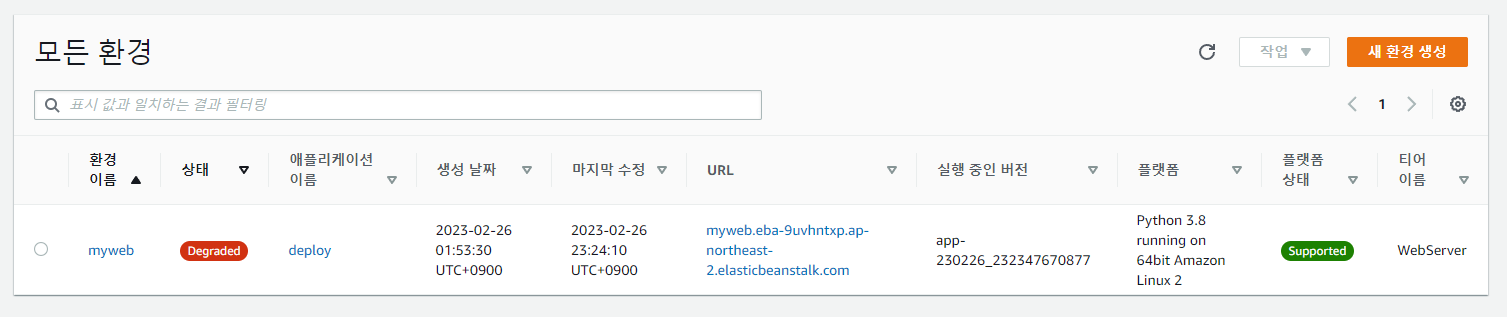
홈페이지

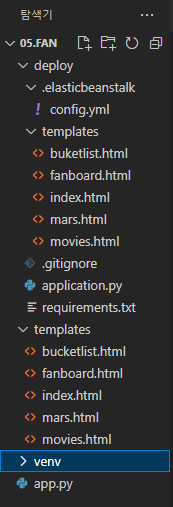
파일 탐색기


댓글 알림
