커뮤니티

포인트
쿠폰
내 강의실
국비 신청 내역
증명서
계정
로그아웃
학습 질문
개발 일지
나의 활동
답변 완료
Shazam 클론 코딩 세번째 페이지 데이터 가져오기 문의
앱개발 종합반 - 플러터 v8
2주차


박*호
댓글
2
・
추천
0
・
조회수
73
조회수
73
답변 완료
* 겪고 있는 문제 상황을 최대한 자세하게 작성해주세요.
* 문제 해결을 위해 어떤 시도를 해보았는지 구체적으로 함께 알려주세요.
샤잠 클론 코딩 1페이지 2페이지는 완성 했는데
3번째 탭 제작 부분에서 chatData = {'korea':[{}]} 과 같이
맵 맵 리스트 맵 구조로 이루어진 컬렉션에서 데이터를 가져오는 방법을 도저히 모르겠네요...
아래 처럼 작성한 코드에서 ListView.builder를 사용해서 가로방향 리스트뷰를 만들려면
NetworkImage('${chartData['korea']![index]['imageUrl']}
이코드를 어떻게 작성해야 하나요?
물론 답안에 적힌 대로 따라 만들면 되긴하지만, 정답 코드는 전혀 배운 방법이 아닌 새로운 내용이기에
기존에 배운 방법으로 코드를 작성하고 싶어서요.
보고 계신 화면 전체를 캡처해 주시
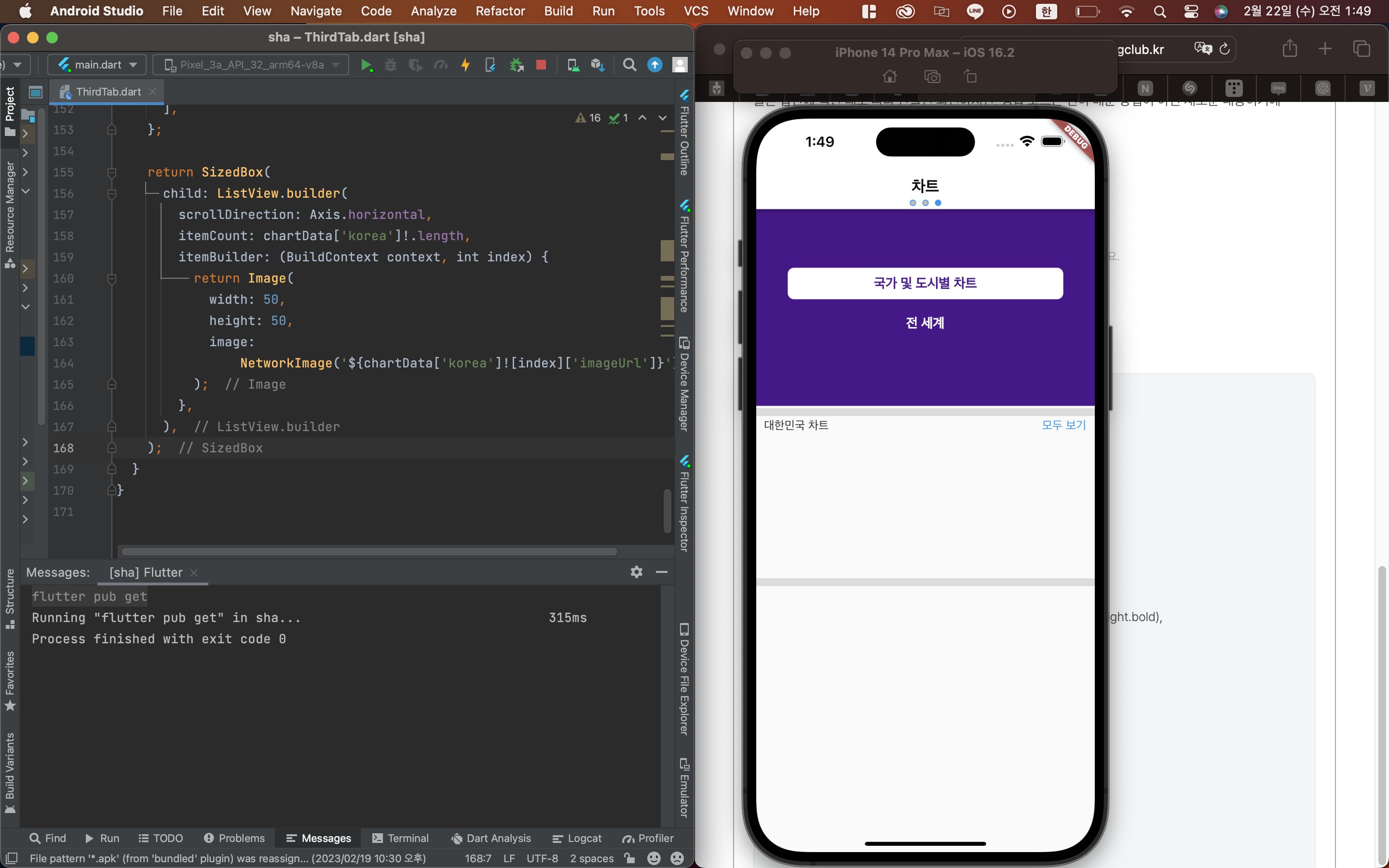
면, 튜터님들이 빠르게 상황을 이해할 수 있어요.
작성한 코드 및 에러 메세지
import 'package:flutter/cupertino.dart';
import 'package:flutter/material.dart';

class ThirdTab extends StatelessWidget {
  const ThirdTab({Key? key}) : super(key: key);

  @override
  Widget build(BuildContext context) {
    return Scaffold(
      appBar: AppBar(
        title: Text(
          '차트',
          style: TextStyle(color: Colors.black, fontWeight: FontWeight.bold),
        ),
        backgroundColor: Colors.white,
      ),
      body: Column(
        children: [
          Stack(
            children: [
              Container(
                height: 250,
                width: double.infinity,
                color: Colors.purple.shade900,
              ),
              SizedBox(
                width: double.infinity,
                height: 250,
                child: Column(
                  mainAxisAlignment: MainAxisAlignment.center,
                  crossAxisAlignment: CrossAxisAlignment.center,
                  children: [
                    Container(
                        decoration: BoxDecoration(
                            borderRadius: BorderRadius.circular(8),
                            color: Colors.white),
                        alignment: Alignment.center,
                        width: 350,
                        height: 40,
                        // color: Colors.white,
                        child: Text(
                          '국가 및 도시별 차트',
                          style: TextStyle(
                              color: Colors.purple.shade900,
                              fontWeight: FontWeight.bold,
                              fontSize: 17),
                        )),
                    Padding(
                      padding: const EdgeInsets.symmetric(vertical: 20),
                      child: Text(
                        '전 세계',
                        style: TextStyle(
                            color: Colors.white,
                            fontSize: 17,
                            fontWeight: FontWeight.bold),
                      ),
                    ),
                  ],
                ),
              )
            ],
          ),
          Divider(
            thickness: 10,
          ),
          Container(
            padding: EdgeInsets.symmetric(horizontal: 10),
            height: 200,
            child: Column(
              children: [
                Row(
                  children: [
                    Text(
                      '대한민국 차트',
                      style: TextStyle(fontSize: 15),
                    ),
                    Spacer(),
                    Text(
                      '모두 보기',
                      style: TextStyle(color: Colors.blue, fontSize: 15),
                    )
                  ],
                ),
                SongData()
              ],
            ),
          ),
          Divider(thickness: 10,),
          Container(),
        ],
      ),
    );
  }
}

class SongData extends StatelessWidget {
  const SongData({Key? key}) : super(key: key);

  @override
  Widget build(BuildContext context) {
    final chartData = {
      'korea': [ //키 + 밸류(리스트) 리스트안에 키 밸류
        {
          'imageUrl': 'https://i.ibb.co/xf2HpfG/dynamite.jpg',
          'name': 'Dynamite',
          'artist': 'BTS',
        },
        {
          'imageUrl': 'https://i.ibb.co/xf2HpfG/dynamite.jpg',
          'name': 'Dynamite',
          'artist': 'BTS',
        },
        {
          'imageUrl': 'https://i.ibb.co/xf2HpfG/dynamite.jpg',
          'name': 'Dynamite',
          'artist': 'BTS',
        },
      ],
      'global': [
        {
          'imageUrl': 'https://i.ibb.co/xf2HpfG/dynamite.jpg',
          'name': 'Dynamite',
          'artist': 'BTS',
        },
        {
          'imageUrl': 'https://i.ibb.co/xf2HpfG/dynamite.jpg',
          'name': 'Dynamite',
          'artist': 'BTS',
        },
        {
          'imageUrl': 'https://i.ibb.co/xf2HpfG/dynamite.jpg',
          'name': 'Dynamite',
          'artist': 'BTS',
        },
      ],
      'newyork': [
        {
          'imageUrl': 'https://i.ibb.co/xf2HpfG/dynamite.jpg',
          'name': 'Dynamite',
          'artist': 'BTS',
        },
        {
          'imageUrl': 'https://i.ibb.co/xf2HpfG/dynamite.jpg',
          'name': 'Dynamite',
          'artist': 'BTS',
        },
        {
          'imageUrl': 'https://i.ibb.co/xf2HpfG/dynamite.jpg',
          'name': 'Dynamite',
          'artist': 'BTS',
        },
      ],
    };

    return SizedBox(
      child: ListView.builder(
        scrollDirection: Axis.horizontal,
        itemCount: chartData['korea']!.length,
        itemBuilder: (BuildContext context, int index) {
          return Image(
            width: 50,
            height: 50,
            image:
                NetworkImage('${chartData['korea']![index]['imageUrl']}'),
          );
        },
      ),
    );
  }
}
오류 발생 시, 작성한 코드 전체와 에러 메시지를 첨부해 주세요.
Tip 1) </> 아이콘을 눌러 코드박스를 만들어 보세요.
Tip 2) Ctrl+A(맥의 경우 Command+A) 단축키로 코드를 한 번에 선택할 수 있어요!


댓글 알림
