


* 겪고 있는 문제 상황을 최대한 자세하게 작* 겪고 있는 문제 상황을 최대한 자세하게 작성해주세요.
* 문제 해결을 위해 어떤 시도를 해보았는지 구체적으로 함께 알려주세요.
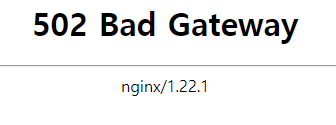
http://myweb.eba-fyycmpku.ap-northeast-2.elasticbeanstalk.com/
안녕하세요 웹홈베이지를 aws 배포 후 잘 사용하고 있었습니다 근데 오늘 수정을 하고 업데이트를 진행해보니 이런 오류가떠서..
(500대는 서버는 문제 없다 이런 걸로 알고 있는데 무엇이 문제 일까요,,?)
보고 계신 화면 전체를 캡처해 주시면, 튜터님들이 빠르게 상황을 이해할 수 있어요.
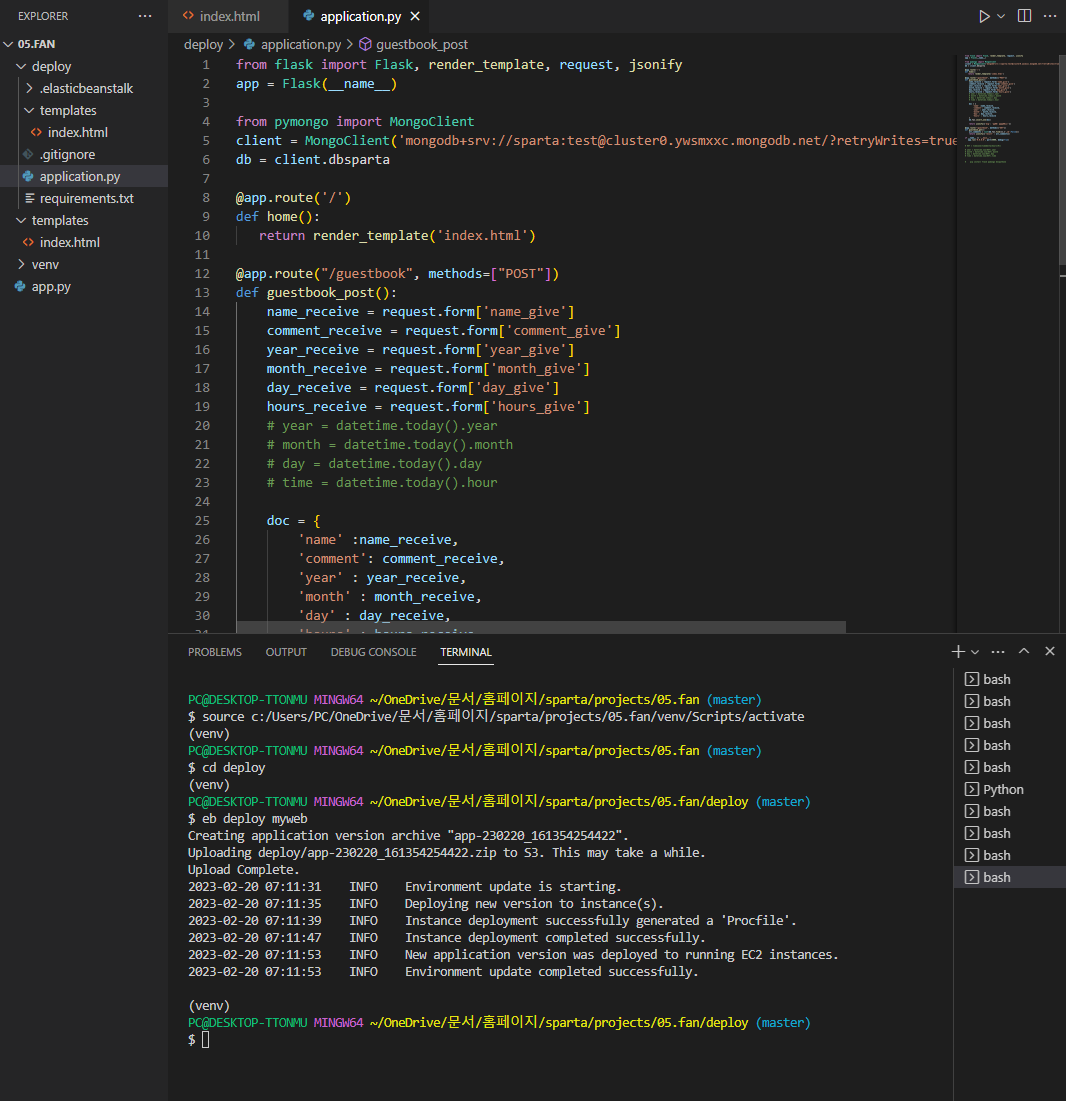
추가적으로 수정한 건 deploy에 있는 index.html과 application.py 만 수정하였습니다. (local:5000은 문제 없었고 전체 복붙을 진행)

(local:5000
작성한 코드 및 에러 메세지
오류 발생 시, 작성한 코드 전체와 에러 메시지를 첨부해 주세요.
Tip 1) </> 아이콘을 눌러 코드박스를 만들어 보세요.
Tip 2) Ctrl+A(맥의 경우 Command+A) 단축키로 코드를 한 번에 선택할 수 있어요!
)))))))))))))))))))))))))))))))))))))))))))))) index.html ))))))))))))))))))))))))))))))))))))))))))))))))))))))))))))))))))
<!DOCTYPE html>
<html lang="en">

<head>
    <meta charset="UTF-8" />
    <meta http-equiv="X-UA-Compatible" content="IE=edge" />
    <meta name="viewport" content="width=device-width, initial-scale=1.0" />

    <link href="https://cdn.jsdelivr.net/npm/bootstrap@5.0.2/dist/css/bootstrap.min.css" rel="stylesheet"
        integrity="sha384-EVSTQN3/azprG1Anm3QDgpJLIm9Nao0Yz1ztcQTwFspd3yD65VohhpuuCOmLASjC" crossorigin="anonymous" />
    <script src="https://ajax.googleapis.com/ajax/libs/jquery/3.5.1/jquery.min.js"></script>
    <script src="https://cdn.jsdelivr.net/npm/bootstrap@5.0.2/dist/js/bootstrap.bundle.min.js"
        integrity="sha384-MrcW6ZMFYlzcLA8Nl+NtUVF0sA7MsXsP1UyJoMp4YLEuNSfAP+JcXn/tWtIaxVXM"
        crossorigin="anonymous"></script>

    <title>똔지홈피 - 똔명록</title>

    <meta property="og:title" content="똔지똔지똔지" />
    <meta property="og:description" content="똔지에게 응원 기기" />
    <meta property="og:image"
        content="https://i.ytimg.com/vi/ghkQ0XCynIQ/hqdefault.jpg?sqp=-oaymwEjCPYBEIoBSFryq4qpAxUIARUAAAAAGAElAADIQj0AgKJDeAE=&rs=AOn4CLAooywpPoewTkZ4p7BKJyvas16ETQ" />

    <link href="https://fonts.googleapis.com/css2?family=Noto+Serif+KR:wght@200;300;400;500;600;700;900&display=swap"
        rel="stylesheet" />
    <style>
        @import url('https://fonts.googleapis.com/css2?family=Gowun+Dodum&display=swap');

        * {
            font-family: 'Gowun Dodum', sans-serif;
            /* font-family: "Noto Serif KR", serif; */
        }

        .mypic {
            width: 100%;
            height: 700px;

            background-image: linear-gradient(0deg,
                    rgba(0, 0, 0, 0.3),
                    rgba(0, 0, 0, 0.3)),
                url("https://postfiles.pstatic.net/MjAyMzAyMjBfMjQ4/MDAxNjc2ODc1NDI2Njgx.i3qjC_W5I-Qd9L9TdBfM8zQkOnrhS1ld6ZL-EHlKr9og.BbY2QXQ48FiBIKSSvsMie_1aBzEWtnmJUY24O5R2tPsg.JPEG.jejuguy2405/photo_2023-02-20_15-45-56.jpg?type=w580");
            background-position: center 30%;
            background-size: cover;

            color: white;

            display: flex;
            flex-direction: column;
            align-items: center;
            justify-content: center;
        }

        .mypost {
            width: 95%;
            max-width: 500px;
            margin: 20px auto 20px auto;

            box-shadow: 0px 0px 3px 0px black;
            padding: 20px;
            border-radius: 20px;
        }

        .mypost>button {
            margin: 15px auto auto 180px;
            border-radius: 10px;
        }

        .mycards {
            width: 95%;
            max-width: 500px;
            margin: auto;
        }

        .mycards>.card {
            margin-top: 10px;
            margin-bottom: 10px;
            border-radius: 20px;
            padding: 10px 20px;
            opacity: 0;
        }
    </style>
    <script>

        $(document).ready(function () {
            $(window).scroll(function () {

                $('.card').each(function (i) {

                    var bottom_of_element = $(this).offset().top + $(this).outerHeight();
                    var bottom_of_window = $(window).scrollTop() + $(window).height();

                    if (bottom_of_window > bottom_of_element) {
                        $(this).animate({ 'opacity': '1' }, 700);
                    }

                });
            });
        })

        // var now = new Date();    // 현재 날짜 및 시간
        // console.log("현재 : ", now);

        $(document).ready(function () {
            set_temp();
            show_comment();
        });
        function set_temp() {
            fetch("http://spartacodingclub.shop/sparta_api/weather/seoul").then((res) => res.json()).then((data) => {
                // console.log(data['temp'])

                let temp = data['temp'] // 여기 temp는 변수
                $('#temp').text(temp) // 여기는 id=temp
            });
        }
        function save_comment() {
            let name = $('#name').val()
            let comment = $('#comment').val()

            var now = new Date();   // 현재 날짜 및 시간
            var year = now.getFullYear();   // 연도
            var month = now.getMonth() + 1; // 월
            var day = now.getDate();    // 일
            var hours = now.getHours(); // 시간

            // let year = $('#year').val()
            // let month = $('#month').val()
            // let time = $('#time').val()   이걸로는 안되낭..?

            let formData = new FormData();
            formData.append("name_give", name);
            formData.append("comment_give", comment);
            formData.append("year_give", year);
            formData.append("month_give", month);
            formData.append("day_give", day);
            formData.append("hours_give", hours);


            fetch('/guestbook', { method: "POST", body: formData, }).then((res) => res.json()).then((data) => {
                //console.log(data)
                alert(data["msg"]);
                window.location.reload()
            });
        }
        function show_comment() {
            fetch('/guestbook').then((res) => res.json()).then((data) => {
                // alert(data["msg"])
                let rows = data['result']
                // console.log(rows)
                $('#comment-list').empty()


                rows.reverse().forEach((a) => {
                    let name = a['name']
                    let comment = a['comment']


                    let year = a['year']
                    let month = a['month']
                    let day = a['day']
                    let hours = a['hours']

                    // console.log(name, comment)


                    let temp_html = `<div class="card">
                                        <div class="card-body">
                                            <blockquote class="blockquote mb-0">
                                                <p>${comment}</p>
                                                <footer class="blockquote-footer">${name}</footer>
                                                <div class="date"> ${year}년 ${month}월 ${day}일 ${hours}시 무렵의 기록입니다.</div>
                                            </blockquote>
                                        </div>
                                    </div>`
                    $('#comment-list').append(temp_html)

                })
            })
        }
    </script>
</head>

<body>
    <div class="mypic">
        <h1>똔지 팬명록!</h1>
        <p>마음온도: <span id="temp">36</span>도</p>
    </div>
    <div class="mypost">
        <div class="form-floating mb-3">
            <input type="text" class="form-control" id="name" placeholder="url" />
            <label for="floatingInput">닉네임</label>
        </div>
        <div class="form-floating">
            <textarea class="form-control" placeholder="Leave a comment here" id="comment"
                style="height: 100px"></textarea>
            <label for="floatingTextarea2">응원댓글</label>
        </div>
        <button onclick="save_comment()" type="button" class="btn btn-dark">
            댓글 남기기
        </button>
    </div>
    <div class="mycards" id="comment-list">
        <div class="card">
            <div class="card-body">
                <blockquote class="blockquote mb-0">
                    <p>새로운 앨범 너무 멋져요!</p>
                    <footer class="blockquote-footer">호빵맨</footer>
                    <div class="date"> ${year}년 ${month}월 ${day}일 ${time}시 무렵의 기록입니다.</div>
                </blockquote>
            </div>
        </div>
        <div class="card">
            <div class="card-body">
                <blockquote class="blockquote mb-0">
                    <p>새로운 앨범 너무 멋져요!</p>
                    <footer class="blockquote-footer">호빵맨</footer>
                </blockquote>
            </div>
        </div>
        <div class="card">
            <div class="card-body">
                <blockquote class="blockquote mb-0">
                    <p>새로운 앨범 너무 멋져요!</p>
                    <footer class="blockquote-footer">호빵맨</footer>
                </blockquote>
            </div>
        </div>
    </div>
</body>

</html>
))))))))))))))))))))))))))))))))))))))) application.py ))))))))))))))))))))))))))))))))))))))))))))))))))))
from flask import Flask, render_template, request, jsonify
app = Flask(__name__)

from pymongo import MongoClient
client = MongoClient('mongodb+srv://sparta:test@cluster0.ywsmxxc.mongodb.net/?retryWrites=true&w=majority')
db = client.dbsparta

@app.route('/')
def home():
   return render_template('index.html')

@app.route("/guestbook", methods=["POST"])
def guestbook_post():
    name_receive = request.form['name_give']
    comment_receive = request.form['comment_give']
    year_receive = request.form['year_give']
    month_receive = request.form['month_give']
    day_receive = request.form['day_give']
    hours_receive = request.form['hours_give']
    # year = datetime.today().year
    # month = datetime.today().month
    # day = datetime.today().day
    # time = datetime.today().hour

    doc = {
        'name' :name_receive,
        'comment': comment_receive,
        'year' : year_receive,
        'month' : month_receive,
        'day' : day_receive,
        'hours' : hours_receive
    }
    db.fan.insert_one(doc)

    return jsonify({'msg': '작완~ 작성완료~'})

@app.route("/guestbook", methods=["GET"])
def guestbook_get():
    all_comments = list(db.fan.find({},{'_id':False}))
    return jsonify({'result' : all_comments})

if __name__ == '__main__':
   app.run('0.0.0.0', port=5000, debug=True)


# KST = timezone(timedelta(hours=9))

# year = datetime.now(KST).year
# month = datetime.now(KST).month
# day = datetime.now(KST).day
# time = datetime.now(KST).time


#    pip install flask pymongo dnspythone
성해주세요.
* 문제 해결을 위해 어떤 시도를 해보았는지 구체적으로 함께 알려주세요.


