


* 겪고 있는 문제 상황을 최대한 자세하게 작성해주세요.
* 문제 해결을 위해 어떤 시도를 해보았는지 구체적으로 함께 알려주세요.
키페어를 다운 받아서 앱 다운 후 열어보았는데요
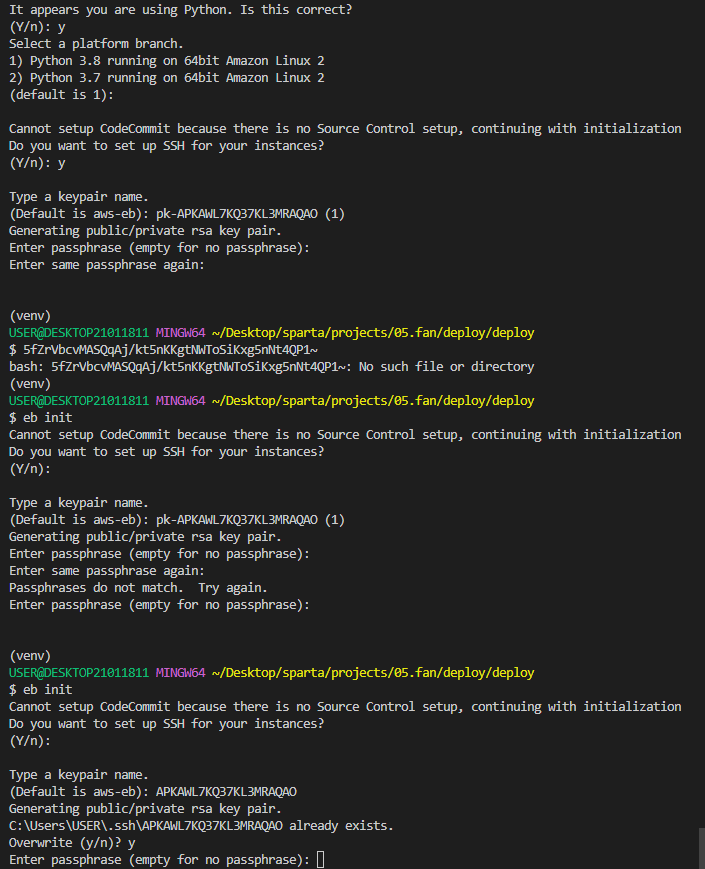
일단 VSCODE상에서 이와 같은 안내가 나와서 어디서부터 다시 시작해야 할 까 고민이네요.
eb init
이 명령어를 사용해서 받아놓은 키페어를 입력해보기도 하고
캡쳐의 ID 같은것도 넣어보는데
Type a keypair name.
(Default is aws-eb): APKAWL7KQ37KL3MRAQAO
Generating public/private rsa key pair.
C:\Users\USER\.ssh\APKAWL7KQ37KL3MRAQAO already exists.
Overwrite (y/n)? y
Enter passphrase (empty for no passphrase):
이 질문의 답을 모르겠어요.
----
Type a keypair name.
(Default is aws-eb): pk-APKAWL7KQ37KL3MRAQAO (1)
Generating public/private rsa key pair.
Enter passphrase (empty for no passphrase):
Enter same passphrase again:
Passphrases do not match. Try again.
Enter passphrase (empty for no passphrase):
----

USER@DESKTOP21011811 MINGW64 ~/Desktop/sparta/projects/05.fan/deploy
$ eb init
Select a default region
1) us-east-1 : US East (N. Virginia)
2) us-west-1 : US West (N. California)
3) us-west-2 : US West (Oregon)
4) eu-west-1 : EU (Ireland)
5) eu-central-1 : EU (Frankfurt)
6) ap-south-1 : Asia Pacific (Mumbai)
7) ap-southeast-1 : Asia Pacific (Singapore)
8) ap-southeast-2 : Asia Pacific (Sydney)
9) ap-northeast-1 : Asia Pacific (Tokyo)
10) ap-northeast-2 : Asia Pacific (Seoul)
11) sa-east-1 : South America (Sao Paulo)
12) cn-north-1 : China (Beijing)
13) cn-northwest-1 : China (Ningxia)
14) us-east-2 : US East (Ohio)
15) ca-central-1 : Canada (Central)
16) eu-west-2 : EU (London)
17) eu-west-3 : EU (Paris)
18) eu-north-1 : EU (Stockholm)
19) eu-south-1 : EU (Milano)
20) ap-east-1 : Asia Pacific (Hong Kong)
21) me-south-1 : Middle East (Bahrain)
22) af-south-1 : Africa (Cape Town)
(default is 3): 10
You have not yet set up your credentials or your credentials are incorrect
You must provide your credentials.
(aws-access-id): AKIAWL7KQ37KJNUMPGZL
(aws-secret-key): 5fZrVbcvMASQqAj/kt5nKKgtNWToSiKxg5nNt4QP
Enter Application Name
(default is "deploy"):
Application deploy has been created.
It appears you are using Python. Is this correct?
(Y/n): y
Select a platform branch.
1) Python 3.8 running on 64bit Amazon Linux 2
2) Python 3.7 running on 64bit Amazon Linux 2
(default is 1):
Cannot setup CodeCommit because there is no Source Control setup, continuing with initialization
Do you want to set up SSH for your instances?
(Y/n): y
Type a keypair name.
(Default is aws-eb): APKAWL7KQ37KL3MRAQAO
Generating public/private rsa key pair.
Enter passphrase (empty for no passphrase):
Enter same passphrase again:
Your identification has been saved in C:\Users\USER\.ssh\APKAWL7KQ37KL3MRAQAO
Your public key has been saved in C:\Users\USER\.ssh\APKAWL7KQ37KL3MRAQAO.pub
The key fingerprint is:
SHA256:J5+5H8XNrodLZDt/XdaXsT5MGfcKUmadOzL4h9tguQQ APKAWL7KQ37KL3MRAQAO
The key's randomart image is:
+---[RSA 3072]----+
| |
| |
| . . |
| +.o=.|
| S E= =.%|
| +o++=oB*|
| +o*=B==|
| +o*+B+|
| ..+o+o+|
+----[SHA256]-----+
Enter passphrase:
ERROR: CommandError - An error occurred while trying to get ssh public key
(venv)
USER@DESKTOP21011811 MINGW64 ~/Desktop/sparta/projects/05.fan/deploy
$ Cannot setup CodeCommit because there is no Source Control setup, continuing with initialization
bash: Cannot: command not found
(venv)
USER@DESKTOP21011811 MINGW64 ~/Desktop/sparta/projects/05.fan/deploy
$ Do you want to set up SSH for your instances?~
bash: Do: command not found
(venv)
USER@DESKTOP21011811 MINGW64 ~/Desktop/sparta/projects/05.fan/deploy
$ mkdir deploy
(venv)
USER@DESKTOP21011811 MINGW64 ~/Desktop/sparta/projects/05.fan/deploy
$ cp app.py deploy/application.py
cp: cannot stat 'app.py': No such file or directory
(venv)
USER@DESKTOP21011811 MINGW64 ~/Desktop/sparta/projects/05.fan/deploy
$ cp -r templates deploy/templates
(venv)
USER@DESKTOP21011811 MINGW64 ~/Desktop/sparta/projects/05.fan/deploy
$ pip freeze > deploy/requirements.txt
(venv)
USER@DESKTOP21011811 MINGW64 ~/Desktop/sparta/projects/05.fan/deploy
$ cd deploy
(venv)
USER@DESKTOP21011811 MINGW64 ~/Desktop/sparta/projects/05.fan/deploy/deploy
$ pip install awsebcli
Requirement already satisfied: awsebcli in c:\users\user\desktop\sparta\projects\05.fan\venv\lib\site-packages (3.20.3)
Requirement already satisfied: botocore<1.24.0,>1.23.41 in c:\users\user\desktop\sparta\projects\05.fan\venv\lib\site-packages (from awsebcli) (1.23.54)
Requirement already satisfied: cement==2.8.2 in c:\users\user\desktop\sparta\projects\05.fan\venv\lib\site-packages (from awsebcli) (2.8.2)
Requirement already satisfied: colorama<0.4.4,>=0.2.5 in c:\users\user\desktop\sparta\projects\05.fan\venv\lib\site-packages (from awsebcli) (0.4.3)
Requirement already satisfied: future<0.17.0,>=0.16.0 in c:\users\user\desktop\sparta\projects\05.fan\venv\lib\site-packages (from awsebcli) (0.16.0)
Requirement already satisfied: pathspec==0.9.0 in c:\users\user\desktop\sparta\projects\05.fan\venv\lib\site-packages (from awsebcli) (0.9.0)
Requirement already satisfied: python-dateutil<3.0.0,>=2.1 in c:\users\user\desktop\sparta\projects\05.fan\venv\lib\site-packages (from
awsebcli) (2.8.2)
Requirement already satisfied: requests<=2.26,>=2.20.1 in c:\users\user\desktop\sparta\projects\05.fan\venv\lib\site-packages (from awsebcli) (2.26.0)
Requirement already satisfied: setuptools>=20.0 in c:\users\user\desktop\sparta\projects\05.fan\venv\lib\site-packages (from awsebcli) (49.2.1)
Requirement already satisfied: semantic_version==2.8.5 in c:\users\user\desktop\sparta\projects\05.fan\venv\lib\site-packages (from awsebcli) (2.8.5)
Requirement already satisfied: six<1.15.0,>=1.11.0 in c:\users\user\desktop\sparta\projects\05.fan\venv\lib\site-packages (from awsebcli) (1.14.0)
Requirement already satisfied: termcolor==1.1.0 in c:\users\user\desktop\sparta\projects\05.fan\venv\lib\site-packages (from awsebcli) (1.1.0)
Requirement already satisfied: wcwidth<0.2.0,>=0.1.7 in c:\users\user\desktop\sparta\projects\05.fan\venv\lib\site-packages (from awsebcli) (0.1.9)
Requirement already satisfied: PyYAML<5.5,>=5.3.1 in c:\users\user\desktop\sparta\projects\05.fan\venv\lib\site-packages (from awsebcli) (5.4.1)
Requirement already satisfied: urllib3>=1.26.5 in c:\users\user\desktop\sparta\projects\05.fan\venv\lib\site-packages (from awsebcli) (1.26.14)
Requirement already satisfied: pypiwin32==223 in c:\users\user\desktop\sparta\projects\05.fan\venv\lib\site-packages (from awsebcli) (223)
Requirement already satisfied: jmespath<1.0.0,>=0.7.1 in c:\users\user\desktop\sparta\projects\05.fan\venv\lib\site-packages (from botocore<1.24.0,>1.23.41->awsebcli) (0.10.0)
Requirement already satisfied: idna<4,>=2.5; python_version >= "3" in c:\users\user\desktop\sparta\projects\05.fan\venv\lib\site-packages (from requests<=2.26,>=2.20.1->awsebcli) (3.4)
Requirement already satisfied: charset-normalizer~=2.0.0; python_version >= "3" in c:\users\user\desktop\sparta\projects\05.fan\venv\lib\site-packages (from requests<=2.26,>=2.20.1->awsebcli) (2.0.12)
Requirement already satisfied: certifi>=2017.4.17 in c:\users\user\desktop\sparta\projects\05.fan\venv\lib\site-packages (from requests<=2.26,>=2.20.1->awsebcli) (2022.12.7)
Requirement already satisfied: pywin32>=223 in c:\users\user\desktop\sparta\projects\05.fan\venv\lib\site-packages (from pypiwin32==223->awsebcli) (305)
WARNING: You are using pip version 20.2.1; however, version 23.0 is available.
You should consider upgrading via the 'c:\users\user\desktop\sparta\projects\05.fan\venv\scripts\python.exe -m pip install --upgrade pip' command.
(venv)
USER@DESKTOP21011811 MINGW64 ~/Desktop/sparta/projects/05.fan/deploy/deploy
$ eb init
Select a default region
1) us-east-1 : US East (N. Virginia)
2) us-west-1 : US West (N. California)
3) us-west-2 : US West (Oregon)
4) eu-west-1 : EU (Ireland)
5) eu-central-1 : EU (Frankfurt)
6) ap-south-1 : Asia Pacific (Mumbai)
7) ap-southeast-1 : Asia Pacific (Singapore)
8) ap-southeast-2 : Asia Pacific (Sydney)
9) ap-northeast-1 : Asia Pacific (Tokyo)
10) ap-northeast-2 : Asia Pacific (Seoul)
11) sa-east-1 : South America (Sao Paulo)
12) cn-north-1 : China (Beijing)
13) cn-northwest-1 : China (Ningxia)
14) us-east-2 : US East (Ohio)
15) ca-central-1 : Canada (Central)
16) eu-west-2 : EU (London)
17) eu-west-3 : EU (Paris)
18) eu-north-1 : EU (Stockholm)
19) eu-south-1 : EU (Milano)
20) ap-east-1 : Asia Pacific (Hong Kong)
21) me-south-1 : Middle East (Bahrain)
22) af-south-1 : Africa (Cape Town)
(default is 3): 10
Select an application to use
1) deploy
2) [ Create new Application ]
(default is 1): 1
It appears you are using Python. Is this correct?
(Y/n): y
Select a platform branch.
1) Python 3.8 running on 64bit Amazon Linux 2
2) Python 3.7 running on 64bit Amazon Linux 2
(default is 1):
Cannot setup CodeCommit because there is no Source Control setup, continuing with initialization
Do you want to set up SSH for your instances?
(Y/n): y
Type a keypair name.
(Default is aws-eb): pk-APKAWL7KQ37KL3MRAQAO (1)
Generating public/private rsa key pair.
Enter passphrase (empty for no passphrase):
Enter same passphrase again:


