


* 겪고 있는 문제 상황을 최대한 자세하게 작성해주세요.
* 문제 해결을 위해 어떤 시도를 해보았는지 구체적으로 함께 알려주세요.
firebase 계정 만들어서 연동 중인데 앱 화면을 켰을 때 다음과 같은 오류가 발생합니다.
firebase 주소가 잘못되었다고 하는 것 같은데... 다시 databaseURL 주소를 수정했는데도 앱 메인화면으로 넘어가지 않습니다
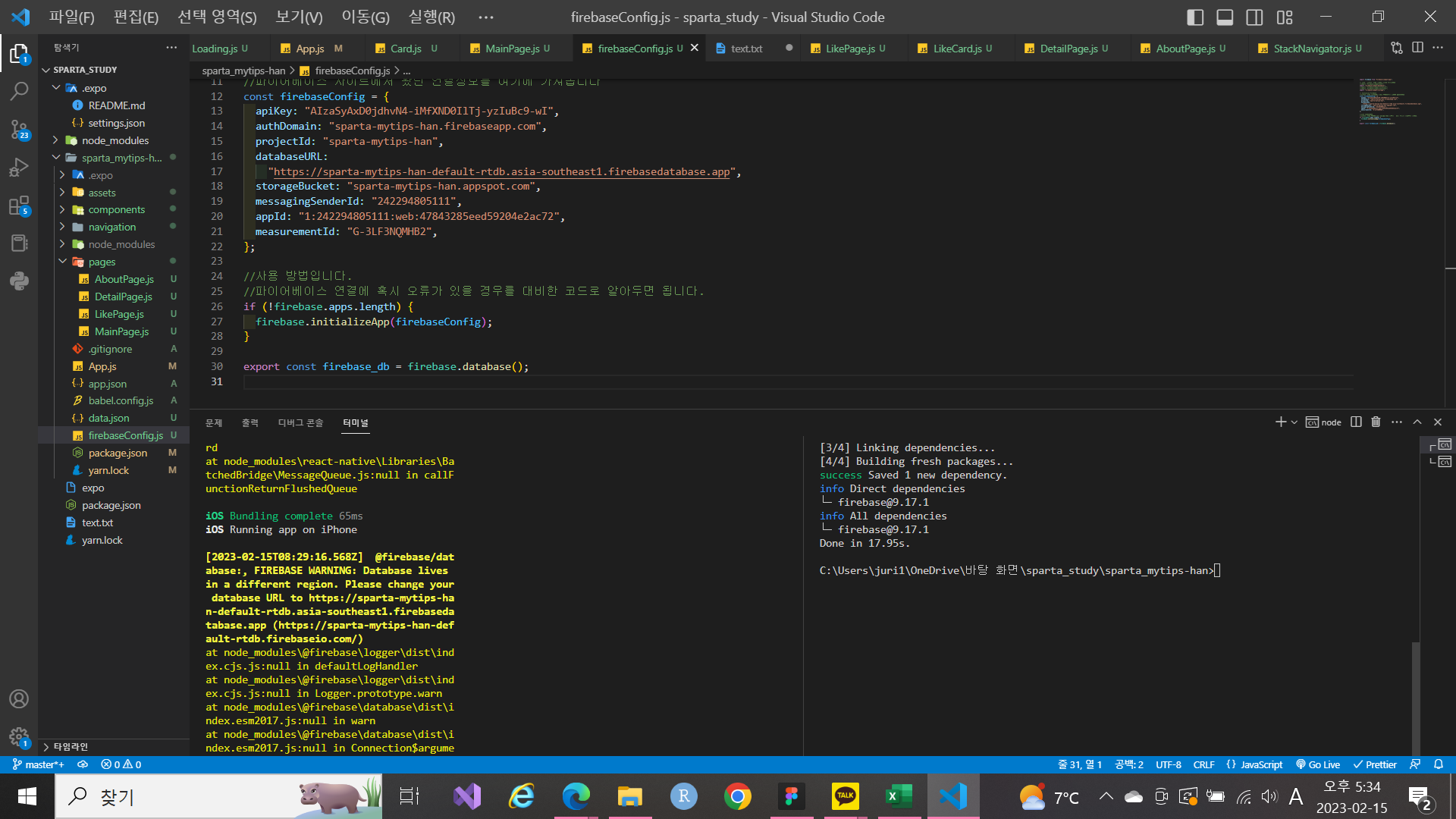
작성한 코드 및 에러 메세지
오류 발[2023-02-15T08:29:16.568Z] @firebase/database:, FIREBASE WARNING: Database lives
in a different region. Please change your database URL to https://sparta-mytips-han-default-rtdb.asia-southeast1.firebasedatabase.app (https://sparta-mytips-han-default-rtdb.firebaseio.com/)
at node_modules\@firebase\logger\dist\index.cjs.js:null in defaultLogHandler
at node_modules\@firebase\logger\dist\index.cjs.js:null in Logger.prototype.warn
at node_modules\@firebase\database\dist\index.esm2017.js:null in warn
at node_modules\@firebase\database\dist\index.esm2017.js:null in Connection$argument_8
at node_modules\@firebase\database\dist\index.esm2017.js:null in Connection#onConnectionShutdown_
at node_modules\@firebase\database\dist\index.esm2017.js:null in Connection#onControl_
at node_modules\@firebase\database\dist\index.esm2017.js:null in Connection#onPrimaryMessageReceived_
at node_modules\@firebase\database\dist\index.esm2017.js:null in <anonymous>
at node_modules\@firebase\database\dist\index.esm2017.js:null in WebSocketConnection#appendFrame_
at node_modules\@firebase\database\dist\index.esm2017.js:null in WebSocketConnection#handleIncomingFrame
at node_modules\@firebase\database\dist\index.esm2017.js:null in mySock.onmessage
at node_modules\event-target-shim\dist\event-target-shim.js:null in EventTarget.prototype.dispatchEvent
at node_modules\react-native\Libraries\WebSocket\WebSocket.js:null in _eventEmitter.addListener$argument_1
at node_modules\react-native\Libraries\vendor\emitter\EventEmitter.js:null in emitat node_modules\react-native\Libraries\BatchedBridge\MessageQueue.js:null in __callFunction
at node_modules\react-native\Libraries\BatchedBridge\MessageQueue.js:null in __guard$argument_0
at node_modules\react-native\Libraries\BatchedBridge\MessageQueue.js:null in __guard
at node_modules\react-native\Libraries\BatchedBridge\MessageQueue.js:null in callFunctionReturnFlushedQueue
생 시, 작성한 코드 전체와 에러 메시지를 첨부해 주세요.
Tip 1) </> 아이콘을 눌러 코드박스를 만들어 보세요.
Tip 2) Ctrl+A(맥의 경우 Command+A) 단축키로 코드를 한 번에 선택할 수 있어요!


