


* 겪고 있는 문제 상황을 최대한 자세하게 작성해주세요.
* 문제 해결을 위해 어떤 시도를 해보았는지 구체적으로 함께 알려주세요.
알려주신대로 photo_discription 코드 작성을 하고 실행됐는지 확인을 해보니 전혀 되지 않았어요...
글씨 흰색으로 변경도 안되고 배경색 생성도 안되고 둥글게 끝부분 처리하는 것도 실행이 안됩니다..
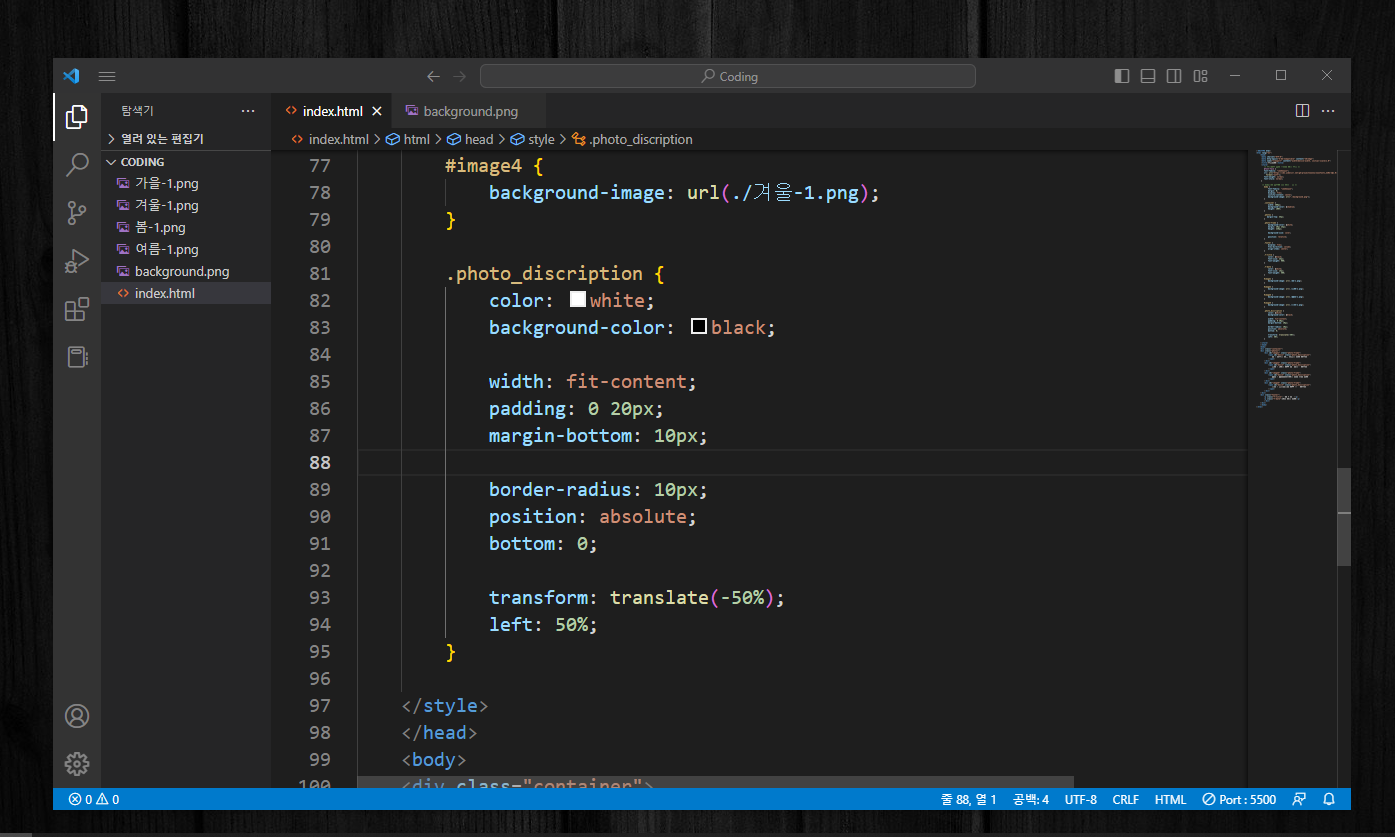

이렇게 실행이 됩니다..
<!DOCTYPE html>
<html lang="en">
<head>
<meta charset="UTF-8">
<meta http-equiv="X-UA-Compatible" content="IE=edge">
<meta name="viewport" content="width=device-width, initial-scale=1.0">
<title>코딩네컷</title>
<style>
/* 이서윤체 폰트 적용을 위한 코드 */
@font-face {
font-family: "LeeSeoyun";
src: url("https://cdn.jsdelivr.net/gh/projectnoonnu/noonfonts_2202-2@1.0/LeeSeoyun.woff")
format("woff");
font-weight: normal;
font-style: normal;
}
/* body태그 자체에 css 요소 부여 */
body {
font-family: "LeeSeoyun";
margin: 0;
display: flex;
justify-content: center;
background-image: url("./background.png");
}
.container {
width: 300px;
background-color: skyblue;
height: 100%;
}
.photos {
margin-top: 35px;
}
.photo-frame {
background-color: white;
margin: 20px 25px;
height: 230px;
background-size: cover;
position: relative;
}
.footer {
display: flex;
flex-direction: column;
align-items: center;
}
.f-title {
color: black;
font-size: 25px;
font-weight: 900;
}
.f-date {
color: white;
font-size: 15px;
font-weight: 500;
}
#image1 {
background-image: url(./봄-1.png);
}
#image2 {
background-image: url(./여름-1.png);
}
#image3 {
background-image: url(./가을-1.png);
}
#image4 {
background-image: url(./겨울-1.png);
}
.photo_discription {
color: white;
background-color: black;
width: fit-content;
padding: 0 20px;
margin-bottom: 10px;
border-radius: 10px;
position: absolute;
bottom: 0;
transform: translate(-50%);
left: 50%;
}
</style>
</head>
<body>
<div class="container">
<div class="photos">
<div id="image1" class="photo-frame">
<span id="desc1" class="photo_description">
봄 - 둘이서 처음 함께한 벚꽃 데이트
</span>
</div>
<div id="image2" class="photo-frame">
<span id="desc2" class="photo_description">
여름 - 100일 기념 아쿠아리움 데이트
</span>
</div>
<div id="image3" class="photo-frame">
<span id="desc3" class="photo_description">
가을 - 타임스퀘어에서 댄스 릴스 찍기
</span>
</div>
<div id="image4" class="photo-frame">
<span id="desc4" class="photo_description">
겨울 - 크리스마스 기념 홍대 데이트
</span>
</div>
</div>
<div class="footer">
<p class="f-title">지욱 ♥ 도은</p>
<p class="f-date">2022 계절 네컷</p>
</div>
</div>
</body>
</html>


