


제가 전에도 gradlew에 대한 질문후,24시간이 지나도 답변이 오지 않아 다시 질문을 올려봅니다,저는 지금 5주차 완성폴더에 제 id를 집어 넣고 전 질문으로teamViewer를 이용하여도 문제가 생겼습니다.
지금 상태로는 대시보드 로도 확인을 할수가 없습니다,그리고
operation not permitted, symlink
'..\..\..\..\..\..\node_modules\react-native\ReactCommon\runtimeexecu
tor\ReactCommon\RuntimeExecutor.h' ->
'C:\Users\super\AppData\Local\Temp\eas-cli-nodejs\a4ffdd2b-6e44-4a3d-
aa4c-4adc50896c6e-shallow-clone\ios\Pods\Headers\Public\React-runtime
executor\ReactCommon\RuntimeExecutor.h'
Code: EPERM
가 나오며 위에 나온 파일로 들어가본 결과 에러가 있는듯 했지만 어떻게 할지 몰라 문제가 생겼고
our-proj
Found eas-cli in your project dependencies.
It's recommended to use the "cli.version" field in eas.json to enforce the
eas-cli version for your project. roid dir
Learn more: https://github.com/expo/eas-cli#enforcing-eas-cli-version-for-your-project
Found eas-cli in your project dependencies.
It's recommended to use the "cli.version" field in eas.json to enforce the eas-cli
version for your project.
Learn more: https://github.com/expo/eas-cli#enforcing-eas-cli-version-for-your-project
Specified value for "android.package" in app.json is ignored because an android directory was detected in the project.
EAS Build will use the value found in the native code.
이 나오며 실행이 될라다 앞에 문제가 생기게 됩니다. 밑 사진은 위에 나온 파일로 들어가 문제가 있다는 곳의 사진입니다.그리고 코드는 위에 이야기한 코드입니다
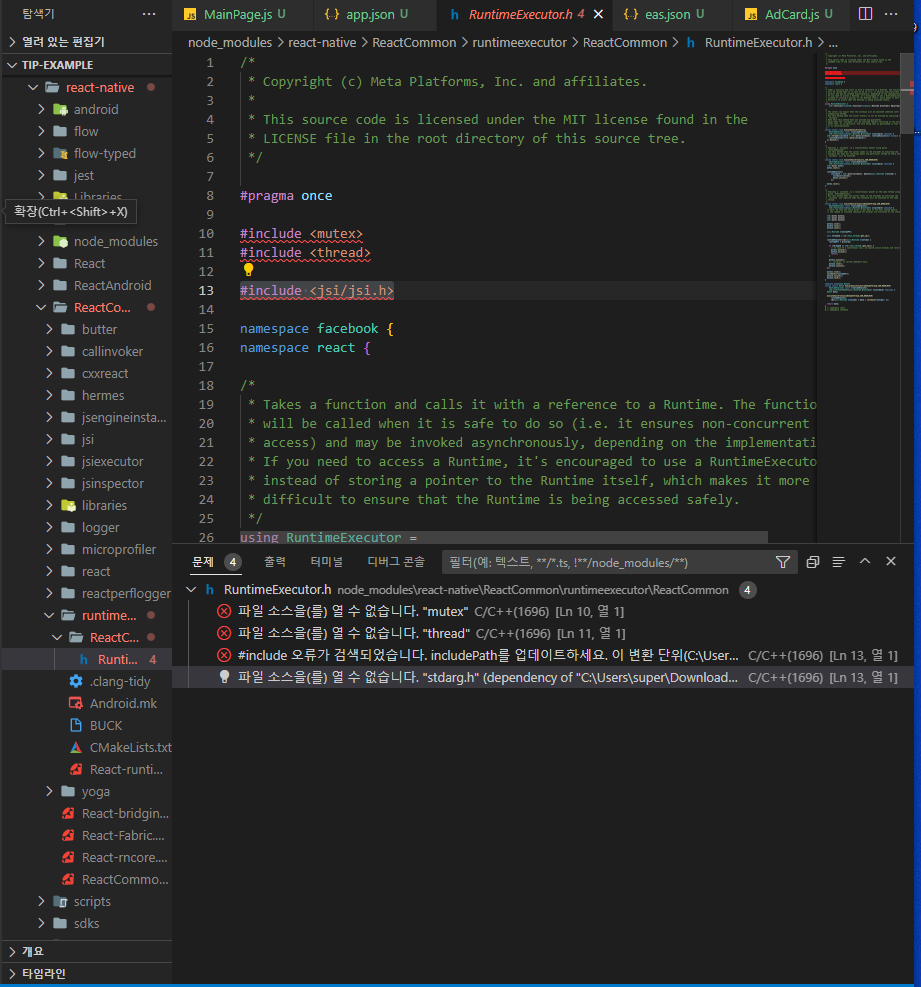
작성한 코드 및 에러 메세지
PS C:\Users\super\Downloads\tip-example> eas build -p android --profile development
Found eas-cli in your project dependencies.
It's recommended to use the "cli.version" field in eas.json to enforce the eas-cli
version for your project.
Learn more: https://github.com/expo/eas-cli#enforcing-eas-cli-version-for-your-project
Found eas-cli in your project dependencies.
It's recommended to use the "cli.version" field in eas.json to enforce the eas-cli
PS C:\Users\super\Downloads\tip-example> eas build -p android --profile development our-proj
Found eas-cli in your project dependencies.
It's recommended to use the "cli.version" field in eas.json to enforce the
eas-cli version for your project. roid dir
Learn more: https://github.com/expo/eas-cli#enforcing-eas-cli-version-for-your-project
Found eas-cli in your project dependencies.
It's recommended to use the "cli.version" field in eas.json to enforce the eas-cli
version for your project.
Learn more: https://github.com/expo/eas-cli#enforcing-eas-cli-version-for-your-project
Specified value for "android.package" in app.json is ignored because an android directory was detected in the project.
EAS Build will use the value found in the native code.
✔ Using remote Android credentials (Expo server)
✔ Using Keystore from configuration: Build Credentials sONJ5WrVzL (default)
Compressing project files and uploading to EAS Build. Learn more: https://expo.fyi/eas-build-archive
✖ Compressing project files
Error: EPERM: operation not permitted, symlink
'..\..\..\..\..\..\node_modules\react-native\ReactCommon\runtimeexecu
tor\ReactCommon\RuntimeExecutor.h' ->
'C:\Users\super\AppData\Local\Temp\eas-cli-nodejs\a4ffdd2b-6e44-4a3d-
aa4c-4adc50896c6e-shallow-clone\ios\Pods\Headers\Public\React-runtime
executor\ReactCommon\RuntimeExecutor.h'
Code: EPERM


