


* 겪고 있는 문제 상황을 최대한 자세하게 작성해주세요.
* 문제 해결을 위해 어떤 시도를 해보았는지 구체적으로 함께 알려주세요.
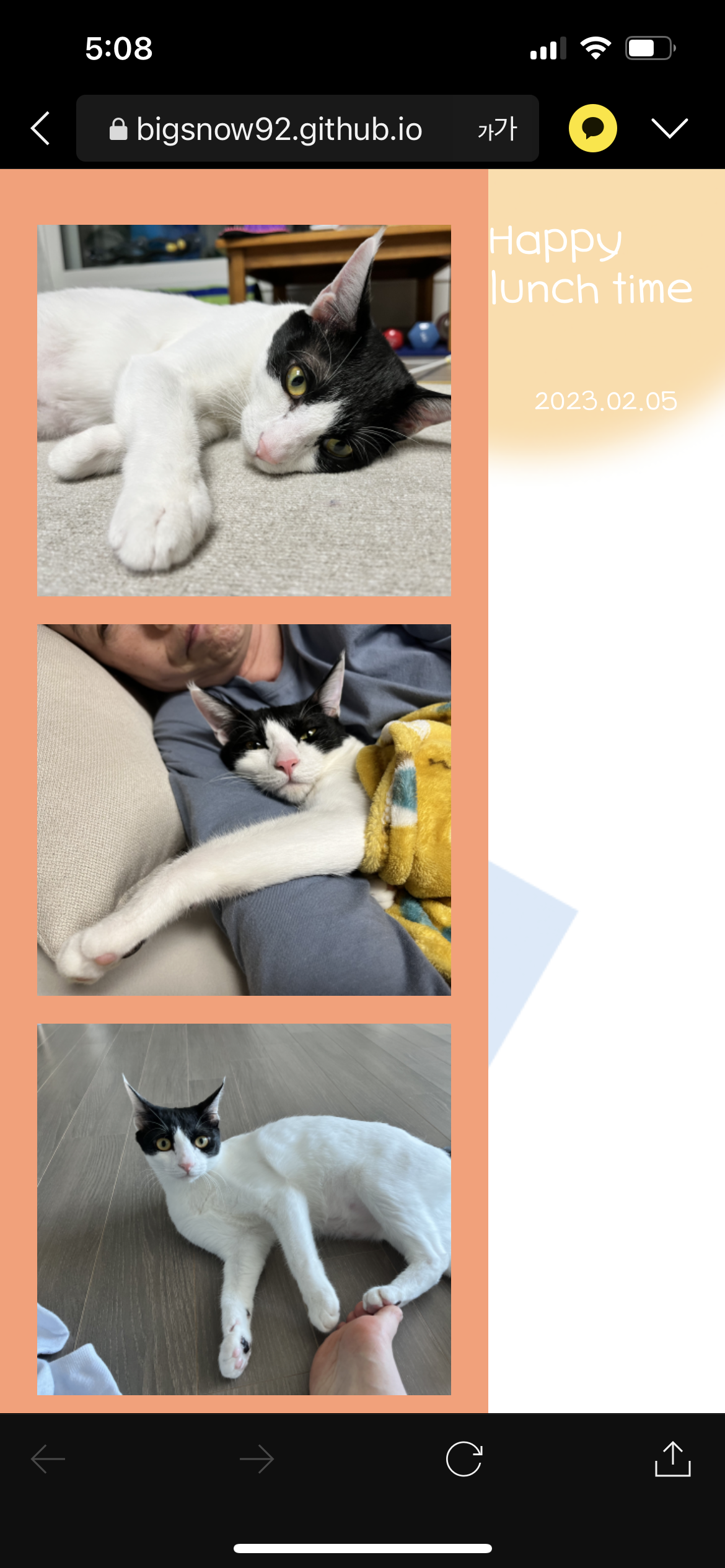
컴퓨터로 볼때는 하단에 happy lunch time 글씨가 안나오고,
휴대폰으로 볼때는 화면 전체가 나오긴한테 happy lunch time이 오른쪽으로 치우쳐져 있고 사진이 길게 나옵니다.
왜그럴까요?ㅠㅠ
<!DOCTYPE html>
<html lang="en">
<head>
<meta charset="UTF-8">
<meta http-equiv="X-UA-Compatible" content="IE=edge">
<meta name="viewport" content="width=device-width, initial-scale=1.0">
<title>Document</title>
<style>
/* 이서윤체 폰트 적용을 위한 코드 */
@font-face {
font-family: "LeeSeoyun";
src: url("https://cdn.jsdelivr.net/gh/projectnoonnu/noonfonts_2202-2@1.0/LeeSeoyun.woff") format("woff");
font-weight: normal;
font-style: normal;
}
/* body태그 자체에 css 요소 부여 */
body {
font-family: "LeeSeoyun";
margin: 0;
display: flex;
justify-content: center;
background-image: url("./background.png");
}
.container{
width: 390px;
background-color: #ff9d73;
height: 100%;
}
.photos {
margin-top: 30px;
}
.photo-frame {
background-color: white;
margin: 15px 20px;
height: 200px;
background-size: cover;
position: relative;
cursor: pointer;
}
.footer {
display: flex;
flex-direction: column;
align-items: center;
}
.f-title {
color: white;
font-size: 25px;
font-weight: 900;
}
.f-date {
color: white;
font-size: 15px;
font-weight: 500;
}
#image1 {
background-image: url(./1.jpg);
}
#image2 {
background-image: url(./2.jpg);
}
#image3 {
background-image: url(./3.jpg);
}
#image4 {
background-image: url(./4.jpg);
}
.photo_description {
color: white;
background-color: black;
width: fit-content;
padding: 0 20px;
margin-bottom: 5px;
border-radius: 10px;
position: absolute;
bottom: 0;
transform: translate(-50%);
left: 50%;
opacity: 0;
}
.video {
width: 100%;
height: 100%;
}
.showText {
opacity: 0;
}
.hideText {
opacity: 1;
transition: opacity 0.5s linear;
}
</style>
<script>
// 텍스트가 보여지는 기능
// 1. 몇 번째 사진에 마우스가 올라갔는지 확인(if문)
// 2. 해당 사진을 찾아 hideText class를 지워주고, showText는 삽입해줌
function showText(number) {
if (number === 1) {
document.querySelector("#desc1").classList.remove("hideText");
document.querySelector("#desc1").classList.add("showText");
} else if (number === 2) {
document.querySelector("#desc2").classList.remove("hideText");
document.querySelector("#desc2").classList.add("showText");
} else {
document.querySelector("#desc3").classList.remove("hideText");
document.querySelector("#desc3").classList.add("showText");
}
}
// 텍스트가 감춰지는 기능
// 1. 몇 번째 사진에서 마우스가 벗어났는지 확인(if문)
// 2. 해당 사진을 찾아 shotText class를 지워주고, hideText는 삽입해줌
function hideText(number) {
if (number === 1) {
document.querySelector("#desc1").classList.remove("showText");
document.querySelector("#desc1").classList.add("hideText");
} else if (number === 2) {
document.querySelector("#desc2").classList.remove("showText");
document.querySelector("#desc2").classList.add("hideText");
} else {
document.querySelector("#desc3").classList.remove("showText");
document.querySelector("#desc3").classList.add("hideText");
}
}
// 클릭 기능
// 1. 선택된 사진의 숫자를 가진 텍스트를 alert 형태로 출력해줌
function alertText(number) {
alert(`${number}번째 추억이에요! 눌러주셔서 감사합니다 :)`);
}
</script>
</head>
<body>
<div class="container">
<div class="photos">
<div id="image1" class="photo-frame"
onmouseover="hideText(1)"
onmouseout="showText(1)"
onclick="alertText(1)"
>
<span id="desc1" class="photo_description">
놀다가 지친 뭉치
</span>
</div>
<div id="image2" class="photo-frame"
onmouseover="hideText(2)"
onmouseout="showText(2)"
onclick="alertText(2)"
>
<span id="desc2" class="photo_description">
엄마에게 안겨서 자는 뭉치
</span>
</div>
<div id="image3" class="photo-frame"
onmouseover="hideText(3)"
onmouseout="showText(3)"
onclick="alertText(3)"
>
<span id="desc3" class="photo_description">
마중나온 뭉치
</span>
</div>
<div class="photo-frame">
<iframe
src="https://www.youtube.com/embed/ijca-XBjBWE" title="YouTube video player"
frameborder="0"
class="video"
></iframe>
</div>
</div>
</div>
<div class="footer">
<p class="f-title">Happy lunch time</p>
<p class="f-date">2023.02.05</p>
</div>
</div>
</body>
</html>


